



 The DIC will show you the CODES (DTC's)

abs traction control
Thread Starter
Racer


Joined: Jul 2010
Posts: 391
Likes: 67
From: Oak Point Texas formerly okc
St. Jude Donor '16
 abs traction control
I am having a problem with my traction control system and abs. When I hit a bump, the DAC says to service system. I am assuming it is a ground connection somewhere. Has anyone else had this problem? Where may the ground be located? The car is a 97 coupe. 34000 miles. 

Tech Contributor


Joined: Dec 1999
Posts: 32,910
Likes: 2,402
From: Anthony TX
CI 6,7,8,9,11 Vet
St. Jude Donor '08
There are 50 causes for that message. Unless you read and post the DTCs no one here is going to be able to point you in the correct direction (Well at least without guessing and causing you to replace perfectly good parts)
Heres where you need to be:
READING YOUR Engine Diagnostic Trouble Codes (DTC)
This procedure should be carried out any time you experience a problem with your C5. Most inexpensive store bought aftermarket code readers will ONLY read power train DTC’s. Reading the DTC’s with the C5 built in code reader will allow you to read ALL the modules in the vehicle.
The Diagnostic Display Mode is entered with the following procedure:
1) Turn on the ignition but don't start the engine.
2) Press the RESET button to turn off any warning messages. (i.e. door open, trunk open ect)
3) Press and hold the OPTIONS button
4) While holding OPTIONS, press FUEL button four times within a 10 -second period.
Initially, the on-board diagnostics go into an Automatic Mode which will cycle through each module and shows diagnostic codes in a pre-set sequence: PCM - TCS - RTD - BCM - IPC - RADIO - HVAC - LDCM - RDCM - SCM - RFA. All codes will be displayed for each module. ( i.e. PCM = 4 codes) If none are present in a given module, you will see No More Codes on the display.
There are two types of diagnostic codes, Current and History designated with a letter suffix, “C” or “H”. A current code indicates a malfunction is present in the module displaying data. A history code indicates a problem existed sometime in the last 40 or 50 ignition cycles. When not accompanied by a current code of the same number, it's potential evidence of a previous problem, now resolved, that was not removed by clearing the codes. More likely it's an indication of an intermittent malfunction.
Intermittent codes are the most challenging of the diagnostics. An intermittent code may have happened once, may have happened more than once but is inconsistent or may be happening on a regular basis but not at the time the codes are displayed. History codes can also be caused by a current malfunction in a system that is not operating at the time codes are displayed. An example is the rear window defogger which doesn't operate until the Body Control Module detects engine rpm. For history codes set by a module that does not operate with the key on and engine off, a special diagnostic tool called a Scan Tester is necessary to properly diagnose the malfunction.
Once the system has displayed all modules, it goes into the manual mode which allows selection of each module using combinations of Driver Information Center buttons. Manual mode can also be entered during the automatic sequence by pressing any button except E/M. Once the display shows Manual Diagnostics, select a module by pressing the OPTIONS button to go forward or the TRIP button to go back. Once a module is selected, a code is displayed, and if more than one are present; press GAGES to go forward or FUEL to go back.
To exit the diagnostic mode at any time, press E/M. If you want to erase codes in a given module, press RESET To reset the codes once in manual mode, press and hold RESET until it displays NO CODES Press OPTIONS to go to the next module. Repeat the steps until you have reset the codes in all the computer modules.
NOTE!! Only reset the codes IF you want to - it is NOT necessary to do this. Clearing a code does not repair a problem. You are simply erasing the evidence of it in the module's memory. If you clear the code/s, and extinguish the Check Engine Light, your emissions status ready will NOT allow you to pass an emissions test until you have completed the required driving cycles. There are a few body module DTC’s that if set will prevent the module from operating properly. Once the DTC is cleared, the module will return to full function. This is not true for power train DTCs.
If you have never read and cleared your codes, there will probably be a lot of old history DTCs. It is recommended that you clear your codes and see if any come back during a driving cycle. Those are the ones that you need to concentrate on diagnosing.
Once you have the codes, the next question is: What to do with the information?
First, consult the factory service manual. Any serious C5 Do-It-Yourself owner should invest in the Corvette Service Manual of the appropriate model year. The Service Manual is really a requirement if you want to understand and work on your C5.
NOTE and a WARNING. You can read the DTCs while the engine is running. I pull mine up all the time while driving.
WARNING. Don’t become distracted while reading DTCs while your driving and cause an accident!!!!! Use common sense and drive safe.
These are some very good C5 Diagnostic Trouble Code (DTC) explanation web sites!!! They also explain how to read the DTCs
Here are some very good sites that explain what DTC mean:
http://www.gearchatter.com/viewtopic11755.php
http://www.obd-codes.com/trouble_cod...d-ii-codes.php
Make sure to include the H or C suffix when you post your DTCs!!
Heres where you need to be:
READING YOUR Engine Diagnostic Trouble Codes (DTC)
This procedure should be carried out any time you experience a problem with your C5. Most inexpensive store bought aftermarket code readers will ONLY read power train DTC’s. Reading the DTC’s with the C5 built in code reader will allow you to read ALL the modules in the vehicle.
The Diagnostic Display Mode is entered with the following procedure:
1) Turn on the ignition but don't start the engine.
2) Press the RESET button to turn off any warning messages. (i.e. door open, trunk open ect)
3) Press and hold the OPTIONS button
4) While holding OPTIONS, press FUEL button four times within a 10 -second period.
Initially, the on-board diagnostics go into an Automatic Mode which will cycle through each module and shows diagnostic codes in a pre-set sequence: PCM - TCS - RTD - BCM - IPC - RADIO - HVAC - LDCM - RDCM - SCM - RFA. All codes will be displayed for each module. ( i.e. PCM = 4 codes) If none are present in a given module, you will see No More Codes on the display.
There are two types of diagnostic codes, Current and History designated with a letter suffix, “C” or “H”. A current code indicates a malfunction is present in the module displaying data. A history code indicates a problem existed sometime in the last 40 or 50 ignition cycles. When not accompanied by a current code of the same number, it's potential evidence of a previous problem, now resolved, that was not removed by clearing the codes. More likely it's an indication of an intermittent malfunction.
Intermittent codes are the most challenging of the diagnostics. An intermittent code may have happened once, may have happened more than once but is inconsistent or may be happening on a regular basis but not at the time the codes are displayed. History codes can also be caused by a current malfunction in a system that is not operating at the time codes are displayed. An example is the rear window defogger which doesn't operate until the Body Control Module detects engine rpm. For history codes set by a module that does not operate with the key on and engine off, a special diagnostic tool called a Scan Tester is necessary to properly diagnose the malfunction.
Once the system has displayed all modules, it goes into the manual mode which allows selection of each module using combinations of Driver Information Center buttons. Manual mode can also be entered during the automatic sequence by pressing any button except E/M. Once the display shows Manual Diagnostics, select a module by pressing the OPTIONS button to go forward or the TRIP button to go back. Once a module is selected, a code is displayed, and if more than one are present; press GAGES to go forward or FUEL to go back.
To exit the diagnostic mode at any time, press E/M. If you want to erase codes in a given module, press RESET To reset the codes once in manual mode, press and hold RESET until it displays NO CODES Press OPTIONS to go to the next module. Repeat the steps until you have reset the codes in all the computer modules.
NOTE!! Only reset the codes IF you want to - it is NOT necessary to do this. Clearing a code does not repair a problem. You are simply erasing the evidence of it in the module's memory. If you clear the code/s, and extinguish the Check Engine Light, your emissions status ready will NOT allow you to pass an emissions test until you have completed the required driving cycles. There are a few body module DTC’s that if set will prevent the module from operating properly. Once the DTC is cleared, the module will return to full function. This is not true for power train DTCs.
If you have never read and cleared your codes, there will probably be a lot of old history DTCs. It is recommended that you clear your codes and see if any come back during a driving cycle. Those are the ones that you need to concentrate on diagnosing.
Once you have the codes, the next question is: What to do with the information?
First, consult the factory service manual. Any serious C5 Do-It-Yourself owner should invest in the Corvette Service Manual of the appropriate model year. The Service Manual is really a requirement if you want to understand and work on your C5.
NOTE and a WARNING. You can read the DTCs while the engine is running. I pull mine up all the time while driving.
WARNING. Don’t become distracted while reading DTCs while your driving and cause an accident!!!!! Use common sense and drive safe.
These are some very good C5 Diagnostic Trouble Code (DTC) explanation web sites!!! They also explain how to read the DTCs
Here are some very good sites that explain what DTC mean:
http://www.gearchatter.com/viewtopic11755.php
http://www.obd-codes.com/trouble_cod...d-ii-codes.php
Make sure to include the H or C suffix when you post your DTCs!!
Thread Starter
Racer
Joined: Jul 2010
Posts: 391
Likes: 67
From: Oak Point Texas formerly okc
St. Jude Donor '16
codes
I should have posted the code but did not have it with me. I will be careful in the future. It simply acted like a ground that may be loose and wondered if there was a particular ground in this area. I have also read your post on where all the grounds are located. Thanks for the insight and your continued work with those of us that are very novice.
Tech Contributor
Joined: Dec 1999
Posts: 32,910
Likes: 2,402
From: Anthony TX
CI 6,7,8,9,11 Vet
St. Jude Donor '08
DIC = Driver Information Concole
DTC= Diagnostic Trouble Codes

There are TWO grounds for the EBTCM. One at G-101/103. Its under the tab for the ground connector and its the single wire with an Eyelet that fits on the ground stud.
The module is also grounded at G-104/108. Thats the single ground stud on the frame next to the battery. Follow the battery negative terminal ground wires. The SMALL wire grounds at G-104/108. There should be two wires on that terminal One of them is the EBTCM ground wire.
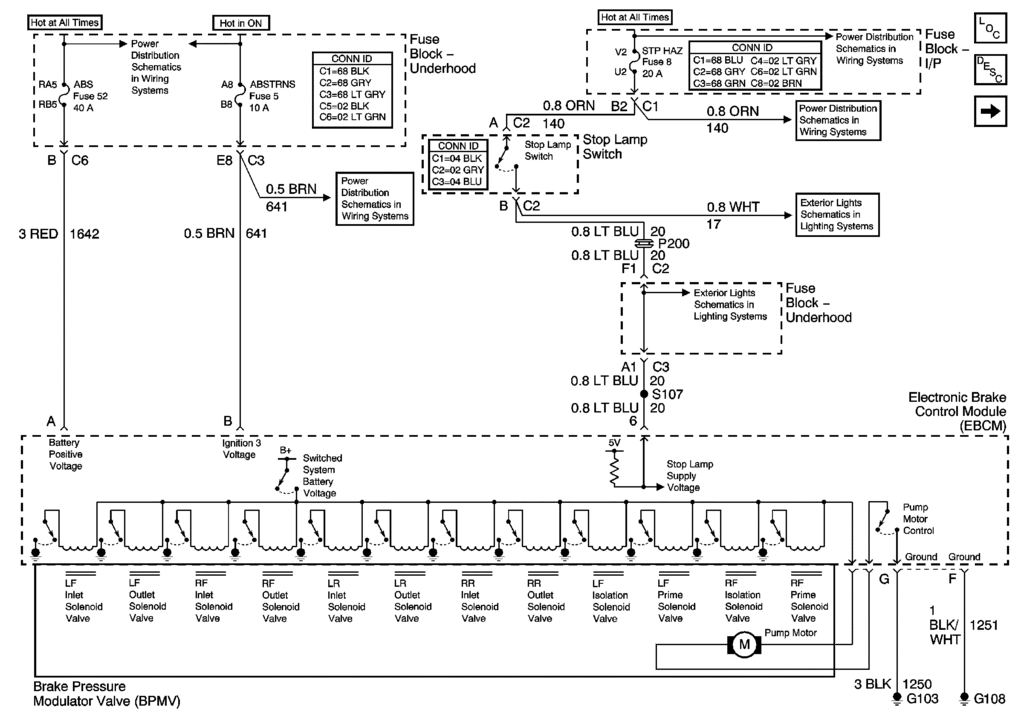
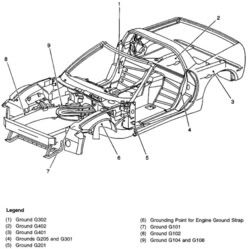
I know,,,,, the schematic says it is grounded at a different location but I will dig deeper tonight.
BC
DTC= Diagnostic Trouble Codes
There are TWO grounds for the EBTCM. One at G-101/103. Its under the tab for the ground connector and its the single wire with an Eyelet that fits on the ground stud.
The module is also grounded at G-104/108. Thats the single ground stud on the frame next to the battery. Follow the battery negative terminal ground wires. The SMALL wire grounds at G-104/108. There should be two wires on that terminal One of them is the EBTCM ground wire.
I know,,,,, the schematic says it is grounded at a different location but I will dig deeper tonight.
BC
Tech Contributor
Joined: Dec 1999
Posts: 32,910
Likes: 2,402
From: Anthony TX
CI 6,7,8,9,11 Vet
St. Jude Donor '08
The chassie ground lug directly below the brake booster is G-103 (according to this doc) and thats where its suppose to be grounded. If it were me, i would clean both and while the wires is off, do a continuity check between the EBTCMBPMV case to the wires at both locations.
See whitch wire it really is.
Bill
See whitch wire it really is.
Bill
Thread Starter
Racer
Joined: Jul 2010
Posts: 391
Likes: 67
From: Oak Point Texas formerly okc
St. Jude Donor '16
thanks
Thanks Bill and to all. I will chase down the grounds this weekend, I hope. Thank you for taking the time. I also learned the difference between a dic a dtc and my fictional dac.
The abs light and traction control lights come on only when I hit hard bumps in the road so that leads me to think it is a ground. It does not happen 100 percent of the time. I had excessive wheel spin in the front left, a few months ago, cleaned out the connection and it ceased. So I have a feeling on a 16 year old stock vehicle it may be a little corrosion on the grounds.
Again thanks for taking the time.
The abs light and traction control lights come on only when I hit hard bumps in the road so that leads me to think it is a ground. It does not happen 100 percent of the time. I had excessive wheel spin in the front left, a few months ago, cleaned out the connection and it ceased. So I have a feeling on a 16 year old stock vehicle it may be a little corrosion on the grounds.
Again thanks for taking the time.
Corvette Stories
The Best of Corvette for Corvette Enthusiasts

Top 10 Most Expensive Corvettes Ever Sold on Bring A Trailer
Brett Foote
10 Things Every Corvette Owner Needs (2026 Edition)
Michael S. Palmer
8 Most "Only Corvette Owners Understand" Quirks and Problems
Pouria Savadkouei
10 Reasons the C6 Z06 is Still A Performance Benchmark After 20 Years
Joe Kucinski
How Much Horsepower Every Corvette Engine "LOST" in 1972
Joe Kucinski
Top 10 DOs and DON'Ts for Protecting Your Convertible Top!
Michael S. Palmer
Top 10 Most Explosive Corvettes Ever Made: Power-to-Weight Ratio Ranked!
Joe Kucinski
150 hp to 1,250 hp: Every Corvette Generation Compared by the Specs That Matter
Joe Kucinski
8 Coolest Corvette Pace Cars (and Replicas) of All Time
Verdad Gallardo
Drifting

Joined: Feb 2008
Posts: 1,596
Likes: 67
From: Bahama North Carolina
Thanks Bill and to all. I will chase down the grounds this weekend, I hope. Thank you for taking the time. I also learned the difference between a dic a dtc and my fictional dac.
The abs light and traction control lights come on only when I hit hard bumps in the road so that leads me to think it is a ground. It does not happen 100 percent of the time. I had excessive wheel spin in the front left, a few months ago, cleaned out the connection and it ceased. So I have a feeling on a 16 year old stock vehicle it may be a little corrosion on the grounds.
Again thanks for taking the time.
The abs light and traction control lights come on only when I hit hard bumps in the road so that leads me to think it is a ground. It does not happen 100 percent of the time. I had excessive wheel spin in the front left, a few months ago, cleaned out the connection and it ceased. So I have a feeling on a 16 year old stock vehicle it may be a little corrosion on the grounds.
Again thanks for taking the time.