




Strange Misfire Issue

Thread Starter
Burning Brakes


Joined: Jun 2002
Posts: 1,055
Likes: 0
From: Troy MI
 Strange Misfire Issue
I have a 99 6spd coupe with a G5X2 Cam and supporting mods.
The cam has been in the car since I installed it in '03, the car was dyno tuned at that time.
It has run well since besides a broken valve spring.
i broke a valve spring about a year ago, replaced the spring and seal etc.
The car ran fine for a couple weeks, and then started a strange misfire issue.
I assumed it was related to the valve spring, but doesn't appear to be mechanical.
The car will run fine at idle, and with casual driving.
If I run it hard, up past roughly 4K RPM it will start misfiring.
The car continues to misfire at all RPMs until I turn it off, and then restart the car.
It usually starts right back up fine, but some times takes a couple of restarts and then it will run fine unless I rag on it again, then the cycle repeats.
It has only thrown a code once or twice, but hasn't thrown the code the last several times the symptom has occurred.
With the help of a cheap IR laser thermometer I was able to determine that a couple of the headers appear to be much cooler when the misfire is happening.
The cool header tubes are as low as 60C, or as high as 100C. The rest seam to be more like 150C to 200C
If I unplug the coil from the cool cylinders no audible change in idle occurs.
I haven't done enough testing to determine if it is always the same cylinders, but it appears to be at least constantly the third from the front on the drivers side.
The wires and plugs were replaced recently, but after this misfire issue came up. I cleaned the MAF.
I have not cleaned the grounds or done any other changes.
I plan to clean the ground connections tomorrow, but they show no signs of corrosion, the car stays inside and is rarely in rain.
Any ideas on what could be happening, or what to try to chase it down?
The cam has been in the car since I installed it in '03, the car was dyno tuned at that time.
It has run well since besides a broken valve spring.
i broke a valve spring about a year ago, replaced the spring and seal etc.
The car ran fine for a couple weeks, and then started a strange misfire issue.
I assumed it was related to the valve spring, but doesn't appear to be mechanical.
The car will run fine at idle, and with casual driving.
If I run it hard, up past roughly 4K RPM it will start misfiring.
The car continues to misfire at all RPMs until I turn it off, and then restart the car.
It usually starts right back up fine, but some times takes a couple of restarts and then it will run fine unless I rag on it again, then the cycle repeats.
It has only thrown a code once or twice, but hasn't thrown the code the last several times the symptom has occurred.
With the help of a cheap IR laser thermometer I was able to determine that a couple of the headers appear to be much cooler when the misfire is happening.
The cool header tubes are as low as 60C, or as high as 100C. The rest seam to be more like 150C to 200C
If I unplug the coil from the cool cylinders no audible change in idle occurs.
I haven't done enough testing to determine if it is always the same cylinders, but it appears to be at least constantly the third from the front on the drivers side.
The wires and plugs were replaced recently, but after this misfire issue came up. I cleaned the MAF.
I have not cleaned the grounds or done any other changes.
I plan to clean the ground connections tomorrow, but they show no signs of corrosion, the car stays inside and is rarely in rain.
Any ideas on what could be happening, or what to try to chase it down?

Tech Contributor


Joined: Dec 1999
Posts: 32,910
Likes: 2,402
From: Anthony TX
CI 6,7,8,9,11 Vet
St. Jude Donor '08
How are you reading your DTCs?
Do you have a FLASHING CHECK ENGINE LIGHT (CEL) on the IPC when the misfire occurs?
Have you tried to chech the DTCs immediately when the misfire occurs. Check them before you turn OFF the engine.
You can check them from the drivers seat while cruising!
Check the DTCs right after the isue happens and see what DTCs pop up.
Im guessing that you have a cracked sparkplug. Have you checked that possibility? What wires are you running and are they properly connected to the coil and plug?
READING YOUR Engine Diagnostic Codes
The Diagnostic Display Mode is entered with the following procedure:
1) Turn on the ignition but don't start the engine. NOTE! You can read the DTCs with the engine running and or driving down the road but it can distract you. BE careful! Some DTCs clear themselves when you turn the ignition OFF!
2) Press the RESET button to turn off any warning messages. (i.e. door open, trunk open ect)
3) Press and hold OPTIONS
4) While holding OPTIONS, press FUEL four times within a 10-second period.
Initially, on-board diagnostics go into an Automatic Mode which shows diagnostic codes in a pre-set sequence: PCM - TCS - RTD - BCM - IPC - RADIO - HVAC - LDCM - RDCM - SCM - RFA. All codes will be displayed for each. ( i.e. PCM = 4 codes) If none are present in a given module, you will see No More Codes on the display.
There are two kinds of diagnostic codes, Current and History designated with a letter suffix, “C” or “H”. A current C code indicates a malfunction is present and active in the module displaying data. A history code indicates a problem existed sometime in the last 40 or 50 ignition cycles. When not accompanied by a current code of the same number, it's potential evidence of a previous problem, now resolved, that was not removed by clearing the codes.
More likely it's an indication of an intermittent malfunction.
Intermittent codes are the most challenging of the diagnostics. An intermittent code may have happened once, may have happened more than once but is inconsistent or may be happening on a regular basis but not at the time the codes are displayed. History codes can also be caused by a current malfunction in a system that is not operating at the time codes are displayed. An example is the rear window defogger which doesn't operate until the Body Control Module detects engine rpm. For history codes set by a module that does not operate with the key on and engine off, a special diagnostic tool called a Scan Tester is necessary to properly diagnose the malfunction.
Once the system has displayed all modules, it goes into the manual mode which allows selection of each module using combinations of Driver Information Center buttons. Manual mode can also be entered during the automatic sequence by pressing any button except English/Metric (E/M). Once the display shows Manual Diagnostics, select a module by pressing the OPTIONS button to go forward or the TRIP button to go back. Once a module is selected, a code is displayed, and if more than one are present; press GAGES to go forward or FUEL to go back.
To exit the diagnostic mode at any time, press E/M. If you want to erase codes in a given module, press and hold the RESET button To reset the codes once in manual mode, press and hold RESET until it displays NO CODES Press OPTIONS to go to the next module. Repeat the steps until you have reset the codes in all the computer modules.
NOTE!! Only reset the codes IF you want to - it is NOT necessary to do this. Clearing a code does not repair a problem. You are simply erasing the evidence of it in the module's memory. If you clear the code/s, and extinguish the Check Engine Light, your emissions status ready will NOT allow you to pass an emissions test until you have completed the required driving cycles.
Once you have the codes, the next question is: What to do with the information?
First, consult the factory service manual. Any serious C5 Do-It-Yourself owner should invest in the Corvette Service Manual of the appropriate model year. The Service Manual is really a requirement if you want to understand and work on your C5. You can GOOGLE the DTC and also find information on it.
Here is very good site that explains the DTCs:
http://www.corvette-web-central.com/C5DTCcode.html
http://www.obd-codes.com/trouble_cod...d-ii-codes.php
Make sure to include the H or C suffix!!
Do you have a FLASHING CHECK ENGINE LIGHT (CEL) on the IPC when the misfire occurs?
Have you tried to chech the DTCs immediately when the misfire occurs. Check them before you turn OFF the engine.
You can check them from the drivers seat while cruising!
Check the DTCs right after the isue happens and see what DTCs pop up.
Im guessing that you have a cracked sparkplug. Have you checked that possibility? What wires are you running and are they properly connected to the coil and plug?
READING YOUR Engine Diagnostic Codes
The Diagnostic Display Mode is entered with the following procedure:
1) Turn on the ignition but don't start the engine. NOTE! You can read the DTCs with the engine running and or driving down the road but it can distract you. BE careful! Some DTCs clear themselves when you turn the ignition OFF!
2) Press the RESET button to turn off any warning messages. (i.e. door open, trunk open ect)
3) Press and hold OPTIONS
4) While holding OPTIONS, press FUEL four times within a 10-second period.
Initially, on-board diagnostics go into an Automatic Mode which shows diagnostic codes in a pre-set sequence: PCM - TCS - RTD - BCM - IPC - RADIO - HVAC - LDCM - RDCM - SCM - RFA. All codes will be displayed for each. ( i.e. PCM = 4 codes) If none are present in a given module, you will see No More Codes on the display.
There are two kinds of diagnostic codes, Current and History designated with a letter suffix, “C” or “H”. A current C code indicates a malfunction is present and active in the module displaying data. A history code indicates a problem existed sometime in the last 40 or 50 ignition cycles. When not accompanied by a current code of the same number, it's potential evidence of a previous problem, now resolved, that was not removed by clearing the codes.
More likely it's an indication of an intermittent malfunction.
Intermittent codes are the most challenging of the diagnostics. An intermittent code may have happened once, may have happened more than once but is inconsistent or may be happening on a regular basis but not at the time the codes are displayed. History codes can also be caused by a current malfunction in a system that is not operating at the time codes are displayed. An example is the rear window defogger which doesn't operate until the Body Control Module detects engine rpm. For history codes set by a module that does not operate with the key on and engine off, a special diagnostic tool called a Scan Tester is necessary to properly diagnose the malfunction.
Once the system has displayed all modules, it goes into the manual mode which allows selection of each module using combinations of Driver Information Center buttons. Manual mode can also be entered during the automatic sequence by pressing any button except English/Metric (E/M). Once the display shows Manual Diagnostics, select a module by pressing the OPTIONS button to go forward or the TRIP button to go back. Once a module is selected, a code is displayed, and if more than one are present; press GAGES to go forward or FUEL to go back.
To exit the diagnostic mode at any time, press E/M. If you want to erase codes in a given module, press and hold the RESET button To reset the codes once in manual mode, press and hold RESET until it displays NO CODES Press OPTIONS to go to the next module. Repeat the steps until you have reset the codes in all the computer modules.
NOTE!! Only reset the codes IF you want to - it is NOT necessary to do this. Clearing a code does not repair a problem. You are simply erasing the evidence of it in the module's memory. If you clear the code/s, and extinguish the Check Engine Light, your emissions status ready will NOT allow you to pass an emissions test until you have completed the required driving cycles.
Once you have the codes, the next question is: What to do with the information?
First, consult the factory service manual. Any serious C5 Do-It-Yourself owner should invest in the Corvette Service Manual of the appropriate model year. The Service Manual is really a requirement if you want to understand and work on your C5. You can GOOGLE the DTC and also find information on it.
Here is very good site that explains the DTCs:
http://www.corvette-web-central.com/C5DTCcode.html
http://www.obd-codes.com/trouble_cod...d-ii-codes.php
Make sure to include the H or C suffix!!
Thread Starter
Burning Brakes
Joined: Jun 2002
Posts: 1,055
Likes: 0
From: Troy MI
How are you reading your DTCs?
Do you have a FLASHING CHECK ENGINE LIGHT (CEL) on the IPC when the misfire occurs?
Have you tried to chech the DTCs immediately when the misfire occurs. Check them before you turn OFF the engine.
You can check them from the drivers seat while cruising!
Check the DTCs right after the isue happens and see what DTCs pop up.
Im guessing that you have a cracked sparkplug. Have you checked that possibility? What wires are you running and are they properly connected to the coil and plug?
READING YOUR Engine Diagnostic Codes
The Diagnostic Display Mode is entered with the following procedure:
1) Turn on the ignition but don't start the engine. NOTE! You can read the DTCs with the engine running and or driving down the road but it can distract you. BE careful! Some DTCs clear themselves when you turn the ignition OFF!
2) Press the RESET button to turn off any warning messages. (i.e. door open, trunk open ect)
3) Press and hold OPTIONS
4) While holding OPTIONS, press FUEL four times within a 10-second period.
Initially, on-board diagnostics go into an Automatic Mode which shows diagnostic codes in a pre-set sequence: PCM - TCS - RTD - BCM - IPC - RADIO - HVAC - LDCM - RDCM - SCM - RFA. All codes will be displayed for each. ( i.e. PCM = 4 codes) If none are present in a given module, you will see No More Codes on the display.
There are two kinds of diagnostic codes, Current and History designated with a letter suffix, “C” or “H”. A current C code indicates a malfunction is present and active in the module displaying data. A history code indicates a problem existed sometime in the last 40 or 50 ignition cycles. When not accompanied by a current code of the same number, it's potential evidence of a previous problem, now resolved, that was not removed by clearing the codes.
More likely it's an indication of an intermittent malfunction.
Intermittent codes are the most challenging of the diagnostics. An intermittent code may have happened once, may have happened more than once but is inconsistent or may be happening on a regular basis but not at the time the codes are displayed. History codes can also be caused by a current malfunction in a system that is not operating at the time codes are displayed. An example is the rear window defogger which doesn't operate until the Body Control Module detects engine rpm. For history codes set by a module that does not operate with the key on and engine off, a special diagnostic tool called a Scan Tester is necessary to properly diagnose the malfunction.
Once the system has displayed all modules, it goes into the manual mode which allows selection of each module using combinations of Driver Information Center buttons. Manual mode can also be entered during the automatic sequence by pressing any button except English/Metric (E/M). Once the display shows Manual Diagnostics, select a module by pressing the OPTIONS button to go forward or the TRIP button to go back. Once a module is selected, a code is displayed, and if more than one are present; press GAGES to go forward or FUEL to go back.
To exit the diagnostic mode at any time, press E/M. If you want to erase codes in a given module, press and hold the RESET button To reset the codes once in manual mode, press and hold RESET until it displays NO CODES Press OPTIONS to go to the next module. Repeat the steps until you have reset the codes in all the computer modules.
NOTE!! Only reset the codes IF you want to - it is NOT necessary to do this. Clearing a code does not repair a problem. You are simply erasing the evidence of it in the module's memory. If you clear the code/s, and extinguish the Check Engine Light, your emissions status ready will NOT allow you to pass an emissions test until you have completed the required driving cycles.
Once you have the codes, the next question is: What to do with the information?
First, consult the factory service manual. Any serious C5 Do-It-Yourself owner should invest in the Corvette Service Manual of the appropriate model year. The Service Manual is really a requirement if you want to understand and work on your C5. You can GOOGLE the DTC and also find information on it.
Here is very good site that explains the DTCs:
http://www.corvette-web-central.com/C5DTCcode.html
http://www.obd-codes.com/trouble_cod...d-ii-codes.php
Make sure to include the H or C suffix!!
Do you have a FLASHING CHECK ENGINE LIGHT (CEL) on the IPC when the misfire occurs?
Have you tried to chech the DTCs immediately when the misfire occurs. Check them before you turn OFF the engine.
You can check them from the drivers seat while cruising!
Check the DTCs right after the isue happens and see what DTCs pop up.
Im guessing that you have a cracked sparkplug. Have you checked that possibility? What wires are you running and are they properly connected to the coil and plug?
READING YOUR Engine Diagnostic Codes
The Diagnostic Display Mode is entered with the following procedure:
1) Turn on the ignition but don't start the engine. NOTE! You can read the DTCs with the engine running and or driving down the road but it can distract you. BE careful! Some DTCs clear themselves when you turn the ignition OFF!
2) Press the RESET button to turn off any warning messages. (i.e. door open, trunk open ect)
3) Press and hold OPTIONS
4) While holding OPTIONS, press FUEL four times within a 10-second period.
Initially, on-board diagnostics go into an Automatic Mode which shows diagnostic codes in a pre-set sequence: PCM - TCS - RTD - BCM - IPC - RADIO - HVAC - LDCM - RDCM - SCM - RFA. All codes will be displayed for each. ( i.e. PCM = 4 codes) If none are present in a given module, you will see No More Codes on the display.
There are two kinds of diagnostic codes, Current and History designated with a letter suffix, “C” or “H”. A current C code indicates a malfunction is present and active in the module displaying data. A history code indicates a problem existed sometime in the last 40 or 50 ignition cycles. When not accompanied by a current code of the same number, it's potential evidence of a previous problem, now resolved, that was not removed by clearing the codes.
More likely it's an indication of an intermittent malfunction.
Intermittent codes are the most challenging of the diagnostics. An intermittent code may have happened once, may have happened more than once but is inconsistent or may be happening on a regular basis but not at the time the codes are displayed. History codes can also be caused by a current malfunction in a system that is not operating at the time codes are displayed. An example is the rear window defogger which doesn't operate until the Body Control Module detects engine rpm. For history codes set by a module that does not operate with the key on and engine off, a special diagnostic tool called a Scan Tester is necessary to properly diagnose the malfunction.
Once the system has displayed all modules, it goes into the manual mode which allows selection of each module using combinations of Driver Information Center buttons. Manual mode can also be entered during the automatic sequence by pressing any button except English/Metric (E/M). Once the display shows Manual Diagnostics, select a module by pressing the OPTIONS button to go forward or the TRIP button to go back. Once a module is selected, a code is displayed, and if more than one are present; press GAGES to go forward or FUEL to go back.
To exit the diagnostic mode at any time, press E/M. If you want to erase codes in a given module, press and hold the RESET button To reset the codes once in manual mode, press and hold RESET until it displays NO CODES Press OPTIONS to go to the next module. Repeat the steps until you have reset the codes in all the computer modules.
NOTE!! Only reset the codes IF you want to - it is NOT necessary to do this. Clearing a code does not repair a problem. You are simply erasing the evidence of it in the module's memory. If you clear the code/s, and extinguish the Check Engine Light, your emissions status ready will NOT allow you to pass an emissions test until you have completed the required driving cycles.
Once you have the codes, the next question is: What to do with the information?
First, consult the factory service manual. Any serious C5 Do-It-Yourself owner should invest in the Corvette Service Manual of the appropriate model year. The Service Manual is really a requirement if you want to understand and work on your C5. You can GOOGLE the DTC and also find information on it.
Here is very good site that explains the DTCs:
http://www.corvette-web-central.com/C5DTCcode.html
http://www.obd-codes.com/trouble_cod...d-ii-codes.php
Make sure to include the H or C suffix!!
Thanks for your reply, but there are no codes and no check engine light
The spark plugs are new and I had this same problem before the plugs were replaced.
The wires are also new but the problem existed before those were replaced
The coils are stock and original.
The engine runs fine as long as I never exceed 3500 or 4000 rpm under load.
After I exceed this range under load it will misfire until I shut then engine off and start it up again.
Tech Contributor
Joined: Dec 1999
Posts: 32,910
Likes: 2,402
From: Anthony TX
CI 6,7,8,9,11 Vet
St. Jude Donor '08
The turning it ON and OFF thing has me thinking on the line of ; MAYBE, you have a failing ignition switch.
C5s have a WELL KNOWN and WELL DOCUMENTED fault. The contacts inside the ignition switch get burnt and pitted and when that happens, it outputs low voltage and current.
Your coils are powered THROUGH relay 16 and 22 and the coils are relays 42
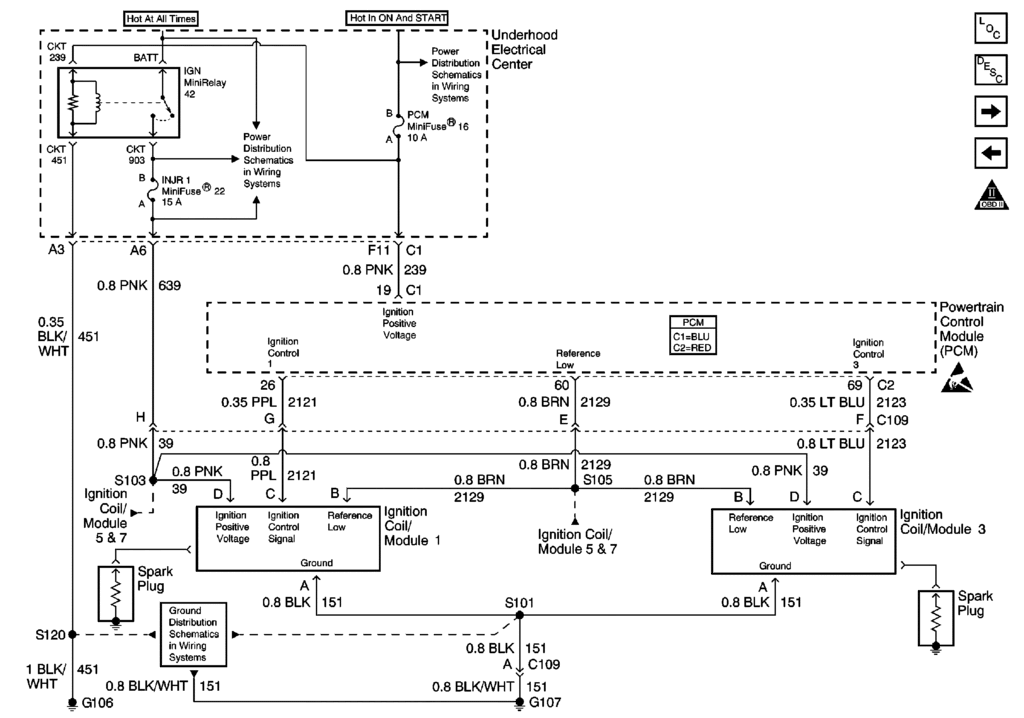
The PCM IGNITION feed is ignition switched controlled.
Try swapping out those relays for simular ones else where and consider rebuilding or replacing the ignition switch. Rebuilding it is FREE!!
- C5 ignition Switch repair - http://forums.corvetteforum.com/c5-t...ch-repair.html
The GROUND for the coils is on the back of the drivers cylinder head. Its TWO black/white stripped wires that end in a ground lug under a 15mm head bolt. Make sure that the bolt is tight and the wires are not damaged and properly crimped in the eyelet.
C5s have a WELL KNOWN and WELL DOCUMENTED fault. The contacts inside the ignition switch get burnt and pitted and when that happens, it outputs low voltage and current.
Your coils are powered THROUGH relay 16 and 22 and the coils are relays 42
The PCM IGNITION feed is ignition switched controlled.
Try swapping out those relays for simular ones else where and consider rebuilding or replacing the ignition switch. Rebuilding it is FREE!!
- C5 ignition Switch repair - http://forums.corvetteforum.com/c5-t...ch-repair.html
The GROUND for the coils is on the back of the drivers cylinder head. Its TWO black/white stripped wires that end in a ground lug under a 15mm head bolt. Make sure that the bolt is tight and the wires are not damaged and properly crimped in the eyelet.
Thread Starter
Burning Brakes
Joined: Jun 2002
Posts: 1,055
Likes: 0
From: Troy MI
The turning it ON and OFF thing has me thinking on the line of ; MAYBE, you have a failing ignition switch.
C5s have a WELL KNOWN and WELL DOCUMENTED fault. The contacts inside the ignition switch get burnt and pitted and when that happens, it outputs low voltage and current.
Your coils are powered THROUGH relay 16 and 22 and the coils are relays 42
The PCM IGNITION feed is ignition switched controlled.
Try swapping out those relays for simular ones else where and consider rebuilding or replacing the ignition switch. Rebuilding it is FREE!!
- C5 ignition Switch repair - http://forums.corvetteforum.com/c5-t...ch-repair.html
The GROUND for the coils is on the back of the drivers cylinder head. Its TWO black/white stripped wires that end in a ground lug under a 15mm head bolt. Make sure that the bolt is tight and the wires are not damaged and properly crimped in the eyelet.
C5s have a WELL KNOWN and WELL DOCUMENTED fault. The contacts inside the ignition switch get burnt and pitted and when that happens, it outputs low voltage and current.
Your coils are powered THROUGH relay 16 and 22 and the coils are relays 42
The PCM IGNITION feed is ignition switched controlled.
Try swapping out those relays for simular ones else where and consider rebuilding or replacing the ignition switch. Rebuilding it is FREE!!
- C5 ignition Switch repair - http://forums.corvetteforum.com/c5-t...ch-repair.html
The GROUND for the coils is on the back of the drivers cylinder head. Its TWO black/white stripped wires that end in a ground lug under a 15mm head bolt. Make sure that the bolt is tight and the wires are not damaged and properly crimped in the eyelet.
I tried forcing the light by disconnecting two coils.
The codes showed up for 1st and 6th coil voltage low but the check engine light never came on.
The car also appears to be feeding no info to my elm327 obdii scanner. The scanner works fine on my brothers c6
Tech Contributor
Joined: Dec 1999
Posts: 32,910
Likes: 2,402
From: Anthony TX
CI 6,7,8,9,11 Vet
St. Jude Donor '08
The OBD2 port has a 12 VDC power pin in it and is fuse protected Mini Fuse #29 in the instrument Panel fuse box. ( C/LALDL )
See if thats blown
also see if the pins in the connector under the dash are damaged and spread apart.
Does the Check Engine Light come on when you first turn the ignition switch on in the BULB ON TEST.. It should!!
BC
See if thats blown
also see if the pins in the connector under the dash are damaged and spread apart.
Does the Check Engine Light come on when you first turn the ignition switch on in the BULB ON TEST.. It should!!
BC
Thread Starter
Burning Brakes
Joined: Jun 2002
Posts: 1,055
Likes: 0
From: Troy MI
The OBD2 port has a 12 VDC power pin in it and is fuse protected Mini Fuse #29 in the instrument Panel fuse box. ( C/LALDL )
See if thats blown
also see if the pins in the connector under the dash are damaged and spread apart.
Does the Check Engine Light come on when you first turn the ignition switch on in the BULB ON TEST.. It should!!
BC
See if thats blown
also see if the pins in the connector under the dash are damaged and spread apart.
Does the Check Engine Light come on when you first turn the ignition switch on in the BULB ON TEST.. It should!!
BC
The fuse for the obdii is fine.
My window valet works, and the obdii scanner does power up. There is no data though.
Tech Contributor
Joined: Dec 1999
Posts: 32,910
Likes: 2,402
From: Anthony TX
CI 6,7,8,9,11 Vet
St. Jude Donor '08
Im leaning toward a damaged OBD2 port connector. The BEST way to prove that is to find a male pin the same size as the pin in the scanner connector. NAPA has a great selection of spare pins_
Insert it into each pin in the OBD2 connector and see if you get resistance on insertion/removal.
If you get little or no ,, DRAG TEST Resistance,,, that female pin is BAD.. Seen it too many times
Insert it into each pin in the OBD2 connector and see if you get resistance on insertion/removal.
If you get little or no ,, DRAG TEST Resistance,,, that female pin is BAD.. Seen it too many times
Corvette Stories
The Best of Corvette for Corvette Enthusiasts

8 Coolest Corvette Pace Cars (and Replicas) of All Time
Verdad Gallardo
Top 10 Corvette Engines RANKED by Peak Torque (70+ Years of Muscle!)
Joe Kucinski
Corvette ZR1X Will Be Pacing the Indy 500, And Could Probably Race, Too!
Verdad Gallardo
Top 10 Corvettes Coming to Mecum Indy 2026!
Brett Foote
Top 10 C9 Corvette MUST-HAVES to Fix These C8 Generation Flaws!
Michael S. Palmer
10 Revolutionary 'Corvette Firsts' Most People Don't Know
Joe Kucinski
5 Reasons to Upgrade to an LS6-Powered Corvette; 5 Reasons to Stay LT2
Michael S. Palmer
2027 Corvette vs The World: Every C8 vs Its Closest Competitor
Joe Kucinski