



Keyless entry rfa module not working

Thread Starter
Heel & Toe

Joined: Oct 2012
Posts: 15
Likes: 0
 Keyless entry rfa module not working
To the Tech Gurus out there,
Desperately trying to get my keyless entry on the 99 C5 Corvette working. After countless hours of research on the internet, thought I might post a message as Im sure someone has been there before..
To sum it up real simple...
Ive got a 99 Corvette. The Key FOB began losing memory every week or so. Bought a new key FOB, tuned it in through the dash...same issue. Works good for a few days then loses memory. Hold Lock/Unlock, all good for a few days then doesnt work so I have to tune it in again through the dash (DIC).
Now it completely doesnt work. When I get to the FOB Training display screen, it stops there! It wont let me proceed to the next screen where I can then tune in the remote! Its completely dead. Ive had the remote tested and it works fine, the main issue is that when trying to tune in the remote through the dash, it wont let you proceed past the key fob learning screen!
What I have done so far...
- Ran the diagnostics. Got the NO COM RFA error code.
- Checked the fuse 27, all good.
- Bought a replacement (2nd hand) keyless entry module (the little black box with the big antenna located in the boot down the side above the wheel arch).
- Plugged it in... doesnt work. Screen still will not proceed to the hold lock/unlock display. Thought the module was faulty.
- Got another 2, those dont work either.
- Ive got 4 total modules now including my original, all 4 doesn't work.
- The part numbers of the modules I have tried are..
- 10422088 (this is the original one I had in the car, plus another one I bought)
- Also tried 2 x 10422621 (both don't work either)
- Cleaned 2 x ground locations as recommended by Don.
(1) The ground just under the battery near the rail frame (G104)
(2) The ground located on the passenger side footwell (near the inside of the door) G202.
JUST CANT GET PAST THE KEY FOB LEARNING SCREEN ON THE DISPLAY!
The module has 3 wires going into it.
Pink
Orange
Black/White (ground)
Im not an electronics expert but would anyone recommend getting a test light to test the wires. Im assuming 1 end you touch the black/white ground cable and the other end touch the orange and then the pink am I right?
Should the light turn on when I touch the orange or the pink cable while the other end is touching the black/white?
Ive come to a total dead end. Any help would be greatly appreciated guys. Im determined to solve this mystery!
Desperately trying to get my keyless entry on the 99 C5 Corvette working. After countless hours of research on the internet, thought I might post a message as Im sure someone has been there before..
To sum it up real simple...
Ive got a 99 Corvette. The Key FOB began losing memory every week or so. Bought a new key FOB, tuned it in through the dash...same issue. Works good for a few days then loses memory. Hold Lock/Unlock, all good for a few days then doesnt work so I have to tune it in again through the dash (DIC).
Now it completely doesnt work. When I get to the FOB Training display screen, it stops there! It wont let me proceed to the next screen where I can then tune in the remote! Its completely dead. Ive had the remote tested and it works fine, the main issue is that when trying to tune in the remote through the dash, it wont let you proceed past the key fob learning screen!
What I have done so far...
- Ran the diagnostics. Got the NO COM RFA error code.
- Checked the fuse 27, all good.
- Bought a replacement (2nd hand) keyless entry module (the little black box with the big antenna located in the boot down the side above the wheel arch).
- Plugged it in... doesnt work. Screen still will not proceed to the hold lock/unlock display. Thought the module was faulty.
- Got another 2, those dont work either.
- Ive got 4 total modules now including my original, all 4 doesn't work.
- The part numbers of the modules I have tried are..
- 10422088 (this is the original one I had in the car, plus another one I bought)
- Also tried 2 x 10422621 (both don't work either)
- Cleaned 2 x ground locations as recommended by Don.
(1) The ground just under the battery near the rail frame (G104)
(2) The ground located on the passenger side footwell (near the inside of the door) G202.
JUST CANT GET PAST THE KEY FOB LEARNING SCREEN ON THE DISPLAY!
The module has 3 wires going into it.
Pink
Orange
Black/White (ground)
Im not an electronics expert but would anyone recommend getting a test light to test the wires. Im assuming 1 end you touch the black/white ground cable and the other end touch the orange and then the pink am I right?
Should the light turn on when I touch the orange or the pink cable while the other end is touching the black/white?
Ive come to a total dead end. Any help would be greatly appreciated guys. Im determined to solve this mystery!

Team Owner


Joined: Jul 2006
Posts: 22,202
Likes: 4,187
From: Kannapolis NC
The RFA also handles the tire pressure monitoring. Does that work? It uses the same wiring, internal circuitry, etc, but on a different frequency. If the TPMS works, it's generally not an RFA issue.
Thread Starter
Heel & Toe
Joined: Oct 2012
Posts: 15
Likes: 0
Hey!
No the TPMS was working when the key fob was working and was able to be tuned in through the display.
Since the key fob stopped working/RFA module stopped working, so did the TPMS.
Now I get the usual error messages come up on the display... Service tyre mon.sys etc
This is a mystery. I can only assume either the following problems:
1. All 4 replacement RFA modules are faulty (can this be possible? I read somewhere that they have a very low failure rate).
2. The BCM is faulty? (Low probability as everything else is working well).
3. The wiring is damaged somewhere. (Again everything else working well so if this was the case, other things wouldnt be working either right?)
4. Still a bad/corroded ground somewhere? Ive checked the 2 main ones that control the RFA. Is there any I have missed? (High probability this is the cause Im guessing)
5. Is there a finite number of times you can tune the key fob in through the dash? Ive done it several dozen times so maybe once it reaches a certain number of times its been tuned in, it doesnt let you do any more or you have to reset something?
Cash prize to anyone that can recommend a solution that solves the problem :-)
No the TPMS was working when the key fob was working and was able to be tuned in through the display.
Since the key fob stopped working/RFA module stopped working, so did the TPMS.
Now I get the usual error messages come up on the display... Service tyre mon.sys etc
This is a mystery. I can only assume either the following problems:
1. All 4 replacement RFA modules are faulty (can this be possible? I read somewhere that they have a very low failure rate).
2. The BCM is faulty? (Low probability as everything else is working well).
3. The wiring is damaged somewhere. (Again everything else working well so if this was the case, other things wouldnt be working either right?)
4. Still a bad/corroded ground somewhere? Ive checked the 2 main ones that control the RFA. Is there any I have missed? (High probability this is the cause Im guessing)
5. Is there a finite number of times you can tune the key fob in through the dash? Ive done it several dozen times so maybe once it reaches a certain number of times its been tuned in, it doesnt let you do any more or you have to reset something?
Cash prize to anyone that can recommend a solution that solves the problem :-)

Le Mans Master

Joined: Mar 2011
Posts: 6,835
Likes: 302
From: Columbia SC
Not at home with the FSM now but I can help a little later.
If it were me, I would unplug the RFA and check the continuity for each circuit going to it.
This should just be power, ground, and the serial bus.
Later I can tell you the details of doing this. Power and ground are simple. I will need to identify the BCM and/or serial bus pins for you.
If not a circuit issue it would seem to indicate the BCM is the culprit.
If it were me, I would unplug the RFA and check the continuity for each circuit going to it.
This should just be power, ground, and the serial bus.
Later I can tell you the details of doing this. Power and ground are simple. I will need to identify the BCM and/or serial bus pins for you.
If not a circuit issue it would seem to indicate the BCM is the culprit.
Racer
Joined: Feb 2004
Posts: 348
Likes: 6
From: Las vegas Nevada
No RFA Comm
The RFA is not rersponding on the bus is your problem. The biggest suspect is the seat control module that is on the secondary star bus. Try disconnecting the drivers seat connector under the seat on the left side. Reset your codes and check it again. Its a good bet that the seat module bus controller or wiring is bad.
Search the seat control module issues and you'll see the problem.

Search the seat control module issues and you'll see the problem.
Thread Starter
Heel & Toe
Joined: Oct 2012
Posts: 15
Likes: 0
Not at home with the FSM now but I can help a little later.
If it were me, I would unplug the RFA and check the continuity for each circuit going to it.
This should just be power, ground, and the serial bus.
Later I can tell you the details of doing this. Power and ground are simple. I will need to identify the BCM and/or serial bus pins for you.
If not a circuit issue it would seem to indicate the BCM is the culprit.
If it were me, I would unplug the RFA and check the continuity for each circuit going to it.
This should just be power, ground, and the serial bus.
Later I can tell you the details of doing this. Power and ground are simple. I will need to identify the BCM and/or serial bus pins for you.
If not a circuit issue it would seem to indicate the BCM is the culprit.
Awesome appreciate the help Dadaroo. Will wait your response and then test it out. :-)
Thread Starter
Heel & Toe
Joined: Oct 2012
Posts: 15
Likes: 0
The RFA is not rersponding on the bus is your problem. The biggest suspect is the seat control module that is on the secondary star bus. Try disconnecting the drivers seat connector under the seat on the left side. Reset your codes and check it again. Its a good bet that the seat module bus controller or wiring is bad.
Search the seat control module issues and you'll see the problem.
Search the seat control module issues and you'll see the problem.
Corvette Stories
The Best of Corvette for Corvette Enthusiasts

5 Best & 5 Worst Corvette Daily Drivers
Joe Kucinski
The Headlights of Every Corvette Generation Explained
Joe Kucinski
5 Best & 5 Most Overrated Corvette Track Packages of All Time!
Joe Kucinski
Every 2027 Corvette Engine Explained
Joe Kucinski
Designer Imagines A Corvette That Looks More Like a Corvette Than the Corvette
Verdad Gallardo
10 Ugly Corvettes That We Still Kinda Love
Joe Kucinski
Top 10 Most Expensive Corvettes Ever Sold on Bring A Trailer
Brett Foote
10 Things Every Corvette Owner Needs (2026 Edition)
Michael S. Palmer
8 Most "Only Corvette Owners Understand" Quirks and Problems
Pouria Savadkouei
Le Mans Master
Joined: Mar 2011
Posts: 6,835
Likes: 302
From: Columbia SC
I am also going to send you my phone number so I can discuss circuit testing and how you can deal with any seat or door serial bus issues which are very common in C5s.
When recording codes make sure you not under what major category they show up.
Team Owner
Joined: Jul 2006
Posts: 22,202
Likes: 4,187
From: Kannapolis NC
[QUOTE=dadaroo;1587416812]I just realized you never pulled your DIC codes so you could have a serial bus issue. Here is how to do it.
I am also going to send you my phone number so I can discuss circuit testing and how you can deal with any seat or door serial bus issues which are very common in C5s.
He says in his first post he ran diagnostics and got the rfa no comm
I am also going to send you my phone number so I can discuss circuit testing and how you can deal with any seat or door serial bus issues which are very common in C5s.
He says in his first post he ran diagnostics and got the rfa no comm
Le Mans Master
Joined: Mar 2011
Posts: 6,835
Likes: 302
From: Columbia SC
[QUOTE=65GGvert;1587417117][B]
Thanks, I thought he did but then I reread his post and didn't see it. Just getting older.
If he has a serial bus wire/connector issue it should be from the star connector to the RFA or else other issues would be there if the BCM to the star connector was a problem.
If he has a serial bus wire/connector issue it should be from the star connector to the RFA or else other issues would be there if the BCM to the star connector was a problem.
Thread Starter
Heel & Toe
Joined: Oct 2012
Posts: 15
Likes: 0
[QUOTE=dadaroo;1587417345]
Thanks Dadaroo.
So far the recommendations are to unplug the seat control module under the drivers seat and then retest.
Also to test the circuitry continuity of the wires when I unplug the RFA module. (I know black/white is ground, just need to work out if pink or orange wire is the power).
Do you have more instructions on how exactly I can check the star connector to the RFA?
Few more days to weekend when I can spend a few hours checking it all out. Really appreciate your guys help so far! Cheers
[B]
Thanks, I thought he did but then I reread his post and didn't see it. Just getting older.
If he has a serial bus wire/connector issue it should be from the star connector to the RFA or else other issues would be there if the BCM to the star connector was a problem.
Thanks, I thought he did but then I reread his post and didn't see it. Just getting older.
If he has a serial bus wire/connector issue it should be from the star connector to the RFA or else other issues would be there if the BCM to the star connector was a problem.
So far the recommendations are to unplug the seat control module under the drivers seat and then retest.
Also to test the circuitry continuity of the wires when I unplug the RFA module. (I know black/white is ground, just need to work out if pink or orange wire is the power).
Do you have more instructions on how exactly I can check the star connector to the RFA?
Few more days to weekend when I can spend a few hours checking it all out. Really appreciate your guys help so far! Cheers
Le Mans Master
Joined: Mar 2011
Posts: 6,835
Likes: 302
From: Columbia SC
The Orange wire is Always Hot battery power and the Pink is the serial bus. You are correct the Black/White wire is ground. Earlier models had a 4th Yellow wire for power from the ignition switch.
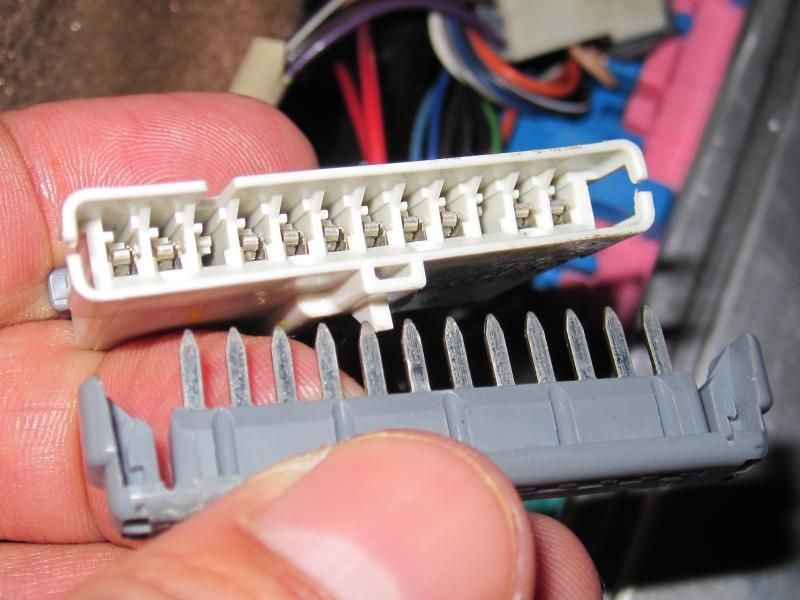
The other end of the Pink wire goes to one of the Star connectors which has 10 wires going to it. The other connector only has 4 wires. These are used to just "tie together" all the modules in the car for communication interaction.
You should be able to back probe the wire pin from the outside and if not, you can remove the cap to access it from the inside.
Here is a picture of a Star connector to help. They are to the left of the BCM.
The other end of the Pink wire goes to one of the Star connectors which has 10 wires going to it. The other connector only has 4 wires. These are used to just "tie together" all the modules in the car for communication interaction.
You should be able to back probe the wire pin from the outside and if not, you can remove the cap to access it from the inside.
Here is a picture of a Star connector to help. They are to the left of the BCM.

Thread Starter
Heel & Toe
Joined: Oct 2012
Posts: 15
Likes: 0
Hey guys,
Pulled the seats out and disconnected the seat wires. No luck unfortunately. Still wont let me proceed past the key fob learning page.
While the seats where out, checked all the wiring under the carpet visually for any damage, moisture etc, all looked ok.
Got hold of a 12v car test light probe. Checked the black/white wire with the orange wire. What do you know, theres no power to the module.
Question now remains, whats the best way to locate the problem in the wires without having to pull out and unwind the whole harness that controls the RFA module?
Is it easier to lay new wire from the star bus and battery?
Any ideas? Thanks guys :-)
Pulled the seats out and disconnected the seat wires. No luck unfortunately. Still wont let me proceed past the key fob learning page.
While the seats where out, checked all the wiring under the carpet visually for any damage, moisture etc, all looked ok.
Got hold of a 12v car test light probe. Checked the black/white wire with the orange wire. What do you know, theres no power to the module.
Question now remains, whats the best way to locate the problem in the wires without having to pull out and unwind the whole harness that controls the RFA module?
Is it easier to lay new wire from the star bus and battery?
Any ideas? Thanks guys :-)
Team Owner
Joined: Jul 2006
Posts: 22,202
Likes: 4,187
From: Kannapolis NC
How confident are you about the fuses? Did you measure, replace, or just look at the fuses? I'd also measure from the orange wire to a good chassis ground in case the ground is what is missing.
Le Mans Master
Joined: Mar 2011
Posts: 6,835
Likes: 302
From: Columbia SC

If I understand what you did, I am not confident of your test. If you used a "test light" and put it between the Orange and Black/White wire it will only light up IF you have power AND the ground is good. That test tells you that one or the other is the problem but not which one.
If you ran power from the battery using a piece of wire and re-did the test putting the test light between the jumper and the Black/White wire and got the test light to work then you would know that power was the issue. If it does not light then you know that the ground is the issue.
If you think you have a power problem:
The RFA fuse is 27 in the passenger fuse box. There should be a small metal tab on each end of the fuse for measuring voltage or applying a test light. Hopefully your fuse has that feature. If it does then make sure you have power on both sides of the fuse. This verifies the fuse is getting power, and that the fuse is good. Put one end of the "test light" on the fuse tab and the other on a GOOD known ground. I am working on an HVAC fuse box problem where the fuse box and not the fuse is the problem.
If you think you have a ground problem:
The ground for the RFA is G104.
Here is where the ground is for that. It talks about cleaning grounds also.
http://forums.corvetteforum.com/c5-t...tion-long.html
If you have any issues with doing this let me know. Sorry we're having trouble hooking up on Skype but we're on opposite ends of the world. I would also think since you are upside down it makes everything harder too.

If you can't find the problem with the above we'll have to look at the actual wiring. This is not rocket science.
Thread Starter
Heel & Toe
Joined: Oct 2012
Posts: 15
Likes: 0
Thanks again guys, Im very appreciative of all the help.
First thing I did was check the fuse. I pulled it out using the fuse puller, checked it visually and it wasnt blown so put it back in. This was from the fuse box located in the footwell area, not the one under the bonnet? Is there another one I should check?
Might be worth just replacing it anyway incase the eye sight is messing with me.
Yep I also checked the orange wire against several metal chassis locations. Definately no power coming in.
Ive cleaned G104 ground (the one under the bonnet, under the fuse box connected to the rails on the passenger side of the car) previously, so have eliminated that one. (Also cleaned the grounds in the passenger door near the footwell).
No prob with skype dadaroo, sorry for the short notice the other day :-)
Ok so will recheck the fuse, replace with a new one, check the actual contacts behind the fuse to make sure they look ok and report back asap.
First thing I did was check the fuse. I pulled it out using the fuse puller, checked it visually and it wasnt blown so put it back in. This was from the fuse box located in the footwell area, not the one under the bonnet? Is there another one I should check?
Might be worth just replacing it anyway incase the eye sight is messing with me.
Yep I also checked the orange wire against several metal chassis locations. Definately no power coming in.
Ive cleaned G104 ground (the one under the bonnet, under the fuse box connected to the rails on the passenger side of the car) previously, so have eliminated that one. (Also cleaned the grounds in the passenger door near the footwell).
No prob with skype dadaroo, sorry for the short notice the other day :-)
Ok so will recheck the fuse, replace with a new one, check the actual contacts behind the fuse to make sure they look ok and report back asap.
Team Owner
Joined: Jul 2006
Posts: 22,202
Likes: 4,187
From: Kannapolis NC
So you don't have an ohm meter? You can get a multimeter for free at harbor freight with any purchase (with coupon) or buy one for less than 10 bucks and it will measure continuity of the fuse. You can't always tell by looking and it might save you a lot of time. If you don't have power on the orange wire, you need to start somewhere, I pick the fuse. Touch your test light to both sides of that fuse. There should be a small area in the visible part of the fuse that you can touch the probe to. Make sure your ground is clipped on a good ground on the car.
Thread Starter
Heel & Toe
Joined: Oct 2012
Posts: 15
Likes: 0
Hey guys,
Finally got a chance to take another look at the issue and good news, had a bit of a breakthrough today.
Discovered that its not a grounding issue after all as originally thought after using the test light probe.
I ran a temporary test wire directly from the battery to the module and low and behold it worked. It allowed me to proceed to the hold lock/unlock screen, i tuned my remote and all is good... Very close now to solving the problem:-)
So to sum it up...
Black/white ground wire - ok
Pink bcm wire - ok
Rfa module - ok
Remote key fob - ok
Orange positive wire - NOT WORKING
I also tested fuse 27 in the footwell area, aswell as the contacts behind the fuse and they are both good!
The question now remains, how to fix the positive orange wire?
Is there another fuse I should be looking at?
If not, is it easier to just run a new wire to the battery? This wire should have a fuse right? Where should I plug it in to the fuse box?
Just an idea, but easiest way I think would be to splice the positive wire of the button near the rfa module that opens the hatch for the convertible top as its so close to the rfa module and run the power to the rfa module from there?
Thoughts? Thanks guys issue almost resolved!
Finally got a chance to take another look at the issue and good news, had a bit of a breakthrough today.
Discovered that its not a grounding issue after all as originally thought after using the test light probe.
I ran a temporary test wire directly from the battery to the module and low and behold it worked. It allowed me to proceed to the hold lock/unlock screen, i tuned my remote and all is good... Very close now to solving the problem:-)
So to sum it up...
Black/white ground wire - ok
Pink bcm wire - ok
Rfa module - ok
Remote key fob - ok
Orange positive wire - NOT WORKING
I also tested fuse 27 in the footwell area, aswell as the contacts behind the fuse and they are both good!
The question now remains, how to fix the positive orange wire?
Is there another fuse I should be looking at?
If not, is it easier to just run a new wire to the battery? This wire should have a fuse right? Where should I plug it in to the fuse box?
Just an idea, but easiest way I think would be to splice the positive wire of the button near the rfa module that opens the hatch for the convertible top as its so close to the rfa module and run the power to the rfa module from there?
Thoughts? Thanks guys issue almost resolved!
Team Owner
Joined: Jul 2006
Posts: 22,202
Likes: 4,187
From: Kannapolis NC
Hey guys,
Finally got a chance to take another look at the issue and good news, had a bit of a breakthrough today.
Discovered that its not a grounding issue after all as originally thought after using the test light probe.
I ran a temporary test wire directly from the battery to the module and low and behold it worked. It allowed me to proceed to the hold lock/unlock screen, i tuned my remote and all is good... Very close now to solving the problem:-)
So to sum it up...
Black/white ground wire - ok
Pink bcm wire - ok
Rfa module - ok
Remote key fob - ok
Orange positive wire - NOT WORKING
I also tested fuse 27 in the footwell area, aswell as the contacts behind the fuse and they are both good!
The question now remains, how to fix the positive orange wire?
Is there another fuse I should be looking at?
If not, is it easier to just run a new wire to the battery? This wire should have a fuse right? Where should I plug it in to the fuse box?
Just an idea, but easiest way I think would be to splice the positive wire of the button near the rfa module that opens the hatch for the convertible top as its so close to the rfa module and run the power to the rfa module from there?
Thoughts? Thanks guys issue almost resolved!
Finally got a chance to take another look at the issue and good news, had a bit of a breakthrough today.
Discovered that its not a grounding issue after all as originally thought after using the test light probe.
I ran a temporary test wire directly from the battery to the module and low and behold it worked. It allowed me to proceed to the hold lock/unlock screen, i tuned my remote and all is good... Very close now to solving the problem:-)
So to sum it up...
Black/white ground wire - ok
Pink bcm wire - ok
Rfa module - ok
Remote key fob - ok
Orange positive wire - NOT WORKING
I also tested fuse 27 in the footwell area, aswell as the contacts behind the fuse and they are both good!
The question now remains, how to fix the positive orange wire?
Is there another fuse I should be looking at?
If not, is it easier to just run a new wire to the battery? This wire should have a fuse right? Where should I plug it in to the fuse box?
Just an idea, but easiest way I think would be to splice the positive wire of the button near the rfa module that opens the hatch for the convertible top as its so close to the rfa module and run the power to the rfa module from there?
Thoughts? Thanks guys issue almost resolved!