When you click on links to various merchants on this site and make a purchase, this can result in this site earning a commission. Affiliate programs and affiliations include, but are not limited to, the eBay Partner Network.
Unfortunately mine went SOUTH. Anyone have any secrets or tricks to aid the job replacing it ?
Any thoughts or ideas would be greatly appreciated.
The Big Guy !
Unfortunately mine went SOUTH. Anyone have any secrets or tricks to aid the job replacing it ?
Any thoughts or ideas would be greatly appreciated.
The Big Guy !
2020 Corvette of the Year Finalist (performance mods)
C5 of Year Winner (performance mods) 2019
pretty straightforward assuming you have the right tools... move the rack over to the passenger side (you don't have to totally remove it), remove crank bolt, pull old balancer off, and install the new one... I just had to take mine off again this past weekend, not a bad job... I would recommend an arp bolt instead of the stock one since you can reuse it and it has a more straightforward torque spec... also use some red loctite on the new bolt... you might consider pinning the balancer now in case you decide to supercharge the car later on, that will save you some time on that install
pretty straightforward assuming you have the right tools... move the rack over to the passenger side (you don't have to totally remove it), remove crank bolt, pull old balancer off, and install the new one... I just had to take mine off again this past weekend, not a bad job... I would recommend an arp bolt instead of the stock one since you can reuse it and it has a more straightforward torque spec... also use some red loctite on the new bolt... you might consider pinning the balancer now in case you decide to supercharge the car later on, that will save you some time on that install
Neutron 82 Thank you for the info. Much Appreciated !
Well that sounded easy, it's a little more than what it sounds like. Moving the sterring rack in a pain in the $&@. Buy the Hawks balancer install tool. Well worth the money. New bolt requires 240 lbs of torque, that's tighter than any bolt in the world. Make sure you have the balancer in the correct position, you want your belts to track correctly. Check out LS1 How to, look for cam install, it's the same task.
2020 Corvette of the Year Finalist (performance mods)
C5 of Year Winner (performance mods) 2019
Originally Posted by Paul 75 L82
Well that sounded easy, it's a little more than what it sounds like. Moving the sterring rack in a pain in the $&@. Buy the Hawks balancer install tool. Well worth the money. New bolt requires 240 lbs of torque, that's tighter than any bolt in the world. Make sure you have the balancer in the correct position, you want your belts to track correctly. Check out LS1 How to, look for cam install, it's the same task.
ah, moving the rack isn't that bad... if my car was stock I could have it out of the way pretty quick but I also have a secondary drive in the way so I have to partially remove that also... as I stated you need the correct tools, I have 2 different balancer removal tools depending what balancer I'm working with and also the install tool is needed
pretty straightforward assuming you have the right tools... move the rack over to the passenger side (you don't have to totally remove it), remove crank bolt, pull old balancer off, and install the new one... I just had to take mine off again this past weekend, not a bad job... I would recommend an arp bolt instead of the stock one since you can reuse it and it has a more straightforward torque spec... also use some red loctite on the new bolt... you might consider pinning the balancer now in case you decide to supercharge the car later on, that will save you some time on that install
neutron, all you did was remove the bolts that mount the rack and then moved it over, no other disconnecting of anything else? If so, big facepalm for me as I removed the rack for mine. I'll have to remember this for next time
2020 Corvette of the Year Finalist (performance mods)
C5 of Year Winner (performance mods) 2019
Originally Posted by Dcollins3208
neutron, all you did was remove the bolts that mount the rack and then moved it over, no other disconnecting of anything else? If so, big facepalm for me as I removed the rack for mine. I'll have to remember this for next time
everything needs to be disconnected you just don't have to take it out of the car... so disconnect the tie rod ends, the 2 rack lines, steering shaft bolt, remove the ebcm bracket if applicable, and the 2 rack mount bolts... you can then move it over to the passenger side far enough to clear the balancer... I did my cam swap and removed/installed balancers a handful of times without ever completely removing the rack
use the ls1how and I nelieve it says use the longer bolt now but I made a tool cost about 20 bucks. Everything else I rented. I have some pics up if you wanna see what's all involved. It's really not that bad at all..
One recommendation is leave the back wheels on the ground with the e brake on and the car in 6th gear. This will allow you to torque the bolt without removing the starter to hold the flywheel. Recommend you use a balancer puller and installer tools. You can get these along with the torque wrench at auto zone for free. Good luck.
Using LS1howto.com for this job will likely result in damaged crankshaft threads. I really wish they would fix that web site or take it down.
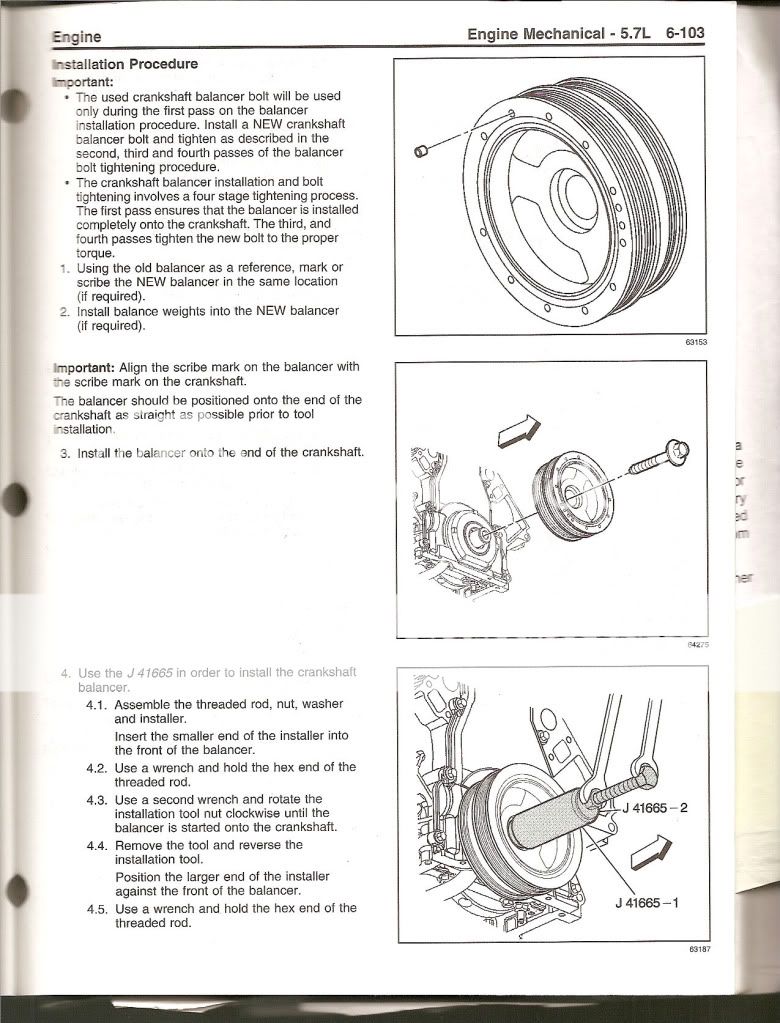
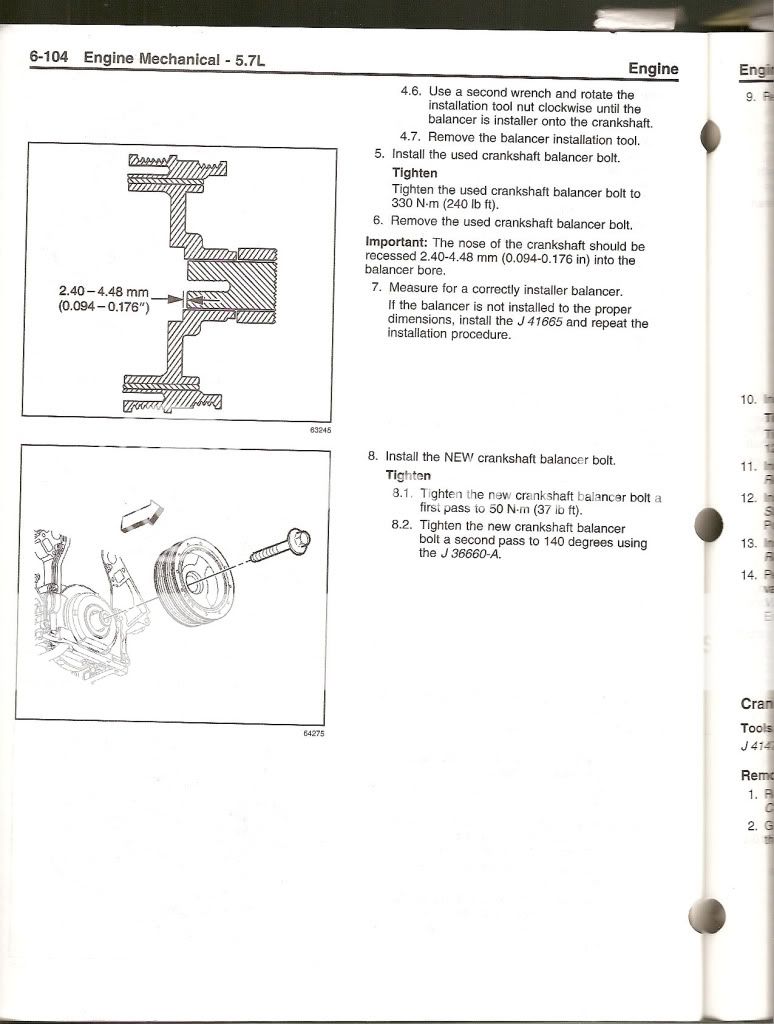
Make a a tool from threaded rod to press the new damper onto the crankshaft. Here is mine that I made for around $20. Also below is the GM Service Manual Procedure. Don't follow LS1howto.com to install the damper. The piece shown as J41665-1 is a Kent-Moore tool that can be bought off of Ebay for around $10 and is used in other procedures as well. That would replace the washer stack I show in the photo. Note also that the measurements shown are for the GM pulley on a Vette, might be different for an aftermarket pulley but you can figure it out. I computed new values for my ATI pulley hub.
Last edited by vettenuts; Apr 8, 2015 at 07:50 AM.
[QUOTE=vettenuts;1589370653]Using LS1howto.com for this job will likely result in damaged crankshaft threads. I really wish they would fix that web site or take it down.
Make a a tool from threaded rod to press the new damper onto the crankshaft. Here is mine that I made for around $20. Also below is the GM Service Manual Procedure. Don't follow LS1howto.com to install the damper. The piece shown as J41665-1 is a Kent-Moore tool that can be bought off of Ebay for around $10 and is used in other procedures as well. That would replace the washer stack I show in the photo. Note also that the measurements shown are for the GM pulley on a Vette, might be different for an aftermarket pulley but you can figure it out. I computed new values for my ATI pulley hub.
Images won't open for me...don't know about others.
With respect to dealing with the steering rack, disconnecting the P/S hoses is not in itself "difficult", but due to the limited work space, it's best described as tedious. Whether or not you remove the rack completely, is no big deal, since you have to slide it far enough out of the way, that you might as well take it completely out.
One thing to be mindful of, is when reinstalling the rack, the passenger side of the rack sits in two "ears" on the cradle. These ears have a little "spring" to them, and may close up a little, with the rack removed. If that happens, CAREFULLY pry them apart, to allow the rack to go back in. if you're working on an older car, you may also want to replace the bushing that's on the rack. Moog sells the part, and it's only a few dollars.
I have them within the post and can see them. What are you using to read the thread?
PM sent with images.
I'm just saying if I click on the link like most post and as it instructs to do it doesn't open... I just get a little white box with a thingy mabob that goes round and round like it's trying to load, but doesn't.
Maybe they open for everyone else... maybe I have something different about our PC... I'm so tech challenged it could be anything.
Last edited by 73Corvette; Apr 8, 2015 at 05:18 PM.
I'm just saying if I click on the link like most post and as it instructs to do it doesn't open... I just get a little white box with a thingy mabob that goes round and round like it's trying to load, but doesn't.
Maybe they open for everyone else... maybe I have something different about our PC... I'm so tech challenged it could be anything.
Your PC is likely blocking Photobucket.
Last edited by lionelhutz; Apr 8, 2015 at 10:54 PM.
I'm just saying if I click on the link like most post and as it instructs to do it doesn't open... I just get a little white box with a thingy mabob that goes round and round like it's trying to load, but doesn't.
Maybe they open for everyone else... maybe I have something different about our PC... I'm so tech challenged it could be anything.
Let me know if you see them now, I did a direct upload through CF rather than a link to photobucket.







 Crankshhaft Balancer Replacement