






which digital camera?????
Pro

Joined: Mar 2006
Posts: 671
Likes: 0
From: Antelope CA

>>> It just annoys the crap out of me when I look at a high res picture that looks perfect, then after I resize and crop it, it just doesn't look as sharp.
When you downrez (decimation), you need to sharpen a bit afterwards. Uprezzing (interpolation), a bit of smoothing is called for. These options are available as Bicubic Sharper and Bicubic Smoother in the Image Size panel.

When you downrez (decimation), you need to sharpen a bit afterwards. Uprezzing (interpolation), a bit of smoothing is called for. These options are available as Bicubic Sharper and Bicubic Smoother in the Image Size panel.
You certainly seem to have a handle on Photoshop and Photography
 You're right about the process 1-5 over, and over, and over
  I've only been shooting 5 years and mostly my, kids sports, soccer, baseball. A little nature, macros, and family events indoor with slaved bounce flash and onboard fill flash.
 I've been using a Cannon 20D for the last 3 years, and it's my first SLR and only second digital. I'm having lots of fun and think I'm learning, thank goodness it's digital. Yeah, I'm a cheapskate
 I have thumbed a few books at the library, and learned tons at dpreview for 3 years.
So my question to you is, the bicubic smoother for up sizing ? I've never heard of it for this, mostly have heard to add more sharpening. Part of me sees how the smmother makes sense, can you explain more or give me some links to further my knowledge please.
A few days ago I uploaded a file for a poster 18x24 and upsized it 10% twice. So about 20%, I also doubled my normal amount of sharpening. I hope I didn't to too bad with this process, what do you think ?
This link is to pictures I was shooting and printing, comments are welcomed
 even bad ones
http://forums.corvetteforum.com/show....php?t=1854244
Thanks, Greg

Team Owner


Joined: Jun 2001
Posts: 26,714
Likes: 344
From: Houston, TX
What program resizes poorly for you ? Some may save as a gif. for the web, bad for pictures, be sure it's jpeg. or jpg. and sRGB
I think the correct order is: Be sure you crop before resize.
1) crop
2) resize say 800x600, @ 72 or 96 dpi
4) sharpen a bit, and view at 100% to see true results
3) save as, or for web, jpg quality about 80 percent
Depending on the complexity of the image, the above processes should give you a file size between 80k - 120k. If your sizes are much smaller do less JPG compression and check your dpi or ppi.
If you keep making changes to the same photo, and save as with JPG compression, the image will degrade each time. Do all your processing with that photo and save first, before resizing smaller, with the highest quality jpg for making a print later. Then you can open that one and resize once and sharpen a bit for the web.
If you need to make editing changes later, start from the origional. Or if you know you will make changes later, save as PSD for Photoshop to keep layers open, or if not using layers save as Tiff. not JPG.
I use Photoshop for the inital editing and croping and save as highest quality jpeg. Later I'll batch resize for the web using "irafanview" a free program. It is a really slick program for many things, I use it to make slide shows with music too. I just started using photobucket also, really easy to embed images for the web.
Good luck, hope this helps Greg
Greg
I think the correct order is: Be sure you crop before resize.
1) crop
2) resize say 800x600, @ 72 or 96 dpi
4) sharpen a bit, and view at 100% to see true results
3) save as, or for web, jpg quality about 80 percent
Depending on the complexity of the image, the above processes should give you a file size between 80k - 120k. If your sizes are much smaller do less JPG compression and check your dpi or ppi.
If you keep making changes to the same photo, and save as with JPG compression, the image will degrade each time. Do all your processing with that photo and save first, before resizing smaller, with the highest quality jpg for making a print later. Then you can open that one and resize once and sharpen a bit for the web.
If you need to make editing changes later, start from the origional. Or if you know you will make changes later, save as PSD for Photoshop to keep layers open, or if not using layers save as Tiff. not JPG.
I use Photoshop for the inital editing and croping and save as highest quality jpeg. Later I'll batch resize for the web using "irafanview" a free program. It is a really slick program for many things, I use it to make slide shows with music too. I just started using photobucket also, really easy to embed images for the web.
Good luck, hope this helps
GregYes, I already do all those things (except the web programs). I'm using MGI Photosuite.
Thanks!

Le Mans Master


Joined: Jul 2000
Posts: 5,406
Likes: 2,202
I like the Fuji digitals (look like a small slr) for quick grab photography and went you dont want to lug a larger Digital SLR. For serious events and when you want more flexibility I use a Nikon D80, but they are "best priced" around $1,200 so they are more of a comittment. I love my Fuji's though.

Burning Brakes


Joined: Jan 2005
Posts: 1,027
Likes: 2
From: Baltimore MD
St. Jude Donor '08
I've had many cameras over the years and my favorite is the Nikon D70. You definately cannot beat the SLR cameras when it comes to shooting speed. Having other digital cameras finally take the picture 2 seconds after I wanted got old. I have a Minolta G500 that is small and takes very good pictures when I just need a simple camera to carry around.
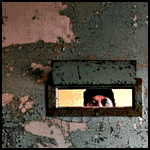
Here is a scary photo:

Here is a scary photo:

Advanced

Joined: Jul 2006
Posts: 52
Likes: 0
[QUOTE=KMK454;1562790934]Here's what a Nikon D70 SLR and a little bit of studying photography did for me
Time Elapse fun... bonus points if you know where this was taken:

QUOTE]
Don't know where you shot this...I'm still trying to figure out how you have time lapse with the back-up lights
Time Elapse fun... bonus points if you know where this was taken:
QUOTE]
Don't know where you shot this...I'm still trying to figure out how you have time lapse with the back-up lights
Team Owner
Joined: Jun 2001
Posts: 26,714
Likes: 344
From: Houston, TX
Okay, I've been doing some experimenting (using my MGI Photosuite program). Look at my new sig picture below. If you look at the hood, you see a lot of dark blotches. Those were virtually not noticable on the original picture. After I cropped and resized the picture (the blotches still not showing up) - as soon as I saved the picture with a JPEG extension those blotches got dark.
So, I tried saving it as a .bmp file and they dark blotches did not look nearly that bad - almost not noticable. Unfortunately, the Corvette forum file manager won't let me upload a .bmp file. I'm stumped.
<<EDIT>> Thanks to ya'lls advice, I found some settings I was not aware of - picture turned out MUCH better.
So, I tried saving it as a .bmp file and they dark blotches did not look nearly that bad - almost not noticable. Unfortunately, the Corvette forum file manager won't let me upload a .bmp file. I'm stumped.
<<EDIT>> Thanks to ya'lls advice, I found some settings I was not aware of - picture turned out MUCH better.
Last edited by jschindler; Nov 18, 2007 at 03:56 PM.
Corvette Stories
The Best of Corvette for Corvette Enthusiasts

Top 10 Most Explosive Corvettes Ever Made: Power-to-Weight Ratio Ranked!
Joe Kucinski
150 hp to 1,250 hp: Every Corvette Generation Compared by the Specs That Matter
Joe Kucinski
8 Coolest Corvette Pace Cars (and Replicas) of All Time
Verdad Gallardo
Top 10 Corvette Engines RANKED by Peak Torque (70+ Years of Muscle!)
Joe Kucinski
Corvette ZR1X Will Be Pacing the Indy 500, And Could Probably Race, Too!
Verdad Gallardo
Top 10 Corvettes Coming to Mecum Indy 2026!
Brett Foote
Top 10 C9 Corvette MUST-HAVES to Fix These C8 Generation Flaws!
Michael S. Palmer
10 Revolutionary 'Corvette Firsts' Most People Don't Know
Joe Kucinski
5 Reasons to Upgrade to an LS6-Powered Corvette; 5 Reasons to Stay LT2
Michael S. Palmer
Race Director


Joined: Oct 2004
Posts: 10,516
Likes: 2
From: Virginia Bch VA
Cruise-In VI Veteran
Cruise-In VII Veteran
St. Jude Donor '06
Camera 101
There are cameras and then there are cameras. In any camera the optics/lens is what’s most important. If you’re a pro then you need a “thru the lens” high end camera. In my experience Nikon and Cannon are top rated. But you don’t sound like you need all that. If you were then you would not be asking the question in the first place.
What you need to look for is:
1. Resolution in mega-pixels. Get nothing less than 3 mg. Best range is 5-8mg. Any more than that in overkill.
2. Optical zoom. Digital zoom does nothing. 6-12x is top of the line.
3. Lens size. Most digitals have small lens openings and high zoom capabilities to compensate. F2-3 is the norm. You will not get the f1.2 range unless you buy one of the $1000 boys. The smaller the “f” the lager the lens opening. Large is good cuz it lets in more light.
4. LED screen. 2” is the norm. Some have pop out & swivel capabilities. The LED negates the need to put the camera up to your eye. The swivel feature is great for setting the camera low to the ground or holding the camera over your head and using it sort like a periscope. To me that’s a super capability that I would always want to have.
I have a Cannon S3-IS. 6 mg-pix; 12x optical zoom; f2.1; swivel LED for less than $300. I think Cannon recently introduced a S5-IS with 8mg pix and most of the same features. The IS stands for "Image Stabilization".
Go to CNET.com. They explain functions & capabilities well with short videos on different models.
What you need to look for is:
1. Resolution in mega-pixels. Get nothing less than 3 mg. Best range is 5-8mg. Any more than that in overkill.
2. Optical zoom. Digital zoom does nothing. 6-12x is top of the line.
3. Lens size. Most digitals have small lens openings and high zoom capabilities to compensate. F2-3 is the norm. You will not get the f1.2 range unless you buy one of the $1000 boys. The smaller the “f” the lager the lens opening. Large is good cuz it lets in more light.
4. LED screen. 2” is the norm. Some have pop out & swivel capabilities. The LED negates the need to put the camera up to your eye. The swivel feature is great for setting the camera low to the ground or holding the camera over your head and using it sort like a periscope. To me that’s a super capability that I would always want to have.
I have a Cannon S3-IS. 6 mg-pix; 12x optical zoom; f2.1; swivel LED for less than $300. I think Cannon recently introduced a S5-IS with 8mg pix and most of the same features. The IS stands for "Image Stabilization".
Go to CNET.com. They explain functions & capabilities well with short videos on different models.
Safety Car


Joined: Aug 2005
Posts: 4,279
Likes: 82
From: North Strand, NMB, SC; Retired x 2 (US Army: 70-90 AD) (US Army: 91-16 DAC); yea, I'm old.
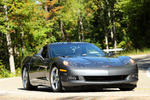
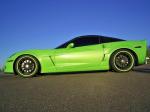
Great shot...I really like the lines of the C6 and this low angle shot captures it very well.
I think it's not time lapse but rather dragging the shutter while backing up that made this shot....
Looking at this iamge, I say it was shot at 300mm or very, very close to it...
Looking at this iamge, I say it was shot at 300mm or very, very close to it...
Pro
Joined: Mar 2006
Posts: 671
Likes: 0
From: Antelope CA
Okay, I've been doing some experimenting (using my MGI Photosuite program). Look at my new sig picture below. If you look at the hood, you see a lot of dark blotches. Those were virtually not noticable on the original picture. After I cropped and resized the picture (the blotches still not showing up) - as soon as I saved the picture with a JPEG extension those blotches got dark.
So, I tried saving it as a .bmp file and they dark blotches did not look nearly that bad - almost not noticable. Unfortunately, the Corvette forum file manager won't let me upload a .bmp file. I'm stumped.
So, I tried saving it as a .bmp file and they dark blotches did not look nearly that bad - almost not noticable. Unfortunately, the Corvette forum file manager won't let me upload a .bmp file. I'm stumped.
From what I can see, your program which I have no experence with, is applying too much jpg. compression. Is it adjustable ? Those size images should be at least 60K, you got 25 - 30K there, too much lost information. Since your hosting images from your own website, you don't have size limitations. Try for minimum compression and they maybe 150-200K and you will see vast improvement.
I noticed on your website, which is very nice
 need to browse more on it later. Your first pic is only 48K which is half the info of that 5.7 liter engine pic but twice the viewing size. Loss of info degrades image. Get a hold of that compression level and you'll be golden.
If you want to send me a full size image, I can show you what high compression levels can do to hurt an image.
Greg
Race Director
Joined: Dec 2005
Posts: 11,295
Likes: 954
From: Carlsbad Ca
I use a Panasonic DMC-TZ3. 10X optical zoom. 7MP. Most importantly, it has a very high quality lens made by Leica.
Leica markets the same camera... (and it costs $600+ more...) My pics are junk but I'm no photographer and I don't electronically molest pics either.
Here's one~

See, I told you they're junk!
Leica markets the same camera... (and it costs $600+ more...) My pics are junk but I'm no photographer and I don't electronically molest pics either.
Here's one~
See, I told you they're junk!


Team Owner
Joined: Jun 2001
Posts: 26,714
Likes: 344
From: Houston, TX
Hi Jim,
From what I can see, your program which I have no experence with, is applying too much jpg. compression. Is it adjustable ? Those size images should be at least 60K, you got 25 - 30K there, too much lost information. Since your hosting images from your own website, you don't have size limitations. Try for minimum compression and they maybe 150-200K and you will see vast improvement.
I noticed on your website, which is very nice need to browse more on it later. Your first pic is only 48K which is half the info of that 5.7 liter engine pic but twice the viewing size. Loss of info degrades image. Get a hold of that compression level and you'll be golden.
If you want to send me a full size image, I can show you what high compression levels can do to hurt an image.
Greg
From what I can see, your program which I have no experence with, is applying too much jpg. compression. Is it adjustable ? Those size images should be at least 60K, you got 25 - 30K there, too much lost information. Since your hosting images from your own website, you don't have size limitations. Try for minimum compression and they maybe 150-200K and you will see vast improvement.
I noticed on your website, which is very nice
need to browse more on it later. Your first pic is only 48K which is half the info of that 5.7 liter engine pic but twice the viewing size. Loss of info degrades image. Get a hold of that compression level and you'll be golden.If you want to send me a full size image, I can show you what high compression levels can do to hurt an image.
GregI'll check the settings on my other program as well. I really appreciate all who are making suggestions! I'm picky as hell about pics, but I just haven't taken the time to figure it out!!!

Melting Slicks

Joined: Aug 2007
Posts: 2,236
Likes: 0
Great shot...I really like the lines of the C6 and this low angle shot captures it very well.
I think it's not time lapse but rather dragging the shutter while backing up that made this shot....
Looking at this iamge, I say it was shot at 300mm or very, very close to it...
I think it's not time lapse but rather dragging the shutter while backing up that made this shot....
Looking at this iamge, I say it was shot at 300mm or very, very close to it...
Look under syncing of the flash curtain.
Racer
Joined: Mar 2007
Posts: 465
Likes: 0
From: San Francisco Bay Area California
Jim, I suspect you may not have done you're resizing, sharpening, and compression right. Here's what a bit of sharpening can do, but of course working from your downrezzed file, the damage has already been done from the small file.
BTW, there's some pretty serious blur on the nose...

BTW, there's some pretty serious blur on the nose...