







Navigation system questions

Burning Brakes


Joined: Apr 2001
Posts: 773
Likes: 107
From: NC

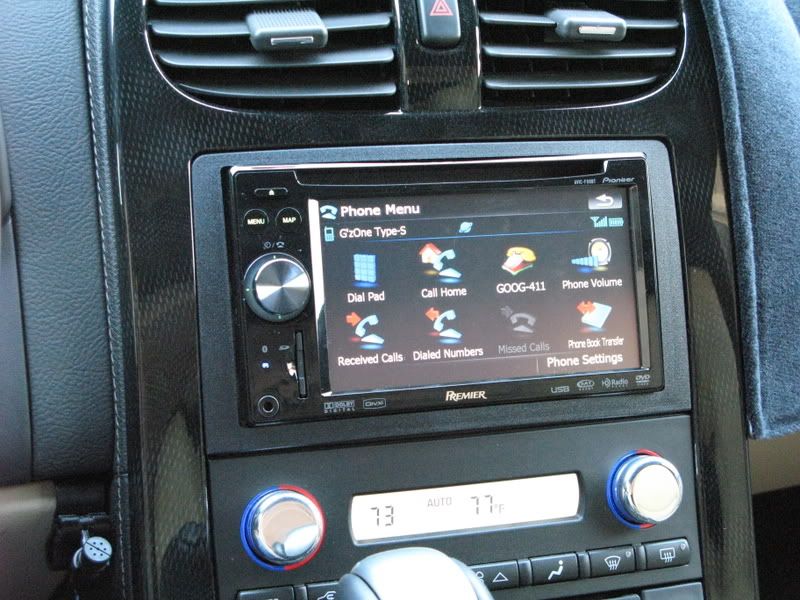
I suggest you spend some time driving a Corvette with the NAV. I had an 03 MDX with NAV and I currently have a 2007 MDX with NAV. The Corvette NAV is nowhere near as good as the one in either of the Acura's. The only advantage is the routing instructions in the heads up display. I order my 08 Corvette without NAV and added a nice Kenwood audio system with integrated Garmin NAV.

Drifting

Joined: Jun 2008
Posts: 1,540
Likes: 4
From: N.E. GA
I don't drive my vette enough to have gotten used to the nav system. I finally figured out how to input destinations and calculate a route, but the first time I did it, it was taking me somewhere in Virginia (I kept wondering why it wanted me to turn at odd places when I was only going home).
I had selected a home street address that it suggested (same name as mine but in Virginia). It was a learning and somewhat fun experience for my wife and me.
I am about to get there...I just don't have the time to sit in there and figure it out but it is slowly coming around.
I had selected a home street address that it suggested (same name as mine but in Virginia). It was a learning and somewhat fun experience for my wife and me.
I am about to get there...I just don't have the time to sit in there and figure it out but it is slowly coming around.

Advanced

Joined: May 2008
Posts: 84
Likes: 0
I am in the market for a used C6 and was debating the importance of the NAV system.....my question, when you get the factory NAV system, is the radio and CD system a touch screen system and how user friendly is the Radio, CD and XM to operate....is it worth getting the NAV system just to have a modern touch screen radio rather than the stock non-NAV radio????
a friend just got a Dodge charger (don't ask) and it had a touch screen radio with no NAV and i thought it was pretty cool to play around with.....felt like i was at a touch screen ATM machine....
a friend just got a Dodge charger (don't ask) and it had a touch screen radio with no NAV and i thought it was pretty cool to play around with.....felt like i was at a touch screen ATM machine....

Safety Car


Joined: Apr 2006
Posts: 4,254
Likes: 5
From: Anaheim Hills, Ca
All NAV units are different and of course you'll find one that you like better if you are looking to go with aftermarket. I have factory NAV and would get it again. I use a Garmin in my daily driver and even though it is easier to use than the GM unit in my Vette, I would never consider an aftermarket unit for it. In my opinion, certain aftermarket add-ons take away from a car.

Le Mans Master


Joined: Feb 2007
Posts: 8,514
Likes: 235
From: Currently somewhere in IL,IN,KY,TN,MO,AR,MS,AL, or FL
As far as addresses being missing, I have found that it is almost always user error. The system IS picky about spelling and will just say Oakridge Drive doesn't exist when it does have an Oak Ridge Drive. The solution is to always enter the city first. Then it is a LOT more helpful with data entry. In the above example as you enter "oak" the "r" is grayed out so you know the only thing that would make sense is to press the space which is not grayed.
I used the nav this morning to find a tire store I had no idea existed. I entered the city first and then category of auto service. As soon as I hit the first character of the name it popped up the place I was looking for. You would have thought there would have been more than 1 auto service store with a name beginning with "R" and, looking in the phone book after coming home there were dozens. But only one in the town I was interested in. If I had not entered the city first I would have had all the others to chose from and misspell.
The Corvette factory nav is not as intuitive as others but if you take the time to learn how to use it the way it was designed to be used rather than insist it work the way you want it to work, it is actually very good.
Corvette Stories
The Best of Corvette for Corvette Enthusiasts

Top 10 Most Expensive Corvettes Ever Sold on Bring A Trailer
Brett Foote
10 Things Every Corvette Owner Needs (2026 Edition)
Michael S. Palmer
8 Most "Only Corvette Owners Understand" Quirks and Problems
Pouria Savadkouei
10 Reasons the C6 Z06 is Still A Performance Benchmark After 20 Years
Joe Kucinski
How Much Horsepower Every Corvette Engine "LOST" in 1972
Joe Kucinski
Top 10 DOs and DON'Ts for Protecting Your Convertible Top!
Michael S. Palmer
Top 10 Most Explosive Corvettes Ever Made: Power-to-Weight Ratio Ranked!
Joe Kucinski
150 hp to 1,250 hp: Every Corvette Generation Compared by the Specs That Matter
Joe Kucinski
8 Coolest Corvette Pace Cars (and Replicas) of All Time
Verdad Gallardo
Pro


Joined: Mar 2005
Posts: 578
Likes: 0
From: Wasco Ca.
St. Jude Donor '07-'08
backup camera, Ipod cable in the center glove box(really cool).
And my wife can use GPS on the fly! OPTIONAL...



Safety Car
Joined: Aug 2000
Posts: 3,510
Likes: 43
From: Tulsa OK

Burning Brakes
Joined: Mar 2008
Posts: 883
Likes: 3
From: Rancho Murieta California
I have the navi system in my 05, but no disc. (I took it out and sent it back to the old owner before knowing what it was) Therefore it does not send me anywhere. Anyone have a copy of a disc or an older version they can send me?

Drifting
Joined: Jan 2003
Posts: 1,817
Likes: 5
From: Nevada
2009
If you are looking at a 2009, it is possible (but not confirmed) that there might be some changes on the way increasing the functionality of the navigation unit resulting from its integration with the new OnStar Version 8.0. This is a GM blurb for the 2009 Cadillac XLR:
OnStar 8.0 and Bluetooth capability
XLR is factory-equipped with OnStar 8.0 with Bluetooth capability. This technology enables wireless connectivity of cell phones and other electronic data devices, allowing for easier and safer hands-free phone connectivity.
The next-generation OnStar 8.0 system (OnStar subscription is not required for Bluetooth) features enhanced hands-free voice commands, Turn-by-Turn Navigation and eNav powered by MapQuest. This includes the industry-first Destination Download feature that enables directions to be downloaded from OnStar directly to the XLR’s navigation system, eliminating the need to stop the car to manually input a destination.
Also new is an iPod interface that is available through Cadillac Accessories. It allows the music stored on an iPod to be played through the XLR’s audio system.
No guarantees that it will show up on the 2009 Corvette, but the two cars share some common components so it might be worth looking into.
OnStar 8.0 and Bluetooth capability
XLR is factory-equipped with OnStar 8.0 with Bluetooth capability. This technology enables wireless connectivity of cell phones and other electronic data devices, allowing for easier and safer hands-free phone connectivity.
The next-generation OnStar 8.0 system (OnStar subscription is not required for Bluetooth) features enhanced hands-free voice commands, Turn-by-Turn Navigation and eNav powered by MapQuest. This includes the industry-first Destination Download feature that enables directions to be downloaded from OnStar directly to the XLR’s navigation system, eliminating the need to stop the car to manually input a destination.
Also new is an iPod interface that is available through Cadillac Accessories. It allows the music stored on an iPod to be played through the XLR’s audio system.
No guarantees that it will show up on the 2009 Corvette, but the two cars share some common components so it might be worth looking into.

Race Director

Joined: Apr 2008
Posts: 17,373
Likes: 6
From: Chatsworth California
If you are looking at a 2009, it is possible (but not confirmed) that there might be some changes on the way increasing the functionality of the navigation unit resulting from its integration with the new OnStar Version 8.0. This is a GM blurb for the 2009 Cadillac XLR:
OnStar 8.0 and Bluetooth capability
XLR is factory-equipped with OnStar 8.0 with Bluetooth capability. This technology enables wireless connectivity of cell phones and other electronic data devices, allowing for easier and safer hands-free phone connectivity.
The next-generation OnStar 8.0 system (OnStar subscription is not required for Bluetooth) features enhanced hands-free voice commands, Turn-by-Turn Navigation and eNav powered by MapQuest. This includes the industry-first Destination Download feature that enables directions to be downloaded from OnStar directly to the XLR’s navigation system, eliminating the need to stop the car to manually input a destination.
Also new is an iPod interface that is available through Cadillac Accessories. It allows the music stored on an iPod to be played through the XLR’s audio system.
No guarantees that it will show up on the 2009 Corvette, but the two cars share some common components so it might be worth looking into.
OnStar 8.0 and Bluetooth capability
XLR is factory-equipped with OnStar 8.0 with Bluetooth capability. This technology enables wireless connectivity of cell phones and other electronic data devices, allowing for easier and safer hands-free phone connectivity.
The next-generation OnStar 8.0 system (OnStar subscription is not required for Bluetooth) features enhanced hands-free voice commands, Turn-by-Turn Navigation and eNav powered by MapQuest. This includes the industry-first Destination Download feature that enables directions to be downloaded from OnStar directly to the XLR’s navigation system, eliminating the need to stop the car to manually input a destination.
Also new is an iPod interface that is available through Cadillac Accessories. It allows the music stored on an iPod to be played through the XLR’s audio system.
No guarantees that it will show up on the 2009 Corvette, but the two cars share some common components so it might be worth looking into.
Instructor

Joined: Sep 2006
Posts: 144
Likes: 0
From: Farmington Hills Mi
Try playing with the contrast and brightnest buttons. Lower both and that should get rid of lines I believe lowering contrast gets rid of lines

Burning Brakes
Joined: Apr 2007
Posts: 1,013
Likes: 1
From: New Orleans Louisiana
 ...it's really not fair to compare the C6 NAV to the Acura since IMO they make one of the best systems out there.
I have NAV and it does exactly what I need to it and I have no complaints. One nice feature of the C6 NAV is it feeds information to the HUD so you don't have to look down at the screen.
