



C6 Z06 overheating again
Thread Starter
Heel & Toe

Joined: May 2014
Posts: 20
Likes: 0
 C6 Z06 overheating again
Hey guys, i have this overheating issue once again on my 2007 s/c z06. I had this same problem before as well, replace Tstat, replaced control module and the fan still wouldnt come on. i finally replaced the actual cooling fan then it started to work fine. 4 months later it started to fail again, i was driving to dinner couple days ago and noticed that temp was going higher and higher way passed normal. can someone please help me out with this problem , i dont want to go out and replace fan again for it to go out the same way. how can i check if fan actually work, ive tried turning on a/c and fan still wont come on. 
Mods on car:
vortech v3 with A&A kit,
boost a pump
corsa exhaust.
everything else is stock.
Mods on car:
vortech v3 with A&A kit,
boost a pump
corsa exhaust.
everything else is stock.

Tolero Apto Victum


Joined: Jul 2007
Posts: 9,669
Likes: 37
From: Woodlands TX
On my 07 (NON-Z06), I had the fan fail to operate and the problem was that when the fan was commanded to run or "cycle" to 100%, the prolonged amps being pulled melted the fan connector.
Thread Starter
Heel & Toe
Joined: May 2014
Posts: 20
Likes: 0
ahh i see, should i check the fan connectors then, my car was also parked and garaged for couple months and battery died, would that have helped out the problem? because fan would go on by itself only when it wanted to but lately it hasnt been coming on whatsoever
Tolero Apto Victum
Joined: Jul 2007
Posts: 9,669
Likes: 37
From: Woodlands TX
When my fan connector melted, it would not come on at all and we had to make a new connector. As for your car battery being dead, be mindful that the C6 Corvette has a lot of items drawing power from it while it is shut down. I drive my 07 Vet everyday so I do not have that problem, but those that do not drive their Vet sometime place a battery tender on them during the winter months or during prolonged storage.
Thread Starter
Heel & Toe
Joined: May 2014
Posts: 20
Likes: 0
When my fan connector melted, it would not come on at all and we had to make a new connector. As for your car battery being dead, be mindful that the C6 Corvette has a lot of items drawing power from it while it is shut down. I drive my 07 Vet everyday so I do not have that problem, but those that do not drive their Vet sometime place a battery tender on them during the winter months or during prolonged storage.
Tolero Apto Victum
Joined: Jul 2007
Posts: 9,669
Likes: 37
From: Woodlands TX
https://www.corvetteforum.com/forums...connector.html
https://www.corvetteforum.com/forums...melt-down.html
https://www.corvetteforum.com/forums...ontroller.html
I hope this helps.
Last edited by Gering; Oct 21, 2015 at 02:15 AM. Reason: Added more info.
Thread Starter
Heel & Toe
Joined: May 2014
Posts: 20
Likes: 0

Corvette Stories
The Best of Corvette for Corvette Enthusiasts

150 hp to 1,250 hp: Every Corvette Generation Compared by the Specs That Matter
Joe Kucinski
8 Coolest Corvette Pace Cars (and Replicas) of All Time
Verdad Gallardo
Top 10 Corvette Engines RANKED by Peak Torque (70+ Years of Muscle!)
Joe Kucinski
Corvette ZR1X Will Be Pacing the Indy 500, And Could Probably Race, Too!
Verdad Gallardo
Top 10 Corvettes Coming to Mecum Indy 2026!
Brett Foote
Top 10 C9 Corvette MUST-HAVES to Fix These C8 Generation Flaws!
Michael S. Palmer
10 Revolutionary 'Corvette Firsts' Most People Don't Know
Joe Kucinski
5 Reasons to Upgrade to an LS6-Powered Corvette; 5 Reasons to Stay LT2
Michael S. Palmer
2027 Corvette vs The World: Every C8 vs Its Closest Competitor
Joe Kucinski


Thread Starter
Heel & Toe
Joined: May 2014
Posts: 20
Likes: 0


Melting Slicks


Joined: Oct 2010
Posts: 2,220
Likes: 16
From: Sugarhill Ga
the harness melting is a common issue, especially on tuned cars where the fan runs at high speed all the time. The plastic connector melts and the wires wiggle and loose connection. Try using a volt meter and check both sides of the connector. If you don't have voltage to the connector try the fan relay. Has your headlight recall been done? If you trace the problem to the fuse box, some damage may have been done at that time.
good luck
good luck
Thread Starter
Heel & Toe
Joined: May 2014
Posts: 20
Likes: 0
the harness melting is a common issue, especially on tuned cars where the fan runs at high speed all the time. The plastic connector melts and the wires wiggle and loose connection. Try using a volt meter and check both sides of the connector. If you don't have voltage to the connector try the fan relay. Has your headlight recall been done? If you trace the problem to the fuse box, some damage may have been done at that time.
good luck
good luck

Race Director


Joined: Dec 2013
Posts: 12,502
Likes: 3,629
Keep in mind that you have two connectors after the fuse box.
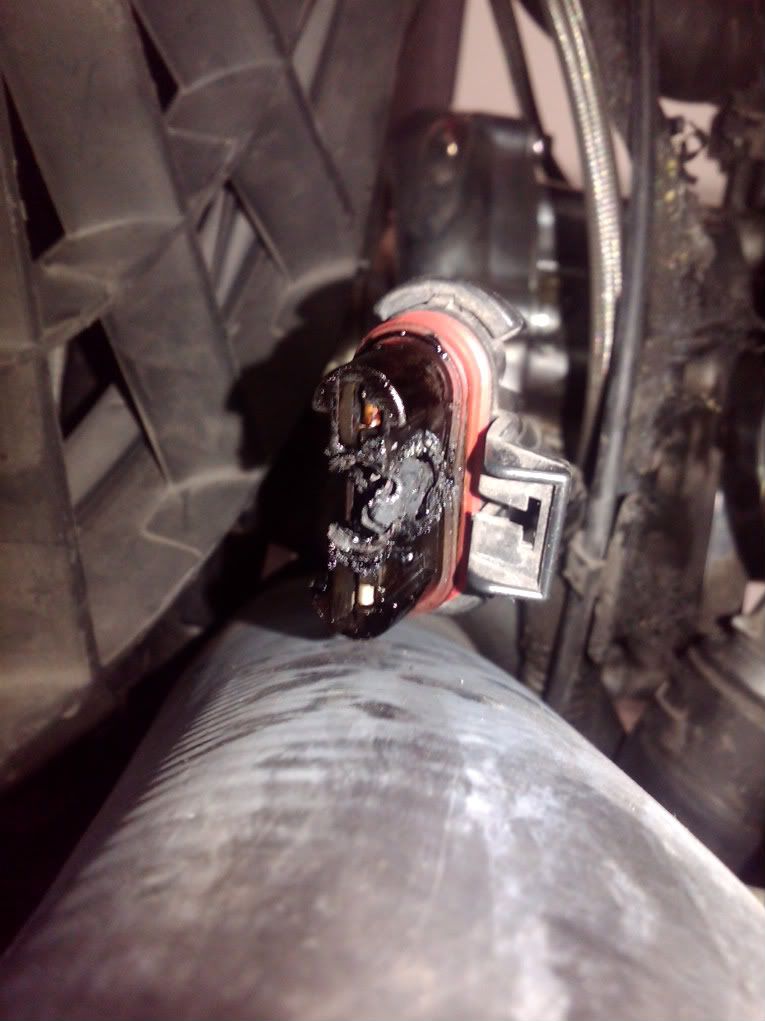
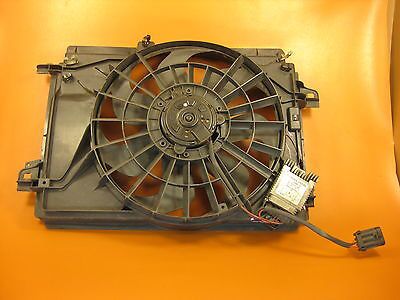
The first is the connector about half way down passenger side back of the radiator, then below that, you will see the pwm controller, and there is another connect that plugs into that as well.
So start with the top connector half way down on the back side of the radiator that you can get to from the hood side, and if it looks fine when unplugged and checked, then get under the car to disconnect the PWM controller connector to check that connector and the PWM pins for melting problems next.
This is the top one that you are checking to see if it melted,
And this is the lower PWM connector to see if it or the PWM pins are melted instead,
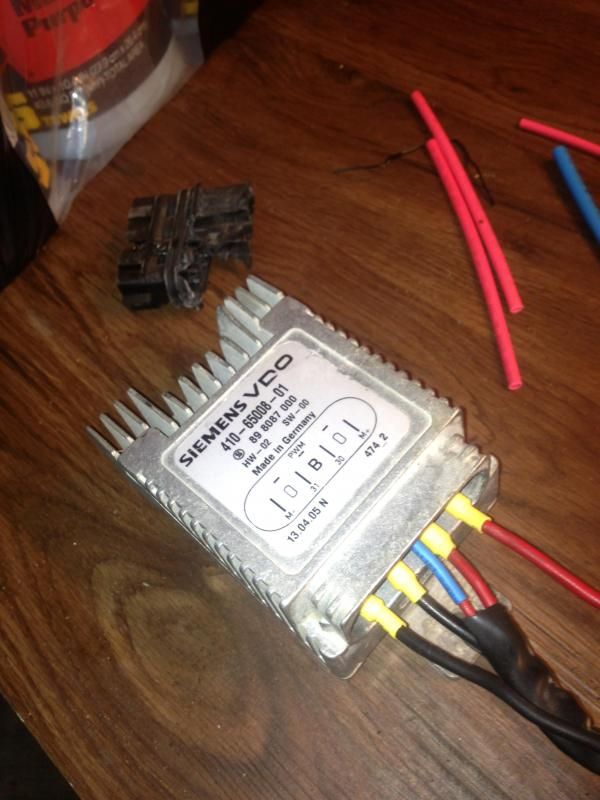
The loose connector in the below photo is clipped to the shroud of the radiator just above the PWM module and will be able to spot it from the top of the car just looking down.
The first is the connector about half way down passenger side back of the radiator, then below that, you will see the pwm controller, and there is another connect that plugs into that as well.
So start with the top connector half way down on the back side of the radiator that you can get to from the hood side, and if it looks fine when unplugged and checked, then get under the car to disconnect the PWM controller connector to check that connector and the PWM pins for melting problems next.
This is the top one that you are checking to see if it melted,
And this is the lower PWM connector to see if it or the PWM pins are melted instead,
The loose connector in the below photo is clipped to the shroud of the radiator just above the PWM module and will be able to spot it from the top of the car just looking down.
Last edited by Dano523; Oct 21, 2015 at 02:22 PM.

Thread Starter
Heel & Toe
Joined: May 2014
Posts: 20
Likes: 0
Keep in mind that you have two connectors after the fuse box.
The first is the connector about half way down passenger side back of the radiator, then below that, you will see the pwm controller, and there is another connect that plugs into that as well.
So start with the top connector half way down on the back side of the radiator that you can get to from the hood side, and if it looks fine when unplugged and checked, then get under the car to disconnect the PWM controller connector to check it out next.
The first is the connector about half way down passenger side back of the radiator, then below that, you will see the pwm controller, and there is another connect that plugs into that as well.
So start with the top connector half way down on the back side of the radiator that you can get to from the hood side, and if it looks fine when unplugged and checked, then get under the car to disconnect the PWM controller connector to check it out next.
aaaaah i see what you mean now, pics are much more helpful
in case none of these connectors are burnt out or melted, what you guys suggest i do next?
Last edited by Zeta6; Oct 21, 2015 at 02:23 PM.
Race Director
Joined: Dec 2013
Posts: 12,502
Likes: 3,629
If the connector both sides look good for each when unplugged, then start at the fuse block to make sure that the radiator fan fuse is not blown, and double check the fan harness ground connector to make sure it still good as well.
From there, you can check power from the battery at the PWM connector to make sure that the PWM is getting power to begin with.
If you do have power at the PWM controller from the battery, then it comes down to either the PWM burnt up, the fan burnt up again, or a problem in the PWM control wire from the ECM.
In the above photo of the PWM, 31 is your positive from the battery, 30 is the ground to the frame, and the red wire with the blue heat shrink is the control wire from the ECM. So with a multimeter, check the PWM connector for pins 30 and 31 to make sure you have power at the pwm connector.
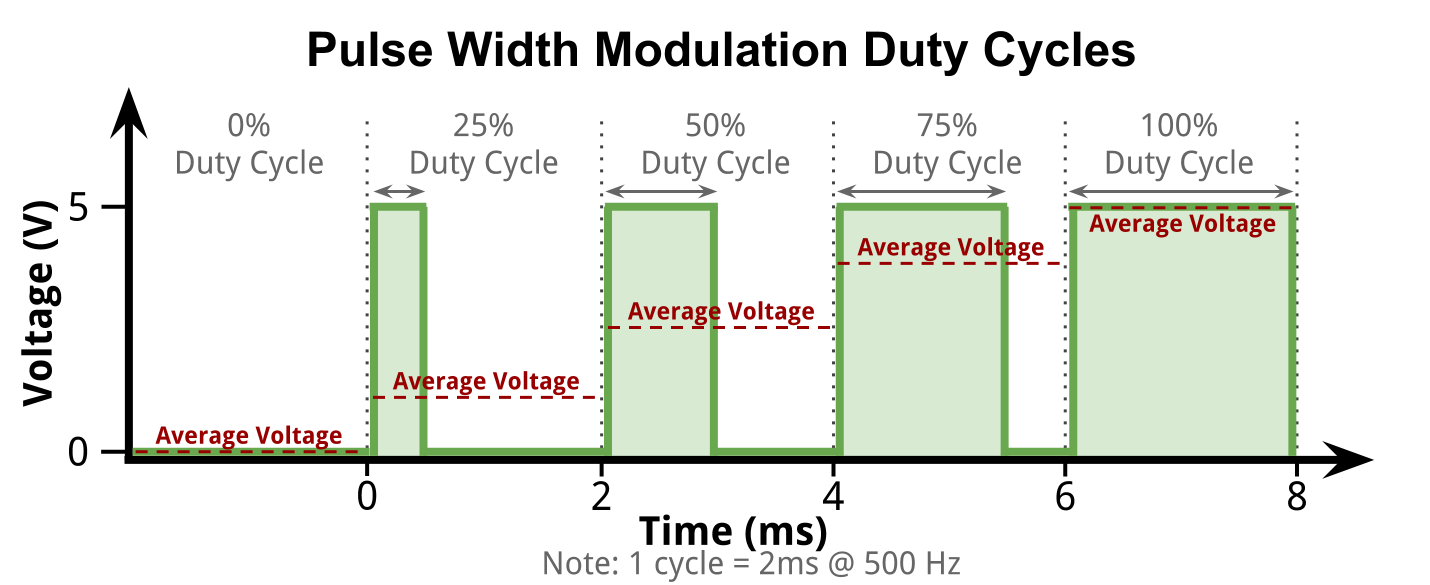
As for the PWM, it a pulse width modulator, so battery power in, power out to the motor on M+ and M-, and the ECM control wire will control the module output (pulse widths) to run the fan at a give speed on the M wires to the fan.
From there, you can check power from the battery at the PWM connector to make sure that the PWM is getting power to begin with.
If you do have power at the PWM controller from the battery, then it comes down to either the PWM burnt up, the fan burnt up again, or a problem in the PWM control wire from the ECM.
In the above photo of the PWM, 31 is your positive from the battery, 30 is the ground to the frame, and the red wire with the blue heat shrink is the control wire from the ECM. So with a multimeter, check the PWM connector for pins 30 and 31 to make sure you have power at the pwm connector.
As for the PWM, it a pulse width modulator, so battery power in, power out to the motor on M+ and M-, and the ECM control wire will control the module output (pulse widths) to run the fan at a give speed on the M wires to the fan.
Thread Starter
Heel & Toe
Joined: May 2014
Posts: 20
Likes: 0
If the connector both sides look good for each when unplugged, then start at the fuse block to make sure that the radiator fan fuse is not blown, and double check the fan harness ground connector to make sure it still good as well.
From there, you can check power from the battery at the PWM connector to make sure that the PWM is getting power to begin with.
If you do have power at the PWM controller from the battery, then it comes down to either the PWM burnt up, the fan burnt up again, or a problem in the PWM control wire from the ECM.
In the above photo of the PWM, 31 is your positive from the battery, 30 is the ground to the frame, and the red wire with the blue heat shrink is the control wire from the ECM. So with a multimeter, check the PWM connector for pins 30 and 31 to make sure you have power at the pwm connector.
As for the PWM, it a pulse width modulator, so battery power in, power out to the motor on M+ and M-, and the ECM control wire will control the module output (pulse widths) to run the fan at a give speed on the M wires to the fan.
From there, you can check power from the battery at the PWM connector to make sure that the PWM is getting power to begin with.
If you do have power at the PWM controller from the battery, then it comes down to either the PWM burnt up, the fan burnt up again, or a problem in the PWM control wire from the ECM.
In the above photo of the PWM, 31 is your positive from the battery, 30 is the ground to the frame, and the red wire with the blue heat shrink is the control wire from the ECM. So with a multimeter, check the PWM connector for pins 30 and 31 to make sure you have power at the pwm connector.
As for the PWM, it a pulse width modulator, so battery power in, power out to the motor on M+ and M-, and the ECM control wire will control the module output (pulse widths) to run the fan at a give speed on the M wires to the fan.
So i replaced my battery since it was bad and fan is working fine , turned it off and on couple times, seems like its working now, i will take it out tonight hopefully it keeps running.
Last edited by Zeta6; Oct 24, 2015 at 08:58 PM.
