





Stingray Infotainment System - Quick Reference guide

Thread Starter
Team Owner


Joined: Aug 2002
Posts: 35,617
Likes: 166
Tech Contributor
Cruise-In 11 Veteran
NCM Ambassador
St. Jude Donor '05-'06-'07-'10

I have updated the document to include some additional information about the configurable IP.
**** Revision 2 is now up on my site. Same link, same file name so the download link will still work. *****
**** Revision 2 is now up on my site. Same link, same file name so the download link will still work. *****

Intermediate

Joined: Apr 2013
Posts: 41
Likes: 0
From: Perry GA
Thank you very much Paul. This is really useful. There is one thing I have not been able to figure out and that is how to set phone numbers as favorites or as speed dial buttons. Any suggestions?
Sekhar
Sekhar
Corvette Stories
The Best of Corvette for Corvette Enthusiasts

8 Coolest Corvette Pace Cars (and Replicas) of All Time
Verdad Gallardo
Top 10 Corvette Engines RANKED by Peak Torque (70+ Years of Muscle!)
Joe Kucinski
Corvette ZR1X Will Be Pacing the Indy 500, And Could Probably Race, Too!
Verdad Gallardo
Top 10 Corvettes Coming to Mecum Indy 2026!
Brett Foote
Top 10 C9 Corvette MUST-HAVES to Fix These C8 Generation Flaws!
Michael S. Palmer
10 Revolutionary 'Corvette Firsts' Most People Don't Know
Joe Kucinski
5 Reasons to Upgrade to an LS6-Powered Corvette; 5 Reasons to Stay LT2
Michael S. Palmer
2027 Corvette vs The World: Every C8 vs Its Closest Competitor
Joe Kucinski
10 Most Common Corvette Problems of the Last 20 Years!
Joe Kucinski
Thread Starter
Team Owner
Joined: Aug 2002
Posts: 35,617
Likes: 166
Tech Contributor
Cruise-In 11 Veteran
NCM Ambassador
St. Jude Donor '05-'06-'07-'10
Works the same way with anything like a destination or mixed mode audio, just press and hold a favorite location with it displayed on the screen.
Thread Starter
Team Owner
Joined: Aug 2002
Posts: 35,617
Likes: 166
Tech Contributor
Cruise-In 11 Veteran
NCM Ambassador
St. Jude Donor '05-'06-'07-'10

Melting Slicks


Joined: Nov 1999
Posts: 2,920
Likes: 360
From: Mayer, AZ
Question regarding Galaxy S4. When I connect via USB port the infotainment system doesn't recognize or even see the phone. My friends Ipod worked just fine. It will work with bluetooth but most of the infotainment features don't work or does it show anything on the screen but the name of the song. Nothing like the info/features when the Ipod was plugged in. So should the system "see" the Galaxy?
Second question, I tried loading music to my Corvette thumbdrive that I go at the reveal, and the system ignores it also. I can plug into my laptop and drive works just fine. Any thoughts?
I tried another USB device after I copied all the music to it from the Corvette drive and it works just fine.
So what do you think I am doing wrong?
Thanks
Tom
Second question, I tried loading music to my Corvette thumbdrive that I go at the reveal, and the system ignores it also. I can plug into my laptop and drive works just fine. Any thoughts?
I tried another USB device after I copied all the music to it from the Corvette drive and it works just fine.
So what do you think I am doing wrong?
Thanks
Tom

Pro


Joined: Dec 2005
Posts: 610
Likes: 0
From: Ellicott City Maryland
Paul, Thanks for the information. I had NCM delivery Thursday 10/10 and learned a lot but subsequently realized a problem. My iPhone paired just fine at NCM and made outgoing voice calls easily. Only later en route home did I realize incoming calls did not "ring" until I saw voice mails. I called people and asked them to call me back and again no ring tone from either the car or my iPhone. On my C6 incoming calls would ring on the car speakers and I could answer the call via car hands free. The Owner's Manual is NO help and checking sub-menus is useless and the dealer tried to be helpful but is as clueless as I am. Can you help?
Thanks,
Art
Thanks,
Art

Advanced
Joined: Mar 2013
Posts: 66
Likes: 0
From: Alamogordo New Mexico
V8 Juice, are you sure you had signal? After we paired my iPhone at the museum, I got an incoming call (while we were still going over the system) that did ring and display on the center console.
AIR FORCE VETERAN
Joined: Nov 2009
Posts: 6,223
Likes: 441
From: Pennsylvania
I am a little confused about traffic on my NAV. I have never had this feature. Also I have never had OnStar. The dealer activated the OnStar what do I need to do ? Also what the heck do I need it for?
Thanks.
Enjoyed your video on Infotainment
Thanks.
Enjoyed your video on Infotainment
Thread Starter
Team Owner
Joined: Aug 2002
Posts: 35,617
Likes: 166
Tech Contributor
Cruise-In 11 Veteran
NCM Ambassador
St. Jude Donor '05-'06-'07-'10
Question regarding Galaxy S4. When I connect via USB port the infotainment system doesn't recognize or even see the phone. My friends Ipod worked just fine. It will work with bluetooth but most of the infotainment features don't work or does it show anything on the screen but the name of the song. Nothing like the info/features when the Ipod was plugged in. So should the system "see" the Galaxy?
Second question, I tried loading music to my Corvette thumbdrive that I go at the reveal, and the system ignores it also. I can plug into my laptop and drive works just fine. Any thoughts?
I tried another USB device after I copied all the music to it from the Corvette drive and it works just fine.
So what do you think I am doing wrong?
Thanks
Tom
Second question, I tried loading music to my Corvette thumbdrive that I go at the reveal, and the system ignores it also. I can plug into my laptop and drive works just fine. Any thoughts?
I tried another USB device after I copied all the music to it from the Corvette drive and it works just fine.
So what do you think I am doing wrong?
Thanks
Tom
The USB thumbdrive from the reveal is formatted as a FAT device. It would need to be reformatted if you wanted to use it in the Stingray. The system will accept FAT32 or NTFS file formatting.
V8 Juice,
You should be receiving calls via the system. Could it have been a signal issue?
Last edited by talon90; Oct 13, 2013 at 08:40 AM.
Thread Starter
Team Owner
Joined: Aug 2002
Posts: 35,617
Likes: 166
Tech Contributor
Cruise-In 11 Veteran
NCM Ambassador
St. Jude Donor '05-'06-'07-'10
The traffic system will update your on screen map with traffic issues and will offer you alternate routes to navigate around the traffic problem if under route guidance.
Intermediate
Joined: Apr 2013
Posts: 41
Likes: 0
From: Perry GA
Thanks, Sekhar

Drifting


Joined: Jun 2000
Posts: 1,577
Likes: 99
From: Dubai, UAE
Is there a way to enter a Nav destination through entering Geo-coordinates (Latitude, longitude)?
C6 Nav did have this option and it was very useful for me, since I work in a Telecom company where I sometimes have to visit Telecom poles, and the only address info available for those poles is through Geo-coordinates
C6 Nav did have this option and it was very useful for me, since I work in a Telecom company where I sometimes have to visit Telecom poles, and the only address info available for those poles is through Geo-coordinates
Thread Starter
Team Owner
Joined: Aug 2002
Posts: 35,617
Likes: 166
Tech Contributor
Cruise-In 11 Veteran
NCM Ambassador
St. Jude Donor '05-'06-'07-'10
Maybe I'm just not getting it, but when I have a contact detail pulled up from the contact list on the phone mode, I have no way to bring up the Favorites to put it into a location. Pulling up the tab button at the bottom of the screen brings up the phone menu and not the Favorites. I was able to input an address, add it to the Vehicle contact list and then save the address to a Favorite location. I should probably go back and look at your video at the NCM to see if there is something there. In the meantime, if you can walk me through this it would be great.
Thanks, Sekhar
Thanks, Sekhar
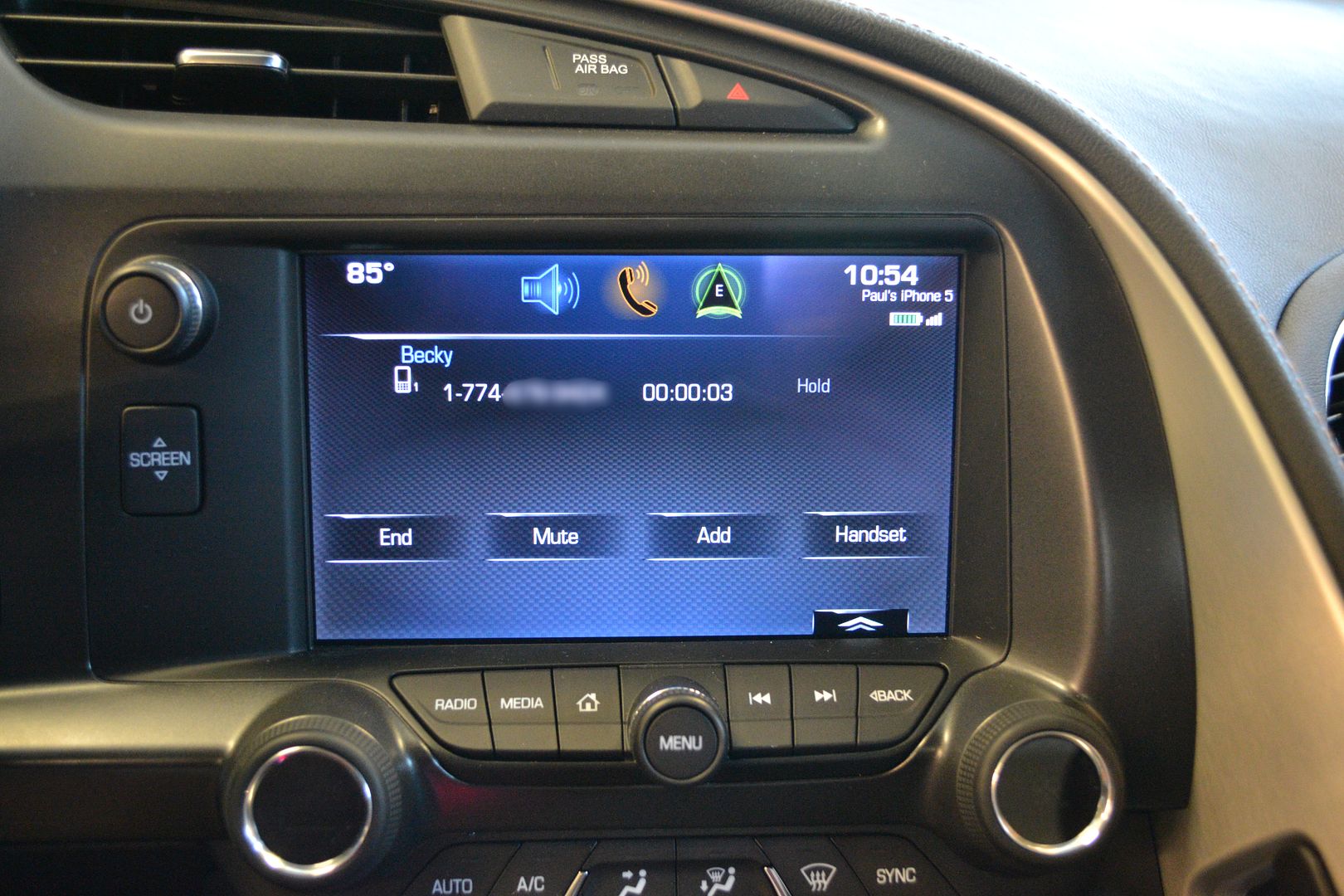
Here is another illustration but using an mp3 selection that is playing.
Here is the screen with the menu bar showing:
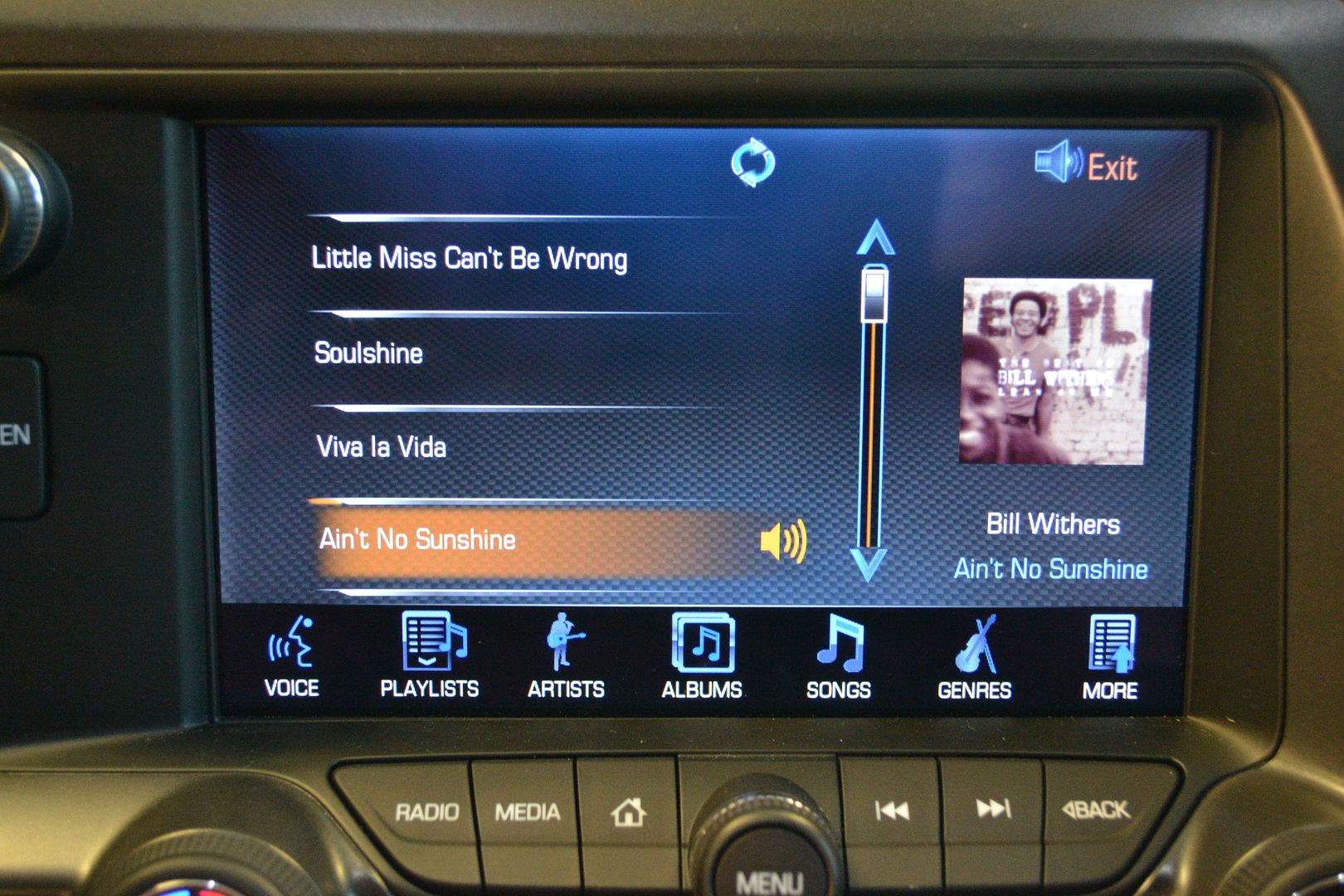
Here is the screen with the menu bar minimized and the chevron showing which will pull up the favorites bar.
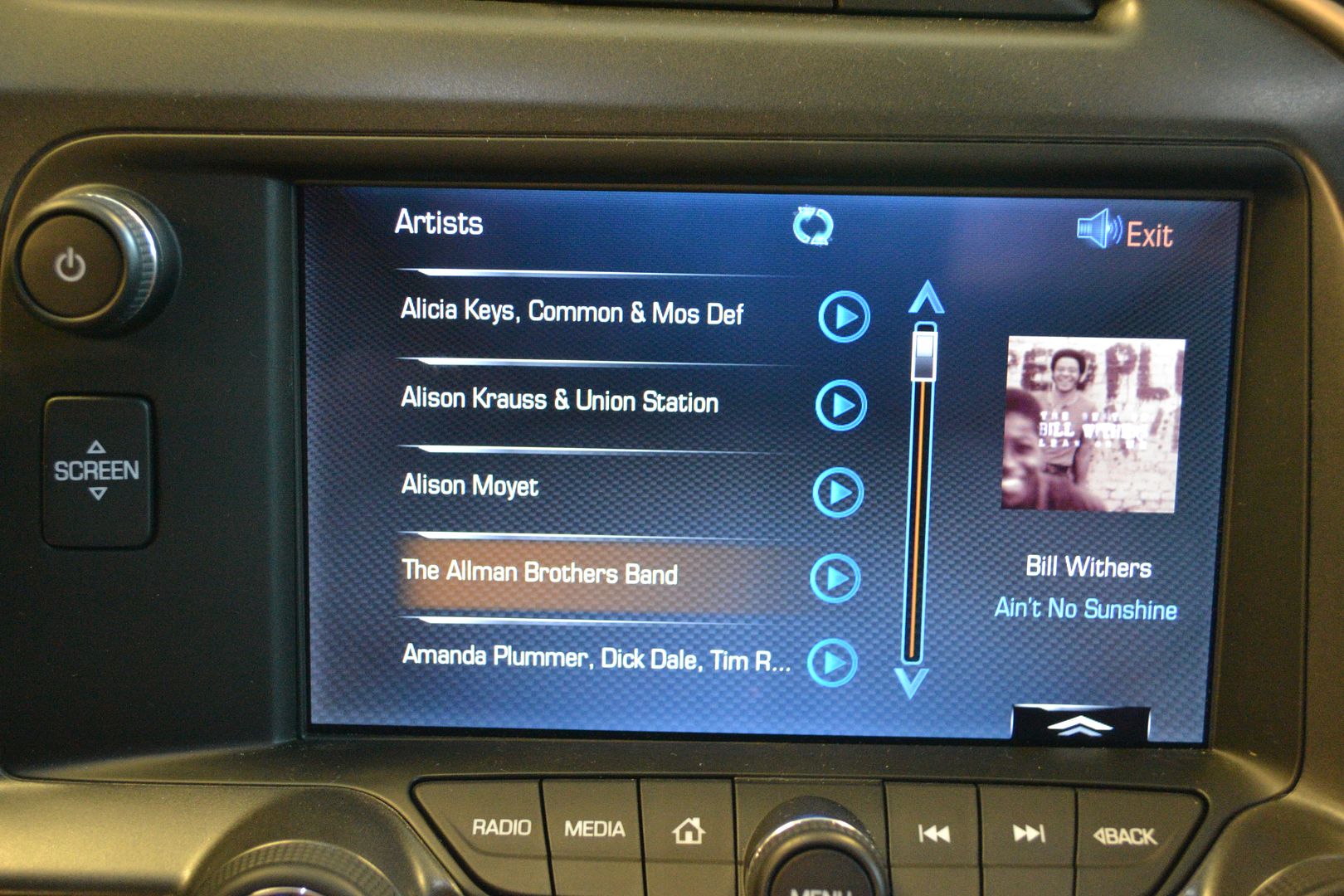
Here is the screen with the favorites bar showing
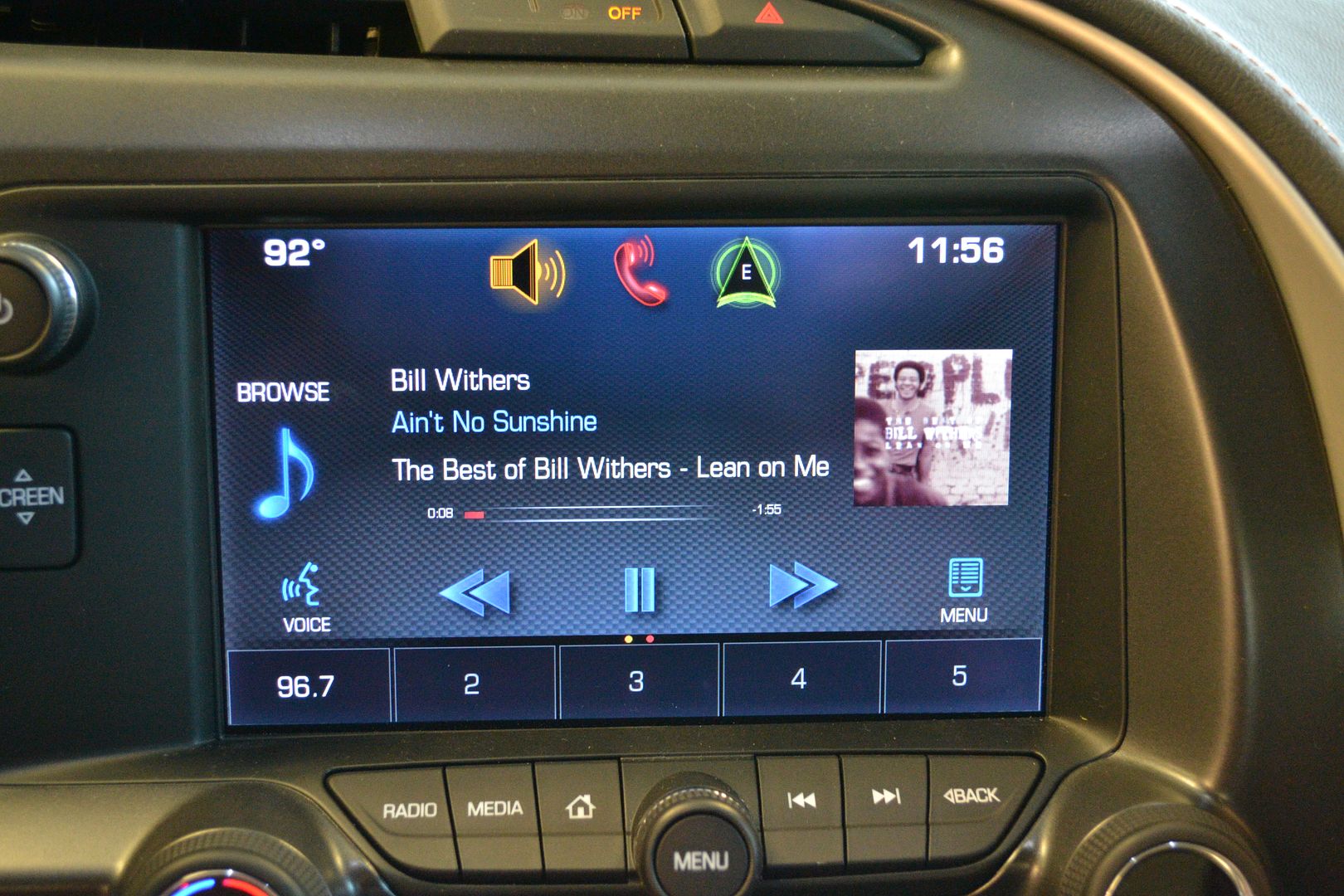
The same can be accomplished on almost any screen. With the favorites showing and your selection on the screen, press and hold a favorite location and that mixed media item (song, album, artist, playlist, contact, destination, etc.) will be added as a favorite.
Pro
Joined: Dec 2005
Posts: 610
Likes: 0
From: Ellicott City Maryland
[QUOTE=talon90;
V8 Juice,
You should be receiving calls via the system. Could it have been a signal issue?[/QUOTE]
Thanks for the comment; I also suspected the signal but outgoing calls were fine. When i stopped for gas I made calls from the car and also walked away from the car with the iPhone and asked for call back from friend and phone rang fine. Other attempts the last few days have same no ring tone for incoming. Reluctantly going to delete the phone on car and try to re-boot and see what happens. Has anyone else had this problem? Thanks again for the help Talon, the Owners Manual is totally deficient, GM should have a downloadable very comprehensive guide for all the NAV, Audio, Phone and many, many options. BTW, the NAV is far inferior to a good Garmin system and GM engineers admit it privately. In all other aspects the C7 is awesome!
V8 Juice,
You should be receiving calls via the system. Could it have been a signal issue?[/QUOTE]
Thanks for the comment; I also suspected the signal but outgoing calls were fine. When i stopped for gas I made calls from the car and also walked away from the car with the iPhone and asked for call back from friend and phone rang fine. Other attempts the last few days have same no ring tone for incoming. Reluctantly going to delete the phone on car and try to re-boot and see what happens. Has anyone else had this problem? Thanks again for the help Talon, the Owners Manual is totally deficient, GM should have a downloadable very comprehensive guide for all the NAV, Audio, Phone and many, many options. BTW, the NAV is far inferior to a good Garmin system and GM engineers admit it privately. In all other aspects the C7 is awesome!