






Cluster does not change
Thread Starter
Racer

Joined: Apr 2014
Posts: 270
Likes: 21
 Cluster does not change
I am trying to change the cluster display to the performance one with the half moon tack....track mode tack cluster display. I put the selector in track mode, Tr nothing changes . How do i switch to the performance
cluster screen ? thanks
cluster screen ? thanks

Le Mans Master


Joined: Jan 2009
Posts: 6,683
Likes: 1,247
From: NYC
2015 C7 of the Year Finalist
move to the settings menu on the left, then go back to center screen and scroll up or down till you see drive mode now move to the right and you will see a setting for "link to drive mode"

Team Owner

Joined: Aug 2002
Posts: 35,617
Likes: 167
Tech Contributor
Cruise-In 11 Veteran
NCM Ambassador
St. Jude Donor '05-'06-'07-'10
I posted a thread about this several months ago. It is in the sticky thread for Manuals and Reference Materials.
http://forums.corvetteforum.com/c7-g...cking-etc.html
I thought it best to cross post it here since people may not find the sticky post.
When the Stingray shipped it was originally intended for the IP gauge cluster to be "Linked to the Driver Mode". Turns out, this is not the case and I'm getting lots of requests to help folks understand what is going on as well as seeing some folks ready to head back to the dealership because they think there is something wrong with their car. If you haven't found it yet, and you would like your IP gauge display to change modes when you move your Driver Mode Selector ****, you will need to do the following.
Using the four way switch on your right steering wheel spoke, press the left arrow and it will bring up your configuration menu. It should look something like the left photo in this image.
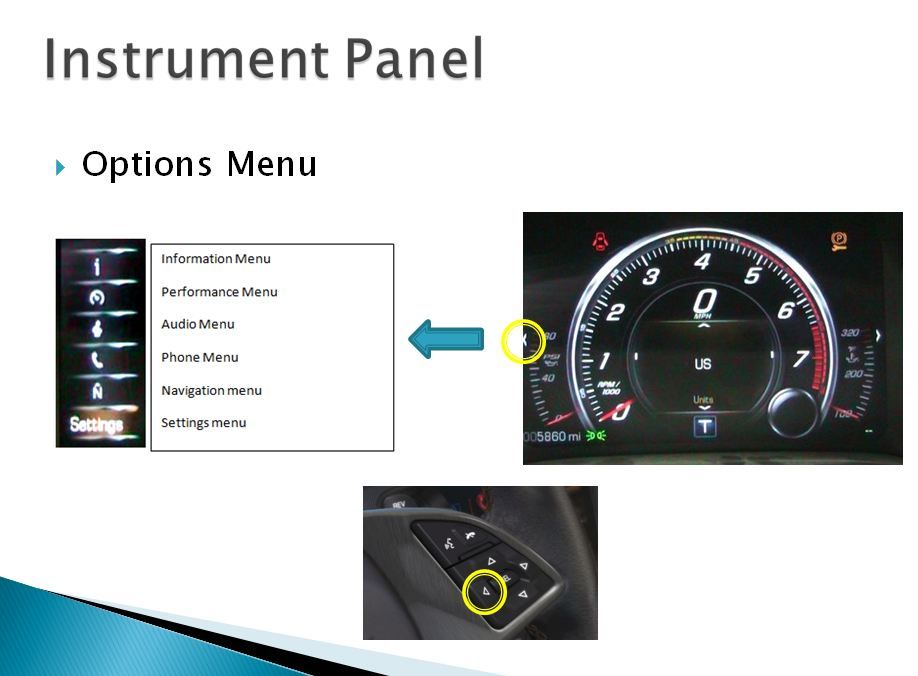
From the Sport or Tour Driver Mode (S or T displayed under the Tach).
Using the down arrow, scroll to the bottom of the list and select the "Settings" menu using the SEL button at the center of the four way switch.
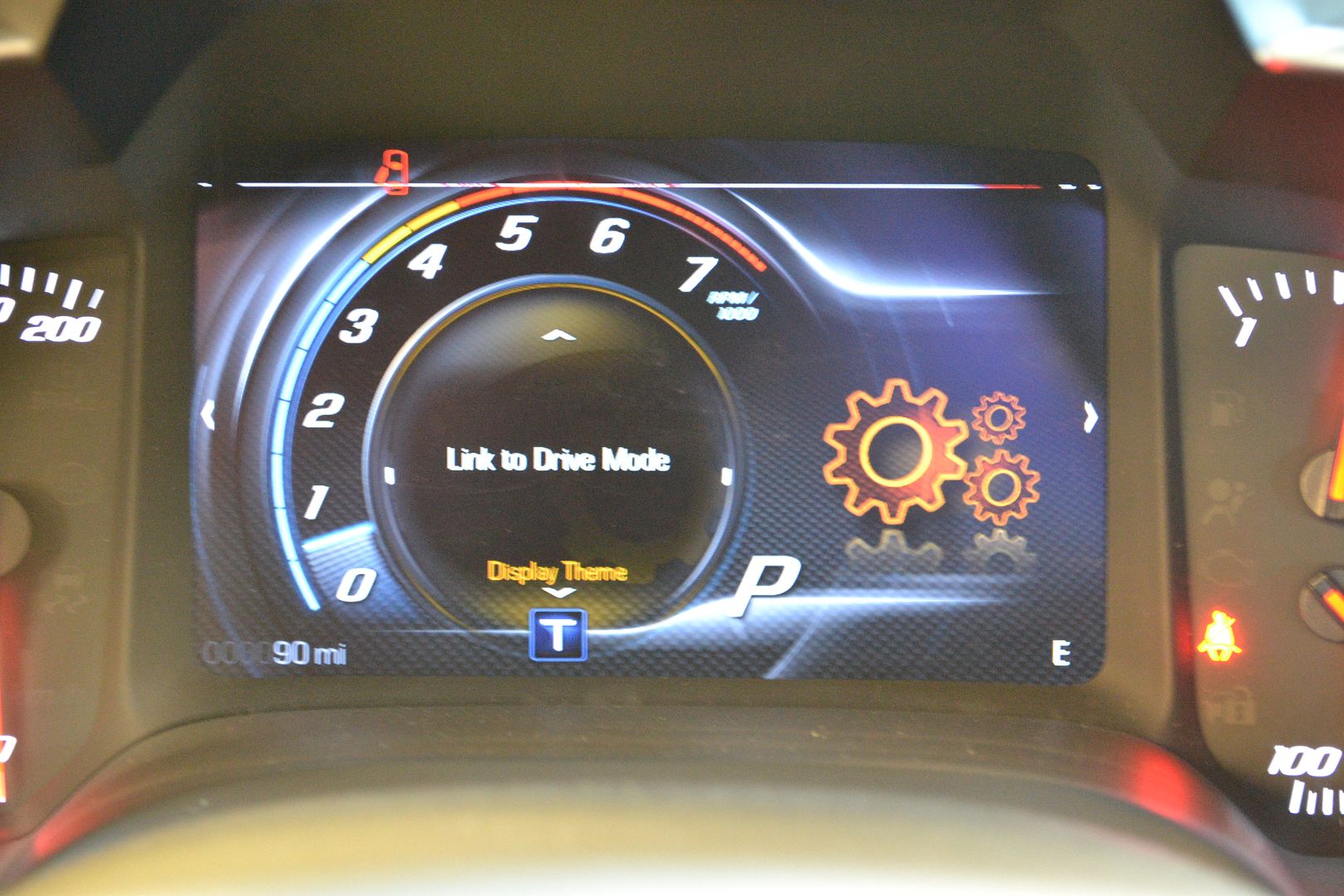
Now, using the four way switch again, press the up and down arrow until the center display shows Display theme as pictured here:
Now, using the four way switch again, press the right arrow and you should see this display as pictured here:
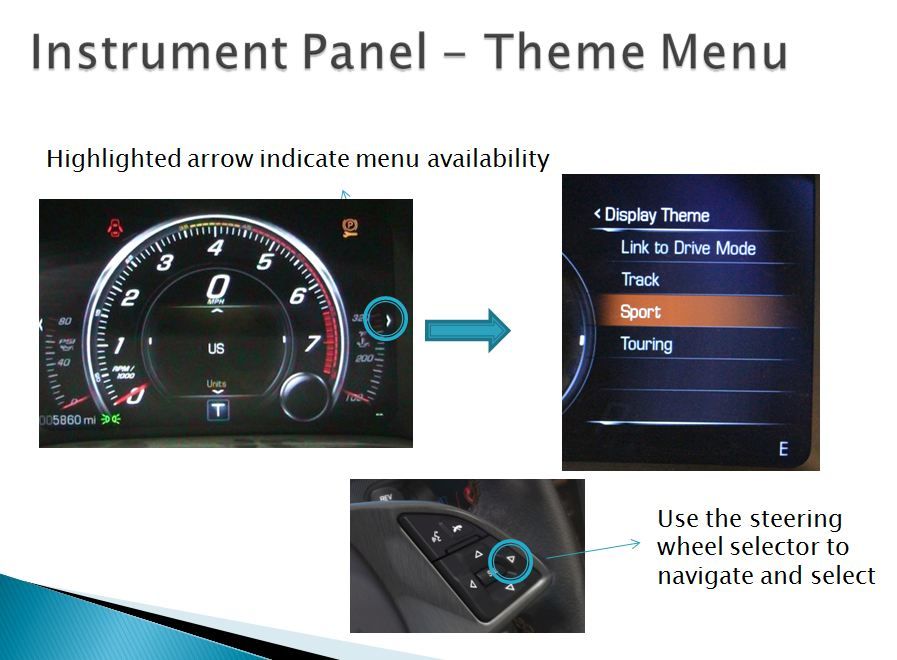
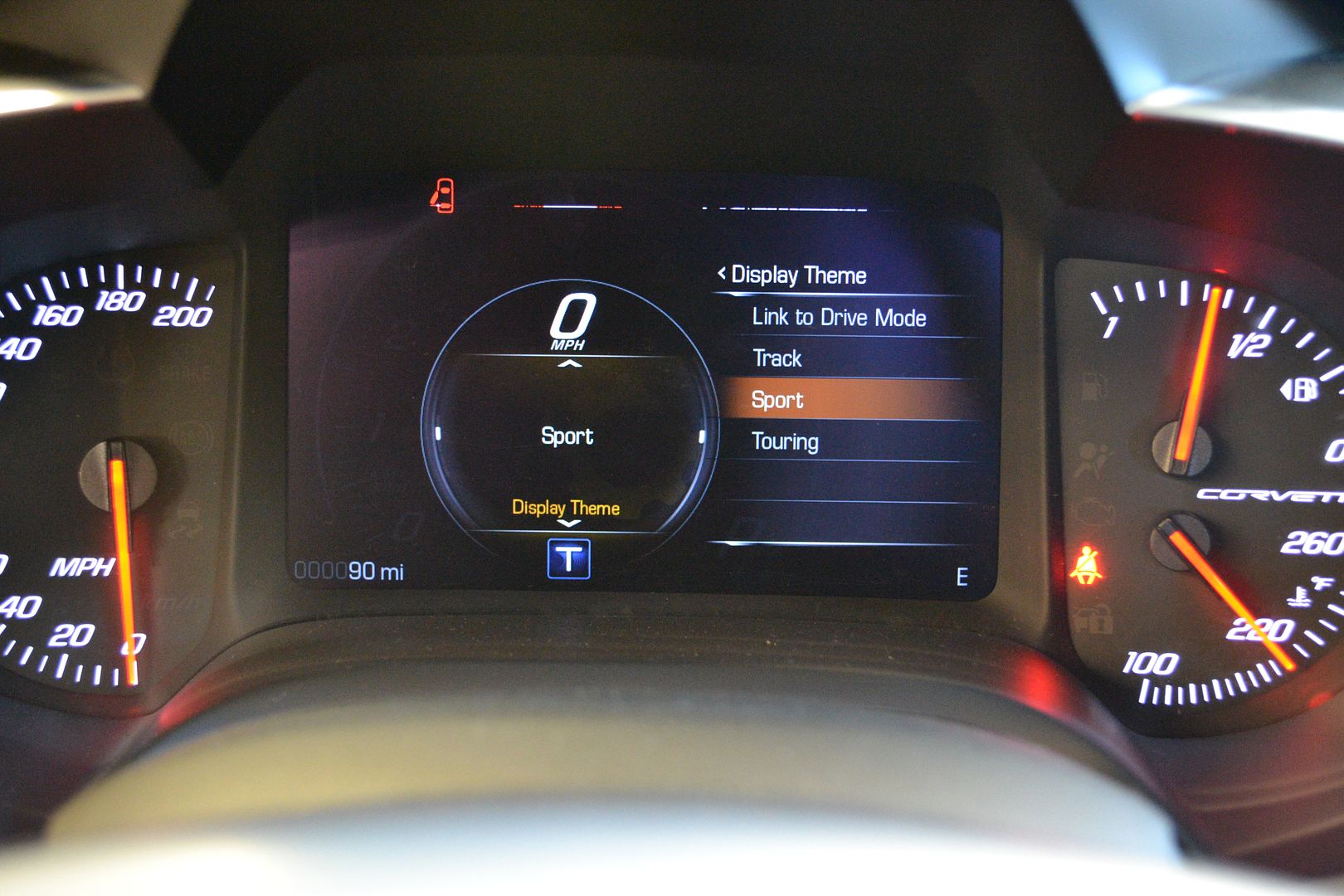
Using the four way switch, use the up arrow to highlight "Link to Driver Mode" and press the SEL button.
This will set your display on the IP to change when you move the Driver Mode Selection ****.
http://forums.corvetteforum.com/c7-g...cking-etc.html
I thought it best to cross post it here since people may not find the sticky post.
When the Stingray shipped it was originally intended for the IP gauge cluster to be "Linked to the Driver Mode". Turns out, this is not the case and I'm getting lots of requests to help folks understand what is going on as well as seeing some folks ready to head back to the dealership because they think there is something wrong with their car. If you haven't found it yet, and you would like your IP gauge display to change modes when you move your Driver Mode Selector ****, you will need to do the following.
Using the four way switch on your right steering wheel spoke, press the left arrow and it will bring up your configuration menu. It should look something like the left photo in this image.
From the Sport or Tour Driver Mode (S or T displayed under the Tach).
Using the down arrow, scroll to the bottom of the list and select the "Settings" menu using the SEL button at the center of the four way switch.
Now, using the four way switch again, press the up and down arrow until the center display shows Display theme as pictured here:
Now, using the four way switch again, press the right arrow and you should see this display as pictured here:
Using the four way switch, use the up arrow to highlight "Link to Driver Mode" and press the SEL button.
This will set your display on the IP to change when you move the Driver Mode Selection ****.
Corvette Stories
The Best of Corvette for Corvette Enthusiasts

Top 10 Most Expensive Corvettes Ever Sold on Bring A Trailer
Brett Foote
10 Things Every Corvette Owner Needs (2026 Edition)
Michael S. Palmer
8 Most "Only Corvette Owners Understand" Quirks and Problems
Pouria Savadkouei
10 Reasons the C6 Z06 is Still A Performance Benchmark After 20 Years
Joe Kucinski
How Much Horsepower Every Corvette Engine "LOST" in 1972
Joe Kucinski
Top 10 DOs and DON'Ts for Protecting Your Convertible Top!
Michael S. Palmer
Top 10 Most Explosive Corvettes Ever Made: Power-to-Weight Ratio Ranked!
Joe Kucinski
150 hp to 1,250 hp: Every Corvette Generation Compared by the Specs That Matter
Joe Kucinski
8 Coolest Corvette Pace Cars (and Replicas) of All Time
Verdad Gallardo
Melting Slicks


Joined: Jun 2009
Posts: 2,867
Likes: 66
From: . Wyoming .
Note that the car must be on in order to change vehicle settings. You can turn the car on without starting the engine by pressing and holding the start button without depressing the brake/clutch. You have to hold it for several seconds, just be patient.
Team Owner
Joined: Aug 2002
Posts: 35,617
Likes: 167
Tech Contributor
Cruise-In 11 Veteran
NCM Ambassador
St. Jude Donor '05-'06-'07-'10
Ignition on/Engine off mode. 10 seconds.