When you click on links to various merchants on this site and make a purchase, this can result in this site earning a commission. Affiliate programs and affiliations include, but are not limited to, the eBay Partner Network.
I just installed the base C7 tune and zero'ed my suspension. Had no issues, everything went forward like the video direction I watched. Took her out for a drive and I keep getting service suspension flashes on my dash. I rechecked all connections and everything looks good to go. Anyone else have his happen? I plan on calling DSC in the morning.
We would like to take this opportunity to chime in on the thread and help DSC users diagnose the “Service Suspension” light by illustrating potential causes. When the service suspension message comes on, it is typically the result of a contact pin in the connector having a poor connection. Below are items to look for as well as installation tips.
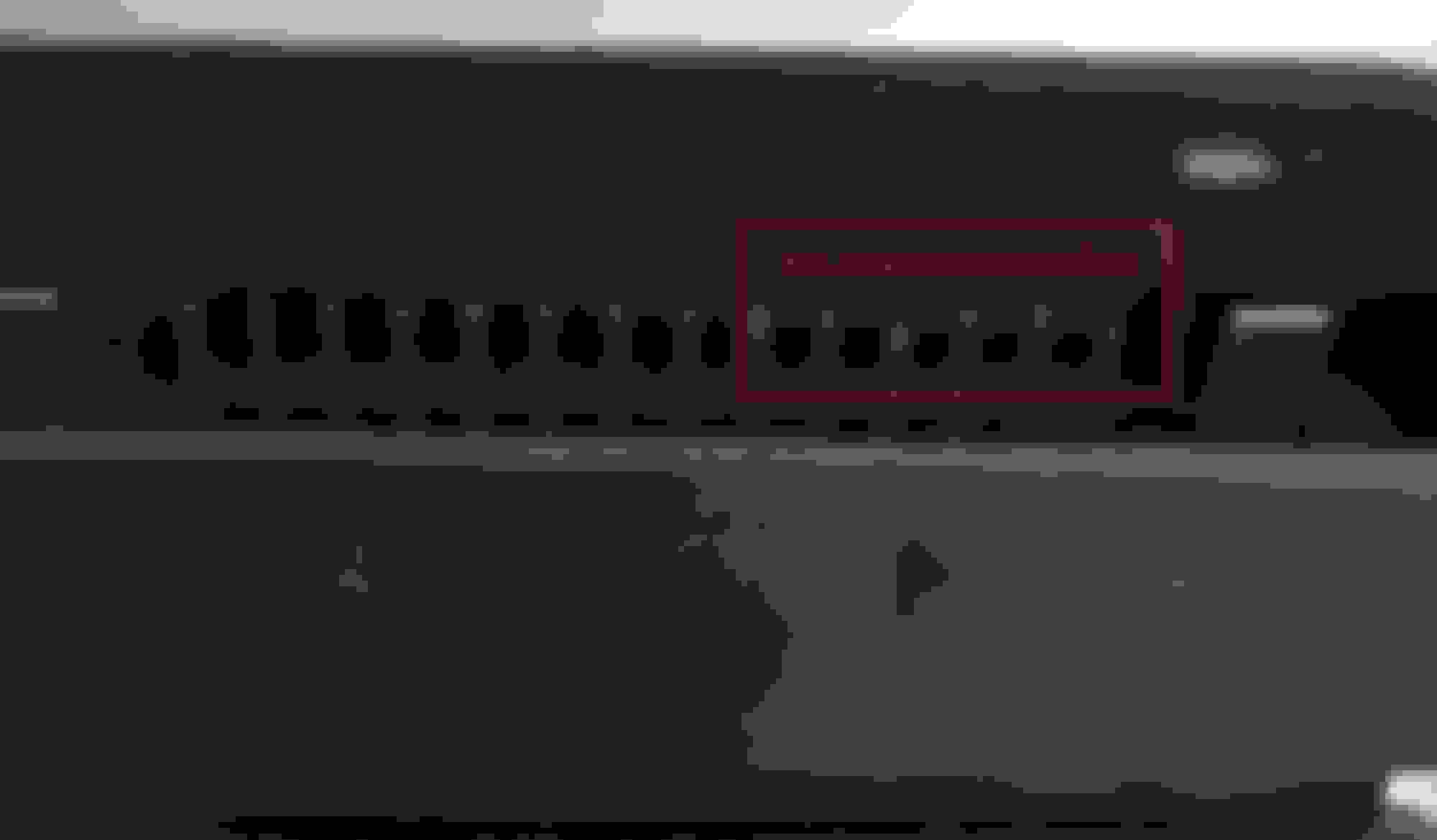
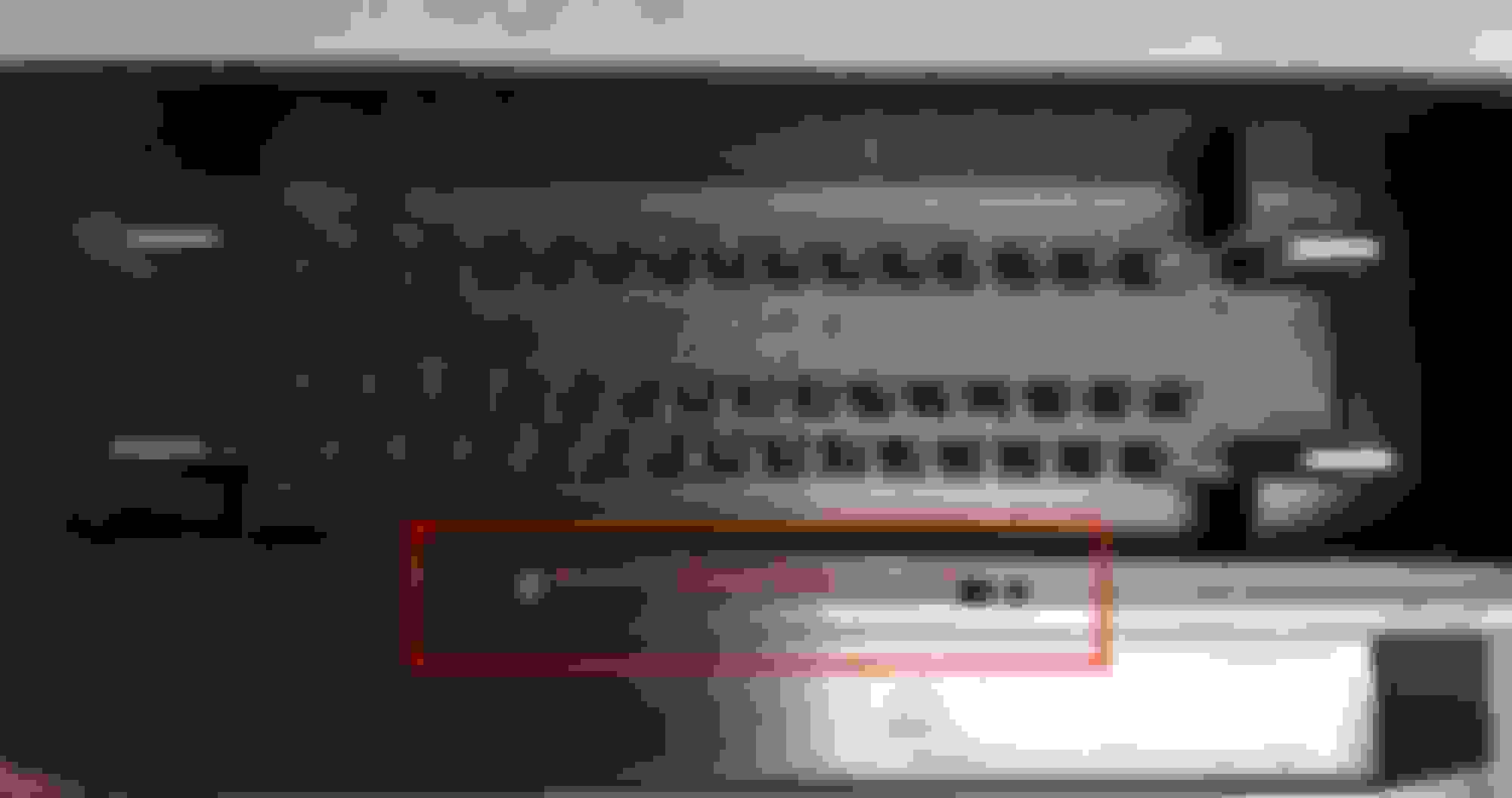
● Pin Lock- Pin Lock is the white plastic rectangular frame that locks the female contact pin in place in the factory connector assembly. The Pin Lock is also a guide for the connector and the controller. When installing the controller, make sure the Pin Lock is seated flush onto the factory connector assembly. An unseated Pin Lock will cause misalignment of the contact pins (shown in Figure 1). (MAKE SURE TO VERIFY ORIENTATION OF PINS TO WIRING HARNESS CONNECTOR. It is possible to install the Pin Lock backwards to the controller!)
● Drive Pins- Drives Pins are the four dowel pins that are molded to the controller. When installing the controller make sure that the Pin Lock of the connector assembly is perfectly aligned onto the Drive Pins (shown in figure 2 and 2.1)
● Lever on the connector- The correct way for installing the controller is by using the lever to draw up/pull the Drive Pins inward onto the connector EVENLY. You will be able to see right away if the connector is not drawing in evenly this is imperative; the connector must be parallel and flat as shown in Figure 3. DO NOT use your hand to assist the controller onto the connector while using the lever because the assist can cause misalignment.
● Completing the Install- After you are sure the pins of the controller pulled into the connector evenly and fully clicked the lever into final position, give a GENTLE push on the connector to the controller (as shown in the video below).
● Misalignment of Contact Pins- Mis-aligned pins (pins are not the right height) after the DSC controller install (as shown in Figure 3), if this is the case, you can pull the mis-aligned pins outward back into position with a small needle nose plier. If you don’t feel comfortable doing this procedure we ask you immediately contact us so we can further assist you.
As shown in Figure 1 mis-aligned contact pins. This indefinitely can issues and service suspension warnings. Figure 2/2.1 show the drive pins and how the contact pins may all be straight, but the key is to check that the orientation to the wiring harness connector is correct and the height of the pins to be within reasonable tolerance. Figure 3 explains the process of drawing in the controller using the wiring harness connector lever (it must draw up perfectly even!!!). We have first hand seen that if any of these steps are overlooked it can cause contact issues.
Figure 1
Figure 2
Figure 2.1
Figure 3
We want to provide this link to a video on our YouTube channel of the DSC Controller install on a customer’s C7 Corvette to explain the install procedure to draw the controller into the wiring harness connector. DSC Sport C7, Camaro, and Mustang Installation (Connector)
We have reviewed the entirety of the thread and wanted to assure this has only happened on a small percentage of controllers. The WD-40 will help only with contact issues and the lube reduces friction which makes the connector go on easier. The main focus is to be aware of the pins lining up correctly and the use of the wiring harness lever for proper installation.
We have stood by every controller and have worked hard with our customers on diagnosis, technical support, and exchanges of controllers because it is our due diligence.
If anyone has any further questions or concerns please feel free to email or call us during business hours at info@dscport.com (410)-799-7798, we are always glad to help!
There's always a first for everything, and I guess you get to be first in this case. In literally hundreds and hundreds of posts, on multiple sections of this forum, I've never seen this before.
Is there any chance you were powered up when removing the OEM and installing the DSC? If so, it will hopefully reset.
There's always a first for everything, and I guess you get to be first in this case. In literally hundreds and hundreds of posts, on multiple sections of this forum, I've never seen this before.
Is there any chance you were powered up when removing the OEM and installing the DSC? If so, it will hopefully reset.
No, looks like Murphy still loves me. Thanks for the feed back!
Before you do that, drive around for a bit, and see if it resets. You should also be able to tell if the DSC is working properly by the noticeably different feel in your car. Also change the modes on the console selector to see if your suspension settings are changing. They should be very noticeable.
Talked to DSC. They said common issue if all the pins are not making a good connection. So I pulled he controller. All pins were Nice and straight. I sprayed the housing in WD40 reconnected and I'm good to go. No more warning and I can feel the difference. I'm already testing out stiffer track settings!
Excellent . . . and thanks for the follow-up. I can't believe I didn't think of that last night. It is a very tight connector and a lot of connections to be made. It would be very easy to not get it fully seated.
Wow! The adjustability is amazing just in the shock table. I have already tuned the plush tune a bit stiffer up front to get the wallow out. I compared to the stock DSC tune and evened it out a bit. Instant success. What a great tool. FYI the stock C7 track tune is softer than the Plush tune update. In the stock DSC tune it maxed out the shock calibration table at 1100ma. In the updated plush tune, the track shock table maxes out at the full 1500 ma. Interestingly sport mode from plush more closely matches track mode from the stock DSC file.
Wow! The adjustability is amazing just in the shock table. I have already tuned the plush tune a bit stiffer up front to get the wallow out. I compared to the stock DSC tune and evened it out a bit. Instant success. What a great tool. FYI the stock C7 track tune is softer than the Plush tune update. In the stock DSC tune it maxed out the shock calibration table at 1100ma. In the updated plush tune, the track shock table maxes out at the full 1500 ma. Interestingly sport mode from plush more closely matches track mode from the stock DSC file.
Great observation I did not realize the plush tune touring shock Cal table is 1500 at 100% I'll look into that I may have an even nicer tuned file/firmware coming out soon if all works we have been working on a new firmware on the simulator. I'll have a firmware in my car when I get back from road America. We never stop testing and developing and please any ideas and comments keep them coming . We have always benefited most by listening to the user and customer. Thank You
I am having the exact same problem with a DSC controller i just received. I put the stock unit back in and the problem went away. Reinstalled DSC being very careful to WD40 gasket so pins will slide in with minimal friction when reconnecting to wiring harness and now am getting service suspension alarm again! DSC told me even though pins are straight they could still possibly not all engage properly and was offered to swap units if i couldn't get current unit to work. Will start the swap process tomorrow...
Great observation I did not realize the plush tune touring shock Cal table is 1500 at 100% I'll look into that I may have an even nicer tuned file/firmware coming out soon if all works we have been working on a new firmware on the simulator. I'll have a firmware in my car when I get back from road America. We never stop testing and developing and please any ideas and comments keep them coming . We have always benefited most by listening to the user and customer. Thank You
The plush tune, Track table is different from the stock tune track table. My plush touring shock table is maxed at 1000ma. I am very interested in track updates! I've already changed my tune 6 times testing it out. I love this controller!
I am having the exact same problem with a DSC controller i just received. I put the stock unit back in and the problem went away. Reinstalled DSC being very careful to WD40 gasket so pins will slide in with minimal friction when reconnecting to wiring harness and now am getting service suspension alarm again! DSC told me even though pins are straight they could still possibly not all engage properly and was offered to swap units if i couldn't get current unit to work. Will start the swap process tomorrow...
I sprayed the entire outside of the plastic housing, of the DSC controller very liberally with WD40. I made sure I got all the plastic that slides up into the plastic of the harness. I then wiped of the excess. It needs lube or it creates to much friction to let the pins fully mate up. At least in mine, that was he issue. Good luck resolving.
Talked to DSC. They said common issue if all the pins are not making a good connection. So I pulled he controller. All pins were Nice and straight. I sprayed the housing in WD40 reconnected and I'm good to go. No more warning and I can feel the difference. I'm already testing out stiffer track settings!
When I googled this issue I was happy to see this post with a fix. I drove 200 miles on my new controller and after stopping to fill up gas I got the service suspension message about 10 times until I parked. The drive back home no messages. I am going to pull the controller out and check the connections, WD40 and reinstall. I have a track day Tuesday so tomorrows car show is getting passed over so I can get this working right.
I am also having the "service suspension" warning. It goes on and off for a couple minutes then it is fine. This only happens about once a week. The DSC controler still works fine, but I don't like this flashing - even intermittently
I am also having the "service suspension" warning. It goes on and off for a couple minutes then it is fine. This only happens about once a week. The DSC controler still works fine, but I don't like this flashing - even intermittently
I am getting the same issue. I haven't called DSC yet, but I will pull the controller and recheck the pins and reinstall before I make contact with DSC about this issue.
It has to be a connection harness issue. The connector housings fit tightly together to keep it water-tight. If not completely seated it's not surprising one or more pins may not be making firm contact. Removing, and reseating will fix it.
Further update:
When I originally installed the controller, I applied WD40 to each pin with a Qtip as suggested by another poster. The install was effortless when closing the locking leaver. The controller worked perfectly. I have done firmware and pdts file updates since. Only since I updated the controller have I had the issue (not sure if it is related). I have disconnected the controller and reinstalled (again it went well and all pins look perfect) and am still getting the message (service suspension) occasionally. I think it maybe when I turn off the ignition that it resets, but I am not sure. I'll be sure to check that if it happens again. I have not contacted DSC, yet.
Guys, doesn't wd40 leave a small oil residue? I am a little nervous about using it as a contact cleaner. I can see using it for the plastic slide, but for the pins themselves, it seems like a contact cleaner would do better. What about using dielectric grease on the pins instead?
I'm thinking over time wd40 could potentially dry into a non-conductive coating if it collects any grime on the left over thin oil, which is what a couple guys are seeing.
Last edited by spinkick; Sep 16, 2017 at 11:48 AM.
Designer Imagines A Corvette That Looks More Like a Corvette Than the Corvette
Slideshow: A Jaguar designer's personal project imagines what a modern front-engined Corvette might look like if Chevrolet revisited the golden age of the Stingray.









 DSC Causing Service Suspension flash