When you click on links to various merchants on this site and make a purchase, this can result in this site earning a commission. Affiliate programs and affiliations include, but are not limited to, the eBay Partner Network.
Well I just got my first message alerting me to an update required. I hit "remind me later" and I plan to do it tomorrow. It said the car has to sit for 15 minutes and turned off. Has anyone had any issues doing it inside their garage? Should I roll it out into the driveway for a clear signal?
just did the update. Outside the garage for sure. The update will provide more info once started. No need to connect to WiFi or have OnStar. Took about 5 min, no issues.
I kicked off the software update yesterday - while the car was in my garage. I left the door up, but i don’t think it would have mattered.
It was a 59 minute update, and I wondered if it had anything to do with my Check engine light coming on yesterday….
My car was built 8-26-21 as a 2021, and has about 2020 miles on it now.
Dealer says the Check engine lights come on sometimes when the car has set for a while. The battery gets a little low and some logic is shutdown in the car, setting the Check engine light. I’ll find out Thursday when I take it to my dealer.
Attempted to do the update....inside and outside the garage....got this message...."Conditions are not ideal at this time. Please try again the next time the car is placed in Park".....I tried multiple times and got the same message? Anyone have a solution?
I got mine out of the garage Sunday for the first time in months. My wife and I took a one hour drive to lunch and then back home. When we pulled in the drive an update popped up on the screen. I ran it and it went just fine and was successful. It did change my driver mode, wiped out my tire info (no pressures or temp), and changed the performance section from g load to 0-60. I drove it a short distance after and everything populated again and is 100% normal.
No update shows available on my 2LT with no options. The updates should apply to mine, so I'm curious why no update is showing. Do they do a rolled out updates over time?
I got mine out of the garage Sunday for the first time in months. My wife and I took a one hour drive to lunch and then back home. When we pulled in the drive an update popped up on the screen. I ran it and it went just fine and was successful. It did change my driver mode, wiped out my tire info (no pressures or temp), and changed the performance section from g load to 0-60. I drove it a short distance after and everything populated again and is 100% normal.
The update message pops up on mine at all the wrong times....when I'm leaving the store or the golf course but never in or outside my garage when I have the opportunity to run it. Now that I'm trying to download the update inside and outside my garage, connected to my WIFI, it refuses to issue the message and says conditions are not ideal....WTF????
Attempted to do the update....inside and outside the garage....got this message...."Conditions are not ideal at this time. Please try again the next time the car is placed in Park".....I tried multiple times and got the same message? Anyone have a solution?
Same issue today. I shut off the car and the radio continued playing - which is a general sign that an update is pending. When to the update page an saw the same error message.
Same issue today. I shut off the car and the radio continued playing - which is a general sign that an update is pending. When to the update page an saw the same error message.
That's exactly what happened top me. The radio kept playing, even after I opened the door to exit. I've since started and stopped the car about 6-8 times and no reminder or messages....duh
Attempted to do the update....inside and outside the garage....got this message...."Conditions are not ideal at this time. Please try again the next time the car is placed in Park".....I tried multiple times and got the same message? Anyone have a solution?
I keep getting asked to do the update. When I pull into the garage it goes away. I will need to update in the driveway. If anyone wants any info I will hit details and write it down. Then I will post.
I keep getting asked to do the update. When I pull into the garage it goes away. I will need to update in the driveway. If anyone wants any info I will hit details and write it down. Then I will post.
It really shouldn't matter if you're connected to wifi....I'm going to wait until I get the message again and where I am I'll try to download it and install it....
Well, my 2020 just completed its first OTA update.
Initially, I wasn't getting a message to update but my radio stayed on when I turned off the car. When I checked for updates there was a message that the conditions weren't right for an update. This continued for several days.
Yesterday, I got a message that an update was available, I selected to install it and followed the instructions. I came back about half an hour later and took my car for a drive. I had a message that the update was successful but when I turned off my car my radio stayed on. When I restarted the car I got the message that an update was available so I installed it. I got a message the update was successful and now my radio turns off when I shut off the car. But there is only one update listed in the update history for yesterday.
The update message pops up on mine at all the wrong times....when I'm leaving the store or the golf course but never in or outside my garage when I have the opportunity to run it. Now that I'm trying to download the update inside and outside my garage, connected to my WIFI, it refuses to issue the message and says conditions are not ideal....WTF????
"Conditions are not ideal" ... conditions are checked when applying an update, but not when downloading it:
Unable to Complete
There are a number of criteria that must be met in order to successfully complete the software update installation on a vehicle. The most common cause of being unable to complete an installation is the State of Charge (SOC) of the 12V battery. If the 12V battery does not meet the minimum SOC requirement of 70 percent or greater along with an Outside Ambient Temperature (OAT) greater than 14°F (-10°C), the OTA update installation will not occur. The colder the ambient air temperature is, the higher the target SOC becomes. To determine the battery SOC for VIP vehicles, go to BCM/12V Battery/Battery Sensor Module – State of Charge in GDS 2.
There may be other conditions that will affect an OTA update installation. If any of these conditions are present, a “Vehicle Conditions Not Ideal” message may display on the infotainment screen stating that conditions are not ideal to proceed with the update installation. These conditions do not indicate a failure; only that the vehicle does not meet all the criteria necessary to complete the OTA update installation. (Fig. 4)
Some customers may comment that the radio appears to stay on or is backlit after exiting the vehicle. If this occurs, it’s a telltale sign that an OTA update is in progress.
Fig. 4
OTA Software Download
In order for an OTA update to be pushed to a vehicle, the vehicle must be parked for the entire download process. There is not a notification to the driver that the software update is being downloaded to the vehicle. Battery SOC and OAT values are not checked before a download. These checks are only performed once the software update is downloaded and ready to be installed.
The OTA software download can occur in increments. So if the vehicle is driven during the download process, the download will be paused until the vehicle is parked and download conditions are met again.
Well, my 2020 just completed its first OTA update.
Initially, I wasn't getting a message to update but my radio stayed on when I turned off the car. When I checked for updates there was a message that the conditions weren't right for an update. This continued for several days.
Yesterday, I got a message that an update was available, I selected to install it and followed the instructions. I came back about half an hour later and took my car for a drive. I had a message that the update was successful but when I turned off my car my radio stayed on. When I restarted the car I got the message that an update was available so I installed it. I got a message the update was successful and now my radio turns off when I shut off the car. But there is only one update listed in the update history for yesterday.
Say Whaaaaat?
I have a 2020 also, but I have had at least 8 updates in total. The updates are not the same for all C8s depending on model and features installed, but only 1. There was the FOB disaster amongst others at a minimum. I don't remember all the details. I'd have your C8 check the next time you are at your dealership. You can check the following information on your info screen on updates.
Is there a logic behind software updates, who gets them and who don't? What is the latest SW update? I haven't seen a thread about this.
I think there is a logic. If the software updates an option that your car does not have, then no need for your car to be updated. This would account for "missing" updates.
Say Whaaaaat?
I have a 2020 also, but I have had at least 8 updates in total. The updates are not the same for all C8s depending on model and features installed, but only 1. There was the FOB disaster amongst others at a minimum. I don't remember all the details. I'd have your C8 check the next time you are at your dealership. You can check the following information on your info screen on updates.
Here is a summary of mine.
I had my dealer check my system when I was in for my first service before I had any OTA updates. They installed several updates and told me one should address a problem with OTA updates if there was a problem. After that I received the one OTA update that was supposed to warn you if you left your phone in the charger. I have never received a warning that I have left my phone in the charger even after the update. And I have never received any subsequent OTA updates.
I had my dealer check my system when I was in for my first service before I had any OTA updates. They installed several updates and told me one should address a problem with OTA updates if there was a problem. After that I received the one OTA update that was supposed to warn you if you left your phone in the charger. I have never received a warning that I have left my phone in the charger even after the update. And I have never received any subsequent OTA updates.
Dealership did some ???? updates when I was in last year re my Lift .... I do not recall them showing up on the update list. My complete guess is that the update list shows only user updates. If someone here knows the real info, I'd like to know for sure.
Dealership did some ???? updates when I was in last year re my Lift .... I do not recall them showing up on the update list. My complete guess is that the update list shows only user updates. If someone here knows the real info, I'd like to know for sure.
My understanding is the update list only shows OTA updates. Updates made by the dealers using the tool connected to the car don't show in the update list.
The question is if an OTA update is performed by the dealership using his connection (network), it will be the same updates) applied, but not over the air so ... it'll be in the C8s stored configuration, just not displayed on the owner's screen. Same idiots that designed/programmed the Frunk/FOB. Children doing the programming nowadays.
re: logic Doesn't seem to be, except that I believe GM rolls them out gradually, so they don't have 20,000 cars all hitting the update server at the same time.
See post 5 for what the latest update includes.
I just got CarPlay and Battery sate updates for my 2022. All Done at the dealer. Dealer is working out a dash flickering issue on 8th gear indicator.




























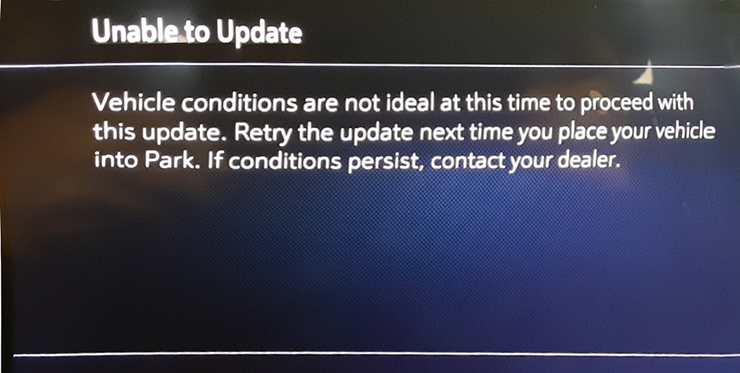 Fig. 4