









How To Signup for Photobucket - Tutorial Inside

Thread Starter
Safety Car


Joined: Nov 2005
Posts: 4,590
Likes: 48
From: W MI
 How To Signup for Photobucket - Tutorial Inside
Many people here have trouble with pictures hosting, so here is a tutorial I assembled today while I was bored at work. Any constructive comments are welcome to improve this guide.
Step One
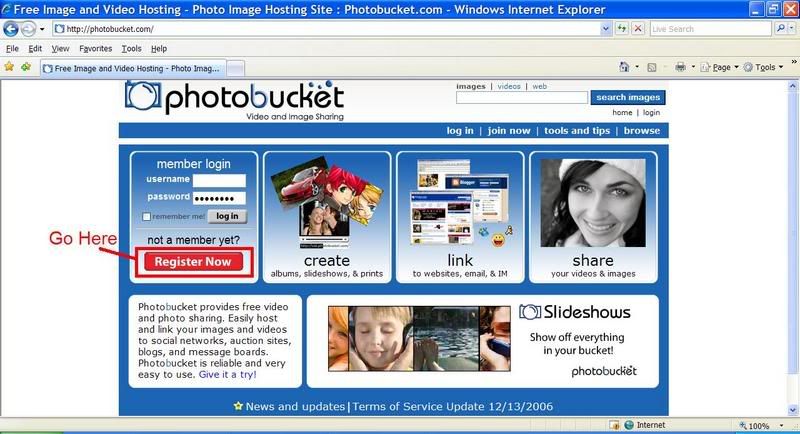
Go to photobucket.com & underneath “not a member yet?", on the red button where it says "Register Now":
Step Two
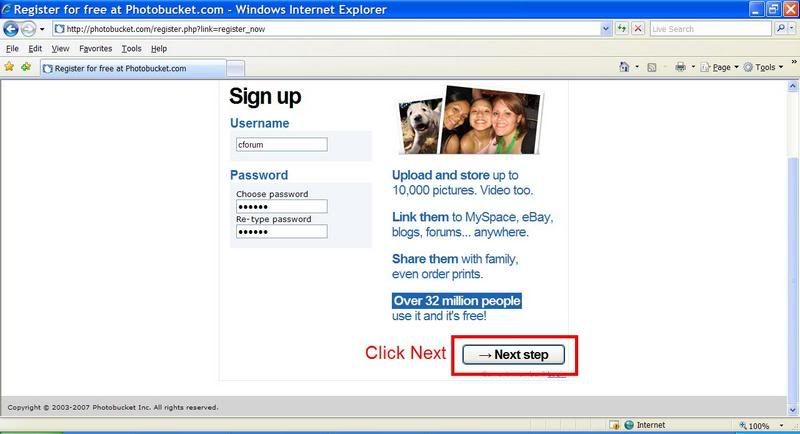
Fill out your information, and follow the instructions in the picture. Filling in a username that you would like to use to log in to photobucket, and checking it's availability.
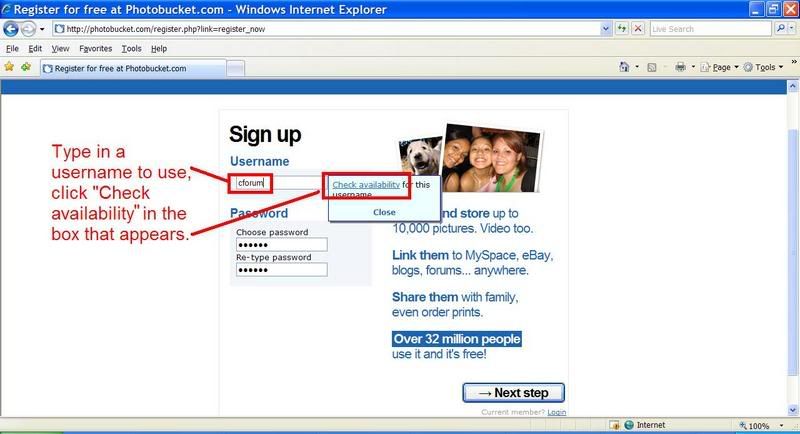
Something similar to the picture below will appear if your choice has already been taken.
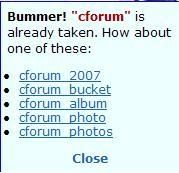
If your username choice is available, this will appear. Click "Close"

Click "Next Step" at the bottom of the page.
Step Three
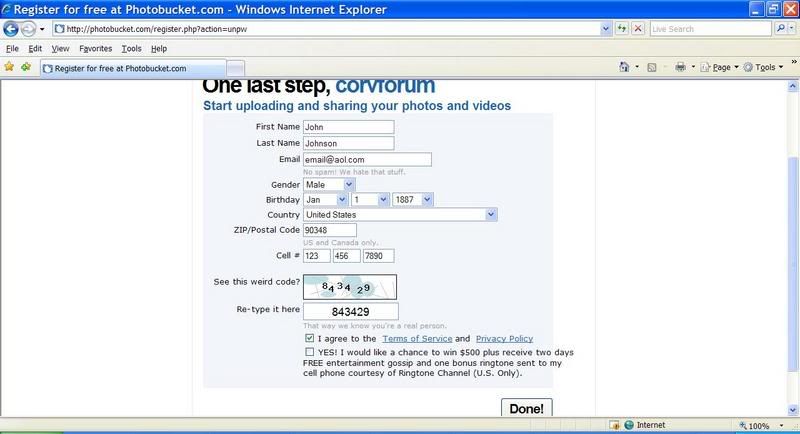
Fill out your information, and type in the authorization code that is pictured on your monitor, don’t copy mine. Make sure to click "I agree to the Terms..." and unclick the "Yes! I would like to...". Then click “Done”.
Step Four
After you click done, a page similar to this one should appear:
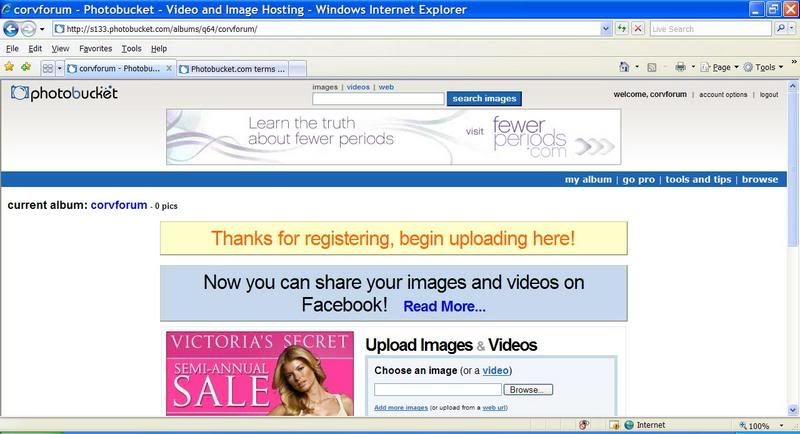
Signup finished!
Last Updated: January 05, 2007
Good Luck,
80sRule
Step One
Go to photobucket.com & underneath “not a member yet?", on the red button where it says "Register Now":
Step Two
Fill out your information, and follow the instructions in the picture. Filling in a username that you would like to use to log in to photobucket, and checking it's availability.
Something similar to the picture below will appear if your choice has already been taken.
If your username choice is available, this will appear. Click "Close"
Click "Next Step" at the bottom of the page.
Step Three
Fill out your information, and type in the authorization code that is pictured on your monitor, don’t copy mine. Make sure to click "I agree to the Terms..." and unclick the "Yes! I would like to...". Then click “Done”.
Step Four
After you click done, a page similar to this one should appear:
Signup finished!
Last Updated: January 05, 2007
Good Luck,
80sRule
Last edited by 80sRule; Jan 5, 2007 at 02:55 PM.
Corvette Stories
The Best of Corvette for Corvette Enthusiasts

Top 10 Most Expensive Corvettes Ever Sold on Bring A Trailer
Brett Foote
10 Things Every Corvette Owner Needs (2026 Edition)
Michael S. Palmer
8 Most "Only Corvette Owners Understand" Quirks and Problems
Pouria Savadkouei
10 Reasons the C6 Z06 is Still A Performance Benchmark After 20 Years
Joe Kucinski
How Much Horsepower Every Corvette Engine "LOST" in 1972
Joe Kucinski
Top 10 DOs and DON'Ts for Protecting Your Convertible Top!
Michael S. Palmer
Top 10 Most Explosive Corvettes Ever Made: Power-to-Weight Ratio Ranked!
Joe Kucinski
150 hp to 1,250 hp: Every Corvette Generation Compared by the Specs That Matter
Joe Kucinski
8 Coolest Corvette Pace Cars (and Replicas) of All Time
Verdad Gallardo





Burning Brakes


Joined: Feb 2005
Posts: 787
Likes: 5
From: Kansas
St. Jude Donor '07




 [/IMG]
Thread Starter
Safety Car
Joined: Nov 2005
Posts: 4,590
Likes: 48
From: W MI
It's been a while since I peeped in on this thread, but I created a PDF with all of this in it so it will print nicely.
Here's a direct link to download the PDF, you need Adobe Reader, equivalent pdf viewer or a Mac:
LINK
Here's a direct link to download the PDF, you need Adobe Reader, equivalent pdf viewer or a Mac:
LINK
Racer


Joined: Jan 2005
Posts: 364
Likes: 0
From: Winder GA.
Thanx
Thanks for the LINK. That one worked so ignore my PM which I posted before I saw this post. I will give these instructions a try at some point. I am admittedly a techno idiot, so success is far from assured.
