



 [/ATTACH]
Problem Solution!

Thread Starter
Le Mans Master


Joined: Jul 2000
Posts: 6,001
Likes: 113
From: Saginaw Michigan
 Problem Solution!
This was a recent PM to me. Matt did an excellent job of describing what he had done and what he did not adjust, change, etc. This may be a more common problem than we are familiar with. But the fact that he described things that he didn't change helped me to guess the actual problem and the fix.
--------------------
Originally Posted by Crafty12
Hi Jim,
I was reading a thread about a sticky ignition cylinder, and you provided a very detailed procedure for getting the ignition switch set. I am having a similar problem, but not exact, and I was wondering if you might be able to help me trouble shoot. I removed my steering column so that I could get the dash pad in and out. I did not do anything to the column while it was out. When I put it back in I am getting the sticky cylinder that will not spring back out of the run position. Here is where my problem veers off course.
Everything worked as expected until I noticed I forgot to hook the cable back up under the master cylinder. Once I hooked it back up I started having the problem. I also noticed that in any shifter position (its an automatic) other than park I do not experience the problem. If I start in gear, or neutral the cylinder springs back. I did not remove, or make any changes to the ignition switch while the column was out.
Could my switch have gotten out of sync if i didn't remove it or the rod? The column is back in the car. Is there a way to sync it now, or do I have to remove it again?
Thanks for any assistance you can provide.
Crafty,
I suspect that the lever on the lower end of the steering column is not all the way in the UP position. Remove the cable from the lever and see if you can move the lever further UP and see if the stickiness is eliminated. There is really not much adjustment available for the cable. The big plate (M) on the engine side of the dash panel has one permanent bolt and one removeable carriage bolt (N). When you loosen both nuts (R) from inside the car, you will be able to go back under the hood and pivot the big plate around the permanent bolt. This should provide some adjustment to the backdrive cable.
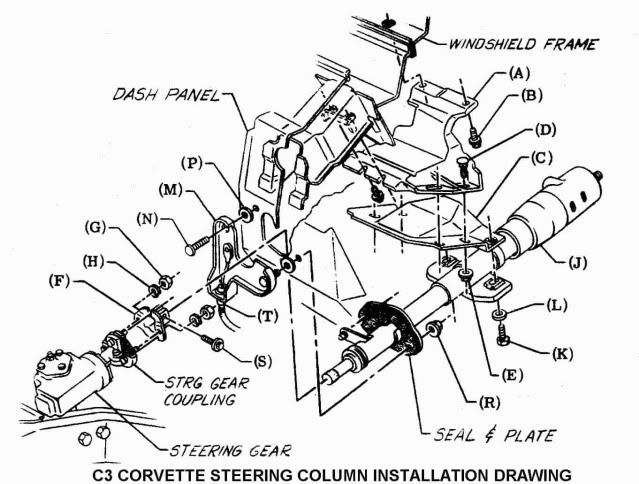
See if that works,
Jim
I knew you were the guy to talk to. That did it!!
Thanks a ton!
Matt
--------------------
Originally Posted by Crafty12
Hi Jim,
I was reading a thread about a sticky ignition cylinder, and you provided a very detailed procedure for getting the ignition switch set. I am having a similar problem, but not exact, and I was wondering if you might be able to help me trouble shoot. I removed my steering column so that I could get the dash pad in and out. I did not do anything to the column while it was out. When I put it back in I am getting the sticky cylinder that will not spring back out of the run position. Here is where my problem veers off course.
Everything worked as expected until I noticed I forgot to hook the cable back up under the master cylinder. Once I hooked it back up I started having the problem. I also noticed that in any shifter position (its an automatic) other than park I do not experience the problem. If I start in gear, or neutral the cylinder springs back. I did not remove, or make any changes to the ignition switch while the column was out.
Could my switch have gotten out of sync if i didn't remove it or the rod? The column is back in the car. Is there a way to sync it now, or do I have to remove it again?
Thanks for any assistance you can provide.
Crafty,
I suspect that the lever on the lower end of the steering column is not all the way in the UP position. Remove the cable from the lever and see if you can move the lever further UP and see if the stickiness is eliminated. There is really not much adjustment available for the cable. The big plate (M) on the engine side of the dash panel has one permanent bolt and one removeable carriage bolt (N). When you loosen both nuts (R) from inside the car, you will be able to go back under the hood and pivot the big plate around the permanent bolt. This should provide some adjustment to the backdrive cable.
See if that works,
Jim
I knew you were the guy to talk to. That did it!!
Thanks a ton!
Matt

Advanced


Joined: Sep 2009
Posts: 87
Likes: 0
From: Melbourne VIC
Ignition Cylinder spinning
Hi Jim
I hope you are still out there.
I jumped into my 74 vette the other day, turned the key and or spun all,the way around to the full clockwise lock without engaging any positions.
I then spun it fully counterclockwise to the remove position, again without engaging any positions.
With a bit of pushing in and counterclockwise twisting I can just get the key out of the cylinder. And I can get it back in the cylinder easily.
Reading related threads from you and your info on corvettefaq I have managed to mostly disassemble the steering column (something I was going to at a later date, but now is OK) and removed the cylinder.
The cable you refer to here moves and appears straight at the firewall end, not bent as in some of the pictures shown.
Before I keep dissecting the steering column, and having read your advice to Matt below I though I should check if there is something more obvious I should be checking, doing, or stop doing.
Cheers
Greg
I hope you are still out there.
I jumped into my 74 vette the other day, turned the key and or spun all,the way around to the full clockwise lock without engaging any positions.
I then spun it fully counterclockwise to the remove position, again without engaging any positions.
With a bit of pushing in and counterclockwise twisting I can just get the key out of the cylinder. And I can get it back in the cylinder easily.
Reading related threads from you and your info on corvettefaq I have managed to mostly disassemble the steering column (something I was going to at a later date, but now is OK) and removed the cylinder.
The cable you refer to here moves and appears straight at the firewall end, not bent as in some of the pictures shown.
Before I keep dissecting the steering column, and having read your advice to Matt below I though I should check if there is something more obvious I should be checking, doing, or stop doing.
Cheers
Greg
This was a recent PM to me. Matt did an excellent job of describing what he had done and what he did not adjust, change, etc. This may be a more common problem than we are familiar with. But the fact that he described things that he didn't change helped me to guess the actual problem and the fix.
--------------------
Originally Posted by Crafty12
Hi Jim,
I was reading a thread about a sticky ignition cylinder, and you provided a very detailed procedure for getting the ignition switch set. I am having a similar problem, but not exact, and I was wondering if you might be able to help me trouble shoot. I removed my steering column so that I could get the dash pad in and out. I did not do anything to the column while it was out. When I put it back in I am getting the sticky cylinder that will not spring back out of the run position. Here is where my problem veers off course.
Everything worked as expected until I noticed I forgot to hook the cable back up under the master cylinder. Once I hooked it back up I started having the problem. I also noticed that in any shifter position (its an automatic) other than park I do not experience the problem. If I start in gear, or neutral the cylinder springs back. I did not remove, or make any changes to the ignition switch while the column was out.
Could my switch have gotten out of sync if i didn't remove it or the rod? The column is back in the car. Is there a way to sync it now, or do I have to remove it again?
Thanks for any assistance you can provide.
Crafty,
I suspect that the lever on the lower end of the steering column is not all the way in the UP position. Remove the cable from the lever and see if you can move the lever further UP and see if the stickiness is eliminated. There is really not much adjustment available for the cable. The big plate (M) on the engine side of the dash panel has one permanent bolt and one removeable carriage bolt (N). When you loosen both nuts (R) from inside the car, you will be able to go back under the hood and pivot the big plate around the permanent bolt. This should provide some adjustment to the backdrive cable.
See if that works,
Jim
I knew you were the guy to talk to. That did it!!
Thanks a ton!
Matt
--------------------
Originally Posted by Crafty12
Hi Jim,
I was reading a thread about a sticky ignition cylinder, and you provided a very detailed procedure for getting the ignition switch set. I am having a similar problem, but not exact, and I was wondering if you might be able to help me trouble shoot. I removed my steering column so that I could get the dash pad in and out. I did not do anything to the column while it was out. When I put it back in I am getting the sticky cylinder that will not spring back out of the run position. Here is where my problem veers off course.
Everything worked as expected until I noticed I forgot to hook the cable back up under the master cylinder. Once I hooked it back up I started having the problem. I also noticed that in any shifter position (its an automatic) other than park I do not experience the problem. If I start in gear, or neutral the cylinder springs back. I did not remove, or make any changes to the ignition switch while the column was out.
Could my switch have gotten out of sync if i didn't remove it or the rod? The column is back in the car. Is there a way to sync it now, or do I have to remove it again?
Thanks for any assistance you can provide.
Crafty,
I suspect that the lever on the lower end of the steering column is not all the way in the UP position. Remove the cable from the lever and see if you can move the lever further UP and see if the stickiness is eliminated. There is really not much adjustment available for the cable. The big plate (M) on the engine side of the dash panel has one permanent bolt and one removeable carriage bolt (N). When you loosen both nuts (R) from inside the car, you will be able to go back under the hood and pivot the big plate around the permanent bolt. This should provide some adjustment to the backdrive cable.
See if that works,
Jim
I knew you were the guy to talk to. That did it!!
Thanks a ton!
Matt
Thread Starter
Le Mans Master
Joined: Jul 2000
Posts: 6,001
Likes: 113
From: Saginaw Michigan
First of all, you didn't mention if you had a standard (non-adjustable) steering column or a T&T.
The T&T column has a reputation for a broken die cast rack up inside the steering column head. Or possibly the plastic sector (attached to the lock cylinder) that engages the rack could be broken.
I have complete instructions on disassembly and repair of either type steering column.
Let's start with what type of column is in your 1974 Vette.
Jim
The T&T column has a reputation for a broken die cast rack up inside the steering column head. Or possibly the plastic sector (attached to the lock cylinder) that engages the rack could be broken.
I have complete instructions on disassembly and repair of either type steering column.
Let's start with what type of column is in your 1974 Vette.
Jim
Advanced
Joined: Sep 2009
Posts: 87
Likes: 0
From: Melbourne VIC
Hi Jim - many thanks for the prompt reply.
Sorry I thought I had specified the steering column type - it is T&T.
Cheers Greg
Sorry I thought I had specified the steering column type - it is T&T.
Cheers Greg
First of all, you didn't mention if you had a standard (non-adjustable) steering column or a T&T.
The T&T column has a reputation for a broken die cast rack up inside the steering column head. Or possibly the plastic sector (attached to the lock cylinder) that engages the rack could be broken.
I have complete instructions on disassembly and repair of either type steering column.
Let's start with what type of column is in your 1974 Vette.
Jim
The T&T column has a reputation for a broken die cast rack up inside the steering column head. Or possibly the plastic sector (attached to the lock cylinder) that engages the rack could be broken.
I have complete instructions on disassembly and repair of either type steering column.
Let's start with what type of column is in your 1974 Vette.
Jim
Advanced
Joined: Sep 2009
Posts: 87
Likes: 0
From: Melbourne VIC
Advanced
Joined: Sep 2009
Posts: 87
Likes: 0
From: Melbourne VIC
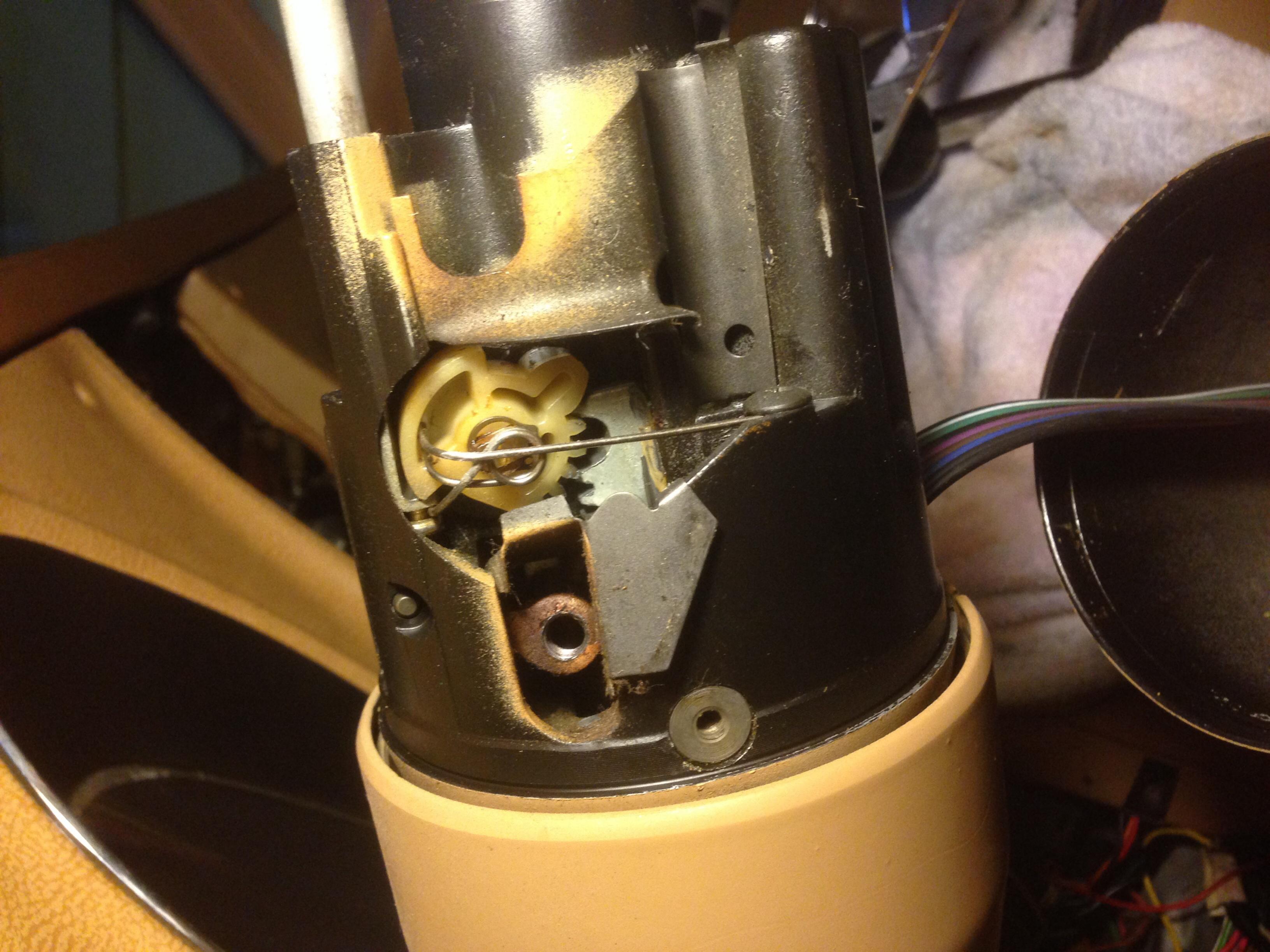
here are a couple of photos that may help jim - if i have attached them right. Greg
[attach]Attachment 47872549[/attach]
[attach]Attachment 47872549[/attach]
Thread Starter
Le Mans Master
Joined: Jul 2000
Posts: 6,001
Likes: 113
From: Saginaw Michigan
You are going to have to remove the metal sight shield and the "grasshopper" spring. The sector may have lost engagement to the shaft that is driven by the lock cylinder. The rack may still be broken and we just can't see it.
Jim
Corvette Stories
The Best of Corvette for Corvette Enthusiasts

Top 10 Most Expensive Corvettes Ever Sold on Bring A Trailer
Brett Foote
10 Things Every Corvette Owner Needs (2026 Edition)
Michael S. Palmer
8 Most "Only Corvette Owners Understand" Quirks and Problems
Pouria Savadkouei
10 Reasons the C6 Z06 is Still A Performance Benchmark After 20 Years
Joe Kucinski
How Much Horsepower Every Corvette Engine "LOST" in 1972
Joe Kucinski
Top 10 DOs and DON'Ts for Protecting Your Convertible Top!
Michael S. Palmer
Top 10 Most Explosive Corvettes Ever Made: Power-to-Weight Ratio Ranked!
Joe Kucinski
150 hp to 1,250 hp: Every Corvette Generation Compared by the Specs That Matter
Joe Kucinski
8 Coolest Corvette Pace Cars (and Replicas) of All Time
Verdad Gallardo
Advanced
Joined: Sep 2009
Posts: 87
Likes: 0
From: Melbourne VIC
Hi Jim,
Sorry for the tardy reply. I sent you a reply a couple of weeks ago, went away with work and came back today to find what I though I sent you gone into,the ether. I'll start again.
I'm starting to understand what you are saying. I have removed the metal sight guard, the grasshopper spring and the guard to the rear of the plastic cog (away from the engine).
Doing that I have then been able to depress the die cast rack to the rear (where the plastic cog sits) and click the cog clockwise to engage the larger tooth into the rear sector of the die cast rack.
The rack seems to be spring loaded at the rear end only (like it pivots at the front end) and the spring pushes up to engage with the plastic cog.
Once in the (I assume) correct position, with the ignition assembly sitting in place I have 2 counter clockwise clicks with the cog engaging and moving forward along the rack.
However on attempting to a 3rd click (if there is a 3rd click - it might be the ignition start position) of the ignition the cog depresses the rack and the large tooth on the cog slips across the rack to end up as per the photo below.
Then to get it set up correctly again I need to repeat the process described above.
I can send you sequential photos if you wish or it would help.
I don't think reassembly of the steering column will stop this slipping cog, though I may be wrong. Anyway I thought I should stop here and seek your further advice please Jim. Let me know if I can send you photos somewhere.
Cheers. Greg
Sorry for the tardy reply. I sent you a reply a couple of weeks ago, went away with work and came back today to find what I though I sent you gone into,the ether. I'll start again.
I'm starting to understand what you are saying. I have removed the metal sight guard, the grasshopper spring and the guard to the rear of the plastic cog (away from the engine).
Doing that I have then been able to depress the die cast rack to the rear (where the plastic cog sits) and click the cog clockwise to engage the larger tooth into the rear sector of the die cast rack.
The rack seems to be spring loaded at the rear end only (like it pivots at the front end) and the spring pushes up to engage with the plastic cog.
Once in the (I assume) correct position, with the ignition assembly sitting in place I have 2 counter clockwise clicks with the cog engaging and moving forward along the rack.
However on attempting to a 3rd click (if there is a 3rd click - it might be the ignition start position) of the ignition the cog depresses the rack and the large tooth on the cog slips across the rack to end up as per the photo below.
Then to get it set up correctly again I need to repeat the process described above.
I can send you sequential photos if you wish or it would help.
I don't think reassembly of the steering column will stop this slipping cog, though I may be wrong. Anyway I thought I should stop here and seek your further advice please Jim. Let me know if I can send you photos somewhere.
Cheers. Greg
Here is your problem in the last picture. The plastic sector is not correctly engaged to the die cast rack. Note that the on large sector tooth is on the back side of the sector. The small sector teeth are in the rack cutout that is supposed to engage the large sector tooth. That is definately the problem. However, I am not sure what caused the sector to rack engagement problem.
You are going to have to remove the metal sight shield and the "grasshopper" spring. The sector may have lost engagement to the shaft that is driven by the lock cylinder. The rack may still be broken and we just can't see it.
Jim
You are going to have to remove the metal sight shield and the "grasshopper" spring. The sector may have lost engagement to the shaft that is driven by the lock cylinder. The rack may still be broken and we just can't see it.
Jim
Advanced
Joined: Sep 2009
Posts: 87
Likes: 0
From: Melbourne VIC
Steering C ring retainer 1974 w T&T
Hi Jim
Have just been swapping emails with Corvette America looking for the above part, but not offered.
Any suggestions pls as mine has disintegrated on steering disassembly
Picture below - Part 1 in the diagram.
Cheers Greg
Have just been swapping emails with Corvette America looking for the above part, but not offered.
Any suggestions pls as mine has disintegrated on steering disassembly
Picture below - Part 1 in the diagram.
Cheers Greg
Hi Jim,
Sorry for the tardy reply. I sent you a reply a couple of weeks ago, went away with work and came back today to find what I though I sent you gone into,the ether. I'll start again.
I'm starting to understand what you are saying. I have removed the metal sight guard, the grasshopper spring and the guard to the rear of the plastic cog (away from the engine).
Doing that I have then been able to depress the die cast rack to the rear (where the plastic cog sits) and click the cog clockwise to engage the larger tooth into the rear sector of the die cast rack.
The rack seems to be spring loaded at the rear end only (like it pivots at the front end) and the spring pushes up to engage with the plastic cog.
Once in the (I assume) correct position, with the ignition assembly sitting in place I have 2 counter clockwise clicks with the cog engaging and moving forward along the rack.
However on attempting to a 3rd click (if there is a 3rd click - it might be the ignition start position) of the ignition the cog depresses the rack and the large tooth on the cog slips across the rack to end up as per the photo below.
Then to get it set up correctly again I need to repeat the process described above.
I can send you sequential photos if you wish or it would help.
I don't think reassembly of the steering column will stop this slipping cog, though I may be wrong. Anyway I thought I should stop here and seek your further advice please Jim. Let me know if I can send you photos somewhere.
Cheers. Greg
Sorry for the tardy reply. I sent you a reply a couple of weeks ago, went away with work and came back today to find what I though I sent you gone into,the ether. I'll start again.
I'm starting to understand what you are saying. I have removed the metal sight guard, the grasshopper spring and the guard to the rear of the plastic cog (away from the engine).
Doing that I have then been able to depress the die cast rack to the rear (where the plastic cog sits) and click the cog clockwise to engage the larger tooth into the rear sector of the die cast rack.
The rack seems to be spring loaded at the rear end only (like it pivots at the front end) and the spring pushes up to engage with the plastic cog.
Once in the (I assume) correct position, with the ignition assembly sitting in place I have 2 counter clockwise clicks with the cog engaging and moving forward along the rack.
However on attempting to a 3rd click (if there is a 3rd click - it might be the ignition start position) of the ignition the cog depresses the rack and the large tooth on the cog slips across the rack to end up as per the photo below.
Then to get it set up correctly again I need to repeat the process described above.
I can send you sequential photos if you wish or it would help.
I don't think reassembly of the steering column will stop this slipping cog, though I may be wrong. Anyway I thought I should stop here and seek your further advice please Jim. Let me know if I can send you photos somewhere.
Cheers. Greg

Racer
Joined: May 2014
Posts: 420
Likes: 5
From: Springfield Missouri
CorvetteCentral.com Part#:563022
Willcoxcorvette.com Part Number: 350136
zip-corvette.com Item Number: SC-517
Other vendors sell it too. That was just a quick search.
Willcoxcorvette.com Part Number: 350136
zip-corvette.com Item Number: SC-517
Other vendors sell it too. That was just a quick search.
Advanced
Joined: Sep 2009
Posts: 87
Likes: 0
From: Melbourne VIC
Many thanks Chris.
Out of interest, how did you search it, by name of part number.
Cheers. Greg
Out of interest, how did you search it, by name of part number.
Cheers. Greg
CorvetteCentral.com Part#:563022
Willcoxcorvette.com Part Number: 350136
zip-corvette.com Item Number: SC-517
Other vendors sell it too. That was just a quick search.
Willcoxcorvette.com Part Number: 350136
zip-corvette.com Item Number: SC-517
Other vendors sell it too. That was just a quick search.
Racer
Joined: May 2014
Posts: 420
Likes: 5
From: Springfield Missouri
I just searched "corvette horn contact retainer" and then refined the search to the C3 model years.
I did some work in the column recently to get my horn button working and this part was mentioned a lot. That's how I got 'horn contact retainer' even though the diagram you posted calls it a 'c-ring retainer.' Sometimes people/vendors don't call a part what the book calls it, so you have to know how to reconcile the two. :P
I did some work in the column recently to get my horn button working and this part was mentioned a lot. That's how I got 'horn contact retainer' even though the diagram you posted calls it a 'c-ring retainer.' Sometimes people/vendors don't call a part what the book calls it, so you have to know how to reconcile the two. :P
Last edited by Kris Tunetso; Apr 1, 2015 at 01:10 PM.
Advanced
Joined: Sep 2009
Posts: 87
Likes: 0
From: Melbourne VIC
Thanks Kris
I'm still learning. Found the part under a diff name on my usual buying site, even though I had sent them the picture and the part name and they said they don't stock it. Go figure.
Thanks again
Greg
I'm still learning. Found the part under a diff name on my usual buying site, even though I had sent them the picture and the part name and they said they don't stock it. Go figure.
Thanks again
Greg
I just searched "corvette horn contact retainer" and then refined the search to the C3 model years.
I did some work in the column recently to get my horn button working and this part was mentioned a lot. That's how I got 'horn contact retainer' even though the diagram you posted calls it a 'c-ring retainer.' Sometimes people/vendors don't call a part what the book calls it, so you have to know how to reconcile the two. :P
I did some work in the column recently to get my horn button working and this part was mentioned a lot. That's how I got 'horn contact retainer' even though the diagram you posted calls it a 'c-ring retainer.' Sometimes people/vendors don't call a part what the book calls it, so you have to know how to reconcile the two. :P
Thread Starter
Le Mans Master
Joined: Jul 2000
Posts: 6,001
Likes: 113
From: Saginaw Michigan
Kiwigreg,
There should be a flat spring that sits under the rack and preloads the rack into the plastic sector teeth. That would be part #36 in the upside down picture above. If the spring is missing, it might allow the rack and sector teeth to skip. The bad news is that I don't recall ever having seen the flat spring being sold anywhere.
Jim
There should be a flat spring that sits under the rack and preloads the rack into the plastic sector teeth. That would be part #36 in the upside down picture above. If the spring is missing, it might allow the rack and sector teeth to skip. The bad news is that I don't recall ever having seen the flat spring being sold anywhere.
Jim
Advanced
Joined: Sep 2009
Posts: 87
Likes: 0
From: Melbourne VIC
Hi Jim
I don't think the flat spring is missing as I need to depress the rack to re-engage the plastic sector teeth and when I release it it pops back up.
Whether it is broken or worn and therefore has insufficient tension, (which is possible and would explain the plastic sector rolling across and out of the teeth in the rack) I can't tell.
So I guess there is further disassembly required to establish that. I can't see a detailed description of that amongst your corvettefaq info - do you have one?
I've searched several sites for the flat ring and found a couple of Steering Column Bearing and Rack kits, none with the flat spring included. Will cross that bridge when I get there I guess
Thanks again for your advice Jim
Cheers. Greg
I don't think the flat spring is missing as I need to depress the rack to re-engage the plastic sector teeth and when I release it it pops back up.
Whether it is broken or worn and therefore has insufficient tension, (which is possible and would explain the plastic sector rolling across and out of the teeth in the rack) I can't tell.
So I guess there is further disassembly required to establish that. I can't see a detailed description of that amongst your corvettefaq info - do you have one?
I've searched several sites for the flat ring and found a couple of Steering Column Bearing and Rack kits, none with the flat spring included. Will cross that bridge when I get there I guess
Thanks again for your advice Jim
Cheers. Greg
Kiwigreg,
There should be a flat spring that sits under the rack and preloads the rack into the plastic sector teeth. That would be part #36 in the upside down picture above. If the spring is missing, it might allow the rack and sector teeth to skip. The bad news is that I don't recall ever having seen the flat spring being sold anywhere.
Jim
There should be a flat spring that sits under the rack and preloads the rack into the plastic sector teeth. That would be part #36 in the upside down picture above. If the spring is missing, it might allow the rack and sector teeth to skip. The bad news is that I don't recall ever having seen the flat spring being sold anywhere.
Jim
Advanced
Joined: Sep 2009
Posts: 87
Likes: 0
From: Melbourne VIC
Progress at last Jim
I have removed the plastic sector and the most forward tooth has snapped off. Hopefully the cause of my problem.
The flat spring is intact and appears to be OK
Since I have come this far and since a rebuild kit includes the rack, I'd like to replace that as well.
However from the photo below I can't work out how to get the pin/nut/bolt out that is shown centre picture.
I think it is that which is holding the rack in position. However it is threaded internally (though nothing screws into it) and doesn't seem to have any obvious way of removal. I can't find any ref to this type of thing in any parts or shop manual I have.
Any ideas pls Jim ?
Cheers Greg
I have removed the plastic sector and the most forward tooth has snapped off. Hopefully the cause of my problem.
The flat spring is intact and appears to be OK
Since I have come this far and since a rebuild kit includes the rack, I'd like to replace that as well.
However from the photo below I can't work out how to get the pin/nut/bolt out that is shown centre picture.
I think it is that which is holding the rack in position. However it is threaded internally (though nothing screws into it) and doesn't seem to have any obvious way of removal. I can't find any ref to this type of thing in any parts or shop manual I have.
Any ideas pls Jim ?
Cheers Greg
Hi Jim
I don't think the flat spring is missing as I need to depress the rack to re-engage the plastic sector teeth and when I release it it pops back up.
Whether it is broken or worn and therefore has insufficient tension, (which is possible and would explain the plastic sector rolling across and out of the teeth in the rack) I can't tell.
So I guess there is further disassembly required to establish that. I can't see a detailed description of that amongst your corvettefaq info - do you have one?
I've searched several sites for the flat ring and found a couple of Steering Column Bearing and Rack kits, none with the flat spring included. Will cross that bridge when I get there I guess
Thanks again for your advice Jim
Cheers. Greg
I don't think the flat spring is missing as I need to depress the rack to re-engage the plastic sector teeth and when I release it it pops back up.
Whether it is broken or worn and therefore has insufficient tension, (which is possible and would explain the plastic sector rolling across and out of the teeth in the rack) I can't tell.
So I guess there is further disassembly required to establish that. I can't see a detailed description of that amongst your corvettefaq info - do you have one?
I've searched several sites for the flat ring and found a couple of Steering Column Bearing and Rack kits, none with the flat spring included. Will cross that bridge when I get there I guess
Thanks again for your advice Jim
Cheers. Greg

Le Mans Master


Joined: May 2007
Posts: 5,025
Likes: 1,120
From: North tonawanda NY
CorvetteCentral.com Part#:563022
Willcoxcorvette.com Part Number: 350136
zip-corvette.com Item Number: SC-517
Other vendors sell it too. That was just a quick search.
Willcoxcorvette.com Part Number: 350136
zip-corvette.com Item Number: SC-517
Other vendors sell it too. That was just a quick search.
Last edited by augiedoggy; Apr 3, 2015 at 08:07 AM.
Thread Starter
Le Mans Master
Joined: Jul 2000
Posts: 6,001
Likes: 113
From: Saginaw Michigan
Progress at last Jim
I have removed the plastic sector and the most forward tooth has snapped off. Hopefully the cause of my problem.
The flat spring is intact and appears to be OK
Since I have come this far and since a rebuild kit includes the rack, I'd like to replace that as well.
However from the photo below I can't work out how to get the pin/nut/bolt out that is shown centre picture.
I think it is that which is holding the rack in position. However it is threaded internally (though nothing screws into it) and doesn't seem to have any obvious way of removal. I can't find any ref to this type of thing in any parts or shop manual I have.
Any ideas pls Jim ?
Cheers Greg
I have removed the plastic sector and the most forward tooth has snapped off. Hopefully the cause of my problem.
The flat spring is intact and appears to be OK
Since I have come this far and since a rebuild kit includes the rack, I'd like to replace that as well.
However from the photo below I can't work out how to get the pin/nut/bolt out that is shown centre picture.
I think it is that which is holding the rack in position. However it is threaded internally (though nothing screws into it) and doesn't seem to have any obvious way of removal. I can't find any ref to this type of thing in any parts or shop manual I have.
Any ideas pls Jim ?
Cheers Greg
Jim
Advanced
Joined: Sep 2009
Posts: 87
Likes: 0
From: Melbourne VIC
Hi Jim, The sector is broken - the last tooth has been snapped off.
Are the disassembly papers the ones at Corvettefaq ?
Cheers. Greg
Are the disassembly papers the ones at Corvettefaq ?
Cheers. Greg
I think that your rack is broken. The sector looks in good shape so the teeth can't be skipping because of a bad sector. I think the rack is tipping because it is broken down past where we can see it. I would remove the column from the car and pull the pivot pins so you can get at the whole rack. Have you downloaded my T&T Disassembly and Repair Papers? They will walk you through the disassembly.
Jim
Jim