










"Jake" backup lights

Administrator


Joined: Mar 2001
Posts: 368,297
Likes: 24,776
From: In a parallel universe. Currently own 2014 Stingray Coupe.
C7 of the Year - Modified Finalist 2021
MO Events Coordinator
St. Jude Co-Organizer
St. Jude Donor '03 thru '25
NCM Sinkhole Donor
CI 5, 8 & 11 Veteran

Looks good. Nice job doing something very unique.

Thread Starter
Melting Slicks


Joined: Aug 2000
Posts: 2,618
Likes: 5
From: Overland Park KS
Thanks everyone!! I just don't like the big backup lights on these corvettes I think the back end really looses what could be a more exotic look by putting in those big rectangular makeup lights!
Well it's hard to get inside the backup lights to paint and it's not smooth inside so painting it on the inside isn't going to work. I haven't tried these lights at night since my tranny is hanging below the car and the new engine is still on a stand in front of the car. Hopefully in a couple weeks I can report on how they look at night and more importantly do they still function well.
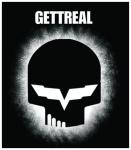
If you want to try this yourself, I just uploaded the file I used next to the photo of the rear end of my Z06. Just copy the JPEG file into the program of your choice and print it on 8.5x11 sticker paper. You can find the paper in the custom papers section of OfficeMax/Depot etc. The brand I used was Office Depot "Print & Stick Paper" sku# 652-051. It's not the easiest to work with, I would think some Avery label type paper might work better. This will print out several Jakes. Then carefully use an exacto knife and cut out the Skull. Be sure to have something under the paper as you cut like an old magazine or newspaper because it will cut through.
Remove the rear license plate assembly from car and clean it with brake parts cleaner. Then warm water with Dawn or Ajax liquid detergent to remove any grease from the assembly.
Take your time and use some masking tape across the top and bottom of the entire assembly to give yourself some guides. I covered about the top 1" and bottom 1" of the assembly. I then placed the skulls where I liked them and looked from a distance. THEN remove the backing and stick them on the light where you want them to go.
After sticking both skulls on your lights lightly sand AROUND the skulls, (try not to touch them) with 1200-2400 grit sandpaper or 0000 steel wool to help with adhesion of the spray paint. This takes about two minutes per side, just a light rubbing around the sticker and perhaps in the middle if you can without touching the sticker.
UPDATE: I'm finding it impossible to spray clear over Krylon paint so although this looks cool, it's probably a temporary thing as the first time I wash the car or get a harsh detergent on it the logo is going to probably turn white. I would talk with a local auto paint store and get a high quality auto paint that accepts a clear coat. Actually the nuts where my license plate mounts are cracked so at least I used a well used license plate frame. I may try again using "real" auto paint instead of Krylon and update this post.
So find a specific paint that accepts a clear coat to protect it and paint the entire assembly. About 6-8 light coats. Check after the first 4 coats with a small flashlight in the light socket. It will highlight any areas where you don't have enough paint coverage, you want these blacked out. You don't want light coming through the paint. After several coats let it dry overnite.
The most difficult part is removing the stickers. You need to use the exacto knife to lightly cut along ALL the edges of the sticker so it comes off cleanly. Then use the knife and work an edge up until you can grab with your fingers and gently pull off the stickers, watch closely that it doesn't lift any paint off the light and if it does, stop and scribe it again with the knife and try pulling again.
I haven't put a clear coat on yet but I plan to. This is usually where I screw up a perfectly good thing so I'll going to check and see if Krylon has a semi-flat clear as I like the almost flat black look. I used the same paint to paint the area between the exhaust pipes.
Let me know if you have any other questions...
Paul.
Well it's hard to get inside the backup lights to paint and it's not smooth inside so painting it on the inside isn't going to work. I haven't tried these lights at night since my tranny is hanging below the car and the new engine is still on a stand in front of the car. Hopefully in a couple weeks I can report on how they look at night and more importantly do they still function well.
If you want to try this yourself, I just uploaded the file I used next to the photo of the rear end of my Z06. Just copy the JPEG file into the program of your choice and print it on 8.5x11 sticker paper. You can find the paper in the custom papers section of OfficeMax/Depot etc. The brand I used was Office Depot "Print & Stick Paper" sku# 652-051. It's not the easiest to work with, I would think some Avery label type paper might work better. This will print out several Jakes. Then carefully use an exacto knife and cut out the Skull. Be sure to have something under the paper as you cut like an old magazine or newspaper because it will cut through.
Remove the rear license plate assembly from car and clean it with brake parts cleaner. Then warm water with Dawn or Ajax liquid detergent to remove any grease from the assembly.
Take your time and use some masking tape across the top and bottom of the entire assembly to give yourself some guides. I covered about the top 1" and bottom 1" of the assembly. I then placed the skulls where I liked them and looked from a distance. THEN remove the backing and stick them on the light where you want them to go.
After sticking both skulls on your lights lightly sand AROUND the skulls, (try not to touch them) with 1200-2400 grit sandpaper or 0000 steel wool to help with adhesion of the spray paint. This takes about two minutes per side, just a light rubbing around the sticker and perhaps in the middle if you can without touching the sticker.
UPDATE: I'm finding it impossible to spray clear over Krylon paint so although this looks cool, it's probably a temporary thing as the first time I wash the car or get a harsh detergent on it the logo is going to probably turn white. I would talk with a local auto paint store and get a high quality auto paint that accepts a clear coat. Actually the nuts where my license plate mounts are cracked so at least I used a well used license plate frame. I may try again using "real" auto paint instead of Krylon and update this post.
So find a specific paint that accepts a clear coat to protect it and paint the entire assembly. About 6-8 light coats. Check after the first 4 coats with a small flashlight in the light socket. It will highlight any areas where you don't have enough paint coverage, you want these blacked out. You don't want light coming through the paint. After several coats let it dry overnite.
The most difficult part is removing the stickers. You need to use the exacto knife to lightly cut along ALL the edges of the sticker so it comes off cleanly. Then use the knife and work an edge up until you can grab with your fingers and gently pull off the stickers, watch closely that it doesn't lift any paint off the light and if it does, stop and scribe it again with the knife and try pulling again.
I haven't put a clear coat on yet but I plan to. This is usually where I screw up a perfectly good thing so I'll going to check and see if Krylon has a semi-flat clear as I like the almost flat black look. I used the same paint to paint the area between the exhaust pipes.
Let me know if you have any other questions...
Paul.
Last edited by KCvetteowner; May 14, 2008 at 02:35 PM.
Corvette Stories
The Best of Corvette for Corvette Enthusiasts

Top 10 Most Expensive Corvettes Ever Sold on Bring A Trailer
Brett Foote
10 Things Every Corvette Owner Needs (2026 Edition)
Michael S. Palmer
8 Most "Only Corvette Owners Understand" Quirks and Problems
Pouria Savadkouei
10 Reasons the C6 Z06 is Still A Performance Benchmark After 20 Years
Joe Kucinski
How Much Horsepower Every Corvette Engine "LOST" in 1972
Joe Kucinski
Top 10 DOs and DON'Ts for Protecting Your Convertible Top!
Michael S. Palmer
Top 10 Most Explosive Corvettes Ever Made: Power-to-Weight Ratio Ranked!
Joe Kucinski
150 hp to 1,250 hp: Every Corvette Generation Compared by the Specs That Matter
Joe Kucinski
8 Coolest Corvette Pace Cars (and Replicas) of All Time
Verdad Gallardo



Race Director


Joined: Apr 2005
Posts: 11,138
Likes: 11
From: Fremont CA
St. Jude Donor '06-'07-'08-'09-'10-'11-'12-'13-'14-'15-'16-'17-'18-'19-'20
NCM Sinkhole Donor
Put lightweight painters tape on wax paper, then feed it through your printer. Use that instead of sticker paper. When you have to remove it from the lights at the end of the process, it should come off much easier. 
Thread Starter
Melting Slicks
Joined: Aug 2000
Posts: 2,618
Likes: 5
From: Overland Park KS
Paul.

CF "Young" Senior Member


Joined: Feb 2005
Posts: 4,034
Likes: 26
From: Cupertino CA
St. Jude Donor '12
Race Director
Joined: Apr 2005
Posts: 11,138
Likes: 11
From: Fremont CA
St. Jude Donor '06-'07-'08-'09-'10-'11-'12-'13-'14-'15-'16-'17-'18-'19-'20
NCM Sinkhole Donor



CF "Young" Senior Member
Joined: Feb 2005
Posts: 4,034
Likes: 26
From: Cupertino CA
St. Jude Donor '12
This actually just gave me a really good idea for doing something similar, but using the two flags for the c5 logo... one flag per light.
If I get some free time this summer I might have to give this idea a try!
If I get some free time this summer I might have to give this idea a try!