


Bcm


Melting Slicks

Joined: Feb 2007
Posts: 3,266
Likes: 8
From: Indian Rocks Beach FL
St. Jude Donor '08-'09-'10

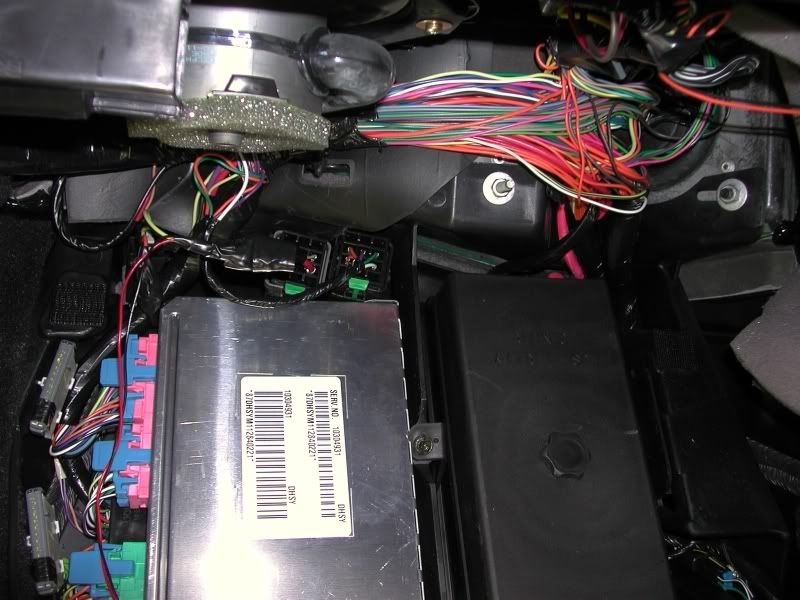
The BCM is located under a panel in the passenger side footwell.
From the service manual:
The service BCMs EEPROM chip must be programmed with the proper RPO configurations by using a scan tool. The EEPROM stores information regarding the vehicle options and point of sale. If the BCM is not properly configured with the correct RPO codes, the BCM will set default values for some systems, which could cause malfunctions in other systems. When the BCM is replaced, the BCM must be programed to identify the following information:
* Real Time Damping (RTD)
* Memory Options
* Daytime Running Lamps (DRL)
* Front Fog Lamps
* Tire Pressure Monitor (TPM)
* HVAC (C60-Manual, CJ2-Automatic)
* Country of Sale (US, Canada, Europe, Japan, etc.)
The BCM sends password information to the PCM on the serial data line to enable fuel for Content Theft Deterrent (CTD) functions, therefore, the PCM must also be programmed to accept the new password sent by the BCM. The BCM programming procedure will enable the learn password mode for both the BCM and PCM. This mode allows the PCM to learn the new password sent by the BCM whenever the BCM or PCM is replaced. If the BCM and PCM is not properly programmed together, the vehicle will exhibit a no start condition and the PCM will store a DTC P1631.
When an ignition key or the BCM is replaced, the BCM must be programmed to accept the resistance value of the new or existing vehicle keys in order to allow PASS-Key® operation. When the BCM is replaced, the service replacement BCM is programmed to accept the first PASS-Key® resistance value detected. If the BCM is unable to detect a valid PASS-Key® resistance value, the BCM will never end the programming sequence and a DTC B2735 will set. The BCM can also be programmed to accept a new PASS-Key® code by completing the following BCM/PASS-Key® programming procedure:
Important:
Before proceeding with this programming procedure, check for proper communications between the BCM and PCM. If communications cannot be established, refer to the appropriate Diagnostic System Check for the system unable to communicate.
Maintain the battery voltage while the PCM is in the Auto Learn Procedure. Follow this procedure exactly as indicated or you will have to repeat the procedure from the beginning.
Manual Programming (Domestic/Canada Only)
1. Using a Tech 2, select New BCM Setup and program the BCM with the correct RPO code configuration.
2. Turn ON the ignition leaving the engine OFF for 11 minutes.
3. Turn OFF the ignition for 30 seconds.
4. Turn ON the ignition leaving the engine OFF for 11 minutes.
5. Turn OFF the ignition for 30 seconds.
6. Turn ON the ignition leaving the engine OFF for 11 minutes or until DTC P1630 sets.
7. Turn OFF the ignition for 30 seconds.
8. Turn ON the ignition leaving the engine OFF and wait 30 seconds.
9. Attempt to start the engine. If the engine does not start, Refer to the Powertrain On Board Diagnostic (OBD) System Check in Engine Controls.
Important
Performing this procedure may cause a DTC P1630 to set. If a DTC P1630 sets, turn OFF the ignition for 30 seconds, then turn ON the ignition. If the DTC P1630 does not clear, Refer to Powertrain On Board Diagnostic (OBD) System Check in Engine Controls.
From the service manual:
The service BCMs EEPROM chip must be programmed with the proper RPO configurations by using a scan tool. The EEPROM stores information regarding the vehicle options and point of sale. If the BCM is not properly configured with the correct RPO codes, the BCM will set default values for some systems, which could cause malfunctions in other systems. When the BCM is replaced, the BCM must be programed to identify the following information:
* Real Time Damping (RTD)
* Memory Options
* Daytime Running Lamps (DRL)
* Front Fog Lamps
* Tire Pressure Monitor (TPM)
* HVAC (C60-Manual, CJ2-Automatic)
* Country of Sale (US, Canada, Europe, Japan, etc.)
The BCM sends password information to the PCM on the serial data line to enable fuel for Content Theft Deterrent (CTD) functions, therefore, the PCM must also be programmed to accept the new password sent by the BCM. The BCM programming procedure will enable the learn password mode for both the BCM and PCM. This mode allows the PCM to learn the new password sent by the BCM whenever the BCM or PCM is replaced. If the BCM and PCM is not properly programmed together, the vehicle will exhibit a no start condition and the PCM will store a DTC P1631.
When an ignition key or the BCM is replaced, the BCM must be programmed to accept the resistance value of the new or existing vehicle keys in order to allow PASS-Key® operation. When the BCM is replaced, the service replacement BCM is programmed to accept the first PASS-Key® resistance value detected. If the BCM is unable to detect a valid PASS-Key® resistance value, the BCM will never end the programming sequence and a DTC B2735 will set. The BCM can also be programmed to accept a new PASS-Key® code by completing the following BCM/PASS-Key® programming procedure:
Important:
Before proceeding with this programming procedure, check for proper communications between the BCM and PCM. If communications cannot be established, refer to the appropriate Diagnostic System Check for the system unable to communicate.
Maintain the battery voltage while the PCM is in the Auto Learn Procedure. Follow this procedure exactly as indicated or you will have to repeat the procedure from the beginning.
Manual Programming (Domestic/Canada Only)
1. Using a Tech 2, select New BCM Setup and program the BCM with the correct RPO code configuration.
2. Turn ON the ignition leaving the engine OFF for 11 minutes.
3. Turn OFF the ignition for 30 seconds.
4. Turn ON the ignition leaving the engine OFF for 11 minutes.
5. Turn OFF the ignition for 30 seconds.
6. Turn ON the ignition leaving the engine OFF for 11 minutes or until DTC P1630 sets.
7. Turn OFF the ignition for 30 seconds.
8. Turn ON the ignition leaving the engine OFF and wait 30 seconds.
9. Attempt to start the engine. If the engine does not start, Refer to the Powertrain On Board Diagnostic (OBD) System Check in Engine Controls.
Important
Performing this procedure may cause a DTC P1630 to set. If a DTC P1630 sets, turn OFF the ignition for 30 seconds, then turn ON the ignition. If the DTC P1630 does not clear, Refer to Powertrain On Board Diagnostic (OBD) System Check in Engine Controls.
Melting Slicks
Joined: Feb 2007
Posts: 3,266
Likes: 8
From: Indian Rocks Beach FL
St. Jude Donor '08-'09-'10

Tech Contributor


Joined: Dec 1999
Posts: 32,910
Likes: 2,402
From: Anthony TX
CI 6,7,8,9,11 Vet
St. Jude Donor '08
There are sever very common issues that will cause the BCM to have issues. Please post what issues you are having and how long you have been having them.
You also need to read and post your DTCs If you dont know how to read your own DTCs,, heres the gouge:
READING YOUR Engine Diagnostic Trouble Codes (DTC)
This procedure should be carried out any time you experience a problem with your C5. Most inexpensive store bought aftermarket code readers will ONLY read power train DTC’s. Reading the DTC’s with the C5 built in code reader will allow you to read ALL the modules in the vehicle.
The Diagnostic Display Mode is entered with the following procedure:
1) Turn on the ignition but don't start the engine.
2) Press the RESET button to turn off any warning messages. (i.e. door open, trunk open ect)
3) Press and hold the OPTIONS button
4) While holding OPTIONS, press FUEL button four times within a 10 -second period.
Initially, the on-board diagnostics go into an Automatic Mode which will cycle through each module and shows diagnostic codes in a pre-set sequence: PCM - TCS - RTD - BCM - IPC - RADIO - HVAC - LDCM - RDCM - SCM - RFA. All codes will be displayed for each module. ( i.e. PCM = 4 codes) If none are present in a given module, you will see No More Codes on the display.
There are two types of diagnostic codes, Current and History designated with a letter suffix, “C” or “H”. A current code indicates a malfunction is present in the module displaying data. A history code indicates a problem existed sometime in the last 40 or 50 ignition cycles. When not accompanied by a current code of the same number, it's potential evidence of a previous problem, now resolved, that was not removed by clearing the codes. More likely it's an indication of an intermittent malfunction.
Intermittent codes are the most challenging of the diagnostics. An intermittent code may have happened once, may have happened more than once but is inconsistent or may be happening on a regular basis but not at the time the codes are displayed. History codes can also be caused by a current malfunction in a system that is not operating at the time codes are displayed. An example is the rear window defogger which doesn't operate until the Body Control Module detects engine rpm. For history codes set by a module that does not operate with the key on and engine off, a special diagnostic tool called a Scan Tester is necessary to properly diagnose the malfunction.
Once the system has displayed all modules, it goes into the manual mode which allows selection of each module using combinations of Driver Information Center buttons. Manual mode can also be entered during the automatic sequence by pressing any button except E/M. Once the display shows Manual Diagnostics, select a module by pressing the OPTIONS button to go forward or the TRIP button to go back. Once a module is selected, a code is displayed, and if more than one are present; press GAGES to go forward or FUEL to go back.
To exit the diagnostic mode at any time, press E/M. If you want to erase codes in a given module, press RESET To reset the codes once in manual mode, press and hold RESET until it displays NO CODES Press OPTIONS to go to the next module. Repeat the steps until you have reset the codes in all the computer modules.
NOTE!! Only reset the codes IF you want to - it is NOT necessary to do this. Clearing a code does not repair a problem. You are simply erasing the evidence of it in the module's memory. If you clear the code/s, and extinguish the Check Engine Light, your emissions status ready will NOT allow you to pass an emissions test until you have completed the required driving cycles. There are a few body module DTC’s that if set will prevent the module from operating properly. Once the DTC is cleared, the module will return to full function. This is not true for power train DTCs.
If you have never read and cleared your codes, there will probably be a lot of old history DTCs. It is recommended that you clear your codes and see if any come back during a driving cycle. Those are the ones that you need to concentrate on diagnosing.
Once you have the codes, the next question is: What to do with the information?
First, consult the factory service manual. Any serious C5 Do-It-Yourself owner should invest in the Corvette Service Manual of the appropriate model year. The Service Manual is really a requirement if you want to understand and work on your C5.
You can read the DTCs while the engine is running. If you turn the engine OFF and then back ON, that can clear some DTCs that may be important with identifying a problem. One example is a Misfire DTC (p-0300) If the engine is shut down, the DTC will clear.
These are some very good C5 Diagnostic Trouble Code (DTC) explanation web sites!!! They also explain how to read the DTCs
Here are some very good sites that explain what DTC mean:
http://www.gearchatter.com/viewtopic11755.php
http://www.obd-codes.com/trouble_cod...d-ii-codes.php
Make sure to include the H or C suffix when you post your DTCs!!
-------------------------------------------------------------------
Before you spend the cash for a new one,,,lets try to resolve your issues first.
BC
You also need to read and post your DTCs If you dont know how to read your own DTCs,, heres the gouge:
READING YOUR Engine Diagnostic Trouble Codes (DTC)
This procedure should be carried out any time you experience a problem with your C5. Most inexpensive store bought aftermarket code readers will ONLY read power train DTC’s. Reading the DTC’s with the C5 built in code reader will allow you to read ALL the modules in the vehicle.
The Diagnostic Display Mode is entered with the following procedure:
1) Turn on the ignition but don't start the engine.
2) Press the RESET button to turn off any warning messages. (i.e. door open, trunk open ect)
3) Press and hold the OPTIONS button
4) While holding OPTIONS, press FUEL button four times within a 10 -second period.
Initially, the on-board diagnostics go into an Automatic Mode which will cycle through each module and shows diagnostic codes in a pre-set sequence: PCM - TCS - RTD - BCM - IPC - RADIO - HVAC - LDCM - RDCM - SCM - RFA. All codes will be displayed for each module. ( i.e. PCM = 4 codes) If none are present in a given module, you will see No More Codes on the display.
There are two types of diagnostic codes, Current and History designated with a letter suffix, “C” or “H”. A current code indicates a malfunction is present in the module displaying data. A history code indicates a problem existed sometime in the last 40 or 50 ignition cycles. When not accompanied by a current code of the same number, it's potential evidence of a previous problem, now resolved, that was not removed by clearing the codes. More likely it's an indication of an intermittent malfunction.
Intermittent codes are the most challenging of the diagnostics. An intermittent code may have happened once, may have happened more than once but is inconsistent or may be happening on a regular basis but not at the time the codes are displayed. History codes can also be caused by a current malfunction in a system that is not operating at the time codes are displayed. An example is the rear window defogger which doesn't operate until the Body Control Module detects engine rpm. For history codes set by a module that does not operate with the key on and engine off, a special diagnostic tool called a Scan Tester is necessary to properly diagnose the malfunction.
Once the system has displayed all modules, it goes into the manual mode which allows selection of each module using combinations of Driver Information Center buttons. Manual mode can also be entered during the automatic sequence by pressing any button except E/M. Once the display shows Manual Diagnostics, select a module by pressing the OPTIONS button to go forward or the TRIP button to go back. Once a module is selected, a code is displayed, and if more than one are present; press GAGES to go forward or FUEL to go back.
To exit the diagnostic mode at any time, press E/M. If you want to erase codes in a given module, press RESET To reset the codes once in manual mode, press and hold RESET until it displays NO CODES Press OPTIONS to go to the next module. Repeat the steps until you have reset the codes in all the computer modules.
NOTE!! Only reset the codes IF you want to - it is NOT necessary to do this. Clearing a code does not repair a problem. You are simply erasing the evidence of it in the module's memory. If you clear the code/s, and extinguish the Check Engine Light, your emissions status ready will NOT allow you to pass an emissions test until you have completed the required driving cycles. There are a few body module DTC’s that if set will prevent the module from operating properly. Once the DTC is cleared, the module will return to full function. This is not true for power train DTCs.
If you have never read and cleared your codes, there will probably be a lot of old history DTCs. It is recommended that you clear your codes and see if any come back during a driving cycle. Those are the ones that you need to concentrate on diagnosing.
Once you have the codes, the next question is: What to do with the information?
First, consult the factory service manual. Any serious C5 Do-It-Yourself owner should invest in the Corvette Service Manual of the appropriate model year. The Service Manual is really a requirement if you want to understand and work on your C5.
You can read the DTCs while the engine is running. If you turn the engine OFF and then back ON, that can clear some DTCs that may be important with identifying a problem. One example is a Misfire DTC (p-0300) If the engine is shut down, the DTC will clear.
These are some very good C5 Diagnostic Trouble Code (DTC) explanation web sites!!! They also explain how to read the DTCs
Here are some very good sites that explain what DTC mean:
http://www.gearchatter.com/viewtopic11755.php
http://www.obd-codes.com/trouble_cod...d-ii-codes.php
Make sure to include the H or C suffix when you post your DTCs!!
-------------------------------------------------------------------
Before you spend the cash for a new one,,,lets try to resolve your issues first.
BC

Thread Starter
Intermediate

Joined: Jul 2010
Posts: 26
Likes: 0
Thank you all you guys are the best. Here are the Codes.C12251,U1016h,C1255h,P1626HC,B0432 ,B0502,B0503,B0507,B0508,B2567,B2593,B27 21,B2723,U1255,U1016,U1096,HVAC codes B0361,B0365,B0367,B0446.I reset the codes but codes Bo361 and B2721 will not clear. The car will not do anything now when i turn the key. This is a new key put i also tried my old one.

Team Owner


Joined: May 2001
Posts: 36,836
Likes: 244
From: Dear Karma, I have a list of people you missed.
St. Jude Donor '08-'09-'10-'11-'12-'13-'14-'15-'16







