




No Comm 2001 Z06

Thread Starter
Intermediate

Joined: Nov 2011
Posts: 48
Likes: 0
From: Deltona FL

Work has been killing my time sorry, and I had to fight off code enforcement since Im apparently not allowed to work on a car in my driveway  ...
...
Anyways I rechecked all the grounds had a second opinion on my bcnm for cleanliness and I figure tomorrow I will order a new head unit unless there is anything else you think I should try first?
...Anyways I rechecked all the grounds had a second opinion on my bcnm for cleanliness and I figure tomorrow I will order a new head unit unless there is anything else you think I should try first?

Tech Contributor


Joined: Dec 1999
Posts: 32,910
Likes: 2,402
From: Anthony TX
CI 6,7,8,9,11 Vet
St. Jude Donor '08
I kind of misread one of your replies,,, Sounds like your head unit has a serial buss comms issue. Time to open it up and see if its an easily fixable issue and can be fixed or if its time to get a new one.
You should still open it and see if theres something obvious..
BC
You should still open it and see if theres something obvious..
BC
Thread Starter
Intermediate
Joined: Nov 2011
Posts: 48
Likes: 0
From: Deltona FL
Okay. I have had a forced hiatus from repairing the car unfortunately.
However, I was forced to push the car back on the road this week due to some events of life happening. I figured that at worst I wouldn't have my ac head unit plugged in and I could drive the car until I could fix it.....
NOT TO BE>>>
I drove the car for about an hour, then on my way home I noticed my interior lights were flashing every few minutes; with the blinker, starting from a dead stop, and randomly.. then my message center started telling me trunk open even though it wasn't, the interior lights started to blink with the blinker. Then the interior lights decided to come on and stay on until I got home and I disconnected the battery!
I am going to recheck the grounds in the morning but is there a chance this is all related and maybe tethered into my ECM? Only reason I am wondering is I can hear something clicking off and on- down in the floor board when all this is going on.
However, I was forced to push the car back on the road this week due to some events of life happening. I figured that at worst I wouldn't have my ac head unit plugged in and I could drive the car until I could fix it.....
NOT TO BE>>>
I drove the car for about an hour, then on my way home I noticed my interior lights were flashing every few minutes; with the blinker, starting from a dead stop, and randomly.. then my message center started telling me trunk open even though it wasn't, the interior lights started to blink with the blinker. Then the interior lights decided to come on and stay on until I got home and I disconnected the battery!
I am going to recheck the grounds in the morning but is there a chance this is all related and maybe tethered into my ECM? Only reason I am wondering is I can hear something clicking off and on- down in the floor board when all this is going on.
Thread Starter
Intermediate
Joined: Nov 2011
Posts: 48
Likes: 0
From: Deltona FL
So replaced my battery and all the new problems went away.
I made a new grounding point on g102 and cleaned the others again.
Then I removed one wire at a time from the ac head unit. Only the white (the wire that runs between the ac head unit and the computer) would make the reduced horsepower mode and no comm situation go away.
Because of this I am convinced my ac head unit is causing the issue. I am ordering one today and it should be here Saturday. Hopefully this is it!
If anyone however happens to have a picture of how the wires are suppose to go in the connector for the a/c head unit please post it or let me know... I should have take a picture before I disconnected them and only have one possibly out of place. The orange wire I am unsure if it goes directly under the pinkish wire or if it skipped a spot or two I am pretty sure it goes directly under the pinkish but I am second guessing myself....
Thanks!
I made a new grounding point on g102 and cleaned the others again.
Then I removed one wire at a time from the ac head unit. Only the white (the wire that runs between the ac head unit and the computer) would make the reduced horsepower mode and no comm situation go away.
Because of this I am convinced my ac head unit is causing the issue. I am ordering one today and it should be here Saturday. Hopefully this is it!
If anyone however happens to have a picture of how the wires are suppose to go in the connector for the a/c head unit please post it or let me know... I should have take a picture before I disconnected them and only have one possibly out of place. The orange wire I am unsure if it goes directly under the pinkish wire or if it skipped a spot or two I am pretty sure it goes directly under the pinkish but I am second guessing myself....
Thanks!
Thread Starter
Intermediate
Joined: Nov 2011
Posts: 48
Likes: 0
From: Deltona FL
Found a pic on here for the wires at http://www.vetteaction.com/curtsphotos/hvacillwire.jpg
it shows the side and the orange is fine.... however a few wires on the other side I am questioning now and its hard to see in the picture... If anyone has a pic of the other side or otherwise knows the layout and correct pattern I would appreciate it. stumbling my way through getting this thing back to working condition one day at a time...
it shows the side and the orange is fine.... however a few wires on the other side I am questioning now and its hard to see in the picture... If anyone has a pic of the other side or otherwise knows the layout and correct pattern I would appreciate it. stumbling my way through getting this thing back to working condition one day at a time...
Last edited by VortexPoweredZ06; Mar 8, 2012 at 06:03 PM. Reason: Diffrent info.

Melting Slicks


Joined: Oct 2007
Posts: 2,383
Likes: 13
From: Kinston North Carolina
Don't know if this is what you're looking or not, hope it helps!
------------------------------------------------
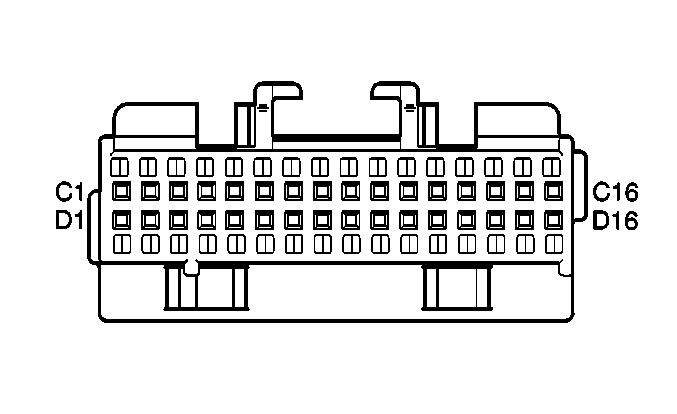
---------------------------------
Connector Part Information
12045470
32-Way F Micro-Pack 100 Series (NAT)
Pin
Wire Color
Circuit No.
Function
C1
BLK
150
Ground
C2
LT BLU/BLK
590
Driver Solar Sensor Signal
C3
DK BLU
1646
Air Temperature Door Position Signal-Auxiliary
C4
--
--
Not Used
C5
BRN
41
Ignition 3 Voltage
C6
WHT/BLK
1236
Air Temperature Door Control-Auxiliary
C7
DK BLU
1199
Air Temperature Door Control
C8
LT BLU
733
Air Temperature Door Position Signal
C9
--
--
Not Used
C10
YEL
1791
5 Volt Reference
C11
TAN
63
Blower Motor Speed Control
C12
ORN
540
Battery Positive Voltage
C13-C15
--
--
Not Used
C16
YEL
390
Instrument Panel Lamp Supply Voltage - 3
D1
GRY/BLK
1798
Ground
D2
DK GRN
734
Inside Air Temperature Sensor Signal
D3
LT GRN/BLK
735
Outside Air Temperature Sensor Signal
D4-D7
--
--
Not Used
D8
DK GRN
1394
Recirculation Mode Valve Solenoid Control
D9
LT GRN
66
Mix-Blend Mode Valve Solenoid Control
D10
PPL
1397
Lower Mode Valve Solenoid Control
D11
LT GRN
1395
Upper Mode Valve Solenoid Control
D12
WHT
1038
HVAC Class 2 Serial Data
D13
PNK
1396
Defrost Mode Valve Solenoid Control
D14-D16
--
--
Not Used
------------------------------------------------
---------------------------------
Connector Part Information
12045470
32-Way F Micro-Pack 100 Series (NAT)
Pin
Wire Color
Circuit No.
Function
C1
BLK
150
Ground
C2
LT BLU/BLK
590
Driver Solar Sensor Signal
C3
DK BLU
1646
Air Temperature Door Position Signal-Auxiliary
C4
--
--
Not Used
C5
BRN
41
Ignition 3 Voltage
C6
WHT/BLK
1236
Air Temperature Door Control-Auxiliary
C7
DK BLU
1199
Air Temperature Door Control
C8
LT BLU
733
Air Temperature Door Position Signal
C9
--
--
Not Used
C10
YEL
1791
5 Volt Reference
C11
TAN
63
Blower Motor Speed Control
C12
ORN
540
Battery Positive Voltage
C13-C15
--
--
Not Used
C16
YEL
390
Instrument Panel Lamp Supply Voltage - 3
D1
GRY/BLK
1798
Ground
D2
DK GRN
734
Inside Air Temperature Sensor Signal
D3
LT GRN/BLK
735
Outside Air Temperature Sensor Signal
D4-D7
--
--
Not Used
D8
DK GRN
1394
Recirculation Mode Valve Solenoid Control
D9
LT GRN
66
Mix-Blend Mode Valve Solenoid Control
D10
PPL
1397
Lower Mode Valve Solenoid Control
D11
LT GRN
1395
Upper Mode Valve Solenoid Control
D12
WHT
1038
HVAC Class 2 Serial Data
D13
PNK
1396
Defrost Mode Valve Solenoid Control
D14-D16
--
--
Not Used
Corvette Stories
The Best of Corvette for Corvette Enthusiasts

Top 10 Most Expensive Corvettes Ever Sold on Bring A Trailer
Brett Foote
10 Things Every Corvette Owner Needs (2026 Edition)
Michael S. Palmer
8 Most "Only Corvette Owners Understand" Quirks and Problems
Pouria Savadkouei
10 Reasons the C6 Z06 is Still A Performance Benchmark After 20 Years
Joe Kucinski
How Much Horsepower Every Corvette Engine "LOST" in 1972
Joe Kucinski
Top 10 DOs and DON'Ts for Protecting Your Convertible Top!
Michael S. Palmer
Top 10 Most Explosive Corvettes Ever Made: Power-to-Weight Ratio Ranked!
Joe Kucinski
150 hp to 1,250 hp: Every Corvette Generation Compared by the Specs That Matter
Joe Kucinski
8 Coolest Corvette Pace Cars (and Replicas) of All Time
Verdad Gallardo
Thread Starter
Intermediate
Joined: Nov 2011
Posts: 48
Likes: 0
From: Deltona FL
I got my head unit tonight! I am glad to report all issues are solved! I plugged that bad boy in turned the fan up and was off and running!!!
Thanks everyone especially Bill and lucky for all suggestions and guidance! I only need to do a few little things (get a new key and replace my e-brake) to be 100% happy with my baby!
Thanks everyone especially Bill and lucky for all suggestions and guidance! I only need to do a few little things (get a new key and replace my e-brake) to be 100% happy with my baby!
