




C5 will not start

Thread Starter
8th Gear

Joined: Nov 2010
Posts: 8
Likes: 0
 C5 will not start
Need Help,
I have a 2003 with 23400 miles on it and it was running fine. Went to start it and all I get is clicks on the inside of the car with no starter action. I read the forum and pulled my Ignition Switch. I followed the direction posted by bill (thanks Bill) and it Ohmed out good. It looked good with really no burn marks. I reinstalled it. I get all dash lights but when I turn it over to the Starter position, all lights go out like it has a bad ground. I pulled the cables clean and retighten, checked battery and it is fully charged. I jacked the car and turned on the key on. Jumpered the purple wire to the hot wire and the engine turned over, started and immediatley died. I did this several times with the same result.
Any Ideas would be helpful.
JC
I have a 2003 with 23400 miles on it and it was running fine. Went to start it and all I get is clicks on the inside of the car with no starter action. I read the forum and pulled my Ignition Switch. I followed the direction posted by bill (thanks Bill) and it Ohmed out good. It looked good with really no burn marks. I reinstalled it. I get all dash lights but when I turn it over to the Starter position, all lights go out like it has a bad ground. I pulled the cables clean and retighten, checked battery and it is fully charged. I jacked the car and turned on the key on. Jumpered the purple wire to the hot wire and the engine turned over, started and immediatley died. I did this several times with the same result.
Any Ideas would be helpful.
JC

Tech Contributor


Joined: Dec 1999
Posts: 32,910
Likes: 2,402
From: Anthony TX
CI 6,7,8,9,11 Vet
St. Jude Donor '08
Need Help,
I have a 2003 with 23400 miles on it and it was running fine. Went to start it and all I get is clicks on the inside of the car with no starter action. I read the forum and pulled my Ignition Switch. I followed the direction posted by bill (thanks Bill) and it Ohmed out good. It looked good with really no burn marks. I reinstalled it. I get all dash lights but when I turn it over to the Starter position, all lights go out like it has a bad ground. I pulled the cables clean and retighten, checked battery and it is fully charged. I jacked the car and turned on the key on. Jumpered the purple wire to the hot wire and the engine turned over, started and immediatley died. I did this several times with the same result.
Any Ideas would be helpful.
JC
I have a 2003 with 23400 miles on it and it was running fine. Went to start it and all I get is clicks on the inside of the car with no starter action. I read the forum and pulled my Ignition Switch. I followed the direction posted by bill (thanks Bill) and it Ohmed out good. It looked good with really no burn marks. I reinstalled it. I get all dash lights but when I turn it over to the Starter position, all lights go out like it has a bad ground. I pulled the cables clean and retighten, checked battery and it is fully charged. I jacked the car and turned on the key on. Jumpered the purple wire to the hot wire and the engine turned over, started and immediatley died. I did this several times with the same result.
Any Ideas would be helpful.
JC
If you had the key in the RUN position and jumped the hot to purple, If the BCM had proper security, it should have cranked and engine should have continued to run.
I agree,, POST the DTCs
Is the SECURITY LIGHT flashing when you have the key in the ignition and in RUN?? If its flashing, it wont crank with the key.
If you have the Pull Key message it will crank and run but if the rear wheel moved/rotated, the PCM killed the fuel.
Sounds to me like you have an issue with the security system or TDR circuit. Post the DTCs
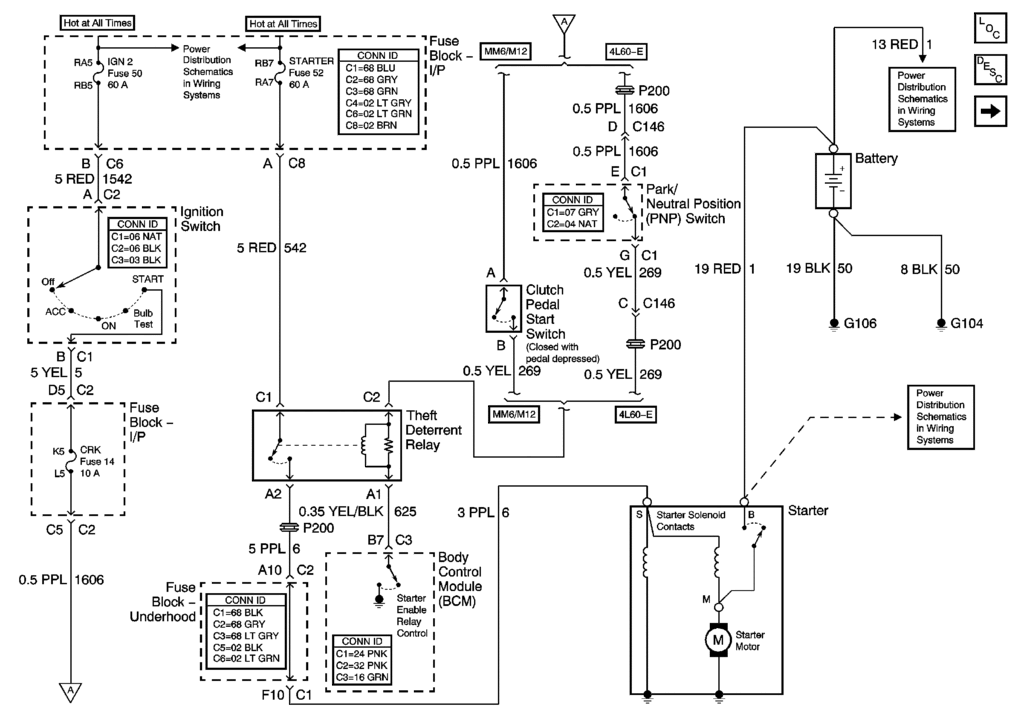
BC
Thread Starter
8th Gear
Joined: Nov 2010
Posts: 8
Likes: 0
Thanks for the help. Here are the codes:
40-BCM B2592 H
40-BCM B2723 H C
58- SDM B0090H
99- HVAC u1160H
AO LDCM B2282 H
B2284 H
U1064 H
A1 RDCM B 2284 H
B2285 H
A6 SCM B2860 H
No Manual Codes
I'm not sure what all this means except the only current code deals with the BCM. Do you think I need a new one?
JC
40-BCM B2592 H
40-BCM B2723 H C
58- SDM B0090H
99- HVAC u1160H
AO LDCM B2282 H
B2284 H
U1064 H
A1 RDCM B 2284 H
B2285 H
A6 SCM B2860 H
No Manual Codes
I'm not sure what all this means except the only current code deals with the BCM. Do you think I need a new one?
JC
Tech Contributor
Joined: Dec 1999
Posts: 32,910
Likes: 2,402
From: Anthony TX
CI 6,7,8,9,11 Vet
St. Jude Donor '08
B2723 is your only current DTC:
Clear ALL the DTCs using the reset module on each Module and then see what comes back and report those
Here is the read on B2723:
Document ID# 680097
2001 Chevrolet/Geo Corvette
--------------------------------------------------------------------------------
DTC B2723
Circuit Description
The body control module (BCM) supplies a 5 volt signal and a ground circuit for the PASS-Key® system. This allows the BCM to detect PASS-Key® resistance values. Inserting the PASS-Key® (with resistor pellet) in the ignition lock cylinder completes the PASS-Key® circuit. Contacts in the ignition lock cylinder mate with the pellet contacts. The BCM compares the resistance value of the key pellet to the valid resistance programmed into the BCM. If the proper resistance value is read, the BCM allows the following functions to occur:
The theft deterrent relay to energize.
The steering column to unlock.
The BCM sends a message through the serial data line to the powertrain control module (PCM) to allow fuel delivery to occur.
If the resistance value is incorrect, a malfunction is present and a DTC will set.
Conditions for Setting the DTC
The voltage level sampled at the BCMs PASS-Key® signal circuit is incorrect, signaling that an invalid PASS-Key® resistance was detected, and a short or an open is present.
This condition must be present for 1 second.
Action Taken When the DTC Sets
The BCM stores DTC B2723 in memory.
The BCM sends a message to the instrument cluster to illuminate the SECURITY indicator.
The BCM disables the theft deterrent relay.
The PCM will not allow fuel delivery to occur.
The BCM disables sampling of the PASS-Key® resistance for a time-out period of 3 minutes.
The steering column remains in the locked position.
Conditions for Clearing the DTC
This DTC requires an ignition cycle in order to change from current to history.
The BCM detects a valid PASS-Key® resistance value on the PASS-Key® signal circuit.
A history DTC will clear after 50 consecutive ignition cycles if the condition for the malfunction is no longer present.
Use the instrument panel cluster (IPC) clearing DTCs feature.
Use a scan tool.
Diagnostic Aids
If the key resistor pellet is incorrect, there will be no BCM outputs to the theft deterrent relay or to the PCM. This state will last about 3 minutes. If a key is inserted, or the ignition is turned ON again before the 3 minute time frame is complete, the timer will reset to 3 minutes. Disconnecting the battery will not clear the timer sequence, but the timer will reset to 3 minutes when the battery power is restored. Even if a proper key is inserted during one of the time periods, the vehicle will not start until the total time period has elapsed.
If there is a short between the PASS-Key® signal and ground circuit, or a short to ground on the PASS-Key® signal circuit, the vehicle will exhibit a no crank condition.
Test Description
The number below refers to the step number on the diagnostic table.
This test verifies the integrity of the key resistor circuits between the ignition switch and the BCM.
Step
Action
Yes
No
Schematic Reference: Theft Deterrent System Schematics
Connector End View Reference: Theft Deterrent System Connector End Views
1
Did you perform the Theft Deterrent Diagnostic System Check?
Go to Step 2
Go to Diagnostic System Check - Theft Deterrent
2
Install a scan tool.
Turn ON the ignition with the ignition OFF.
Select the BCM Display DTCs function on the scan tool.
Does the scan tool display B2723 as a current DTC?
Go to Step 3
Go to Testing for Intermittent and Poor Connections in Wiring Systems
3
Inspect the ignition key for dirt or obvious damage.
Does the ignition key appear dirty or damaged?
Go to Step 8
Go to Step 4
4
Turn OFF the ignition.
Disconnect the ignition lock cylinder connector.
Connect a J 35628-A Vats/Passkey Interrogator using terminal adapters from a J 35616-A to the key resistor input circuit and key resistor reference ground circuit.
Insert the ignition key into the key code reader on the J 35628-A and note the code on the LCD display.
Turn the rotary switch on the J 35628-A to the same code number as the ignition key.
Attempt to start the vehicle.
Does the vehicle start?
Go to Step 7
Go to Step 5
5
Test the following circuits for an open or a short to voltage:
The key resistor input circuit
The key resistor reference ground circuit
Did you find and correct the condition?
Go to Step 11
Go to Step 6
6
Inspect for poor connections at the harness connector of the BCM. Refer to Testing for Intermittent and Poor Connections and Connector Repairs in Wiring Systems.
Did you find and correct the condition?
Go to Step 11
Go to Step 10
7
Inspect for poor connections at the harness connector of the ignition lock cylinder. Refer to Testing for Intermittent and Poor Connections and Connector Repairs in Wiring Systems.
Did you find and correct the condition?
Go to Step 11
Go to Step 9
8
Clean or replace the ignition key as necessary. Refer to Replacing Keys .
Did you complete the procedure?
Go to Step 11
--
9
Replace the ignition switch lock cylinder. Refer to Ignition Switch Lock Cylinder Replacement in Instrument Panel, Gages and Console.
Did you complete the replacement?
Go to Step 11
--
10
Important
When replacing the BCM, perform the relearn procedure. Refer to Body Control Module (BCM) Programming/RPO Configuration in Body Control System.
Replace the BCM. Refer to Body Control Module Replacement in Body Control System.
Did you complete the repair?
Go to Step 11
--
11
Use the scan tool in order to clear the DTCs.
Operate the vehicle within the Conditions for Running the DTC as specified in the supporting text.
Does the DTC reset?
Go to Step 2
System OK
--------------------------------------------------------------------------------
Document ID# 680097
2001 Chevrolet/Geo Corvette
Clear ALL the DTCs using the reset module on each Module and then see what comes back and report those
Here is the read on B2723:
Document ID# 680097
2001 Chevrolet/Geo Corvette
--------------------------------------------------------------------------------
DTC B2723
Circuit Description
The body control module (BCM) supplies a 5 volt signal and a ground circuit for the PASS-Key® system. This allows the BCM to detect PASS-Key® resistance values. Inserting the PASS-Key® (with resistor pellet) in the ignition lock cylinder completes the PASS-Key® circuit. Contacts in the ignition lock cylinder mate with the pellet contacts. The BCM compares the resistance value of the key pellet to the valid resistance programmed into the BCM. If the proper resistance value is read, the BCM allows the following functions to occur:
The theft deterrent relay to energize.
The steering column to unlock.
The BCM sends a message through the serial data line to the powertrain control module (PCM) to allow fuel delivery to occur.
If the resistance value is incorrect, a malfunction is present and a DTC will set.
Conditions for Setting the DTC
The voltage level sampled at the BCMs PASS-Key® signal circuit is incorrect, signaling that an invalid PASS-Key® resistance was detected, and a short or an open is present.
This condition must be present for 1 second.
Action Taken When the DTC Sets
The BCM stores DTC B2723 in memory.
The BCM sends a message to the instrument cluster to illuminate the SECURITY indicator.
The BCM disables the theft deterrent relay.
The PCM will not allow fuel delivery to occur.
The BCM disables sampling of the PASS-Key® resistance for a time-out period of 3 minutes.
The steering column remains in the locked position.
Conditions for Clearing the DTC
This DTC requires an ignition cycle in order to change from current to history.
The BCM detects a valid PASS-Key® resistance value on the PASS-Key® signal circuit.
A history DTC will clear after 50 consecutive ignition cycles if the condition for the malfunction is no longer present.
Use the instrument panel cluster (IPC) clearing DTCs feature.
Use a scan tool.
Diagnostic Aids
If the key resistor pellet is incorrect, there will be no BCM outputs to the theft deterrent relay or to the PCM. This state will last about 3 minutes. If a key is inserted, or the ignition is turned ON again before the 3 minute time frame is complete, the timer will reset to 3 minutes. Disconnecting the battery will not clear the timer sequence, but the timer will reset to 3 minutes when the battery power is restored. Even if a proper key is inserted during one of the time periods, the vehicle will not start until the total time period has elapsed.
If there is a short between the PASS-Key® signal and ground circuit, or a short to ground on the PASS-Key® signal circuit, the vehicle will exhibit a no crank condition.
Test Description
The number below refers to the step number on the diagnostic table.
This test verifies the integrity of the key resistor circuits between the ignition switch and the BCM.
Step
Action
Yes
No
Schematic Reference: Theft Deterrent System Schematics
Connector End View Reference: Theft Deterrent System Connector End Views
1
Did you perform the Theft Deterrent Diagnostic System Check?
Go to Step 2
Go to Diagnostic System Check - Theft Deterrent
2
Install a scan tool.
Turn ON the ignition with the ignition OFF.
Select the BCM Display DTCs function on the scan tool.
Does the scan tool display B2723 as a current DTC?
Go to Step 3
Go to Testing for Intermittent and Poor Connections in Wiring Systems
3
Inspect the ignition key for dirt or obvious damage.
Does the ignition key appear dirty or damaged?
Go to Step 8
Go to Step 4
4
Turn OFF the ignition.
Disconnect the ignition lock cylinder connector.
Connect a J 35628-A Vats/Passkey Interrogator using terminal adapters from a J 35616-A to the key resistor input circuit and key resistor reference ground circuit.
Insert the ignition key into the key code reader on the J 35628-A and note the code on the LCD display.
Turn the rotary switch on the J 35628-A to the same code number as the ignition key.
Attempt to start the vehicle.
Does the vehicle start?
Go to Step 7
Go to Step 5
5
Test the following circuits for an open or a short to voltage:
The key resistor input circuit
The key resistor reference ground circuit
Did you find and correct the condition?
Go to Step 11
Go to Step 6
6
Inspect for poor connections at the harness connector of the BCM. Refer to Testing for Intermittent and Poor Connections and Connector Repairs in Wiring Systems.
Did you find and correct the condition?
Go to Step 11
Go to Step 10
7
Inspect for poor connections at the harness connector of the ignition lock cylinder. Refer to Testing for Intermittent and Poor Connections and Connector Repairs in Wiring Systems.
Did you find and correct the condition?
Go to Step 11
Go to Step 9
8
Clean or replace the ignition key as necessary. Refer to Replacing Keys .
Did you complete the procedure?
Go to Step 11
--
9
Replace the ignition switch lock cylinder. Refer to Ignition Switch Lock Cylinder Replacement in Instrument Panel, Gages and Console.
Did you complete the replacement?
Go to Step 11
--
10
Important
When replacing the BCM, perform the relearn procedure. Refer to Body Control Module (BCM) Programming/RPO Configuration in Body Control System.
Replace the BCM. Refer to Body Control Module Replacement in Body Control System.
Did you complete the repair?
Go to Step 11
--
11
Use the scan tool in order to clear the DTCs.
Operate the vehicle within the Conditions for Running the DTC as specified in the supporting text.
Does the DTC reset?
Go to Step 2
System OK
--------------------------------------------------------------------------------
Document ID# 680097
2001 Chevrolet/Geo Corvette
Tech Contributor
Joined: Dec 1999
Posts: 32,910
Likes: 2,402
From: Anthony TX
CI 6,7,8,9,11 Vet
St. Jude Donor '08
The resistor pellet in your key is not being read properly when you insert it into the slot. Clean the two metal contacts on the pellet or find your second key and try it.
Clear those DTCs!!!!
Clear those DTCs!!!!
Thread Starter
8th Gear
Joined: Nov 2010
Posts: 8
Likes: 0
C5 Will Not Start
Guys,
I charged the battery fully and reinstalled in the car. I ran the diagnostics again and erase all codes. The only one that reappears is this one:
40-BCM B2723 H C
Everything works but the starter will not engage.
I cleaned both keys and cyclinder, still no action from the starter. Tried both keys.
The 40-BCM B2723 H C code is still showing up.
Do I need a new key cyclinder or a new BCM? If it is a BCM, I need to take it in as I do not know how to program.
I was reading on the post of a scanner tech 2 to erase the code. I do not have one but if there is a chance it might work I will purchase one. Do you I need to try this or will it not help the problem.
Any direction would be helpful before I call a tow and take it to the dealer. I really do not want to spend 2K for a remove and replace part.
JC
I charged the battery fully and reinstalled in the car. I ran the diagnostics again and erase all codes. The only one that reappears is this one:
40-BCM B2723 H C
Everything works but the starter will not engage.
I cleaned both keys and cyclinder, still no action from the starter. Tried both keys.
The 40-BCM B2723 H C code is still showing up.
Do I need a new key cyclinder or a new BCM? If it is a BCM, I need to take it in as I do not know how to program.
I was reading on the post of a scanner tech 2 to erase the code. I do not have one but if there is a chance it might work I will purchase one. Do you I need to try this or will it not help the problem.
Any direction would be helpful before I call a tow and take it to the dealer. I really do not want to spend 2K for a remove and replace part.
JC
Tech Contributor
Joined: Dec 1999
Posts: 32,910
Likes: 2,402
From: Anthony TX
CI 6,7,8,9,11 Vet
St. Jude Donor '08
You DO NOT need a Tech2 to do anything with the DTCs EVERYTHING can be done with the IPC / DIC. If you do not FIX the issue that is causing the DTC,, it will continue to reappear each time you check the DTCs
READING YOUR Engine Diagnostic Trouble Codes (DTC)
This procedure should be carried out any time you experience a problem with your C5. Most inexpensive store bought aftermarket code readers will ONLY read power train DTC’s. Reading the DTC’s with the C5 built in code reader will allow you to read ALL the modules in the vehicle.
The Diagnostic Display Mode is entered with the following procedure:
1) Turn on the ignition but don't start the engine.
2) Press the RESET button to turn off any warning messages. (i.e. door open, trunk open ect)
3) Press and hold the OPTIONS button
4) While holding OPTIONS, press FUEL button four times within a 10 -second period.
Initially, the on-board diagnostics go into an Automatic Mode which will cycle through each module and shows diagnostic codes in a pre-set sequence: PCM - TCS - RTD - BCM - IPC - RADIO - HVAC - LDCM - RDCM - SCM - RFA. All codes will be displayed for each module. ( i.e. PCM = 4 codes) If none are present in a given module, you will see No More Codes on the display.
There are two types of diagnostic codes, Current and History designated with a letter suffix, “C” or “H”. A current code indicates a malfunction is present in the module displaying data. A history code indicates a problem existed sometime in the last 40 or 50 ignition cycles. When not accompanied by a current code of the same number, it's potential evidence of a previous problem, now resolved, that was not removed by clearing the codes. More likely it's an indication of an intermittent malfunction.
Intermittent codes are the most challenging of the diagnostics. An intermittent code may have happened once, may have happened more than once but is inconsistent or may be happening on a regular basis but not at the time the codes are displayed. History codes can also be caused by a current malfunction in a system that is not operating at the time codes are displayed. An example is the rear window defogger which doesn't operate until the Body Control Module detects engine rpm. For history codes set by a module that does not operate with the key on and engine off, a special diagnostic tool called a Scan Tester is necessary to properly diagnose the malfunction.
Once the system has displayed all modules, it goes into the manual mode which allows selection of each module using combinations of Driver Information Center buttons. Manual mode can also be entered during the automatic sequence by pressing any button except E/M. Once the display shows Manual Diagnostics, select a module by pressing the OPTIONS button to go forward or the TRIP button to go back. Once a module is selected, a code is displayed, and if more than one are present; press GAGES to go forward or FUEL to go back.
To exit the diagnostic mode at any time, press E/M. If you want to erase codes in a given module, press RESET To reset the codes once in manual mode, press and hold RESET until it displays NO CODES Press OPTIONS to go to the next module. Repeat the steps until you have reset the codes in all the computer modules.
NOTE!! Only reset the codes IF you want to - it is NOT necessary to do this. Clearing a code does not repair a problem. You are simply erasing the evidence of it in the module's memory. If you clear the code/s, and extinguish the Check Engine Light, your emissions status ready will NOT allow you to pass an emissions test until you have completed the required driving cycles. There are a few body module DTC’s that if set will prevent the module from operating properly. Once the DTC is cleared, the module will return to full function. This is not true for power train DTCs.
If you have never read and cleared your codes, there will probably be a lot of old history DTCs. It is recommended that you clear your codes and see if any come back during a driving cycle. Those are the ones that you need to concentrate on diagnosing.
Once you have the codes, the next question is: What to do with the information?
First, consult the factory service manual. Any serious C5 Do-It-Yourself owner should invest in the Corvette Service Manual of the appropriate model year. The Service Manual is really a requirement if you want to understand and work on your C5.
NOTE and a WARNING. You can read the DTCs while the engine is running. I pull mine up all the time while driving.
WARNING. Don’t become distracted while reading DTCs while your driving and cause an accident!!!!! Use common sense and drive safe.
These are some very good C5 Diagnostic Trouble Code (DTC) explanation web sites!!! They also explain how to read the DTCs
Here are some very good sites that explain what DTC mean:
http://www.gearchatter.com/viewtopic11755.php
http://www.obd-codes.com/trouble_cod...d-ii-codes.php
Make sure to include the H or C suffix when you post your DTCs!!
READING YOUR Engine Diagnostic Trouble Codes (DTC)
This procedure should be carried out any time you experience a problem with your C5. Most inexpensive store bought aftermarket code readers will ONLY read power train DTC’s. Reading the DTC’s with the C5 built in code reader will allow you to read ALL the modules in the vehicle.
The Diagnostic Display Mode is entered with the following procedure:
1) Turn on the ignition but don't start the engine.
2) Press the RESET button to turn off any warning messages. (i.e. door open, trunk open ect)
3) Press and hold the OPTIONS button
4) While holding OPTIONS, press FUEL button four times within a 10 -second period.
Initially, the on-board diagnostics go into an Automatic Mode which will cycle through each module and shows diagnostic codes in a pre-set sequence: PCM - TCS - RTD - BCM - IPC - RADIO - HVAC - LDCM - RDCM - SCM - RFA. All codes will be displayed for each module. ( i.e. PCM = 4 codes) If none are present in a given module, you will see No More Codes on the display.
There are two types of diagnostic codes, Current and History designated with a letter suffix, “C” or “H”. A current code indicates a malfunction is present in the module displaying data. A history code indicates a problem existed sometime in the last 40 or 50 ignition cycles. When not accompanied by a current code of the same number, it's potential evidence of a previous problem, now resolved, that was not removed by clearing the codes. More likely it's an indication of an intermittent malfunction.
Intermittent codes are the most challenging of the diagnostics. An intermittent code may have happened once, may have happened more than once but is inconsistent or may be happening on a regular basis but not at the time the codes are displayed. History codes can also be caused by a current malfunction in a system that is not operating at the time codes are displayed. An example is the rear window defogger which doesn't operate until the Body Control Module detects engine rpm. For history codes set by a module that does not operate with the key on and engine off, a special diagnostic tool called a Scan Tester is necessary to properly diagnose the malfunction.
Once the system has displayed all modules, it goes into the manual mode which allows selection of each module using combinations of Driver Information Center buttons. Manual mode can also be entered during the automatic sequence by pressing any button except E/M. Once the display shows Manual Diagnostics, select a module by pressing the OPTIONS button to go forward or the TRIP button to go back. Once a module is selected, a code is displayed, and if more than one are present; press GAGES to go forward or FUEL to go back.
To exit the diagnostic mode at any time, press E/M. If you want to erase codes in a given module, press RESET To reset the codes once in manual mode, press and hold RESET until it displays NO CODES Press OPTIONS to go to the next module. Repeat the steps until you have reset the codes in all the computer modules.
NOTE!! Only reset the codes IF you want to - it is NOT necessary to do this. Clearing a code does not repair a problem. You are simply erasing the evidence of it in the module's memory. If you clear the code/s, and extinguish the Check Engine Light, your emissions status ready will NOT allow you to pass an emissions test until you have completed the required driving cycles. There are a few body module DTC’s that if set will prevent the module from operating properly. Once the DTC is cleared, the module will return to full function. This is not true for power train DTCs.
If you have never read and cleared your codes, there will probably be a lot of old history DTCs. It is recommended that you clear your codes and see if any come back during a driving cycle. Those are the ones that you need to concentrate on diagnosing.
Once you have the codes, the next question is: What to do with the information?
First, consult the factory service manual. Any serious C5 Do-It-Yourself owner should invest in the Corvette Service Manual of the appropriate model year. The Service Manual is really a requirement if you want to understand and work on your C5.
NOTE and a WARNING. You can read the DTCs while the engine is running. I pull mine up all the time while driving.
WARNING. Don’t become distracted while reading DTCs while your driving and cause an accident!!!!! Use common sense and drive safe.
These are some very good C5 Diagnostic Trouble Code (DTC) explanation web sites!!! They also explain how to read the DTCs
Here are some very good sites that explain what DTC mean:
http://www.gearchatter.com/viewtopic11755.php
http://www.obd-codes.com/trouble_cod...d-ii-codes.php
Make sure to include the H or C suffix when you post your DTCs!!
Thread Starter
8th Gear
Joined: Nov 2010
Posts: 8
Likes: 0
C5 Will not start
I have cleared all codes that I can. The only one that reappears that I think is current is this one.
40-BCM B2723 H C
I think the H means History and the C means Current.
Any Ideas?
JC
40-BCM B2723 H C
I think the H means History and the C means Current.
Any Ideas?
JC
Corvette Stories
The Best of Corvette for Corvette Enthusiasts

Top 10 Most Expensive Corvettes Ever Sold on Bring A Trailer
Brett Foote
10 Things Every Corvette Owner Needs (2026 Edition)
Michael S. Palmer
8 Most "Only Corvette Owners Understand" Quirks and Problems
Pouria Savadkouei
10 Reasons the C6 Z06 is Still A Performance Benchmark After 20 Years
Joe Kucinski
How Much Horsepower Every Corvette Engine "LOST" in 1972
Joe Kucinski
Top 10 DOs and DON'Ts for Protecting Your Convertible Top!
Michael S. Palmer
Top 10 Most Explosive Corvettes Ever Made: Power-to-Weight Ratio Ranked!
Joe Kucinski
150 hp to 1,250 hp: Every Corvette Generation Compared by the Specs That Matter
Joe Kucinski
8 Coolest Corvette Pace Cars (and Replicas) of All Time
Verdad Gallardo
Tech Contributor


Joined: Jan 2007
Posts: 19,453
Likes: 1,158
From: Dyer, IN
Thread Starter
8th Gear
Joined: Nov 2010
Posts: 8
Likes: 0
C5 will not start
Guys I think I have found the problem. After taking the ignition switch back out and looking at the contacts where the key slides in and out with magnifying glass, I noticed a small golden conector laying in the tract. (I'm not sure how my key still went in and out but it did) It looks like it came out of the sidewall of the cylinder. I think this is the problem. My plan is to purchase a lock cylinder and swap it out. I dont think I can use my old keys with the new cylinder? If I swap it out and then call a lock smith and tell them I lost the key, do you think that wil work or do I need to take in to the dealer to have them clear the B2723 code?
If you know of anything else I can do please let me know. Trying to avoid the dealer cost....
JC
If you know of anything else I can do please let me know. Trying to avoid the dealer cost....
JC
Last edited by JC218; Oct 22, 2012 at 12:22 AM.

Safety Car


Joined: Dec 2011
Posts: 4,704
Likes: 239
From: Redondo Beach CA
If you need a locksmith, just tell the locksmith what's up. He can put in different lock pins to fit the old keys to the new part. As a matter of fact, the parts he would need would be in the old cylinder.
Thread Starter
8th Gear
Joined: Nov 2010
Posts: 8
Likes: 0
C5 will not start
I will try it and keep you updated.
The part is special order and it it will take a few days to get here. I will post again and let you know how it turns out as soon as I receive the part.
I hope this is the problem.
JC
The part is special order and it it will take a few days to get here. I will post again and let you know how it turns out as soon as I receive the part.
I hope this is the problem.
JC
Thread Starter
8th Gear
Joined: Nov 2010
Posts: 8
Likes: 0
C-5 will not start
Guys,
Thanks for all of your inputs. I oredered a lock cylinder replacement. It came in and I took it apart. I simply removed all the tumblers from the old lock cylinder and installed in the new lock cylinder. Reinstalled in the ignition switch. Put everything back together and ran a diagnostic. The B2723 code was there but it was an H code for History. Vette cranked up first try and has been working all day today.
I wanted to say thanks to all of you for taking the time and making quick replies to my posting and helping me get running again.
JC
Thanks for all of your inputs. I oredered a lock cylinder replacement. It came in and I took it apart. I simply removed all the tumblers from the old lock cylinder and installed in the new lock cylinder. Reinstalled in the ignition switch. Put everything back together and ran a diagnostic. The B2723 code was there but it was an H code for History. Vette cranked up first try and has been working all day today.
I wanted to say thanks to all of you for taking the time and making quick replies to my posting and helping me get running again.
JC