



Orange Electronic TPMS learning?

Thread Starter
Racer

Joined: Aug 2011
Posts: 297
Likes: 0
From: Sevierville TN
 Orange Electronic TPMS learning?
I recently installed new OE wheels on my '04 CE vert along with new Orange Electronic TPMS. So far I've not been able to get a single sensor to respond to the magnet learning procedure outlined here on this forum. I've tried four different magnets I had lying around my shop from an old CB antennae mag mount, one off the back of a speaker, a couple of strong bar magnets purchased from Radio Shack, and a screwdriver magnetizer. I held these magnets in multiple positions on each wheel also.
Just to make sure I ordered the right sensors, I double checked the OE Wheels web site and checked the part # with what I had and checked that with other sites that sell the Orange unit.
While I was on the OE Wheels site that I ordered them from, I noticed they had an "install" tab on the order page for the TPMS and it stated...
1. Turn ignition switch to ON position (engine off)
2. Press and hold unlock and lock buttons on the keyless entry transmitter; until horn sounds and then LF turn signal will become illuminated.
3. Starting with LF tire increase/decrease, tire pressure until horn sounds.
4. After horn sounds proceed as in step 5 for the next 3 sensors in the following order RF RR LR After completing LR tire horn will sound twice.
5. Turn ignition to OFF position to exit vehicle learn mode. Adjust all tires to pressure listed on the placard.
Well, I thought I'd try this but nothing happened while holding the buttons on my transmitter.
I, also, tried the pressure varying while in the regular learning procedure to no avail.
Any suggestions as to what to try next? I would hate to think that the tire installers broke every single sensor but, if nothing else works, I guess it's back to them to find out.
Sonny
Just to make sure I ordered the right sensors, I double checked the OE Wheels web site and checked the part # with what I had and checked that with other sites that sell the Orange unit.
While I was on the OE Wheels site that I ordered them from, I noticed they had an "install" tab on the order page for the TPMS and it stated...
1. Turn ignition switch to ON position (engine off)
2. Press and hold unlock and lock buttons on the keyless entry transmitter; until horn sounds and then LF turn signal will become illuminated.
3. Starting with LF tire increase/decrease, tire pressure until horn sounds.
4. After horn sounds proceed as in step 5 for the next 3 sensors in the following order RF RR LR After completing LR tire horn will sound twice.
5. Turn ignition to OFF position to exit vehicle learn mode. Adjust all tires to pressure listed on the placard.
Well, I thought I'd try this but nothing happened while holding the buttons on my transmitter.
I, also, tried the pressure varying while in the regular learning procedure to no avail.
Any suggestions as to what to try next? I would hate to think that the tire installers broke every single sensor but, if nothing else works, I guess it's back to them to find out.
Sonny
Race Director


Joined: Apr 2007
Posts: 11,150
Likes: 890
From: South Western Ontario
That procedure is wrong.
If you can't get it to learn then you either need a bigger magnet or the sensors are no good. I use a 1" x 2" x 3" ceramic bar magnet. I can hold it by the valve stem and it works no problem.
If you can't get it to learn then you either need a bigger magnet or the sensors are no good. I use a 1" x 2" x 3" ceramic bar magnet. I can hold it by the valve stem and it works no problem.
Thread Starter
Racer
Joined: Aug 2011
Posts: 297
Likes: 0
From: Sevierville TN
Thanks,
Sonny

Racer


Joined: Sep 2012
Posts: 408
Likes: 19
From: O'Fallon MO
Use this procedure copied from this site;
TPMs. 1) Turn ignition on 2) Press "Reset" button in order to clear any IPC display warning messages 3) Press and release the "Options" button on the DIC to scroll through the display options until the IPC display is blank 4) Press and hold the DIC "Reset" button for 3 seconds 5) Press the "Options" button again until TIRE TRAINING message appears 6) Press "Reset" button until the IPC "Learn L Front Tire" message appears in order to begin the programming 7) Install the J41760 Tire Pressure Monitor (TPM) System Programming Tool (large magnet will do) over the left front valve stem 8) The horn will sound, indicating the left front TPM sensor is programmed (if this takes more than 15 seconds, pull magnet back and try again, it will give you three tries. Then you must start over) 9) When the horn sounds, proceed to program the next TPM sensor in the following order as directed by the IPC messages: -Learn R Front Tire -Learn R Rear Tire -Learn L Rear Tire Programming can be canceled by turning ignition off, waiting 2 minutes with no sensors being learned, finishing all 4 wheels or through the DIC. If the programming is canceled with less than 4 sensors learned, it will only accept the codes programmed up to that point.
TPMs. 1) Turn ignition on 2) Press "Reset" button in order to clear any IPC display warning messages 3) Press and release the "Options" button on the DIC to scroll through the display options until the IPC display is blank 4) Press and hold the DIC "Reset" button for 3 seconds 5) Press the "Options" button again until TIRE TRAINING message appears 6) Press "Reset" button until the IPC "Learn L Front Tire" message appears in order to begin the programming 7) Install the J41760 Tire Pressure Monitor (TPM) System Programming Tool (large magnet will do) over the left front valve stem 8) The horn will sound, indicating the left front TPM sensor is programmed (if this takes more than 15 seconds, pull magnet back and try again, it will give you three tries. Then you must start over) 9) When the horn sounds, proceed to program the next TPM sensor in the following order as directed by the IPC messages: -Learn R Front Tire -Learn R Rear Tire -Learn L Rear Tire Programming can be canceled by turning ignition off, waiting 2 minutes with no sensors being learned, finishing all 4 wheels or through the DIC. If the programming is canceled with less than 4 sensors learned, it will only accept the codes programmed up to that point.

Burning Brakes

Joined: Mar 2011
Posts: 1,048
Likes: 5
From: Metairie LA
I think the orange (reddish orange) sensors are OEM Schrader. Mine are the early ones-p/n 28006. Yours should be p/n 20117:
http://www.schraderinternational.com...ette&year=2004
Double check the part number-MAY be incorrect.
http://www.schraderinternational.com...ette&year=2004
Double check the part number-MAY be incorrect.
Last edited by PhilsFRC; Nov 26, 2012 at 02:59 PM.

Tech Contributor
Joined: May 2008
Posts: 3,100
Likes: 17
From: Somers, CT and Clermont, FL
St. Jude Donor '09-'10-'11-'12-'13-'14-'15-'16
While I was on the OE Wheels site that I ordered them from, I noticed they had an "install" tab on the order page for the TPMS and it stated...
1. Turn ignition switch to ON position (engine off)
2. Press and hold unlock and lock buttons on the keyless entry transmitter; until horn sounds and then LF turn signal will become illuminated.
3. Starting with LF tire increase/decrease, tire pressure until horn sounds.
4. After horn sounds proceed as in step 5 for the next 3 sensors in the following order RF RR LR After completing LR tire horn will sound twice.
5. Turn ignition to OFF position to exit vehicle learn mode. Adjust all tires to pressure listed on the placard.
1. Turn ignition switch to ON position (engine off)
2. Press and hold unlock and lock buttons on the keyless entry transmitter; until horn sounds and then LF turn signal will become illuminated.
3. Starting with LF tire increase/decrease, tire pressure until horn sounds.
4. After horn sounds proceed as in step 5 for the next 3 sensors in the following order RF RR LR After completing LR tire horn will sound twice.
5. Turn ignition to OFF position to exit vehicle learn mode. Adjust all tires to pressure listed on the placard.

Use the procedure that clegg posted to program them. It is also outlined in your owner's manual.
Corvette Stories
The Best of Corvette for Corvette Enthusiasts

150 hp to 1,250 hp: Every Corvette Generation Compared by the Specs That Matter
Joe Kucinski
8 Coolest Corvette Pace Cars (and Replicas) of All Time
Verdad Gallardo
Top 10 Corvette Engines RANKED by Peak Torque (70+ Years of Muscle!)
Joe Kucinski
Corvette ZR1X Will Be Pacing the Indy 500, And Could Probably Race, Too!
Verdad Gallardo
Top 10 Corvettes Coming to Mecum Indy 2026!
Brett Foote
Top 10 C9 Corvette MUST-HAVES to Fix These C8 Generation Flaws!
Michael S. Palmer
10 Revolutionary 'Corvette Firsts' Most People Don't Know
Joe Kucinski
5 Reasons to Upgrade to an LS6-Powered Corvette; 5 Reasons to Stay LT2
Michael S. Palmer
2027 Corvette vs The World: Every C8 vs Its Closest Competitor
Joe Kucinski
Thread Starter
Racer
Joined: Aug 2011
Posts: 297
Likes: 0
From: Sevierville TN
Use this procedure copied from this site;
TPMs. 1) Turn ignition on 2) Press "Reset" button in order to clear any IPC display warning messages 3) Press and release the "Options" button on the DIC to scroll through the display options until the IPC display is blank 4) Press and hold the DIC "Reset" button for 3 seconds 5) Press the "Options" button again until TIRE TRAINING message appears 6) Press "Reset" button until the IPC "Learn L Front Tire" message appears in order to begin the programming 7) Install the J41760 Tire Pressure Monitor (TPM) System Programming Tool (large magnet will do) over the left front valve stem 8) The horn will sound, indicating the left front TPM sensor is programmed (if this takes more than 15 seconds, pull magnet back and try again, it will give you three tries. Then you must start over) 9) When the horn sounds, proceed to program the next TPM sensor in the following order as directed by the IPC messages: -Learn R Front Tire -Learn R Rear Tire -Learn L Rear Tire Programming can be canceled by turning ignition off, waiting 2 minutes with no sensors being learned, finishing all 4 wheels or through the DIC. If the programming is canceled with less than 4 sensors learned, it will only accept the codes programmed up to that point.
TPMs. 1) Turn ignition on 2) Press "Reset" button in order to clear any IPC display warning messages 3) Press and release the "Options" button on the DIC to scroll through the display options until the IPC display is blank 4) Press and hold the DIC "Reset" button for 3 seconds 5) Press the "Options" button again until TIRE TRAINING message appears 6) Press "Reset" button until the IPC "Learn L Front Tire" message appears in order to begin the programming 7) Install the J41760 Tire Pressure Monitor (TPM) System Programming Tool (large magnet will do) over the left front valve stem 8) The horn will sound, indicating the left front TPM sensor is programmed (if this takes more than 15 seconds, pull magnet back and try again, it will give you three tries. Then you must start over) 9) When the horn sounds, proceed to program the next TPM sensor in the following order as directed by the IPC messages: -Learn R Front Tire -Learn R Rear Tire -Learn L Rear Tire Programming can be canceled by turning ignition off, waiting 2 minutes with no sensors being learned, finishing all 4 wheels or through the DIC. If the programming is canceled with less than 4 sensors learned, it will only accept the codes programmed up to that point.
Sonny
Thread Starter
Racer
Joined: Aug 2011
Posts: 297
Likes: 0
From: Sevierville TN
I think the orange (reddish orange) sensors are OEM Schrader. Mine are the early ones-p/n 28006. Yours should be p/n 20117:
http://www.schraderinternational.com...ette&year=2004
Double check the part number-MAY be incorrect.
http://www.schraderinternational.com...ette&year=2004
Double check the part number-MAY be incorrect.
Sonny
Thread Starter
Racer
Joined: Aug 2011
Posts: 297
Likes: 0
From: Sevierville TN
Burning Brakes
Joined: Mar 2011
Posts: 1,048
Likes: 5
From: Metairie LA
Never heard of Orange Electronic and then searched:
http://www.orange-electronic.com/index_tw.html
Looks like a great CHINESE company-not that there's anything wrong with that-the wife's from Shanghai. Looking further these sensors are about half the price of the Schraders, which are in turn almost half the price of GM. You may have a part QUALITY problem. My $.02.
http://www.orange-electronic.com/index_tw.html
Looks like a great CHINESE company-not that there's anything wrong with that-the wife's from Shanghai. Looking further these sensors are about half the price of the Schraders, which are in turn almost half the price of GM. You may have a part QUALITY problem. My $.02.

Tech Contributor


Joined: Dec 1999
Posts: 32,910
Likes: 2,402
From: Anthony TX
CI 6,7,8,9,11 Vet
St. Jude Donor '08
The STEM of the sensor does NOTHING for the sensor except to hold it in place and allow air IN & OUT of the tire. The sensor actually have a small reed switch that gets actuated by a MAGNET or CENTRIFICAL FORCE (tire rotation ) This is what turns the sensor ON and OFF to conserve battery power when the car is not in use or to turn the sensor on when programming.
When you place the magnet on the sensor. you really need to place it ON THE RIM over the sensor where the sensor is positioned:

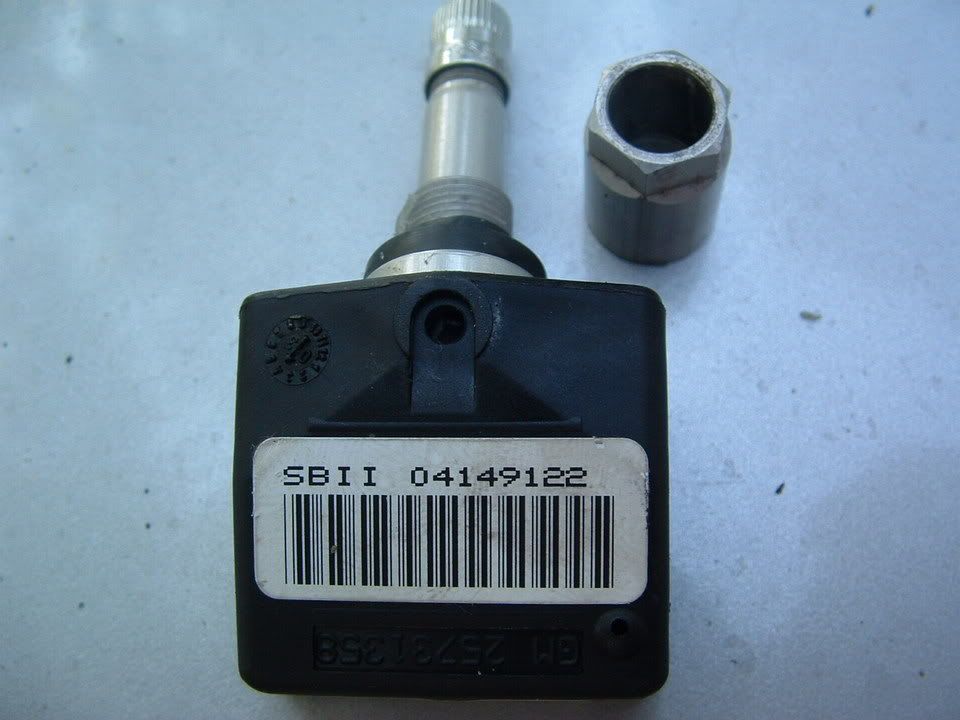
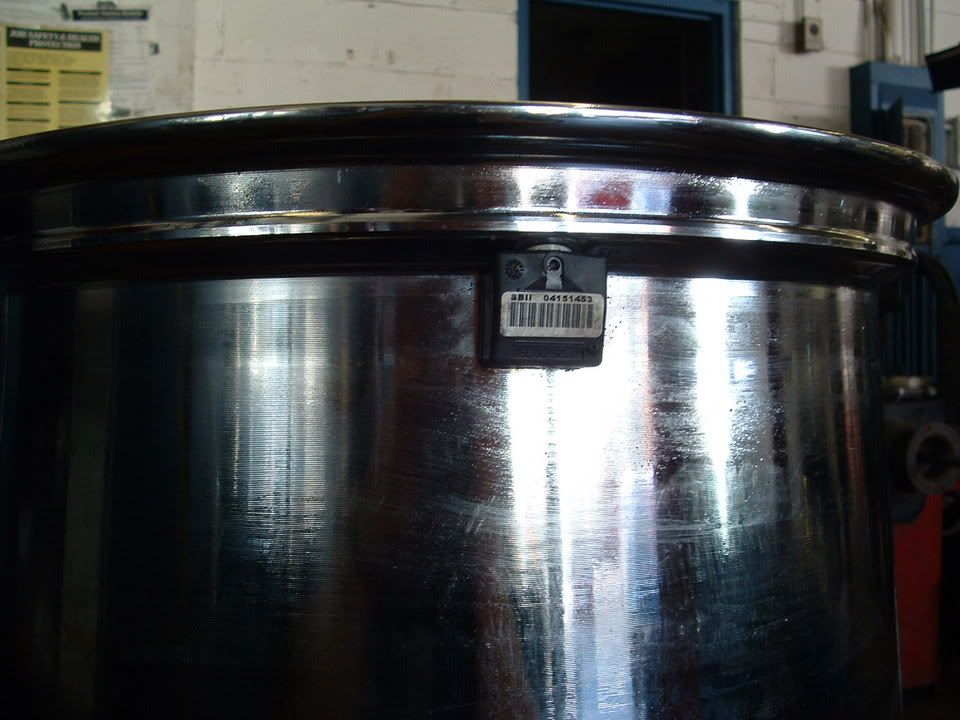
There TWO different sensors. 97-2000 & 2001-2004 You can NOT use one that is not for your year series C5. Did they send you an early or late mod sensor??
Do you have the early sensors or late model sensors?
When you place the magnet on the sensor. you really need to place it ON THE RIM over the sensor where the sensor is positioned:
There TWO different sensors. 97-2000 & 2001-2004 You can NOT use one that is not for your year series C5. Did they send you an early or late mod sensor??
Do you have the early sensors or late model sensors?
Last edited by Bill Curlee; Nov 27, 2012 at 04:56 PM.
Tech Contributor
Joined: Dec 1999
Posts: 32,910
Likes: 2,402
From: Anthony TX
CI 6,7,8,9,11 Vet
St. Jude Donor '08
Here is a picture of an early sensor:
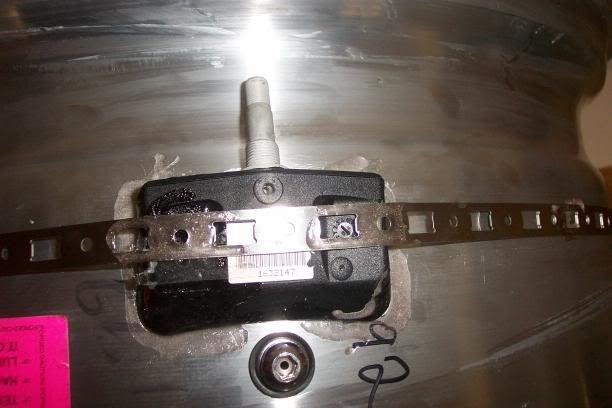
Early vs Late
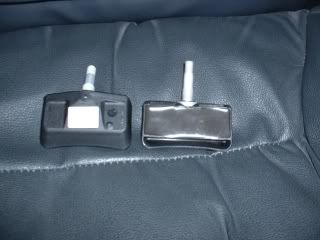
If the sensors that you purchased do not operate on the same frequency as the old ones or the frequency that your RFA module operates on, the sensors will not work. If its an aftermarket sensor, it can look like a late model sensor and actually transmit the early frequency.
BC
Early vs Late
If the sensors that you purchased do not operate on the same frequency as the old ones or the frequency that your RFA module operates on, the sensors will not work. If its an aftermarket sensor, it can look like a late model sensor and actually transmit the early frequency.
BC
Last edited by Bill Curlee; Nov 27, 2012 at 04:58 PM.
Thread Starter
Racer
Joined: Aug 2011
Posts: 297
Likes: 0
From: Sevierville TN
If the sensors that you purchased do not operate on the same frequency as the old ones or the frequency that your RFA module operates on, the sensors will not work. If its an aftermarket sensor, it can look like a late model sensor and actually transmit the early frequency.
BC
BC
Here is the page I ordered from...
http://oewheelsllc.com/TPMS-Sensors_...ssure-Sensor_2
There has got to be something wrong because I found a VERY strong magnet today and still not a single sensor triggered the horn.
Sonny
Burning Brakes
Joined: Mar 2011
Posts: 1,048
Likes: 5
From: Metairie LA
Frequency ID
Don't know if this will help, but the ID information on my early sensors (Schrader, not yet installed) are as follows:
328006 DC
315FM 63PSI
ASIC No. 02073923
FCC ID: MRXGMG2R3FM
IC: 2546A-GMG2R3FM
MODEL: GMG2R3FM
I would assume if these codes are on yours, you have the incorrect sensors. I picked up one of these to "learn" them:
http://www.amazon.com/Schrader-20143.../dp/B004A42MZI
328006 DC
315FM 63PSI
ASIC No. 02073923
FCC ID: MRXGMG2R3FM
IC: 2546A-GMG2R3FM
MODEL: GMG2R3FM
I would assume if these codes are on yours, you have the incorrect sensors. I picked up one of these to "learn" them:
http://www.amazon.com/Schrader-20143.../dp/B004A42MZI
Thread Starter
Racer
Joined: Aug 2011
Posts: 297
Likes: 0
From: Sevierville TN
I'll be pissed if I have to break down each tire again but, I want them to work!
Sonny

Team Owner

Joined: Jul 2012
Posts: 34,479
Likes: 532
From: Central PA. - - My AR15 identifies as a muzzleloader
I believe in the Beer Fairy
The early model is wider, like the ones shown in the photo you linked sbulla. The later 01-04 is usually narrower, like the ones shown in Bill's photos. That's not to say you might not be able to buy new ones and have them look like the old style, but they look wrong to me. Mine that I bought new from Ebay looked more like the ones I took off (like yours, but my car is older).
It doesn't appear to me that you ordered the wrong ones, but, it does appear as if they have the wrong ones on that page. Might check with the place and see what they say. If you get another set, you may consider programming them before you take them to a tire shop. You can just sit in the drivers seat and make sure they're good to go before paying to have them installed. That's what I did. All 4 were ready to go before I took them in. Then, just reprogram them after installation to get the right ones recognized at the proper 4 corners of the car.
It doesn't appear to me that you ordered the wrong ones, but, it does appear as if they have the wrong ones on that page. Might check with the place and see what they say. If you get another set, you may consider programming them before you take them to a tire shop. You can just sit in the drivers seat and make sure they're good to go before paying to have them installed. That's what I did. All 4 were ready to go before I took them in. Then, just reprogram them after installation to get the right ones recognized at the proper 4 corners of the car.
Burning Brakes
Joined: Mar 2011
Posts: 1,048
Likes: 5
From: Metairie LA
From what I'm reading, prepared to be pissed. I got mine from Amazon-here are yours:
http://www.amazon.com/Schrader-20117.../dp/B002GYSP8C
http://www.amazon.com/Schrader-20117.../dp/B002GYSP8C