




Keyless entry not working...

Thread Starter
Drifting

Joined: Feb 2000
Posts: 1,922
Likes: 0
From: Boulder, Colorado
 Keyless entry not working...
I've tried reprogramming both remotes. Sometimes they will work for a few hours, but eventually they don't work again. Battery voltage is good, and I tried cleaning the contacts, too, with no improvement.
Anyone have this problem, and know what needs to be replaced? I never much cared for the GM remotes (my car is a '99), so if a fix is expensive I'll look for an aftermarket system.
Thanks,
Miles
PS: Anyone know what frequency they work at? I couldn't find it on the web, and didn't have any luck searching for it at work on a spectrum-analyzer. Sure seems like it's not a transmitter problem, but it'd be nice if they are actually working.
Anyone have this problem, and know what needs to be replaced? I never much cared for the GM remotes (my car is a '99), so if a fix is expensive I'll look for an aftermarket system.
Thanks,
Miles
PS: Anyone know what frequency they work at? I couldn't find it on the web, and didn't have any luck searching for it at work on a spectrum-analyzer. Sure seems like it's not a transmitter problem, but it'd be nice if they are actually working.

Melting Slicks


Joined: Aug 2003
Posts: 3,306
Likes: 5
I had both of mine go out once, I reprogrammed them and they work now. The only problem is, now they have a mind of their own. It doesn't matter if the passive thing is on or off, it automatically locks and unlocks the car on its own. I don't know what to do about it, these things are a pain in the azz, good luck on getting yours fixed! Maybe someone can step in here and tell us the answer to all our keyless entry problems. 

Tech Contributor


Joined: Dec 1999
Posts: 32,910
Likes: 2,402
From: Anthony TX
CI 6,7,8,9,11 Vet
St. Jude Donor '08
I had the key fob problem from hell! It did all kinds of crazy stuff. I only had one remote, so I couldnt see it it was a fob remote problem or RFA problem. I went on E-Bay and got a brand new set of remotes for $75. Problem solved! 
For anyone having a problem with their remotes loosing sync constantly, more than likley it's the FOB.
Remember,, there is a resync procedure (hold lock and unlock down until the horn toots) and there is the relearn procedure that is outlined in the owners manual.
If re-sync does not work, then carry out the relearn procedure on all of your fobs (it will program up to three fobs) at the same time and then do the resync. Should be good to go after that. If not get a new fob.
BC
For anyone having a problem with their remotes loosing sync constantly, more than likley it's the FOB.
Remember,, there is a resync procedure (hold lock and unlock down until the horn toots) and there is the relearn procedure that is outlined in the owners manual.
If re-sync does not work, then carry out the relearn procedure on all of your fobs (it will program up to three fobs) at the same time and then do the resync. Should be good to go after that. If not get a new fob.
BC

Burning Brakes

Joined: Nov 2003
Posts: 1,120
Likes: 0
From: Ypsilanti MI
I agree with Bill. Everytime mine have went out it either was the battery or I had to re-program. Read the owners manual and it will tell you about holding down the unlock and lock buttons at the same time for 10 or 12 seconds until the horn sounds.
Racer

Joined: Jul 2004
Posts: 331
Likes: 0
From: Atlanta, GA
Any other answers
I've also had problems with the keyless entry on my 99. At first I replaced the battery and resynchronized. I then used the "relearn" program through the DIC. Mine will work for a minute and then stop working. It also works like it is in Passive mode even though the switch is not set to that option. Today, I noticed my average MPG was reset. I also noticed my heads up showing a different screen. Seems like something electrical to me. Any answers or other suggestions? Thanks for any help.
R
R
Last edited by ronman99vette; Aug 16, 2004 at 08:56 PM.

Pro


Joined: Mar 2002
Posts: 576
Likes: 48
From: Woburn MA
I agree with Bill,
I also had both Fobs lose their minds; the press and hold resync would work for a day or two.
New batteries did not help.
Relearned the Fobs thru the DIC, again No Good.
Got the dealer to reluctantly replace one as a test, TaDa its been working ever since.
Don't ya just hate it when its poring out and you run to the car hitting the Fob and nothing happens!
I also had both Fobs lose their minds; the press and hold resync would work for a day or two.
New batteries did not help.
Relearned the Fobs thru the DIC, again No Good.
Got the dealer to reluctantly replace one as a test, TaDa its been working ever since.
Don't ya just hate it when its poring out and you run to the car hitting the Fob and nothing happens!

Pro
Joined: Feb 2004
Posts: 653
Likes: 5
From: Florida
I have the same problem on my 99. I go through the process of programing the remote. The remote works for 15 minutes then loses sync again. I have purchased 2 brand new Key Fobs from Ebay. I was lucky to find new dealer sealed ones not used. I will have them by the end of this week. I will post to let you guys know if it fixes my problem.
BTW I only have one key fob for the car now to test.
BTW I only have one key fob for the car now to test.
Corvette Stories
The Best of Corvette for Corvette Enthusiasts

Top 10 Most Expensive Corvettes Ever Sold on Bring A Trailer
Brett Foote
10 Things Every Corvette Owner Needs (2026 Edition)
Michael S. Palmer
8 Most "Only Corvette Owners Understand" Quirks and Problems
Pouria Savadkouei
10 Reasons the C6 Z06 is Still A Performance Benchmark After 20 Years
Joe Kucinski
How Much Horsepower Every Corvette Engine "LOST" in 1972
Joe Kucinski
Top 10 DOs and DON'Ts for Protecting Your Convertible Top!
Michael S. Palmer
Top 10 Most Explosive Corvettes Ever Made: Power-to-Weight Ratio Ranked!
Joe Kucinski
150 hp to 1,250 hp: Every Corvette Generation Compared by the Specs That Matter
Joe Kucinski
8 Coolest Corvette Pace Cars (and Replicas) of All Time
Verdad Gallardo
Melting Slicks

Joined: Oct 2001
Posts: 2,803
Likes: 0
From: Panama City Beach FL
I have one keyless fob not working at all. The other fob was retrained but it too loses it sychronization with the base unit after 2-3 days.
I have a new one on the way...not sure if it will be the fix.
I have a new one on the way...not sure if it will be the fix.

Drifting
Joined: Jun 2001
Posts: 1,511
Likes: 16
From: "Once you have flown, you will walk the earth with your eyes turned skyward; for there you have been
I am interested in this one too... I had my 98 in and out of the dealer service dept for almost almost three weeks while they scratched their asses over this problem.
They replaced a FOB... Replaced the RFA (reciever), replaced the BCM.... still only holds after training and resynch for 15 to 20 minutes... they told me 4 weeks ago that they were calling the GM Engineers on this one because it stumped them so bad... I still haven't heard back from them... I think they are hoping I have given up!!! (FAT CHANCE) I'll be talking to GM directly later this week after I get all my documentation put together. I am thinking there is a "noise" problem on the serial data bus caused by a bad ground... the noise prevents the BCM from hearing the RFA (reciever) send the lock / unlock.
I did discover something interesting... at least on my car... after I've retrained/synched the key fob and it fails after a short time ... I use the key in the door and turn it to "unlock" 2 times then pull the key and try the FOB... for some reason it wakes up the BCM and it starts to "hear" the unlock/lock message from the reciever. The TPM never fails... So I am fairly certain that the reciever is good. Also on 2000 and older C5's there are NO TPM settings in the BCM... the reciever sends the tire pressure info directly to the instrument cluster.....
Try the key in door trick before retraining the FOBs... I'd be interested in seeing if you can duplicate my results???
Don
They replaced a FOB... Replaced the RFA (reciever), replaced the BCM.... still only holds after training and resynch for 15 to 20 minutes... they told me 4 weeks ago that they were calling the GM Engineers on this one because it stumped them so bad... I still haven't heard back from them... I think they are hoping I have given up!!! (FAT CHANCE) I'll be talking to GM directly later this week after I get all my documentation put together. I am thinking there is a "noise" problem on the serial data bus caused by a bad ground... the noise prevents the BCM from hearing the RFA (reciever) send the lock / unlock.
I did discover something interesting... at least on my car... after I've retrained/synched the key fob and it fails after a short time ... I use the key in the door and turn it to "unlock" 2 times then pull the key and try the FOB... for some reason it wakes up the BCM and it starts to "hear" the unlock/lock message from the reciever. The TPM never fails... So I am fairly certain that the reciever is good. Also on 2000 and older C5's there are NO TPM settings in the BCM... the reciever sends the tire pressure info directly to the instrument cluster.....
Try the key in door trick before retraining the FOBs... I'd be interested in seeing if you can duplicate my results???
Don
Pro
Joined: Feb 2004
Posts: 653
Likes: 5
From: Florida
Well, I just received my brand new key fobs that I bought off Ebay. I programed the fobs using the DIC. Then I pressed the button to lock the doors and guess what happend. The doors locked and stayed locked. I pressed the unlock and the doors unlocked. I left it until this morning and guess what. The fobs WORK GREAT!!. The memory was still there. The fobs still had sync with my car's receiver. This has fixed my problem on my 99 FRC.
I hope this helps. This solved a mystery for me.

The memory was still there. The fobs still had sync with my car's receiver. This has fixed my problem on my 99 FRC. I hope this helps. This solved a mystery for me.
Tech Contributor
Joined: Dec 1999
Posts: 32,910
Likes: 2,402
From: Anthony TX
CI 6,7,8,9,11 Vet
St. Jude Donor '08
Don
I may have a solution to your problem! As soon as I can, I will post back and recommend something for you to try that may fix this issue for you! I have to go out of town until tomorrow! As soon as i get back i will post again!
Bill
I may have a solution to your problem! As soon as I can, I will post back and recommend something for you to try that may fix this issue for you! I have to go out of town until tomorrow! As soon as i get back i will post again!
Bill

Tech Contributor
Joined: Dec 1999
Posts: 32,910
Likes: 2,402
From: Anthony TX
CI 6,7,8,9,11 Vet
St. Jude Donor '08
Don
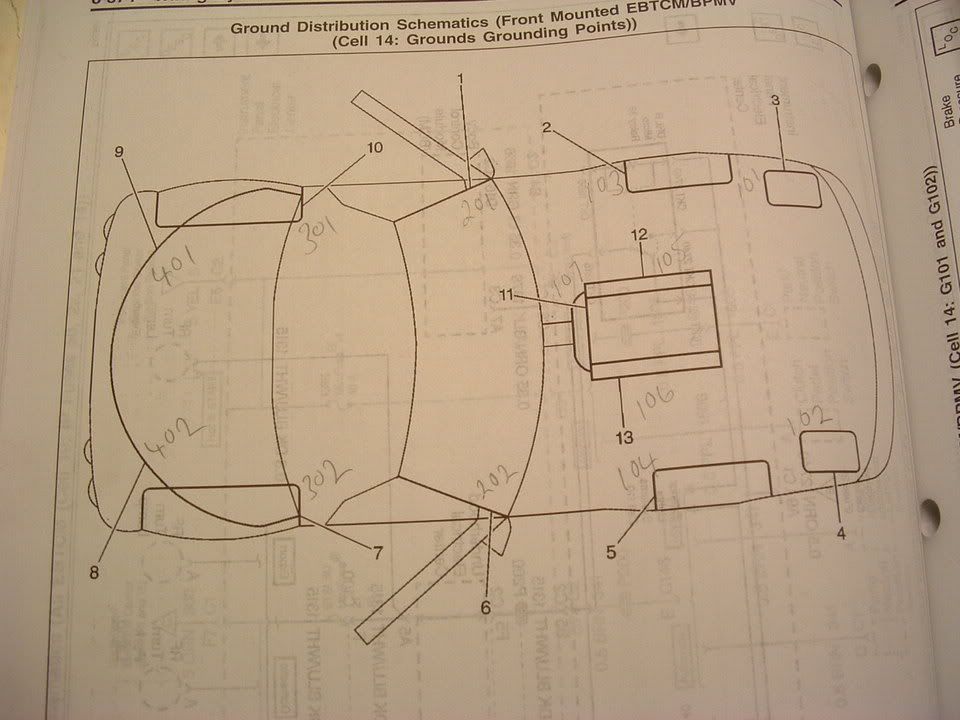
I sorry that it took so long to get back to you. Here is what I recommend. Aging C5's have been expierencing all sorts of ground issues. This may be what is causing you problems. The Remote Keyless Entry system uses two body grounds. Ground G-104 and G-201. The Remote Control Dor Lock Receiver uses G-104. I am posting pictures of the pages that explain where the grounds are located.\
[IMG]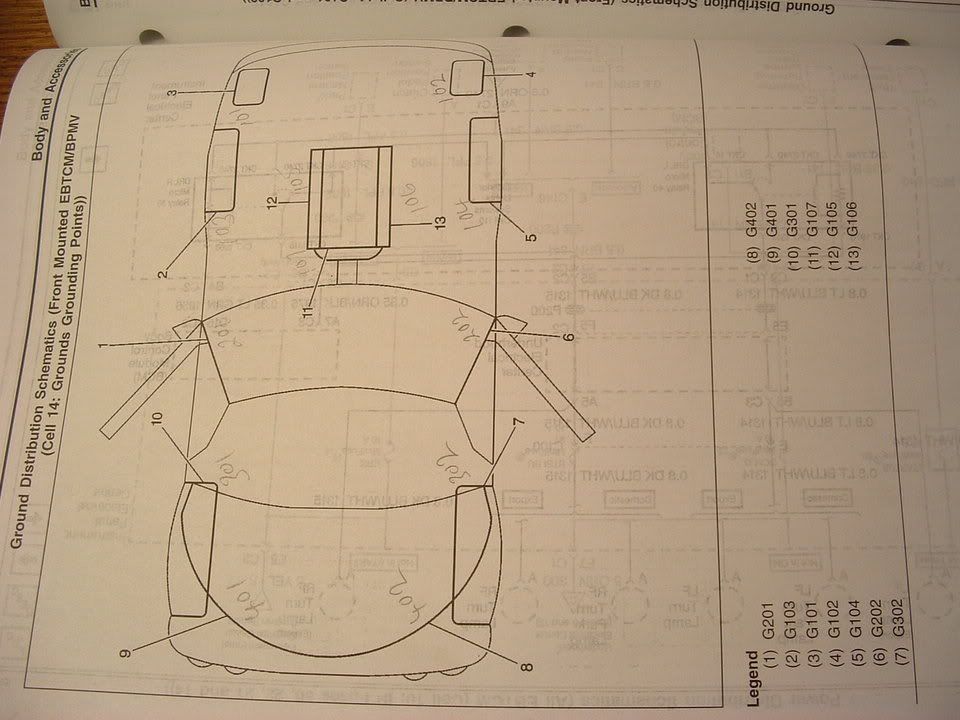 [/IMG]
[IMG] [/IMG]
I am also including pictures of the two types of grounds that you will see.


The location of ground G-104 is out board of the battery on the top side of the frame well. The plastic battery box that sorrounds the battery and the fuse box will have a small plastic tab that snaps over the stud that the ground wires are attached to. Thos is an eyelet type of ground. Spray the ground lug/stud and nut with WD-40 or PB Blaster.
remove the nut, clean the frame and ground wire eyelet and re-assemble.
G-202 is located in the passengers door area and you must remove the front plastic door sill cover to access it. It will be inside a small well towards the front. Its near the lower door hinge area on thebinside of the sill. This one is difficult to get to. This one is the connector type that has become problematic. Once you have removed it, clean the stud and frame, area with a wire brush. Give each of the ground wires a good tug to make sure that each wire is properly seated inside the connector. Each wire is puched into a small "V" grove and if the wires are not properly seated they corrode and cause problems.
PLEASE let me know how you make out after you clean your grounds or if this does not correct your problem. If you try this and it doea NOT solve the issue, I have other recommendations that I can try.
Bill
I sorry that it took so long to get back to you. Here is what I recommend. Aging C5's have been expierencing all sorts of ground issues. This may be what is causing you problems. The Remote Keyless Entry system uses two body grounds. Ground G-104 and G-201. The Remote Control Dor Lock Receiver uses G-104. I am posting pictures of the pages that explain where the grounds are located.\
[IMG]
[/IMG] [IMG]
[/IMG] I am also including pictures of the two types of grounds that you will see.
The location of ground G-104 is out board of the battery on the top side of the frame well. The plastic battery box that sorrounds the battery and the fuse box will have a small plastic tab that snaps over the stud that the ground wires are attached to. Thos is an eyelet type of ground. Spray the ground lug/stud and nut with WD-40 or PB Blaster.
remove the nut, clean the frame and ground wire eyelet and re-assemble.
G-202 is located in the passengers door area and you must remove the front plastic door sill cover to access it. It will be inside a small well towards the front. Its near the lower door hinge area on thebinside of the sill. This one is difficult to get to. This one is the connector type that has become problematic. Once you have removed it, clean the stud and frame, area with a wire brush. Give each of the ground wires a good tug to make sure that each wire is properly seated inside the connector. Each wire is puched into a small "V" grove and if the wires are not properly seated they corrode and cause problems.
PLEASE let me know how you make out after you clean your grounds or if this does not correct your problem. If you try this and it doea NOT solve the issue, I have other recommendations that I can try.
Bill
Drifting
Joined: Jun 2001
Posts: 1,511
Likes: 16
From: "Once you have flown, you will walk the earth with your eyes turned skyward; for there you have been
Wow! Great post and super details... I'll give this a try and I also hope that this will help others that are going through a similar issue... Thanks Bill!
Don
Don



Team Owner

Joined: May 2001
Posts: 36,836
Likes: 244
From: Dear Karma, I have a list of people you missed.
St. Jude Donor '08-'09-'10-'11-'12-'13-'14-'15-'16
