When you click on links to various merchants on this site and make a purchase, this can result in this site earning a commission. Affiliate programs and affiliations include, but are not limited to, the eBay Partner Network.
During battery amperage meter drain down test with car in sleep mode, have the alternator disconnected at both the plug and at the positive cable to starter solenoid off the back of the alternator (at the alternator, and make sure to tape off the positive cable so you don't ground it out to the motor when off the alternator), to make sure your not getting bleed off from the alternator voltage regulator itself that is causing the excess drain.
If still getting excess drain, then pull the positive cable off the battery, and off the engine fuse box terminal, pull the starter relay, and use the meter to jump from the battery terminal to the engine fuse block terminal to take the starter and solenoid out of play as well, as you are monitor the amperage drain of the battery with the car in sleep mode.
Hence we want to make sure that what every is causing the excess drain, is from the engine fuse box out,, and not either the alternator or the starter instead.
From here, if we want to narrow the problem down to just the BCM and it fuses, then we pull the upper engine fuse box, and only power up the BCM alone off the lower fuse block connector with the meter wires jump.
We decided that it was worth the $20 to get a real DMM instead of the $5 toys we have been using. Hooked it up in series and got a realistic reading for a drain that will kill a battery in 12 hours:
After getting a reading of 1.88A with everything hooked up, we isolated the fuse box by removing the power cable from the battery, and pulled the starter relay (J fuse 30) and the alternator sensor fuse (#2).
Hooked it up and waited 20 minutes for everything to go to sleep.
20 mA in the fuse box. That’s good.
So we put the starter fuse back in.
Reattached the alternator sensor fuse.
Disconnected the alternator from the power supply and taped off the leads.
Went back to the battery, and when we hooked up the DMM in series with the cable, we got no reading.
So we hooked the fuse box back up to the power cable, leaving only the alternator disconnected.
Reattached the DMM in series with the battery and cable, then waited for the system to go back to sleep.
With nothing but the alternator detached, we are still seeing the 20mA draw.
After I get done making dinner, we are going to try hooking the three wires back up to the alternator, one at a time, and see if one of them causes the drain, or if the entire alternator has to be hooked up for the drain to return. I will update this with more pics as we do it.
Back at it this morning. Hooked the DMM back up in series with the battery and cable, the 1.88A drain is still present.
So we began disconnecting the wires from the alternator, one by one. We unplugged the connector that runs to the sensor and fuse in the under hood fuse box, then removed the cable from the B+ post to the battery and taped it off, and finally the wire that runs down to the starter.
So with the alternator completely unhooked, we see the 1.88A drain.
We also know that the underhood fuse box is only pulling 20 mA when the starter and alternator are disconnected from it via removing their fuses.
The next step we are going to try is disconnecting the wires at the solenoid on top of the starter while leaving everything else hooked up. I’ve got to do an oil change on a tractor to free up the pit down at the garage, but we will get under the Vette in just a bit and I’ll post updates.
After the terror that was the car dying while driving on the way down to the shop, we finally got the girl into the bay over the pit and got to work. Neither of us have hands that will fit in between the pipes from the top, so we started to remove the starter from the bottom. Unfortunately, that meant removing the exhaust to get to the outer mounting bolt, which sits only about 1/2 inch above the pipes. A much larger job than we anticipated, but once the pipes were unhooked from the block, we were able to get to the solenoid and remove the bolt holding the power cables on it.
Once the power to the starter was removed, we hooked the DMM back up in series and BOOM!!!
The meter reads a 20mA draw with only the wire from the battery to the solenoid disconnected.
Unfortunately, one of the bolts holding the pipes on snapped off when we were putting everything back together, so we’ve got a broken bolt we will have to extract from the block later, but the car started again once everything was reassembled, and now we think there is a pretty good possibility that the solenoid is the culprit behind the battery drain.
Removed the starter, and detached the old solenoid.
Wrapped both the starter and solenoid with heat shielding.
Reinstalled the starter and solenoid, then started a parasitic draw test.
When we hooked everything back up, there was still a 1.8 A drain. (^^^) So we pulled the fuse for the starter to try to figure out if the drain was coming from the battery cable or not. No effect. The drain starts as soon as I
we hook up both wires to the starter. (^^^) Found success by locking the doors with the FOB. The amps surged for a moment up to 2.5 amps, then dropped down to 30 mA.(^^^^)
So this morning the boy had to go to work, but I decided to test the car again. Since locking the doors solved the drain last night, I turned off the passive door lock, the FOB sensor unlock, essentially all the options for automatic security in the dashboard menus were turned off. When I hooked up the multimeter, it started off at 2 A of draw. 3 minutes later it was down to a 20 mA draw. At the end of 20 minutes, still showing a 20 mA draw. Reconnected the battery and started measuring its voltage. At 9:44 AM, battery voltage read 12.79 A.
At the end of an hour, the voltage has dropped all the way down to 12.68, more than 1/10 th of a volt. At this rate, the battery won’t start the car in 10 hours, meaning that the 1.8V drain didn’t go away. I am once again at a loss.
Ok, parasitic draw test #2 following testing showing the battery is still draining.
Started the test showing 2 Amps of draw. 3 minutes later, back down to showing a 20 mA draw. But I know the car is draining at 1/10th of a Volt per hour when everything is hooked up.
BCM and RCDLM, what are the numbers on their firmware?
Have you pulled the Fobs apart to clean then, just in case one of the buttons is sticking, and causing the BCM to come out of sleep mode? Attachment 48331307
Hence can see that the car is going into sleep mode to start with, but something is pulling it out of sleep mode isntead.
So could be a firmware issue with the modules not firmware updated, maybe fob sending a signal or something as simple as a rear hatch button that is stuck up to send the demand signal to pull the car out of sleep mode.
As for starter being the draw with the car in sleep mode, leave the starter fuse in, and pull the starter relay/ solenoid trigger wire off the solenoid to see if that solves the problem. Hence draw problem may not be the starter motor itself that is getting power through the solenoid, but lower voltage through the solenoid coil only, and either getting this power through the relay, or after the relay in the engine fuse box if the relay is not firing instead. Hell, just pull the starter solenoid trigger wire connector at the starter, and see if you have any voltage through it to ground.
Also, if the car is a A4, then we need to look at the PNP at the trans shift lever.
Bottom left'ish.
The pnp (park and neutral switch) is all ground on the ECM side, but pulls power from the crank relay on the BCM side (that should be in sleep mode) to trans-M32.
Note, Both sides run through the C180 and C184 connectors, which are between the battery and the fender wall on the passenger side, so could be that either connectors has intermittent problems, and sending signals to a modules to pull it out of sleep mode as well.
BCM and RCDLM, what are the numbers on their firmware?
Have you pulled the Fobs apart to clean then, just in case one of the buttons is sticking, and causing the BCM to come out of sleep mode?
Same with the rear hatch button as well.
Hence can see that the car is going into sleep mode to start with, but something is pulling it out of sleep mode isntead.
So could be a firmware issue with the modules not firmware updated, maybe fob sending a signal or something as simple as a rear hatch button that is stuck up to send the demand signal to pull the car out of sleep mode.
As for starter being the draw with the car in sleep mode, leave the starter fuse in, and pull the starter relay/ solenoid trigger wire off the solenoid to see if that solves the problem. Hence draw problem may not be the starter motor itself that is getting power through the solenoid, but lower voltage through the solenoid coil only, and either getting this power through the relay, or after the relay in the engine fuse box if the relay is not firing instead. Hell, just pull the starter solenoid trigger wire connector at the starter, and see if you have any voltage through it to ground.
Also, if the car is a A4, then we need to look at the PNP at the trans shift lever.
Bottom left'ish.
The pnp (park and neutral switch) is all ground on the ECM side, but pulls power from the crank relay on the BCM side (that should be in sleep mode) to trans-M32.
Note, Both sides run through the C180 and C184 connectors, which are between the battery and the fender wall on the passenger side, so could be that either connectors has intermittent problems, and sending signals to a modules to pull it out of sleep mode as well.
Sir:
I am not certain where to find the firmware information for the BCM and RCDLM.
When I hook up the Nano to the car, this is the information I am given for the BCM:
When I access the same menu for the RCDLM, the Software setting is listed as *.
Nothing has thrown a code since we cleared the ECU DTCs a month ago.
Since the current hypothesis is that something is waking the BCM up, we decided to hook up the multimeter with a stopwatch next to it so we could map out when things are turning off. There was, as always, and initial spike as soon as the multimeter was attached in series, and we started the pictures as soon as it stabilized:
A minute after hooking up the DMM, the amps stabilize. A minute later, something turns on. 20 seconds after that, a bunch of things turn off and we drop down to 50 mA. Stabilized after 5 seconds. Another 13 seconds and still holding. Then, way out at the 6 1/2 minute mark, there is another wave of shutdowns, which happened too fast to take pics, but it stepped down from 50 mA to 10 mA over about a second.
After the car had dropped down to a 10 mA draw and stayed there for 14 minutes, we hooked the battery cables back up and switched to looking at the voltage available.
Hooked it up. 6.5 minutes later, when the amps should have dropped down to 10 mA, we started recording. I know it’s dark, but the meter is reading 12.49 V after 2 hours of being hooked up, a loss of .2 volts, and the same 10 hour time limit to the battery being fully drained that we have been seeing.
So something is staying awake when the battery cables are hooked up, but not when the DMM is in series.
How do we keep tracking?
We are thinking that the next two options are 1) Reflash the BCM and see if that fixes it, or 2) disconnect all the wires leading into the BCM and use a jumper wire to connect each one individually to find out which circuit is waking it up.
Trying to check modules with my VCX Nano, but I cannot get the GDS2 program to communicate with the Nano.
As you can see, the device is installed properly. I updated it’s firmware and drivers. Works fine with the Tech2Win program, but instantly hits us with an error message as soon as we try to open the diagnostics section on GDS2.
On the latest VX manger, best to install GDS2 to desk top to run under win 10. http://blog.vxdiagshop.com/2019/05/1...o-gm-v2019-02/
Note here, the first time using GDS2, the nano reads as MDI 2, so select MDI2 in that driver selector when running the GDS2 win 10 version.
In tech2 win, you are still going to select MDI 1 on the second pop up screen. Attachment 48339225
If you are still using GDS2 in VM, then bring up VX driver MDI in the VM shell (the old VX manager that works in the XP shell) and do a firmware update to downgrade the Nano firmware to work with that software in the VM shell. Once you are back to using Tech II again in the main OS, then upgrade the nano firmware again.
As for GDS2, it not for the C6, but for the C7 when they started to use GDS2, instead of Tech II/Tech2win.
Here is the list of what cars uses GDS 2, with all the cars using GDS2 (not tech II or Tech2win) by 2014. https://www.genuinegmparts.com/pdf/p...-reference.pdf.
I understand why GM upgraded. The Tech2 would have been better designed if they had a display showing all of the modules and their status at the same time, rather than having to select each module and view the data display for it separately.
I guess my problem is not knowing how to diagnose the numbers I’m seeing.
For example:
With the ignition off, key in the house, there is communication between the Nano and the RCDLR, both door modules, the radio (stock, CD player, no nav), and the HVAC module.
Everything else returns a “Ignition off” error message. There is no communication between the Nano and the ECM, BCM, Transmission module, nothing.
Just the 3 door modules, the radio, and the HVAC.
Inside the modules which are communicating with no fob present, the door modules both show a battery signal fairly close to the 12.92V I’m reading with my DMM at the battery. (It was switching between 12.8 and 12.9 on both).
Th RCDLR was showing a battery voltage signal of 12.54 V, quite a bit lower than the door modules.
The radio showed everything being off except the antenna, though it could see what the settings on the radio were if the car was turned on.
And the HVAC also showed roughly the correct voltage signal from the battery, but every time I look at the Data Display for it, the inside air temp starts off at -40, resets to 75 degrees F, and then counts down to 44 degrees, with each step down registering a count in the Data Display. Not even sure why the HVAC has power with the key off and the FOB inside the hut.
To me, a layman with virtually no understanding, it would seem that these are the circuits where I might be getting drain on the battery in a KOEO situation. Like I said, I don’t even know why the HVAC would be communicating, and the 12.54 V at the RCDLR was curious, especially when all the other modules were showing 12.9ish volts.
What should I be looking for as I’m scanning the car with the Tech 2?
Just the 3 door modules, the radio (antenna power circuit), and the HVAC.
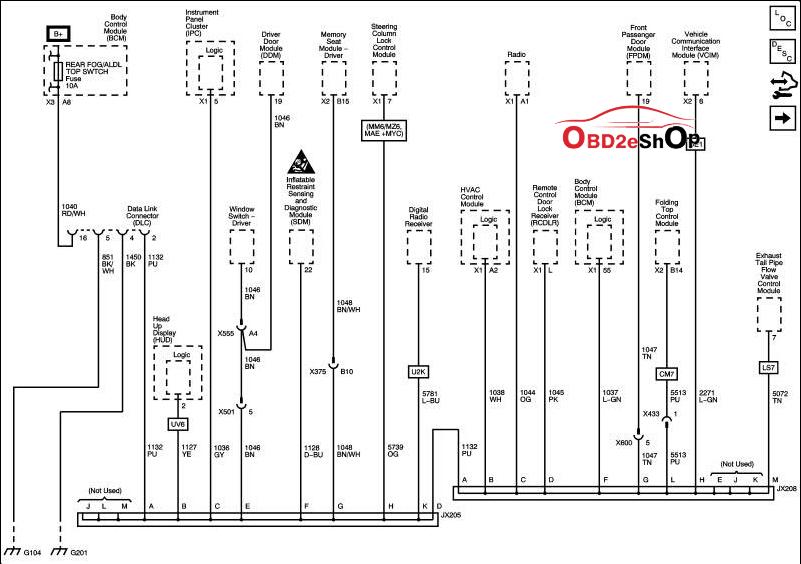
Door modules should be powering down from command from the BCM on the class 2 data link before the BCM goes into sleep mode itself. If you are getting comunication with each module with the Tech2win, then double check the X375,X501, X555 connectors, as well as the driver seat memory module power connector, than may have intermittent problems that is pulling these out of sleep mode as they power up/off from connector problems.
On the radio antenna power circuit, its controlled by the radio. So if stock radio, then maybe suspect a problem in the radio, since its going into sleep mode, but not dropping the power to the antenna when it does goes into sleep mode (see rpo, XM button checking below in programming). If after market radio, then check where in the hell that they pulled the power wire for the antennas circuits off the radio adapter moduel /why they are staying powder up instead.
As for Fob antennas, they are controlled by the RCDLR and will go to sleep to a point with the RCDLR. Hence still need to be active enough to see the Fob when you push a fob button on it, with most of the RCDLR in a semi deeper sleep mode until it gets either a fob button push to wake it up, or door pad pull instead.
Again, there is the update firmware for the first 05 that was having problem the RCDLR not going into sleep mode to begin with. My plan is to hook you up with TIS2000 so you can just re-flash the RCDLR and BCM in the car yourself with the Nano, to make sure they have the updated firmware. When I get the time since I have been slammed, will hook you up with working TIS2000 and write up on how to re-flash both of these.
HVAC controller sounds like it has more than just class 2 data problems, since I guessing that you can communicate with it with Tech2win to start with. So on this one, would pull the board to see if there is cold solder joints causing intermittent problems and why is will not go into/stay in sleep mode to begin with.
Note here, go into HVAC special programming and shut off after blow. If its off, then turn it on, then turn it off again. It should not make a difference, other than the car waiting for the ice to melt on the coil, until it kicks the fan on, and why the HVAC controller is staying active for so long (after blow does not kick up until about 20 mins after the car is shut down, then HVAC blower will run for a few mins, HVAC controller will shut it off, and controller should go into sleep mode afterwards).
Note, since the controller may have have been swapped out in the car at some point from a later car, may as well just re-flash it with Tis2000 to make sure it firmware is the correct one for the car.
Also, go into BCM set up, and look at the RPO list of what has been selected. Since you don't have Onstar, or XM on the car, then make sure these RPO's are not asterisk selected for these. Also, go into radio programming, and make sure that you don't have the XM button still activated on the radio as well.
No rush, amigo. This has turned into a Captain Ahab chasing Moby Dick moment for me. The kid just wants to get a Priority Start and be done with it, but I’m the one who has gotten sucked into the problem and can’t let it go. This has sort of turned into a weekend project since I am also up to my eyeballs in forestry work now that spring is coming.
I downloaded the service manual for the car yesterday, so I’m going to read the sections concerning the things you’ve mentioned and try to tackle that list ASAP, but I’ve got 700 acres of woods to burn this week, two hog traps set up, and 3 logging crews starting harvests.
I really do appreciate all the help, though. Muchas gracias.