




Navigation System Issues

Racer


Joined: Aug 2005
Posts: 304
Likes: 4
From: Shelton CT

The example in the book is wrong on a number of counts.
1) Commas should be enclosed in quotes in a proper csv file.
2) If you try the example, it won't work (even if you fix the commas,) because, if I remember correctly, it's near Bonn, Germany, which is an invalid location in our system.
If you read this thread,
http://forums.corvetteforum.com/c7-g...assistant.html
I think it will help explain how the file works.
IF all else fails, sit back, relax, and feel better knowing that GM has told us all "it's working as designed!"
Ed
Ed

Instructor

Joined: Jan 2006
Posts: 176
Likes: 13
From: New Oxford PA
I have addressed many of these questions in other posts on the forum.
1. As to the contacts, the MyLink system will only address complete contacts with all the information present and formatted in a way that it can discern. For example, if you created a contact with first name, last name all on one line and on both lines of the contact name field it doesn't no where to categorize them, so it ignores them. I had some contacts in my phone where I would like them as Mark Smith on both the first name and last name lines so they would come up in either sort in Outlook. The system doesn't know what to do with this (at least in my case and they are skipped and not in my phone contact list on the car.) If you want to put in a single name like Rifle Range, try to put it in on the Company line, leave the first name and last name fields blank. This can have an affect depending upon how you ask the system to sort the list or they can be ignored by the system. Go edit "Rifle Range" and put it only on the company line.
A lot comes down to the naming convention.
2. When you save it, as a favorite for example, it saves just the address. You have to go in to the Main screen settings menu, radio, manage favorites. You can then rename or delete it.
3. Contacts (only vehicle contacts) can be deleted from the menu in the navigation system. Scroll down to Personal data and you can edit delete a contact or delete all contacts. This is the same menu where you will find the MyPOIs able to be deleted. Working from memory, not infront of a car screen currently so grant me some latitude with the actual menu names.
4. UTF-8 encoding is format that translates our ASCII text in to a format that the system can import and understand (particularly useful if there are any wildcard characters in use in the name). Other system translate and encode things differently and there is not a lot of cross platform compatibility. You cannot create these files in Excel. They must start as text and be encoded in to CSV using the Save As with UTF-8.
Did you receive the email that I sent you last night? The only way to import this POI information is to create it in Word or Text and save it as a CSV with UTF-8 encoding. It will not be read by the system otherwise.
The format I show in my information of "XXXXXXX", "XXXXXXXX", with the comma outside the quotes tells the system to process the information between the quotes and the comma tells it to move on to the next field. Doing it the other way can result in errors of data import. The comma is the separator. CSV=comma separated values.
1. As to the contacts, the MyLink system will only address complete contacts with all the information present and formatted in a way that it can discern. For example, if you created a contact with first name, last name all on one line and on both lines of the contact name field it doesn't no where to categorize them, so it ignores them. I had some contacts in my phone where I would like them as Mark Smith on both the first name and last name lines so they would come up in either sort in Outlook. The system doesn't know what to do with this (at least in my case and they are skipped and not in my phone contact list on the car.) If you want to put in a single name like Rifle Range, try to put it in on the Company line, leave the first name and last name fields blank. This can have an affect depending upon how you ask the system to sort the list or they can be ignored by the system. Go edit "Rifle Range" and put it only on the company line.
A lot comes down to the naming convention.
2. When you save it, as a favorite for example, it saves just the address. You have to go in to the Main screen settings menu, radio, manage favorites. You can then rename or delete it.
3. Contacts (only vehicle contacts) can be deleted from the menu in the navigation system. Scroll down to Personal data and you can edit delete a contact or delete all contacts. This is the same menu where you will find the MyPOIs able to be deleted. Working from memory, not infront of a car screen currently so grant me some latitude with the actual menu names.
4. UTF-8 encoding is format that translates our ASCII text in to a format that the system can import and understand (particularly useful if there are any wildcard characters in use in the name). Other system translate and encode things differently and there is not a lot of cross platform compatibility. You cannot create these files in Excel. They must start as text and be encoded in to CSV using the Save As with UTF-8.
Did you receive the email that I sent you last night? The only way to import this POI information is to create it in Word or Text and save it as a CSV with UTF-8 encoding. It will not be read by the system otherwise.
The format I show in my information of "XXXXXXX", "XXXXXXXX", with the comma outside the quotes tells the system to process the information between the quotes and the comma tells it to move on to the next field. Doing it the other way can result in errors of data import. The comma is the separator. CSV=comma separated values.
I was able to create a file and import it. My first attempt was using the example in the manual with is totally different then your method. Each string requires quotes on each end plus an apostrophe. That worked. Then saving it as you describe in your notes.
What did surprise me was how the POI showed up as "myPOIs" at the bottom of the list - and they were all there.
I have attempted to attach a copy - it seemed to work but the last two in the file are not properly lined up - any ideas?
Again - thanks and I hope others are able to move forward with this Nav system.

Team Owner


Joined: Aug 2002
Posts: 35,617
Likes: 167
Tech Contributor
Cruise-In 11 Veteran
NCM Ambassador
St. Jude Donor '05-'06-'07-'10
I did not receive an email last night. Is it possible you could resend it to: mikefeeser@comcast.net. Thanks - appreciate anything I can get.
I was able to create a file and import it. My first attempt was using the example in the manual with is totally different then your method. Each string requires quotes on each end plus an apostrophe. That worked. Then saving it as you describe in your notes.
What did surprise me was how the POI showed up as "myPOIs" at the bottom of the list - and they were all there.
I have attempted to attach a copy - it seemed to work but the last two in the file are not properly lined up - any ideas?
Again - thanks and I hope others are able to move forward with this Nav system.
I was able to create a file and import it. My first attempt was using the example in the manual with is totally different then your method. Each string requires quotes on each end plus an apostrophe. That worked. Then saving it as you describe in your notes.
What did surprise me was how the POI showed up as "myPOIs" at the bottom of the list - and they were all there.
I have attempted to attach a copy - it seemed to work but the last two in the file are not properly lined up - any ideas?
Again - thanks and I hope others are able to move forward with this Nav system.

5th Gear
Joined: Mar 2015
Posts: 5
Likes: 0
Bought 2015 Vette 3/9/2015 now 100 miles on it been using NAVTEC and Garmin Nuvi 275 so I wanted all my waypoints in to my Vette myLink This is what I done and IT WORKS less than an hour.400 waypoints better than keying in.
Garmin Waypoints to MyLink
1. From Garmin Basecamp or other - EXPORT "my collection" save type as .csv
2. Open saved file in Excel - you will see someware in Column A 1-xxx your Waypoints -- delete all other ROWS before and after them.
3. Cut all Column C Paste to Column A -That is all the Longitudes.
4. Existing Column B is your Latitudes.
5. Delete the existing Columns C,D,E,F,G--J thru end.(NOT H and I)
6. Old column H is now Column C .
7. Old Column I is now Column D .
8. Save type as .csv to a folder "myPOIs" file name "travel_2015_poi.csv" your name (Ignore Excel message)
In Vette POIS Download et al scroll to bottom travel_2015_poi.cvs (or your name) from the USB folder "my POIs" They will be there, change location to STATE you want ie FL AK -or city state they will be there
You can tweek it up in the C and D Columns abovebefore downloading as you see fit also change any "& " which shows as "& to "and"., also any tweeks you see.
Garmin Waypoints to MyLink
1. From Garmin Basecamp or other - EXPORT "my collection" save type as .csv
2. Open saved file in Excel - you will see someware in Column A 1-xxx your Waypoints -- delete all other ROWS before and after them.
3. Cut all Column C Paste to Column A -That is all the Longitudes.
4. Existing Column B is your Latitudes.
5. Delete the existing Columns C,D,E,F,G--J thru end.(NOT H and I)
6. Old column H is now Column C .
7. Old Column I is now Column D .
8. Save type as .csv to a folder "myPOIs" file name "travel_2015_poi.csv" your name (Ignore Excel message)
In Vette POIS Download et al scroll to bottom travel_2015_poi.cvs (or your name) from the USB folder "my POIs" They will be there, change location to STATE you want ie FL AK -or city state they will be there
You can tweek it up in the C and D Columns abovebefore downloading as you see fit also change any "& " which shows as "& to "and"., also any tweeks you see.
Last edited by SGIFL; Mar 13, 2015 at 11:40 AM.

Instructor

Joined: Dec 2010
Posts: 190
Likes: 0
From: Monroe, NC
The video you referenced was me. It was an introduction to the entire Infotainment system. The seminar I'm giving in August is exclusively on the use of the navigation system. There will be a video and it will be online again.
For example, your point 5. Deleting of the home button resulting in the use of contacts. To resolve this, just set your home location on one of the Favorite buttons. With the ability to save contacts, POIs and destinations as favorites not only does the home button become redundant, you actually have expanded capabilities for ease of destination selection. For example:
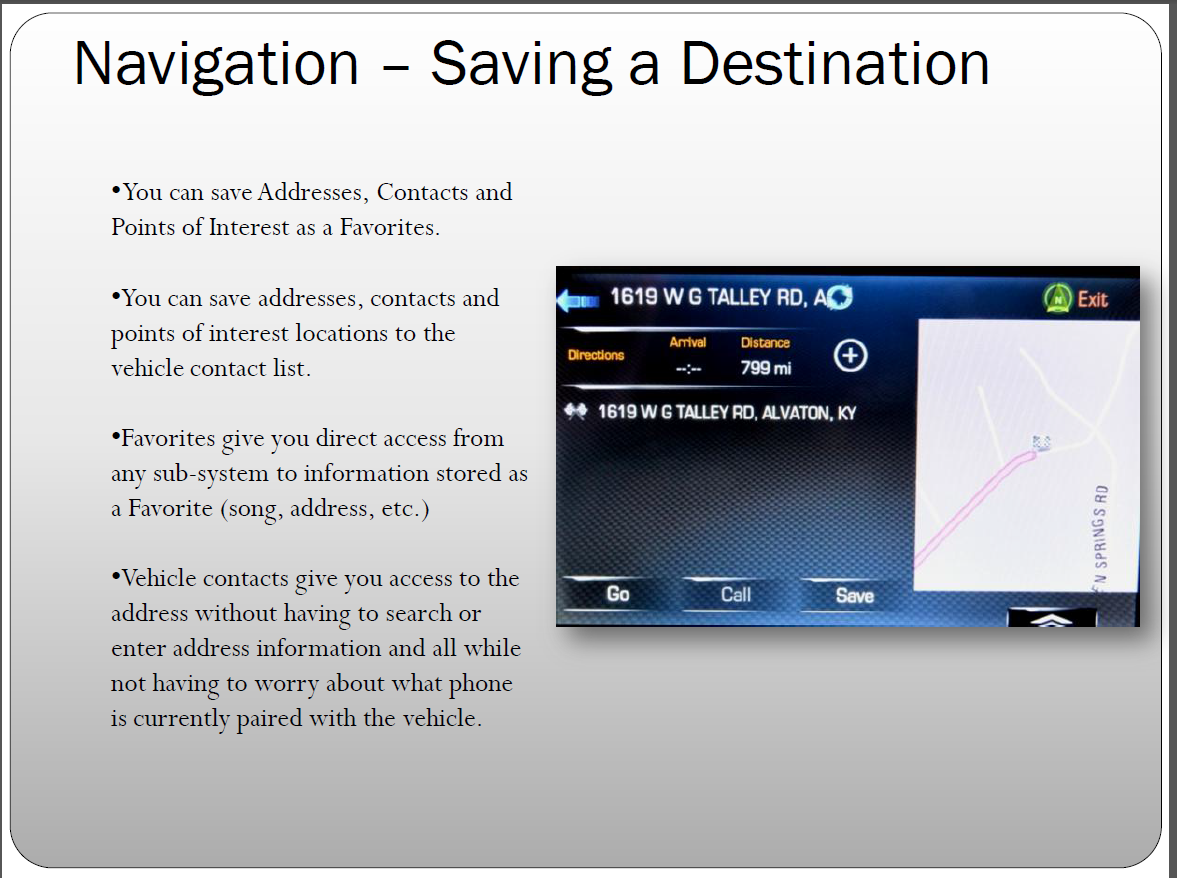
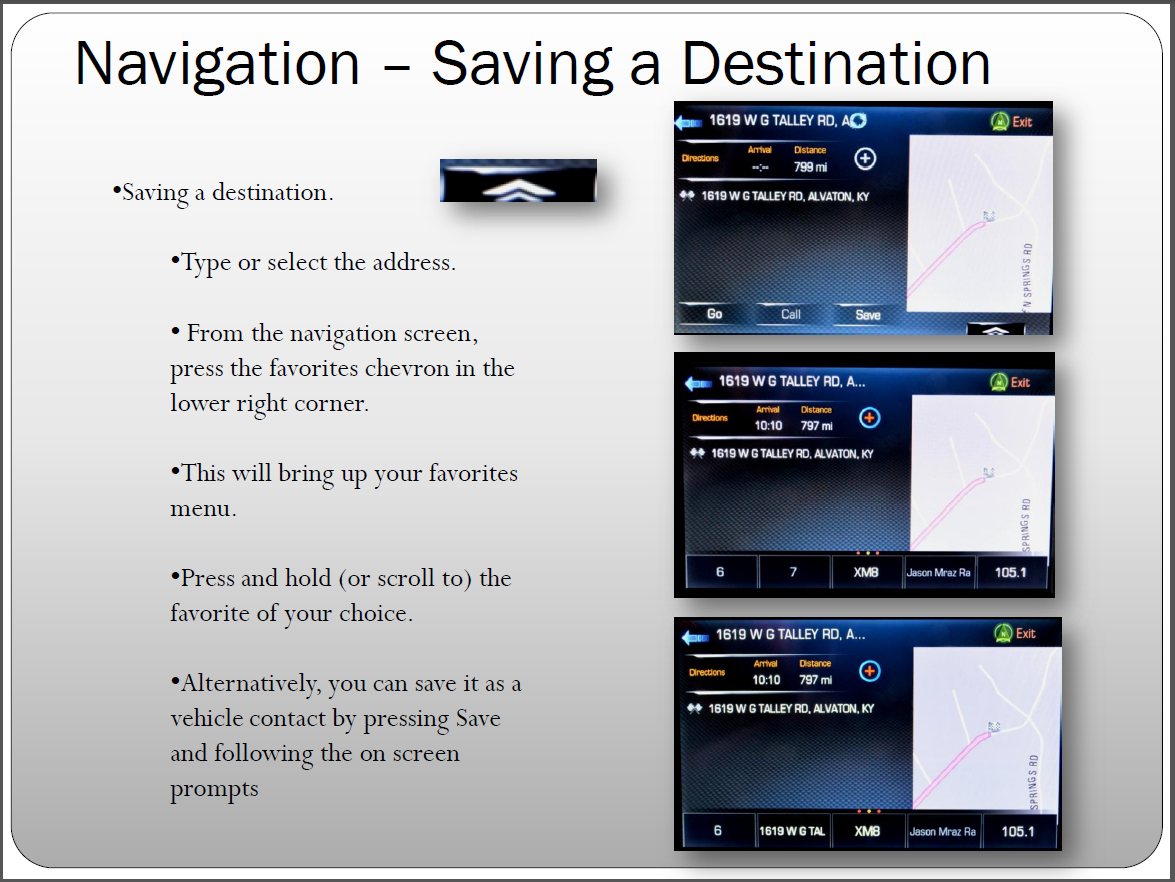
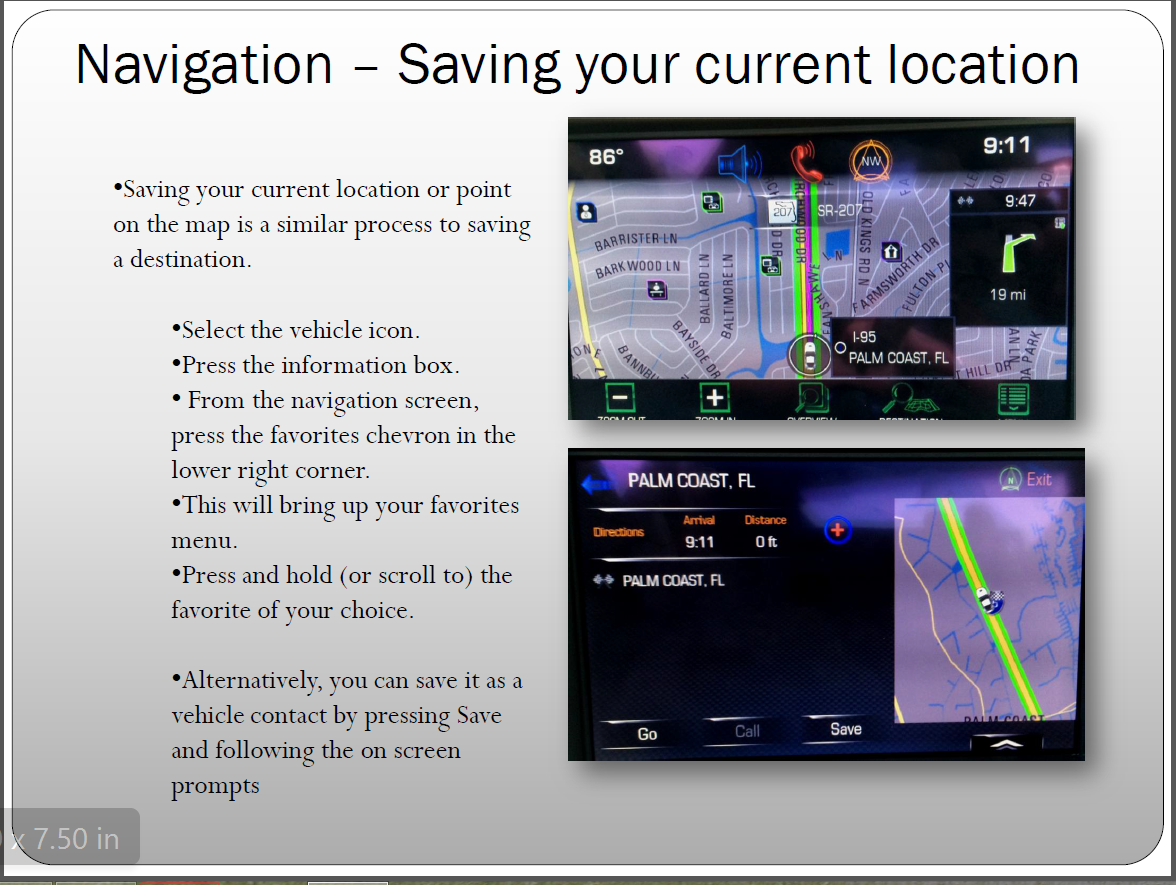
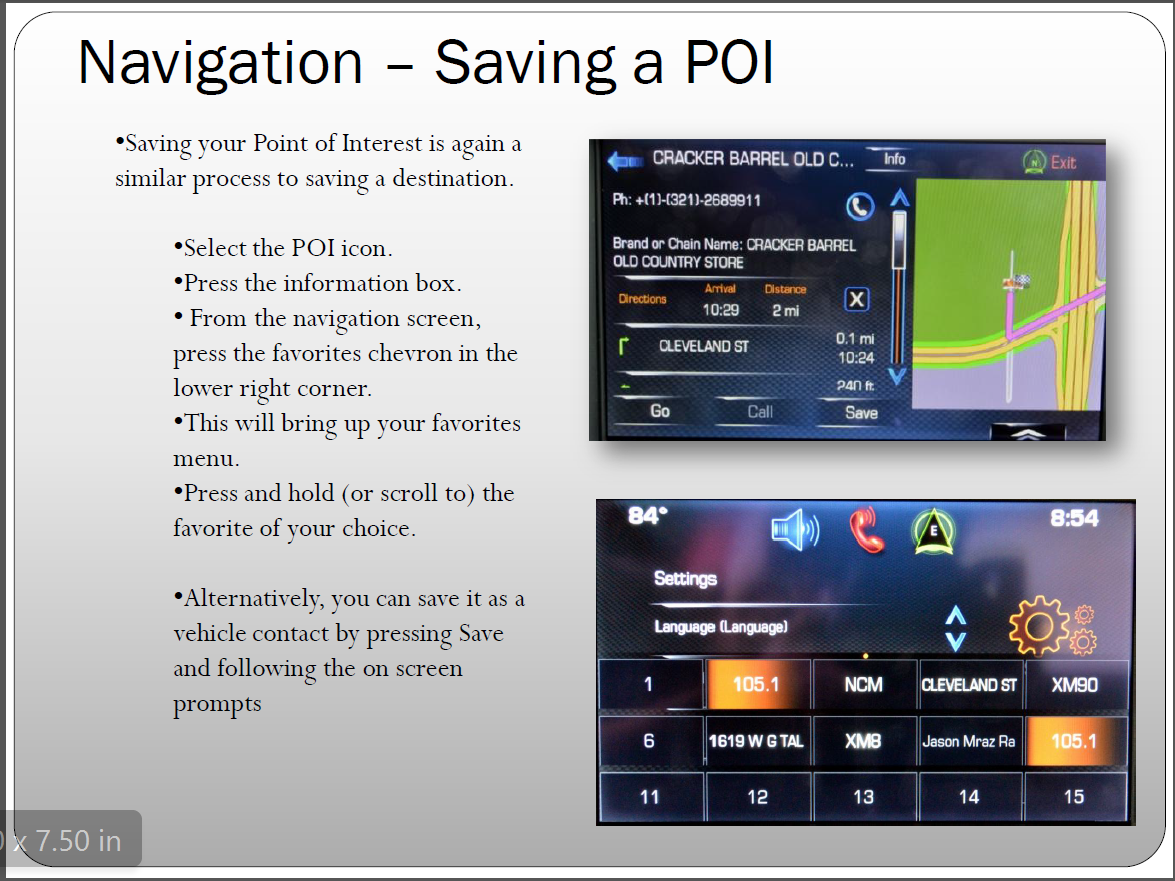
For example, your point 5. Deleting of the home button resulting in the use of contacts. To resolve this, just set your home location on one of the Favorite buttons. With the ability to save contacts, POIs and destinations as favorites not only does the home button become redundant, you actually have expanded capabilities for ease of destination selection. For example:
Racer
Joined: Jun 2014
Posts: 332
Likes: 73
From: Ft. Pierce Florida
GPS address input not working
I understand that the GPS does not give location or direction to a private road ( I had to enter/save my home position by placing the car in front of garage and enter/save the home position, since our condo complex is on private road) but I cannot understand why this GPS does not provide routing/destination info. for any addresses I enter, which are located on official State roads. Never had this issue in our 2010 C6; of course it was a different GPS in that car.
Question: Do I need to take car back to dealer to figure this out or am I missing something here that I should try on my own? Please advise. I'm no tech. but would like to resolve this with your help, if possible.
Thanks to everyone Heidemarie
SAVE THE WAVE!!!!!

Intermediate


Joined: Jan 2000
Posts: 28
Likes: 0
From: La Crosse WI
GPS Software Update
Searching for a firmware update to fix GPS issues (freezes, reboots). Available at dealers yet? Any news on doing updatse on your own? I had similar GPS issues with 2015 Jeep and they provided a download which I installed with a smart key. Simple and effective why to update and much preferred over trip to dealer.

Pro


Joined: Sep 2014
Posts: 502
Likes: 263
Settings --> Radio --> Manage Favorites --> Select Fav to Rename --> Rename (Clear out existing and Type in new Name) --> Label.
Done!
Corvette Stories
The Best of Corvette for Corvette Enthusiasts

Top 10 Most Expensive Corvettes Ever Sold on Bring A Trailer
Brett Foote
10 Things Every Corvette Owner Needs (2026 Edition)
Michael S. Palmer
8 Most "Only Corvette Owners Understand" Quirks and Problems
Pouria Savadkouei
10 Reasons the C6 Z06 is Still A Performance Benchmark After 20 Years
Joe Kucinski
How Much Horsepower Every Corvette Engine "LOST" in 1972
Joe Kucinski
Top 10 DOs and DON'Ts for Protecting Your Convertible Top!
Michael S. Palmer
Top 10 Most Explosive Corvettes Ever Made: Power-to-Weight Ratio Ranked!
Joe Kucinski
150 hp to 1,250 hp: Every Corvette Generation Compared by the Specs That Matter
Joe Kucinski
8 Coolest Corvette Pace Cars (and Replicas) of All Time
Verdad Gallardo
Intermediate
Joined: May 2015
Posts: 47
Likes: 0
The video you referenced was me. It was an introduction to the entire Infotainment system. The seminar I'm giving in August is exclusively on the use of the navigation system. There will be a video and it will be online again.
For example, your point 5. Deleting of the home button resulting in the use of contacts. To resolve this, just set your home location on one of the Favorite buttons. With the ability to save contacts, POIs and destinations as favorites not only does the home button become redundant, you actually have expanded capabilities for ease of destination selection. For example:
For example, your point 5. Deleting of the home button resulting in the use of contacts. To resolve this, just set your home location on one of the Favorite buttons. With the ability to save contacts, POIs and destinations as favorites not only does the home button become redundant, you actually have expanded capabilities for ease of destination selection. For example:
how can i print this out?

Safety Car


Joined: Jul 2001
Posts: 4,661
Likes: 67
From: Ocean Springs MS