




Navigation System Issues

Thread Starter
Instructor


Joined: Jul 2005
Posts: 245
Likes: 3
From: Edmond OK
 Navigation System Issues
I have noticed on this, and other Forum's, that there is an significant number of issues with the C7 built in Navigation system. I certainly have had my share, and continue to do so. It seems to me that Chevrolet should do one of two things. They should either reflash our systems with better software (I have been told that Chrysler uses the Garmin "engine" software on builtin Nav), or a better option, reflash to allow a program similar to "BringGo" or maybe integrate Google Maps like Pandora, into MyLink. Anyway, I have been advised by the Infotainment help desk (which is apparently the OnStar help desk) that the system is "operating as deigned" while the folks at "Voice of the Customer Advisor" have opened a ticket, but never call back within the 24 hours they say they will. Anyway, I have emailed the following issues to Mr. Harlan Charles, the (according to Linked In) Corvette Product and Marketing Manager. If you are as unhappy with your Nav system as I am, I would encourage you to do the same thing. Otherwise, we are going to be left with a subpar system with out internet integration.
"Dear Mr. Charles.
I write to you hoping to get a response to my ongoing issues with my 2014 Z51 3LT coupe Navigation System. I have tried the Infotainment hot line (apparently the OnStar help desk, as directed by Charles W of the Customer Service that monitors the Forums). I received an email from a Lisa and a follow up phone call pertaining to my customer satisfaction survey (SR#71-133364760), who left me a voice mail (which I returned both by email and left her a voice mail), but have never heard back from her.
My car currently has 4,500+ miles on it in a little over 2 months of ownership. I love the car, but the frustrations with the Navigation System are ruining the ownership experience.
1) I had a system lockup on the Natchez Trace, said I was off road, I was not. Would not reset. Shut down Blue Tooth, and Audio. Would not reset till I got back to hotel and let car sit for hours. Problem has not repeated.
2) I have about a 75% success rate on ~ 20 Addresses in OK, MS, LA, and NM. Examples:
a. Last week I went to Santa Fe from OKC. Route Selection by system was through Las Vegas, NM, 44 Minutes and 61 miles further than Clines Corner (NM 285). Can be avoided by having the 3 route Overlay.
b. It decided, in the period of 1 day, that my Motel had moved from one side of the road to the other dependent on which street direction I chose to return to the motel.
c. Other people report similar problems. I have driven the this route before in my Z06 with factory Nav. No issues, but it has 3 route overlay allowing choice. This System requires you to page between screens, and is extremely slow, slower than anything I have ever used. (Garmin, Toyota and Mercedes Benz Nav systems.)
3) Need ability to Input GPS Coordinates directly. From keyboard. Example was looking for a plantation in MS, no address but had GPS Coordinates.
a. Instructions in book are useless in 2 ways, I didn’t have a computer in car to write a USB/SD card, and even if I did, the instructions say use a Text file, but don’t give format. Many examples on web where folks tried to do this and doesn’t work.
b. I had OnStar do it, they sent me to a town that was 17 miles from the Plantation.
c. This feature (keyboard input of GPS Coordinates) was on C6 Nav. Issue is “warranty of merchantability”. I expected more features on my C7, not less.
4) Chevrolet integrates smartphone (BringGo, http://www.chevrolet.com/culture/art...inggo-app.html ) in lower cost car lines, but not flagship car.
5) Deleted the "Home" button in nav menu, have to use “Contacts” which requires extra steps. If the system was not so slow loading screens, this might be acceptable, but is a safety hazard if you are trying to do it in a hurry. It takes a long time for mapset to load.
6) Requires mapset updates (which are 3rd party software) be installed at dealer, while almost every other competitor provides free mapset updates. I requested cost information, told not available. On a comparable Hard Drive system, this took 4 hours at the dealer on a 2011 car.
7) Locks you into Sirius for weather and traffic, Pandora being only internet app I apparently can use in my car.
8) For sake of argument again, let's say a built in car phone is necessary to be installed for folks that want OnStar? (As opposed to dealer installed option for those that want it.) Why block us from accessing free internet Nav routing, weather, and traffic other than force us to buy OnStar and or Sirius to get these features? Some of your competitors take care of this by making it a dealer (the built in cell phone) installed option. I would submit that your demographics are wrong. A built in Cell phone is something that was a 1990’s thing, not 2014. The younger crowd wants to use their smart phone, and the hot spot is on the IPhone, not the OnStar receiver.
9) In effect it APPEARS GM made a marketing decision to "dumbdown" our expensive gps systems and spent their software dollars on integrating to their proprietary cellphone, not the internet. This concept went a step further, and tied RemoteLink to OnStar. Drop OnStar and your RemoteLink program basically becomes a “dumb” key fob for 5 years.
I would request that you or someone you designate respond with what your plans are to make our systems open and integrated into the internet. Nowhere in your sales literature do I see any mention of what appears to be an intentional blocking of internet applications, such as Google Maps. In fact, Chevrolet specifically enables it for a very nominal cost ($49.99 Nav, $59.99 Traffic lifetime, says MyLink software update by dealer at no cost on Sonic and Spark) agreement (with BringGo). Why not Corvette? Is there a reason (other than lock into OnStar’s obsolete technology)?"
"Dear Mr. Charles.
I write to you hoping to get a response to my ongoing issues with my 2014 Z51 3LT coupe Navigation System. I have tried the Infotainment hot line (apparently the OnStar help desk, as directed by Charles W of the Customer Service that monitors the Forums). I received an email from a Lisa and a follow up phone call pertaining to my customer satisfaction survey (SR#71-133364760), who left me a voice mail (which I returned both by email and left her a voice mail), but have never heard back from her.
My car currently has 4,500+ miles on it in a little over 2 months of ownership. I love the car, but the frustrations with the Navigation System are ruining the ownership experience.
1) I had a system lockup on the Natchez Trace, said I was off road, I was not. Would not reset. Shut down Blue Tooth, and Audio. Would not reset till I got back to hotel and let car sit for hours. Problem has not repeated.
2) I have about a 75% success rate on ~ 20 Addresses in OK, MS, LA, and NM. Examples:
a. Last week I went to Santa Fe from OKC. Route Selection by system was through Las Vegas, NM, 44 Minutes and 61 miles further than Clines Corner (NM 285). Can be avoided by having the 3 route Overlay.
b. It decided, in the period of 1 day, that my Motel had moved from one side of the road to the other dependent on which street direction I chose to return to the motel.
c. Other people report similar problems. I have driven the this route before in my Z06 with factory Nav. No issues, but it has 3 route overlay allowing choice. This System requires you to page between screens, and is extremely slow, slower than anything I have ever used. (Garmin, Toyota and Mercedes Benz Nav systems.)
3) Need ability to Input GPS Coordinates directly. From keyboard. Example was looking for a plantation in MS, no address but had GPS Coordinates.
a. Instructions in book are useless in 2 ways, I didn’t have a computer in car to write a USB/SD card, and even if I did, the instructions say use a Text file, but don’t give format. Many examples on web where folks tried to do this and doesn’t work.
b. I had OnStar do it, they sent me to a town that was 17 miles from the Plantation.
c. This feature (keyboard input of GPS Coordinates) was on C6 Nav. Issue is “warranty of merchantability”. I expected more features on my C7, not less.
4) Chevrolet integrates smartphone (BringGo, http://www.chevrolet.com/culture/art...inggo-app.html ) in lower cost car lines, but not flagship car.
5) Deleted the "Home" button in nav menu, have to use “Contacts” which requires extra steps. If the system was not so slow loading screens, this might be acceptable, but is a safety hazard if you are trying to do it in a hurry. It takes a long time for mapset to load.
6) Requires mapset updates (which are 3rd party software) be installed at dealer, while almost every other competitor provides free mapset updates. I requested cost information, told not available. On a comparable Hard Drive system, this took 4 hours at the dealer on a 2011 car.
7) Locks you into Sirius for weather and traffic, Pandora being only internet app I apparently can use in my car.
8) For sake of argument again, let's say a built in car phone is necessary to be installed for folks that want OnStar? (As opposed to dealer installed option for those that want it.) Why block us from accessing free internet Nav routing, weather, and traffic other than force us to buy OnStar and or Sirius to get these features? Some of your competitors take care of this by making it a dealer (the built in cell phone) installed option. I would submit that your demographics are wrong. A built in Cell phone is something that was a 1990’s thing, not 2014. The younger crowd wants to use their smart phone, and the hot spot is on the IPhone, not the OnStar receiver.
9) In effect it APPEARS GM made a marketing decision to "dumbdown" our expensive gps systems and spent their software dollars on integrating to their proprietary cellphone, not the internet. This concept went a step further, and tied RemoteLink to OnStar. Drop OnStar and your RemoteLink program basically becomes a “dumb” key fob for 5 years.
I would request that you or someone you designate respond with what your plans are to make our systems open and integrated into the internet. Nowhere in your sales literature do I see any mention of what appears to be an intentional blocking of internet applications, such as Google Maps. In fact, Chevrolet specifically enables it for a very nominal cost ($49.99 Nav, $59.99 Traffic lifetime, says MyLink software update by dealer at no cost on Sonic and Spark) agreement (with BringGo). Why not Corvette? Is there a reason (other than lock into OnStar’s obsolete technology)?"
Last edited by rohard; Aug 6, 2014 at 08:09 PM. Reason: Correctons

Team Owner

Joined: Aug 2007
Posts: 136,140
Likes: 2,432
From: I live my life by 2 rules. 1) Never share everything you know. 2)
St. Jude Donor '11-'12-'13, '16-'17-'18
Would be a LOT easier to read if it was formatted (paragraph spacing,etc) better..
just sayin'...
just sayin'...

Team Owner


Joined: Aug 2002
Posts: 35,617
Likes: 167
Tech Contributor
Cruise-In 11 Veteran
NCM Ambassador
St. Jude Donor '05-'06-'07-'10
Not sure I can address all of your questions or comments but I'd be happy to try to work with you to attempt to get you in to a better relationship with your system.
I've travelled just over 9,500 miles in my Stingray and Frankly, I've not had any troubles using my system.
I'm not sure if you plan to attend the Labor Day event but I'm giving a seminar on the use of the Navigation system and I'd be happy to spend some time with you at your vehicle if it would help.
I've travelled just over 9,500 miles in my Stingray and Frankly, I've not had any troubles using my system.
I'm not sure if you plan to attend the Labor Day event but I'm giving a seminar on the use of the Navigation system and I'd be happy to spend some time with you at your vehicle if it would help.
Thread Starter
Instructor
Joined: Jul 2005
Posts: 245
Likes: 3
From: Edmond OK
Not sure I can address all of your questions or comments but I'd be happy to try to work with you to attempt to get you in to a better relationship with your system.
I'm not sure if you plan to attend the Labor Day event but I'm giving a seminar on the use of the Navigation system and I'd be happy to spend some time with you at your vehicle if it would help.
I'm not sure if you plan to attend the Labor Day event but I'm giving a seminar on the use of the Navigation system and I'd be happy to spend some time with you at your vehicle if it would help.
Team Owner
Joined: Aug 2007
Posts: 136,140
Likes: 2,432
From: I live my life by 2 rules. 1) Never share everything you know. 2)
St. Jude Donor '11-'12-'13, '16-'17-'18
Team Owner
Joined: Aug 2002
Posts: 35,617
Likes: 167
Tech Contributor
Cruise-In 11 Veteran
NCM Ambassador
St. Jude Donor '05-'06-'07-'10
Thank you. I can make the system work, and the dealer has been very helpful. My list (believe it or not) was longer at one time. However, I keep bumping into limits. The system is painfully slow, and why they deleted useful features (direct GPS coordinate input from softkeys as example) is beyond me. I think the major issue with me is the lack of internet integration. If I could use Google Maps on MyLink, a lot of these problems go away. I don't want to pay $50/month (OnStar Directions and Connections and Sirius traffic) for things "free" on internet. Anyway, your suggestion is thoughtful and appreciated. I have watched the NCM 1.5 hour video on line where the Chevy guy (maybe you?) did an intro on the display and MyLink but did not spend a lot of time on the Navigation. There are helpful guides on line. I have had a total of 6 (counting this C7 and my 08 ZO6 that I still have) built in Nav's plus 2 Garmin's, and this is the slowest and least intuitive I have used. I really wish GM had used the Garmin "engine". At $795, this is 4 times the cost of a Garmin, and I can not imagine the licensing cost would be any more than trying to develop your own as GM has apparently done. I will say the Voice Recognition and the Screen size are big plus, and a reason to buy a built in. I love the car and hate the Nav system.
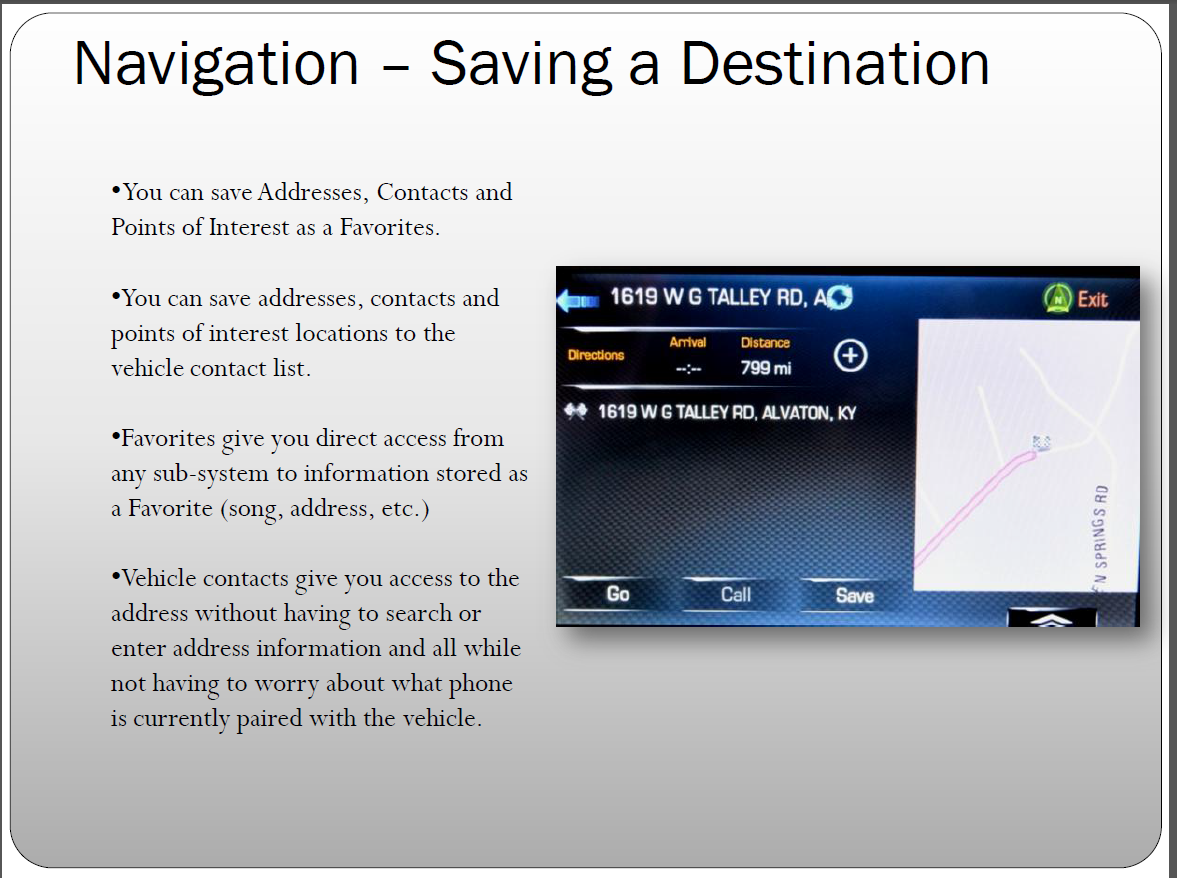
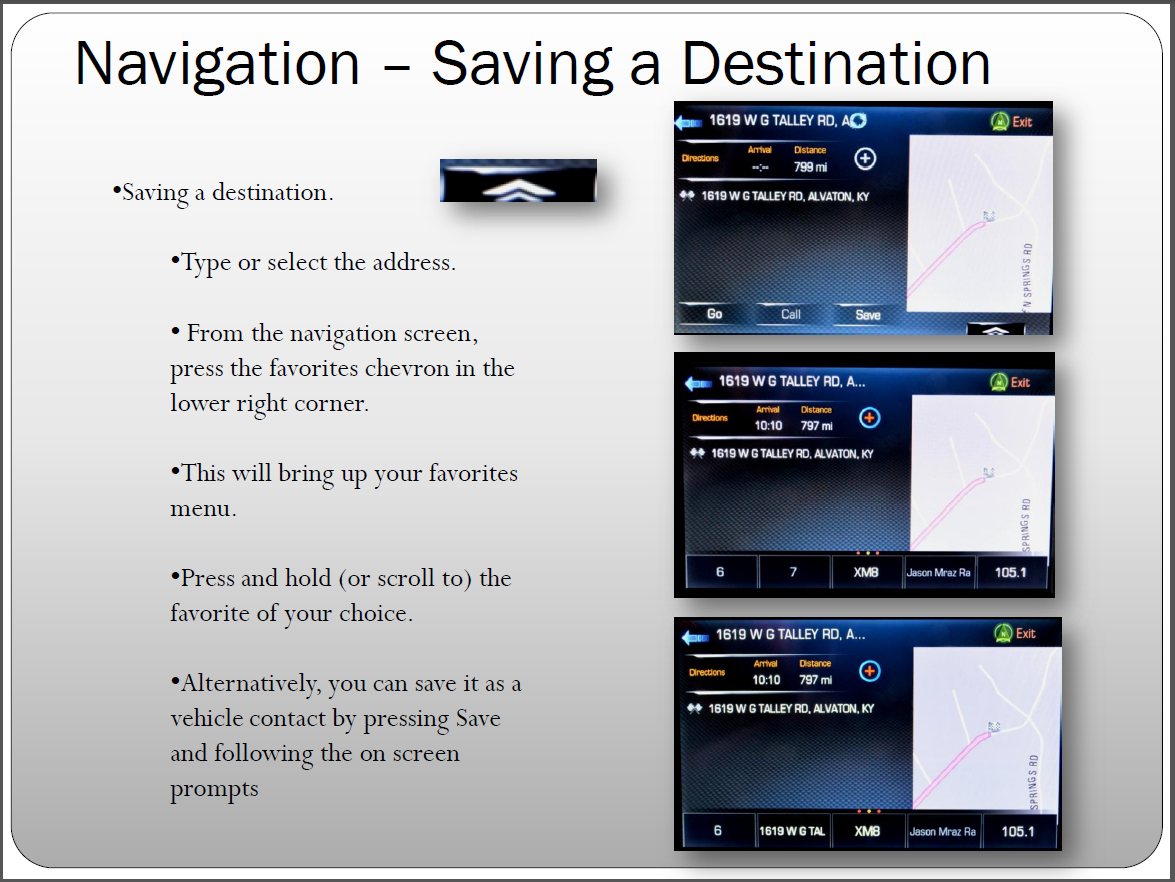
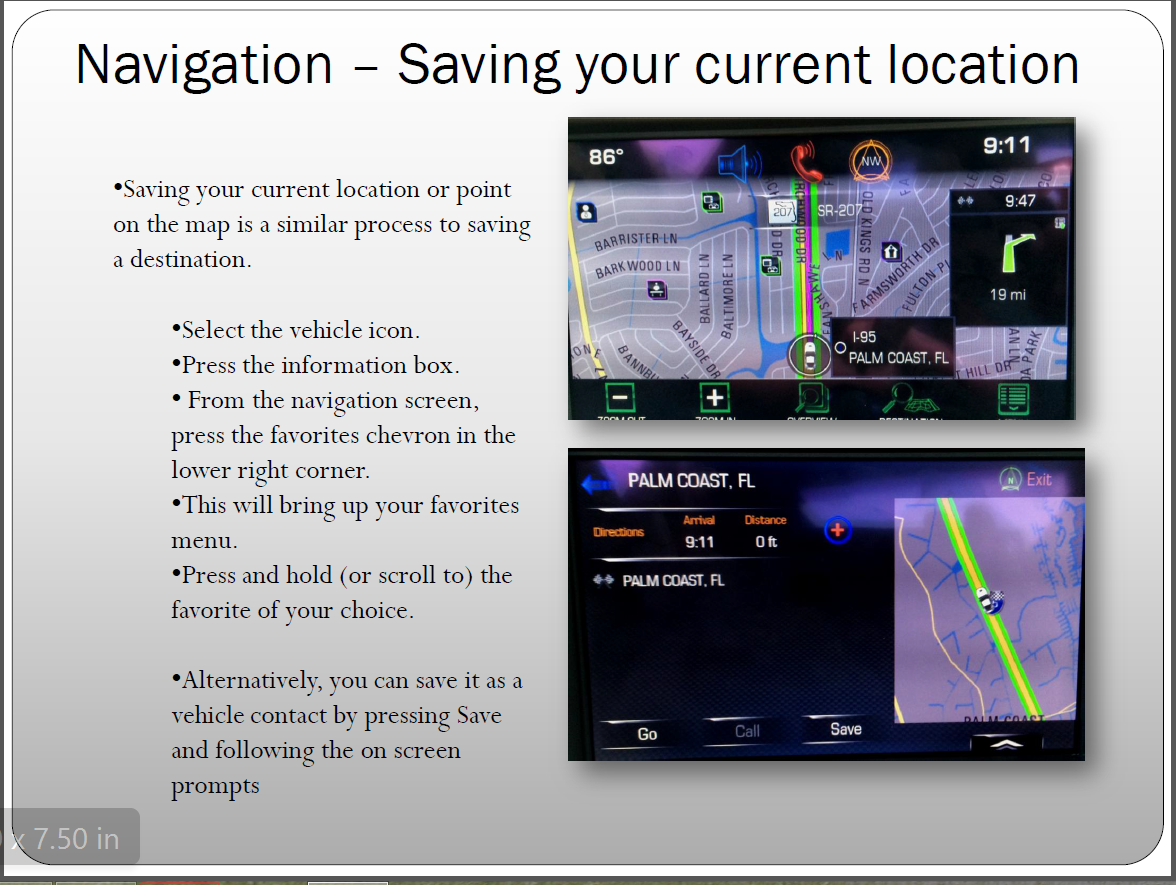
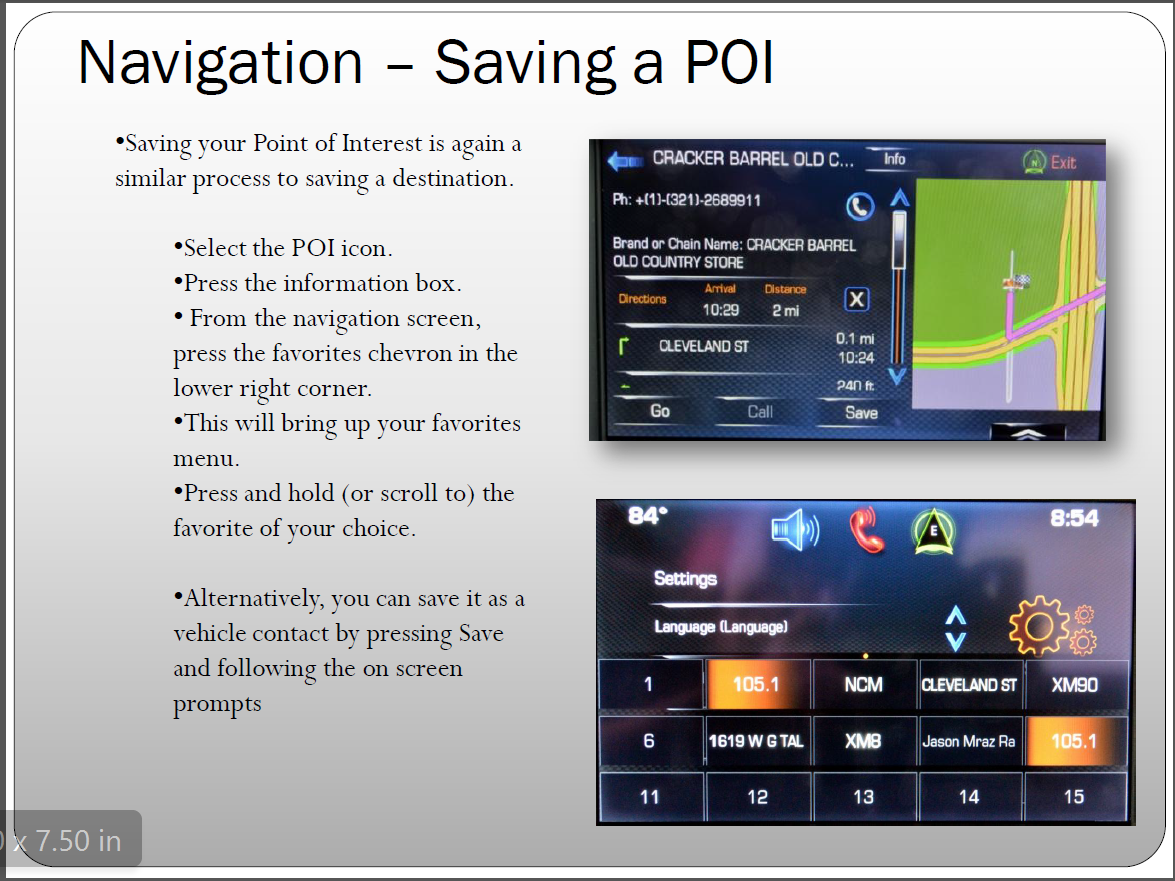
For example, your point 5. Deleting of the home button resulting in the use of contacts. To resolve this, just set your home location on one of the Favorite buttons. With the ability to save contacts, POIs and destinations as favorites not only does the home button become redundant, you actually have expanded capabilities for ease of destination selection. For example:
Last edited by talon90; Aug 6, 2014 at 09:40 PM.
Team Owner
Joined: Aug 2007
Posts: 136,140
Likes: 2,432
From: I live my life by 2 rules. 1) Never share everything you know. 2)
St. Jude Donor '11-'12-'13, '16-'17-'18
Corvette Stories
The Best of Corvette for Corvette Enthusiasts

Top 10 Most Expensive Corvettes Ever Sold on Bring A Trailer
Brett Foote
10 Things Every Corvette Owner Needs (2026 Edition)
Michael S. Palmer
8 Most "Only Corvette Owners Understand" Quirks and Problems
Pouria Savadkouei
10 Reasons the C6 Z06 is Still A Performance Benchmark After 20 Years
Joe Kucinski
How Much Horsepower Every Corvette Engine "LOST" in 1972
Joe Kucinski
Top 10 DOs and DON'Ts for Protecting Your Convertible Top!
Michael S. Palmer
Top 10 Most Explosive Corvettes Ever Made: Power-to-Weight Ratio Ranked!
Joe Kucinski
150 hp to 1,250 hp: Every Corvette Generation Compared by the Specs That Matter
Joe Kucinski
8 Coolest Corvette Pace Cars (and Replicas) of All Time
Verdad Gallardo
Team Owner
Joined: Aug 2002
Posts: 35,617
Likes: 167
Tech Contributor
Cruise-In 11 Veteran
NCM Ambassador
St. Jude Donor '05-'06-'07-'10

Race Director


Joined: Jul 2010
Posts: 10,548
Likes: 176
From: Upstate NY
I would live to see a Garmin interface on the NAV. I won't be holding my breath for it though. I don't think it is nearly as bad as some have described it. Mine seems to get me where I need to be with no fuss. 
Team Owner
Joined: Aug 2007
Posts: 136,140
Likes: 2,432
From: I live my life by 2 rules. 1) Never share everything you know. 2)
St. Jude Donor '11-'12-'13, '16-'17-'18
Team Owner
Joined: Aug 2002
Posts: 35,617
Likes: 167
Tech Contributor
Cruise-In 11 Veteran
NCM Ambassador
St. Jude Donor '05-'06-'07-'10
Thread Starter
Instructor
Joined: Jul 2005
Posts: 245
Likes: 3
From: Edmond OK
The video you referenced was me. It was an introduction to the entire Infotainment system. The seminar I'm giving in August is exclusively on the use of the navigation system. There will be a video and it will be online again.
For example, your point 5. Deleting of the home button resulting in the use of contacts. To resolve this, just set your home location on one of the Favorite buttons. With the ability to save contacts, POIs and destinations as favorites not only does the home button become redundant, you actually have expanded capabilities for ease of destination selection. For example:
For example, your point 5. Deleting of the home button resulting in the use of contacts. To resolve this, just set your home location on one of the Favorite buttons. With the ability to save contacts, POIs and destinations as favorites not only does the home button become redundant, you actually have expanded capabilities for ease of destination selection. For example:

Team Owner
Joined: Aug 2002
Posts: 35,617
Likes: 167
Tech Contributor
Cruise-In 11 Veteran
NCM Ambassador
St. Jude Donor '05-'06-'07-'10
You got me! That is a much better way than Contacts. I will be looking for your video and home will be programed as you outlined next time I take the car out. However, the tie to OnStar still troubles me. It seems like this is the kind of thinking that got GM in trouble, they build great cars, but have not done well in software, (read that as EDS, the Ross Perot debacle). OnStar looks to me to be 20th century, the IPhone/Android is the 21st Century. they should stick with Cars. Leave Software to people more agile and less bureaucratic.
GM Owns OnStar so you have to expect some level of "cooperation".
I'll leave you for tonight with another point that might be of some use for Topic 3c. Albeit, this is a "work around". You are correct, you can no longer input GPS coordinates from the unit and you can't search based on coordinates. The unit is however aware of it's position and coordinates. Working with the belief that the plantation that you needed to find had at least an intersection that you could navigate to prior to turning on to the road, the system will allow you to search for intersections. Once you arrive at that intersection, Press your menu button from within the navigation app. The third menu item down will be "Current Location" Pressing that will bring up a screen that has your current location including the GPS coordinates for that location. You can watch for changes in those coordinates to navigate to your approximate destination.
I'll try to chip away at a few more tomorrow.
Paul



Melting Slicks

Joined: Sep 2013
Posts: 3,119
Likes: 799
From: East Lansing, MI
I've got the integrated Garmin on a 2014 Charger. It works well, has the advantage of being an interface I'm used to. My wife's Jeep Cherokee has the option of adding the Garmin nav via the dealer--just enabling something that's already in the radio--for about $500, still a little steep but reasonable given current prices for integrated nav.
I still think that leveraging smartphone based nav to display on the factory screen is going to be the wave of the future and is needed to appeal to younger buyers who see no reason to pay big bucks for something available essentially for free and freely upgraded. Chevy already does this on Spark and Sonic for $50, $60 with map updates in year 2 & 3 as mentioned by OP. It's called the BringGo app.
I still think that leveraging smartphone based nav to display on the factory screen is going to be the wave of the future and is needed to appeal to younger buyers who see no reason to pay big bucks for something available essentially for free and freely upgraded. Chevy already does this on Spark and Sonic for $50, $60 with map updates in year 2 & 3 as mentioned by OP. It's called the BringGo app.
Last edited by fsvoboda; Aug 7, 2014 at 04:23 AM.

Drifting


Joined: Jun 2013
Posts: 1,764
Likes: 10
From: Cumming GA
On order: Torch Red Z51
Paul,
It's good to see you active on here again. RE: the NAV system, I think it will continually be a learning process to figure out things such as the 'work around' you described. One thing it doesn't seem to do that I love in my Lexus is the ability to switch on what I call the 'cookie crumbs'. As you drive along it drops little crumbs (dots really) on the map behind the car icon. After so many miles they disappear or you can just turn them off. I can't tell you how many times I've found my way out of strange neighborhoods using that feature. It's one that doesn't mean much till you've used it then ....
It's good to see you active on here again. RE: the NAV system, I think it will continually be a learning process to figure out things such as the 'work around' you described. One thing it doesn't seem to do that I love in my Lexus is the ability to switch on what I call the 'cookie crumbs'. As you drive along it drops little crumbs (dots really) on the map behind the car icon. After so many miles they disappear or you can just turn them off. I can't tell you how many times I've found my way out of strange neighborhoods using that feature. It's one that doesn't mean much till you've used it then ....
Excellent. Happy to help even if just one small point. Using the favorites is so much faster than having to scroll through the contacts for sure.
GM Owns OnStar so you have to expect some level of "cooperation".
I'll leave you for tonight with another point that might be of some use for Topic 3c. Albeit, this is a "work around". You are correct, you can no longer input GPS coordinates from the unit and you can't search based on coordinates. The unit is however aware of it's position and coordinates. Working with the belief that the plantation that you needed to find had at least an intersection that you could navigate to prior to turning on to the road, the system will allow you to search for intersections. Once you arrive at that intersection, Press your menu button from within the navigation app. The third menu item down will be "Current Location" Pressing that will bring up a screen that has your current location including the GPS coordinates for that location. You can watch for changes in those coordinates to navigate to your approximate destination.
I'll try to chip away at a few more tomorrow.
Paul
GM Owns OnStar so you have to expect some level of "cooperation".
I'll leave you for tonight with another point that might be of some use for Topic 3c. Albeit, this is a "work around". You are correct, you can no longer input GPS coordinates from the unit and you can't search based on coordinates. The unit is however aware of it's position and coordinates. Working with the belief that the plantation that you needed to find had at least an intersection that you could navigate to prior to turning on to the road, the system will allow you to search for intersections. Once you arrive at that intersection, Press your menu button from within the navigation app. The third menu item down will be "Current Location" Pressing that will bring up a screen that has your current location including the GPS coordinates for that location. You can watch for changes in those coordinates to navigate to your approximate destination.
I'll try to chip away at a few more tomorrow.
Paul
Team Owner
Joined: Aug 2002
Posts: 35,617
Likes: 167
Tech Contributor
Cruise-In 11 Veteran
NCM Ambassador
St. Jude Donor '05-'06-'07-'10
Paul,
It's good to see you active on here again. RE: the NAV system, I think it will continually be a learning process to figure out things such as the 'work around' you described. One thing it doesn't seem to do that I love in my Lexus is the ability to switch on what I call the 'cookie crumbs'. As you drive along it drops little crumbs (dots really) on the map behind the car icon. After so many miles they disappear or you can just turn them off. I can't tell you how many times I've found my way out of strange neighborhoods using that feature. It's one that doesn't mean much till you've used it then ....
It's good to see you active on here again. RE: the NAV system, I think it will continually be a learning process to figure out things such as the 'work around' you described. One thing it doesn't seem to do that I love in my Lexus is the ability to switch on what I call the 'cookie crumbs'. As you drive along it drops little crumbs (dots really) on the map behind the car icon. After so many miles they disappear or you can just turn them off. I can't tell you how many times I've found my way out of strange neighborhoods using that feature. It's one that doesn't mean much till you've used it then ....
No ability to display cookie crumbs. Too many tin foil hat folks would have a problem with a linked system storing and "tracking" your movements.
Just set your home location as a favorite and if you get in to a neighborhood and turned around and lost, press the favorite and it will start working on bringing you back in to familiar territory. Once you get back to a road you are comfortable with, end the navigation and go get your self lost again. That's at least what I do.

Racer
Joined: Aug 2005
Posts: 304
Likes: 4
From: Shelton CT
Not sure I can address all of your questions or comments but I'd be happy to try to work with you to attempt to get you in to a better relationship with your system.
I've travelled just over 9,500 miles in my Stingray and Frankly, I've not had any troubles using my system.
I'm not sure if you plan to attend the Labor Day event but I'm giving a seminar on the use of the Navigation system and I'd be happy to spend some time with you at your vehicle if it would help.
I've travelled just over 9,500 miles in my Stingray and Frankly, I've not had any troubles using my system.
I'm not sure if you plan to attend the Labor Day event but I'm giving a seminar on the use of the Navigation system and I'd be happy to spend some time with you at your vehicle if it would help.
Good to see your posts regarding Nav issues. I have to agree with Rohard on a number of his points. We have crossed paths on a number of threads that discuss Nav shortcomings. I too, have been frustrated with the same location in two different places and long way around routing.
My "pet project" has been documenting the process to get POIs into the Nav system. I have discussed this with Chevy Customer support on the forum, via email and on the phone. I have even sent a set of documents to GM via my dealer, to explain some of my findings and my solutions. Aside from other issues in the Nav system that simply aren't there but are available in a $99 Garmin, this POI issue got the final response from GM, "it's working as designed."
I firmly believe that the design is flawed on a number of counts.
If you have the time, I'd appreciate it if you could read the first few posts in this thread, and I'm sure that you will replicate the issue.
http://forums.corvetteforum.com/c7-g...assistant.html
Many who have said "It works fine for me" , haven't asked the system to do some basic stuff! I can't seem to find any GPS system from $79 and up, that doesn't simply import a set of POIs. Some C7 Owners may not care, but for others it's an important feature.
I have a large number of POIs that I have developed over the past 10 years (relatives' homes, places I consult with, on route waypoints, etc.), and they are easily loadable to every other GPS I've owned! In addition, sites like POI Factory offer user-contributed sets of POIs that are really useful...red light cameras, Dunkin Donut locations, specific hobby destinations, etc.)
Regarding the Home button, to put it in perspective, it took you 4 pages of slides to explain how to do something that I have never had to look at a manual to do on every other GPS I've owned! Sure. It works. But, when I use this Nav system, its always harder to do (or figure out).
I would urge you to sit in a Dodge that has the UConnect 8.4 Infotainment system for a few minutes and not say , "Wow! that's a system!" They partnered with Panasonic and Garmin, and did it right!
We're left with QNX and who-knows-what Nav system on an otherwise SPECTACULAR CAR!
Hoping you get a chance to try the POIs In the thread...
Ed

Racer


Joined: Apr 2014
Posts: 373
Likes: 46
From: Minnesota
Jim,
No ability to display cookie crumbs. Too many tin foil hat folks would have a problem with a linked system storing and "tracking" your movements.
Just set your home location as a favorite and if you get in to a neighborhood and turned around and lost, press the favorite and it will start working on bringing you back in to familiar territory. Once you get back to a road you are comfortable with, end the navigation and go get your self lost again. That's at least what I do.
No ability to display cookie crumbs. Too many tin foil hat folks would have a problem with a linked system storing and "tracking" your movements.
Just set your home location as a favorite and if you get in to a neighborhood and turned around and lost, press the favorite and it will start working on bringing you back in to familiar territory. Once you get back to a road you are comfortable with, end the navigation and go get your self lost again. That's at least what I do.
Thanks for your replies. For what it's worth I use my phone as the gps on my honda and for the past couple of weeks have been having trouble with the phone constantly rebooting, making me unable to safely use it as a nav unit. Whenever it reboots you have to grab it, undo the holder, and unlock it and launch the map app while going. The side effect is now I take my stingray to anyplace that requires nav, I'm new in town so that's most places! Not entirely dreadful. :-)
I do have one concern about using the my link nav. In the route building logic the options are fastest or shortest (one more I can't recall). I'm thinking fastest might be legal speed limit on the roads not necessarily how long before you get to destination. Also shortest is least amount of miles to travel. I encountered a problem traveling cross country where the system wanted me to travel 150 extra miles and add 1.5 hours to an otherwise 4.5 hour trip under the "fastest setting". It did that to keep me on the interstate even though there were a couple of US highways that would have done nicely. The only reason I knew that is coz I had done that trip before.
Called onstar and they did route a proper course. After about 10 minutes and a couple more calls to onstar they said they would only be able to route a turn-by-turn plan not the Indash nav. Whenever they would send it to the nav it would reconfigure the route based on its own logic. I made it to my destination with turn by turn but was wondering if there's a better way to use my nav in that situation?
Thanks for all the help.