




Please help!

Thread Starter
Intermediate

Joined: Nov 2007
Posts: 46
Likes: 0
From: Baltimore Maryland
 Please help!
Well, I`ve had my 02 for 5 days and already have a problem. Everything was fine when I got home. Went back out to leave and got "service abs service active handling servicetraction system" What is this all about and how do I get the messages to stop. No codes came up on the code reader. Thanks in advance.
Racer


Joined: Aug 2000
Posts: 317
Likes: 42
From: Chicago, Illinois
You Need Help
Hello Frankie, from outside of Chicago. I have an 02 Torch Red Coupe and had the same issue about 6 months after I bought it. There are two possibilities. First is that you have some bad connections on some sensors on the wheels or, the computer that controls both the ABS and Traction Control etc is about to go. Don't know how many miles are on your car but that info would help. I bought my coupe with 1800 miles on it and when I kept getting that warning, I took it into the dealer who said the computer was going and it would be a $1200 repair. I got on the phone with Chevy and their customer service folks and explained that I had owned three Vettes, a car with 2000 miles should not need this repair and that I was a loyal Vette owner and wanted their help. Later that day they called me back and paid the entire repair bill except for the diagnostic charge of $95. I was lucky but if your car has a ton of miles, you just might need to get it fixed if it is not a simple sensor issue or something like that. Good luck and let us know what happens.
RJ

RJ

Tech Contributor


Joined: Jan 2007
Posts: 19,465
Likes: 1,167
From: Dyer, IN
I am surpised that the DIC has not stored an codes associated with this issue. So to be clear, do you know how to pull up the codes, or are you expecting them to be flashing in from of you? My guess is, it is probably just a speed sensor harness or wheel speed sensor. Pulling up the exact code will isolate it to a particular wheel.
Also, fill out your sig. We have no idea who you are, or where you are located.
Also, fill out your sig. We have no idea who you are, or where you are located.
Thread Starter
Intermediate
Joined: Nov 2007
Posts: 46
Likes: 0
From: Baltimore Maryland
The codes I was looking for were with my handheld obd code reader. Not sure how to pull them any other way. This is my first corvette, so I`m all new to this. I hope its nothing big. Can`t afford a big hit right after buying it.

Melting Slicks

Joined: Feb 2007
Posts: 3,194
Likes: 10
From: New Smyrna Beach Florida
I had service the traction control and ABS in my 02 coupe with about 24000 miles.  Checked the DIC codes by turning key to on but not starting. Hold options button and press the fuel button 4 times within 10 seconds or so. Then you can manualy go through the codes with the options button. In my case I had the code C1214 which is almost always EBTCM fatal. Removed it per instructions from the forum and had it rebuilt by module masters but is cheaper repair by ABS fixer. After repair, no more C1214.
  I think this happens to most c5s.
Checked the DIC codes by turning key to on but not starting. Hold options button and press the fuel button 4 times within 10 seconds or so. Then you can manualy go through the codes with the options button. In my case I had the code C1214 which is almost always EBTCM fatal. Removed it per instructions from the forum and had it rebuilt by module masters but is cheaper repair by ABS fixer. After repair, no more C1214. I think this happens to most c5s.

Tech Contributor


Joined: Dec 1999
Posts: 32,910
Likes: 2,402
From: Anthony TX
CI 6,7,8,9,11 Vet
St. Jude Donor '08
Your C5 has a "built in DTC code reader" It is a LOT more accurate than a generic code reader. generic readers wont read all the C5 computer modules. You have a LOT more than one!
Take a look below and see what you need to do to read your own DTCs
YOU DON'T NEED NO STINKEN CODE READER!!!!!!!!!!!!!
BC
These are the absolute best C5 Diagnostic Trouble Code (DTC) web sites!!!
http://www.corvettedoctor.com/Code_Main.html
http://www.corvettedoctor.com/index.html
Go to “technical data base” and then to “Corvette ECM Computer Codes”. Then select your year car. Read the instructions and then scroll down to the "READ MORE" window to view the code definitions.\
Here is another very good site:
http://www.obd-codes.com/trouble_cod...d-ii-codes.php
Make sure to include the H or C suffix!!
The Diagnostic Display Mode is entered with the following procedure:
1) Turn on the ignition but don't start the engine.
2) Press the RESET button to turn off any warning messages. (i.e. door open, trunk open ect)
3) Press and hold OPTIONS
4) While holding OPTIONS, press FUEL four times within a 10-second period.
Initially, on-board diagnostics go into an Automatic Mode which shows diagnostic codes in a pre-set sequence: PCM - TCS - RTD - BCM - IPC - RADIO - HVAC - LDCM - RDCM - SCM - RFA. All codes will be displayed for each. ( i.e. PCM = 4 codes)
If none are present in a given module, you will see No More Codes on the display.
There are two kinds of diagnostic codes, Current and History designated with a letter suffix, C or ;H. A current code indicates a malfunction is present in the module displaying data. A history code indicates a problem existed sometime in the last 40 or 50 ignition cycles. When not accompanied by a current code of the same number, it's potential evidence of a previous problem, now resolved, that was not removed by clearing the codes.
More likely it's an indication of an intermittent malfunction.
Intermittent codes are the most challenging of the diagnostics. An intermittent code may have happened once, may have happened more than once but is inconsistent or may be happening on a regular basis but not at the time the codes are displayed. History codes can also be caused by a current malfunction in a system that is not operating at the time codes are displayed. An example is the rear window defogger which doesn't operate until the Body Control Module detects engine rpm. For history codes set by a module that does not operate with the key on and engine off, a special diagnostic tool called a Scan Tester is necessary to properly diagnose the malfunction.
Once the system has displayed all modules, it goes into the manual mode which allows selection of each module using combinations of Driver Information Center buttons. Manual mode can also be entered during the automatic sequence by pressing any button except E/M. Once the display shows Manual Diagnostics, select a module by pressing the OPTIONS button to go forward or the TRIP button to go back. Once a module is selected, a code is displayed, and if more than one are present;
press GAGES to go forward or FUEL to go back.
To exit the diagnostic mode at any time, press E/M. If you want to erase codes in a given module, press RESET
To reset the codes once in manual mode, press and hold RESET until it displays NO CODES Press OPTIONS to go to the next module. Repeat the steps until you have reset the codes in all the computer modules.
NOTE!! Only reset the codes IF you want to - it is NOT necessary to do this. Clearing a code does not repair a problem. You are simply erasing the evidence of it in the module's memory. If you clear the code/s, and extinguish the Check Engine Light, your emissions status ready will NOT allow you to pass an emissions test until you have completed the required driving cycles.
Once you have the codes, the next question is: What to do with the information?
First, consult the factory service manual. Any serious C5 Do-It-Yourself owner should invest in the Corvette Service Manual of the appropriate model year. The Service Manual is really a requirement if you want to understand and work on your C5.
Take a look below and see what you need to do to read your own DTCs
YOU DON'T NEED NO STINKEN CODE READER!!!!!!!!!!!!!
BC
These are the absolute best C5 Diagnostic Trouble Code (DTC) web sites!!!
http://www.corvettedoctor.com/Code_Main.html
http://www.corvettedoctor.com/index.html
Go to “technical data base” and then to “Corvette ECM Computer Codes”. Then select your year car. Read the instructions and then scroll down to the "READ MORE" window to view the code definitions.\
Here is another very good site:
http://www.obd-codes.com/trouble_cod...d-ii-codes.php
Make sure to include the H or C suffix!!
The Diagnostic Display Mode is entered with the following procedure:
1) Turn on the ignition but don't start the engine.
2) Press the RESET button to turn off any warning messages. (i.e. door open, trunk open ect)
3) Press and hold OPTIONS
4) While holding OPTIONS, press FUEL four times within a 10-second period.
Initially, on-board diagnostics go into an Automatic Mode which shows diagnostic codes in a pre-set sequence: PCM - TCS - RTD - BCM - IPC - RADIO - HVAC - LDCM - RDCM - SCM - RFA. All codes will be displayed for each. ( i.e. PCM = 4 codes)
If none are present in a given module, you will see No More Codes on the display.
There are two kinds of diagnostic codes, Current and History designated with a letter suffix, C or ;H. A current code indicates a malfunction is present in the module displaying data. A history code indicates a problem existed sometime in the last 40 or 50 ignition cycles. When not accompanied by a current code of the same number, it's potential evidence of a previous problem, now resolved, that was not removed by clearing the codes.
More likely it's an indication of an intermittent malfunction.
Intermittent codes are the most challenging of the diagnostics. An intermittent code may have happened once, may have happened more than once but is inconsistent or may be happening on a regular basis but not at the time the codes are displayed. History codes can also be caused by a current malfunction in a system that is not operating at the time codes are displayed. An example is the rear window defogger which doesn't operate until the Body Control Module detects engine rpm. For history codes set by a module that does not operate with the key on and engine off, a special diagnostic tool called a Scan Tester is necessary to properly diagnose the malfunction.
Once the system has displayed all modules, it goes into the manual mode which allows selection of each module using combinations of Driver Information Center buttons. Manual mode can also be entered during the automatic sequence by pressing any button except E/M. Once the display shows Manual Diagnostics, select a module by pressing the OPTIONS button to go forward or the TRIP button to go back. Once a module is selected, a code is displayed, and if more than one are present;
press GAGES to go forward or FUEL to go back.
To exit the diagnostic mode at any time, press E/M. If you want to erase codes in a given module, press RESET
To reset the codes once in manual mode, press and hold RESET until it displays NO CODES Press OPTIONS to go to the next module. Repeat the steps until you have reset the codes in all the computer modules.
NOTE!! Only reset the codes IF you want to - it is NOT necessary to do this. Clearing a code does not repair a problem. You are simply erasing the evidence of it in the module's memory. If you clear the code/s, and extinguish the Check Engine Light, your emissions status ready will NOT allow you to pass an emissions test until you have completed the required driving cycles.
Once you have the codes, the next question is: What to do with the information?
First, consult the factory service manual. Any serious C5 Do-It-Yourself owner should invest in the Corvette Service Manual of the appropriate model year. The Service Manual is really a requirement if you want to understand and work on your C5.
Corvette Stories
The Best of Corvette for Corvette Enthusiasts

Top 10 Most Expensive Corvettes Ever Sold on Bring A Trailer
Brett Foote
10 Things Every Corvette Owner Needs (2026 Edition)
Michael S. Palmer
8 Most "Only Corvette Owners Understand" Quirks and Problems
Pouria Savadkouei
10 Reasons the C6 Z06 is Still A Performance Benchmark After 20 Years
Joe Kucinski
How Much Horsepower Every Corvette Engine "LOST" in 1972
Joe Kucinski
Top 10 DOs and DON'Ts for Protecting Your Convertible Top!
Michael S. Palmer
Top 10 Most Explosive Corvettes Ever Made: Power-to-Weight Ratio Ranked!
Joe Kucinski
150 hp to 1,250 hp: Every Corvette Generation Compared by the Specs That Matter
Joe Kucinski
8 Coolest Corvette Pace Cars (and Replicas) of All Time
Verdad Gallardo
Thread Starter
Intermediate
Joined: Nov 2007
Posts: 46
Likes: 0
From: Baltimore Maryland
Looks like I have c1214 hc and P0128 c Several others that are history. Nothing that looked serious. I tried to clear the 1214 code, but I still get the messages on the dash
Melting Slicks
Joined: Feb 2007
Posts: 3,194
Likes: 10
From: New Smyrna Beach Florida
Use the search key to get info on C1214. This is a common code and most of the time seems to point at the electronic brake control module. This is very common Previous treads on the forum will give you a couple of things to check before you get to the EBCM. When I had the service ABS message, I also had the C1214 code. The C after the code indicates that it is a current problem. After checking the grounds and connections, I ended up sending the module to module masters for repair. ABS fixer is the cheapest route. All the info on how to check thinks out and how to remove the module for repair can be found on theis forum using the search key. If module is failing, much cheaper to remove asend out for repair. ABS fixer used to be $150 plus shipping. Search the forum on C1214 and good luck.
Previous treads on the forum will give you a couple of things to check before you get to the EBCM. When I had the service ABS message, I also had the C1214 code. The C after the code indicates that it is a current problem. After checking the grounds and connections, I ended up sending the module to module masters for repair. ABS fixer is the cheapest route. All the info on how to check thinks out and how to remove the module for repair can be found on theis forum using the search key. If module is failing, much cheaper to remove asend out for repair. ABS fixer used to be $150 plus shipping. Search the forum on C1214 and good luck.
Tech Contributor
Joined: Dec 1999
Posts: 32,910
Likes: 2,402
From: Anthony TX
CI 6,7,8,9,11 Vet
St. Jude Donor '08
Yep,,,1214 is the EBTCM kiss of death. It indicates that the internal power relay is bad. Send it out for repair. Its a simple task to remove the module. 6 torx head screws and two connectors. Its even a plug and play module. NO programming necessary!
BC
BC

Le Mans Master

Joined: Dec 2006
Posts: 7,251
Likes: 16
From: Phoenix Arizona
. but never hurts to look some more...
http://www.absfixer.com/
G/L
if you want some piece of mind redo the chassis grounds.
 GM did with the C6, thats gotta tell ya sumthin'
 and............read ALL the stickies at the top of the C5 general forum
 ..then you will be a corvette genius!
http://forums.corvetteforum.com/forumdisplay.php?f=103
Last edited by rustyguns; Nov 10, 2007 at 12:10 AM.
Tech Contributor
Joined: Jan 2007
Posts: 19,465
Likes: 1,167
From: Dyer, IN
 Just hold on a second! There can be other things wrong in the system that will set this code. There are other things to check per the service manual. It may very well be a EBTCM, but there are things to check to be absolutely sure. Don't tell this guy that his EBTCM is bad when you have not suggested the full troubleshooting procedure.
 I hate when people do this to guys that need help


Tech Contributor
Joined: Dec 1999
Posts: 32,910
Likes: 2,402
From: Anthony TX
CI 6,7,8,9,11 Vet
St. Jude Donor '08
Just hold on a second! There can be other things wrong in the system that will set this code. There are other things to check per the service manual. It may very well be a EBTCM, but there are things to check to be absolutely sure. Don't tell this guy that his EBTCM is bad when you have not suggested the full troubleshooting procedure. I hate when people do this to guys that need help
I hate when someone with 300 post goes on an attack. This is the SECOND post that you have had issues with how I interface with someone. If you don't like what I have to say, just add what you have to say.
I've been a member of this forum since 1999 and have over 8000 post. If you want to talk this guy through the entire EBTCM troubleshooting procedure, be my guest. Then you can tell him the send his EBTCM out for repair.
 The relays inside the module are junk! Sending it to ABS fixer resolves this issue.
 There are HUNDREDS of EBTCM post on the forum archive. Give the search thing a try. It works very well. Probably 3/4 of them are 1214 issues.
Im quite sure that I have typed out the entire EBTCM troubleshooting procedure at least ONCE. 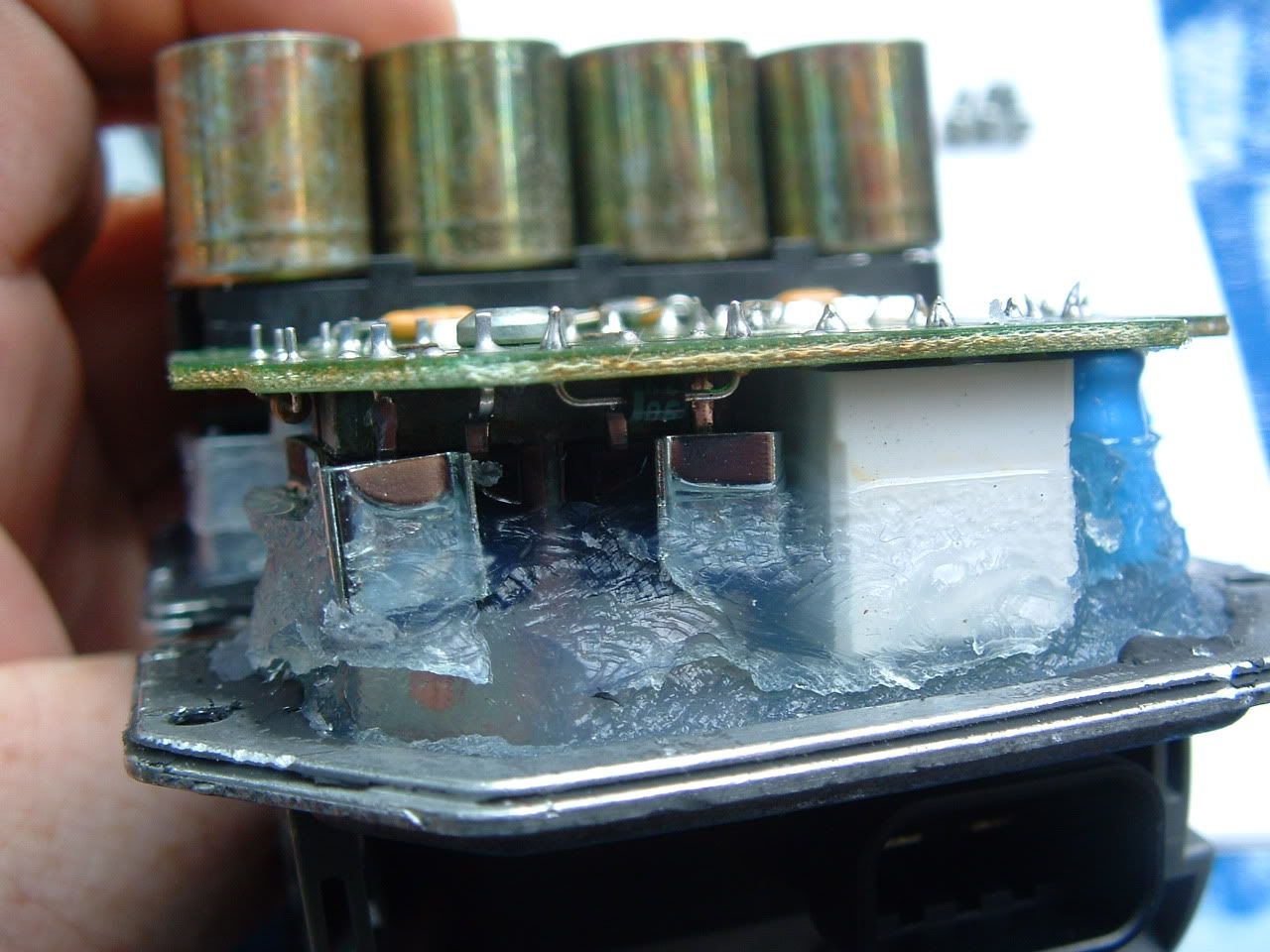
If you really want to help the OP, tell him that not only does he loose TRACTION CONTROL but most importantly anti-lock braking and Active Handling.
BC

Tech Contributor


Joined: Oct 1999
Posts: 41,058
Likes: 9,820
From: Charlotte, NC (formerly Endicott, NY)
Frankie,
I will not get into the peeing contest. Both have their points. I have just one recommendation. Forget the code reader. All it can check is engine codes. There are few engine problems on modern cars. Most of the problems on the C5 and other modern cars are going to be called out in the proprietary sections of the codes. With the C5 you are fortunate GM provided the ability to read them. It is the only car built by any mfg that allows you to see the proprietary codes.
Bill
I will not get into the peeing contest. Both have their points. I have just one recommendation. Forget the code reader. All it can check is engine codes. There are few engine problems on modern cars. Most of the problems on the C5 and other modern cars are going to be called out in the proprietary sections of the codes. With the C5 you are fortunate GM provided the ability to read them. It is the only car built by any mfg that allows you to see the proprietary codes.
Bill
Tech Contributor
Joined: Dec 1999
Posts: 32,910
Likes: 2,402
From: Anthony TX
CI 6,7,8,9,11 Vet
St. Jude Donor '08
Here is some info on reading DTC and some instructions on how to read your own codes:
These are the absolute best C5 Diagnostic Trouble Code (DTC) web sites!!!
http://www.corvettedoctor.com/Code_Main.html
http://www.corvettedoctor.com/index.html
Go to “technical data base” and then to “Corvette ECM Computer Codes”. Then select your year car. Read the instructions and then scroll down to the "READ MORE" window to view the code definitions.\
Here is another very good site:
http://www.obd-codes.com/trouble_cod...d-ii-codes.php
Make sure to include the H or C suffix!!
The Diagnostic Display Mode is entered with the following procedure:
1) Turn on the ignition but don't start the engine.
2) Press the RESET button to turn off any warning messages. (i.e. door open, trunk open ect)
3) Press and hold OPTIONS
4) While holding OPTIONS, press FUEL four times within a 10-second period.
Initially, on-board diagnostics go into an Automatic Mode which shows diagnostic codes in a pre-set sequence: PCM - TCS - RTD - BCM - IPC - RADIO - HVAC - LDCM - RDCM - SCM - RFA. All codes will be displayed for each. ( i.e. PCM = 4 codes)
If none are present in a given module, you will see No More Codes on the display.
There are two kinds of diagnostic codes, Current and History designated with a letter suffix, C or ;H. A current code indicates a malfunction is present in the module displaying data. A history code indicates a problem existed sometime in the last 40 or 50 ignition cycles. When not accompanied by a current code of the same number, it's potential evidence of a previous problem, now resolved, that was not removed by clearing the codes.
More likely it's an indication of an intermittent malfunction.
Intermittent codes are the most challenging of the diagnostics. An intermittent code may have happened once, may have happened more than once but is inconsistent or may be happening on a regular basis but not at the time the codes are displayed. History codes can also be caused by a current malfunction in a system that is not operating at the time codes are displayed. An example is the rear window defogger which doesn't operate until the Body Control Module detects engine rpm. For history codes set by a module that does not operate with the key on and engine off, a special diagnostic tool called a Scan Tester is necessary to properly diagnose the malfunction.
Once the system has displayed all modules, it goes into the manual mode which allows selection of each module using combinations of Driver Information Center buttons. Manual mode can also be entered during the automatic sequence by pressing any button except E/M. Once the display shows Manual Diagnostics, select a module by pressing the OPTIONS button to go forward or the TRIP button to go back. Once a module is selected, a code is displayed, and if more than one are present;
press GAGES to go forward or FUEL to go back.
To exit the diagnostic mode at any time, press E/M. If you want to erase codes in a given module, press RESET
To reset the codes once in manual mode, press and hold RESET until it displays NO CODES Press OPTIONS to go to the next module. Repeat the steps until you have reset the codes in all the computer modules.
NOTE!! Only reset the codes IF you want to - it is NOT necessary to do this. Clearing a code does not repair a problem. You are simply erasing the evidence of it in the module's memory. If you clear the code/s, and extinguish the Check Engine Light, your emissions status ready will NOT allow you to pass an emissions test until you have completed the required driving cycles.
Once you have the codes, the next question is: What to do with the information?
First, consult the factory service manual. Any serious C5 Do-It-Yourself owner should invest in the Corvette Service Manual of the appropriate model year. The Service Manual is really a requirement if you want to understand and work on your C5.
These are the absolute best C5 Diagnostic Trouble Code (DTC) web sites!!!
http://www.corvettedoctor.com/Code_Main.html
http://www.corvettedoctor.com/index.html
Go to “technical data base” and then to “Corvette ECM Computer Codes”. Then select your year car. Read the instructions and then scroll down to the "READ MORE" window to view the code definitions.\
Here is another very good site:
http://www.obd-codes.com/trouble_cod...d-ii-codes.php
Make sure to include the H or C suffix!!
The Diagnostic Display Mode is entered with the following procedure:
1) Turn on the ignition but don't start the engine.
2) Press the RESET button to turn off any warning messages. (i.e. door open, trunk open ect)
3) Press and hold OPTIONS
4) While holding OPTIONS, press FUEL four times within a 10-second period.
Initially, on-board diagnostics go into an Automatic Mode which shows diagnostic codes in a pre-set sequence: PCM - TCS - RTD - BCM - IPC - RADIO - HVAC - LDCM - RDCM - SCM - RFA. All codes will be displayed for each. ( i.e. PCM = 4 codes)
If none are present in a given module, you will see No More Codes on the display.
There are two kinds of diagnostic codes, Current and History designated with a letter suffix, C or ;H. A current code indicates a malfunction is present in the module displaying data. A history code indicates a problem existed sometime in the last 40 or 50 ignition cycles. When not accompanied by a current code of the same number, it's potential evidence of a previous problem, now resolved, that was not removed by clearing the codes.
More likely it's an indication of an intermittent malfunction.
Intermittent codes are the most challenging of the diagnostics. An intermittent code may have happened once, may have happened more than once but is inconsistent or may be happening on a regular basis but not at the time the codes are displayed. History codes can also be caused by a current malfunction in a system that is not operating at the time codes are displayed. An example is the rear window defogger which doesn't operate until the Body Control Module detects engine rpm. For history codes set by a module that does not operate with the key on and engine off, a special diagnostic tool called a Scan Tester is necessary to properly diagnose the malfunction.
Once the system has displayed all modules, it goes into the manual mode which allows selection of each module using combinations of Driver Information Center buttons. Manual mode can also be entered during the automatic sequence by pressing any button except E/M. Once the display shows Manual Diagnostics, select a module by pressing the OPTIONS button to go forward or the TRIP button to go back. Once a module is selected, a code is displayed, and if more than one are present;
press GAGES to go forward or FUEL to go back.
To exit the diagnostic mode at any time, press E/M. If you want to erase codes in a given module, press RESET
To reset the codes once in manual mode, press and hold RESET until it displays NO CODES Press OPTIONS to go to the next module. Repeat the steps until you have reset the codes in all the computer modules.
NOTE!! Only reset the codes IF you want to - it is NOT necessary to do this. Clearing a code does not repair a problem. You are simply erasing the evidence of it in the module's memory. If you clear the code/s, and extinguish the Check Engine Light, your emissions status ready will NOT allow you to pass an emissions test until you have completed the required driving cycles.
Once you have the codes, the next question is: What to do with the information?
First, consult the factory service manual. Any serious C5 Do-It-Yourself owner should invest in the Corvette Service Manual of the appropriate model year. The Service Manual is really a requirement if you want to understand and work on your C5.

Safety Car


Joined: Aug 2000
Posts: 4,933
Likes: 30
From: San Rafael CA
I would NEVER contradict Bill Curlee or Bill Dearborn .... ANYTHING they post is "take it to the bank" golden good stuff ....
Heck, I suspect Bill Curlee has at one time disassembled his C5 down to the last nut and bolt as I have seen him post pictures of parts you wouldn't even know are on the car ..... 
Heck, I suspect Bill Curlee has at one time disassembled his C5 down to the last nut and bolt as I have seen him post pictures of parts you wouldn't even know are on the car .....