






Dumb blonde needs help! PLEASE!

Thread Starter
Intermediate

Joined: Nov 2007
Posts: 40
Likes: 0
From: Baton Rouge Louisiana
 Dumb blonde needs help! PLEASE!
I have had to replaced my air intake sensor three times in the past month. Do ya'll have any suggestions as to why they don't last? I recently replaced the stock intake with a RAM. Do I need a different sensor? 1998 C5.

Drifting


Joined: Mar 2005
Posts: 1,737
Likes: 0
From: Northern VA
It's not unusual for the wires to break inside the connector for the air temp sensor.
I doubt any of your sensors were bad, since there are no moving parts to break.
Take your car to someone and tell them to replace or repair the wiring at the sensor connector.
I doubt any of your sensors were bad, since there are no moving parts to break.
Take your car to someone and tell them to replace or repair the wiring at the sensor connector.
Thread Starter
Intermediate
Joined: Nov 2007
Posts: 40
Likes: 0
From: Baton Rouge Louisiana
The guy at the auto parts place did spray something on the filters when I bought it. I don't know what it was, he just did it before he explained to me how to remove the old intake and install the new one. At first I thought I installed it incorrectly, but there really is only one way to put it on that I can see.
That brings me to my next delima.... I'm having a hard time finding a qualified machanic willing to service Corvettes in the Baton Rouge area other than the stealership! I did a local search but came up empty handed. Any suggestions?
That brings me to my next delima.... I'm having a hard time finding a qualified machanic willing to service Corvettes in the Baton Rouge area other than the stealership! I did a local search but came up empty handed. Any suggestions?

Tech Contributor


Joined: Dec 1999
Posts: 32,910
Likes: 2,402
From: Anthony TX
CI 6,7,8,9,11 Vet
St. Jude Donor '08
 The connector wires can break and the female pins in the connector can spread and not grip the male pins on the sensor.
This isnt the connector but an example of what could be happening. The female pins have a spring clip in the center that makes positive contact with the male pin. See if yours are damaged:
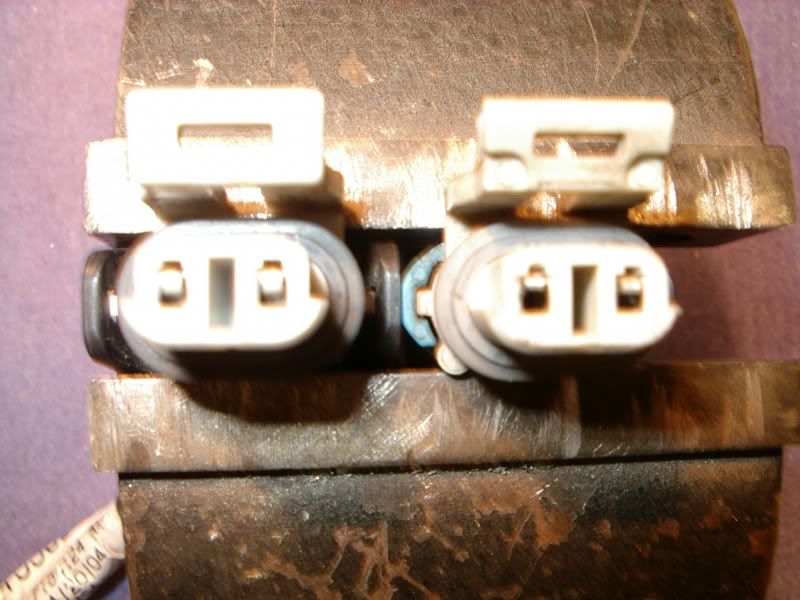
The pins on the connector on the right are BAD!
Let us know how you make out with this repair.
As for finding a good Corvette shop, post a question in the forum Events & Regional section for your area "SOUTH EAST" That will get you something sooner than one post here.

Team Owner


Joined: Mar 1999
Posts: 22,025
Likes: 192
From: At the beach in little Rhody
You might want to contact Thunder Racing, its not a dealer but you are not on warranty either. So for this type of work they may be better but if you have A/C work or something they may not have much experience.
Thread Starter
Intermediate
Joined: Nov 2007
Posts: 40
Likes: 0
From: Baton Rouge Louisiana
The connector wires can break and the female pins in the connector can spread and not grip the male pins on the sensor.This isnt the connector but an example of what could be happening. The female pins have a spring clip in the center that makes positive contact with the male pin. See if yours are damaged:
The pins on the connector on the right are BAD!
Let us know how you make out with this repair.
As for finding a good Corvette shop, post a question in the forum Events & Regional section for your area "SOUTH EAST" That will get you something sooner than one post here.
Corvette Stories
The Best of Corvette for Corvette Enthusiasts

Top 10 Most Expensive Corvettes Ever Sold on Bring A Trailer
Brett Foote
10 Things Every Corvette Owner Needs (2026 Edition)
Michael S. Palmer
8 Most "Only Corvette Owners Understand" Quirks and Problems
Pouria Savadkouei
10 Reasons the C6 Z06 is Still A Performance Benchmark After 20 Years
Joe Kucinski
How Much Horsepower Every Corvette Engine "LOST" in 1972
Joe Kucinski
Top 10 DOs and DON'Ts for Protecting Your Convertible Top!
Michael S. Palmer
Top 10 Most Explosive Corvettes Ever Made: Power-to-Weight Ratio Ranked!
Joe Kucinski
150 hp to 1,250 hp: Every Corvette Generation Compared by the Specs That Matter
Joe Kucinski
8 Coolest Corvette Pace Cars (and Replicas) of All Time
Verdad Gallardo


Pro

Joined: Aug 2000
Posts: 517
Likes: 0
From: Arlington Texas
If it's the Intake Air Temperature sensor that goes into the air bridge, then you probably have a broken wire inside the insulation just outside of the connector. This has happened to me and several others on the forum. It's relatively simple to fix if you're handy with a soldering iron. If not, then maybe you can use some feminine charm to get a friend to fixi it for you.
Thread Starter
Intermediate
Joined: Nov 2007
Posts: 40
Likes: 0
From: Baton Rouge Louisiana
The check engine light came on so I went to AutoZone, they got the code and informed me that the air intake sensor was bad. I replaced it and everything was fine for about a week and it happened again. I went to a different parts place, they checked the code and gave me the same answer/part. Once again, it worked for about a week. I don't know if changing the intake had anything to do with it, I assumed that was the cause since I had just made the change. My car never ran bad or acted weird, if the check engine light wouldn't have come on, I would never have known anything was wrong. AC works great along with everything else.
Thread Starter
Intermediate
Joined: Nov 2007
Posts: 40
Likes: 0
From: Baton Rouge Louisiana

Tech Contributor
Joined: Dec 1999
Posts: 32,910
Likes: 2,402
From: Anthony TX
CI 6,7,8,9,11 Vet
St. Jude Donor '08
You know your C5 has a built in DTC code reader??? Its really easy to use!
Here is a website that explains it and provides you DTC definitions:
These are the absolute best C5 Diagnostic Trouble Code (DTC) web sites!!!
http://www.corvettedoctor.com/Code_Main.html
http://www.corvettedoctor.com/index.html
Go to “technical data base” and then to “Corvette ECM Computer Codes”. Then select your year car. Read the instructions and then scroll down to the "READ MORE" window to view the code definitions.\
Here is another very good site:
http://www.obd-codes.com/trouble_cod...d-ii-codes.php
Make sure to include the H or C suffix!!
The Diagnostic Display Mode is entered with the following procedure:
1) Turn on the ignition but don't start the engine.
2) Press the RESET button to turn off any warning messages. (i.e. door open, trunk open ect)
3) Press and hold OPTIONS
4) While holding OPTIONS, press FUEL four times within a 10-second period.
Initially, on-board diagnostics go into an Automatic Mode which shows diagnostic codes in a pre-set sequence: PCM - TCS - RTD - BCM - IPC - RADIO - HVAC - LDCM - RDCM - SCM - RFA. All codes will be displayed for each. ( i.e. PCM = 4 codes)
If none are present in a given module, you will see No More Codes on the display.
There are two kinds of diagnostic codes, Current and History designated with a letter suffix, C or ;H. A current code indicates a malfunction is present in the module displaying data. A history code indicates a problem existed sometime in the last 40 or 50 ignition cycles. When not accompanied by a current code of the same number, it's potential evidence of a previous problem, now resolved, that was not removed by clearing the codes.
More likely it's an indication of an intermittent malfunction.
Intermittent codes are the most challenging of the diagnostics. An intermittent code may have happened once, may have happened more than once but is inconsistent or may be happening on a regular basis but not at the time the codes are displayed. History codes can also be caused by a current malfunction in a system that is not operating at the time codes are displayed. An example is the rear window defogger which doesn't operate until the Body Control Module detects engine rpm. For history codes set by a module that does not operate with the key on and engine off, a special diagnostic tool called a Scan Tester is necessary to properly diagnose the malfunction.
Once the system has displayed all modules, it goes into the manual mode which allows selection of each module using combinations of Driver Information Center buttons. Manual mode can also be entered during the automatic sequence by pressing any button except E/M. Once the display shows Manual Diagnostics, select a module by pressing the OPTIONS button to go forward or the TRIP button to go back. Once a module is selected, a code is displayed, and if more than one are present;
press GAGES to go forward or FUEL to go back.
To exit the diagnostic mode at any time, press E/M. If you want to erase codes in a given module, press RESET
To reset the codes once in manual mode, press and hold RESET until it displays NO CODES Press OPTIONS to go to the next module. Repeat the steps until you have reset the codes in all the computer modules.
NOTE!! Only reset the codes IF you want to - it is NOT necessary to do this. Clearing a code does not repair a problem. You are simply erasing the evidence of it in the module's memory. If you clear the code/s, and extinguish the Check Engine Light, your emissions status ready will NOT allow you to pass an emissions test until you have completed the required driving cycles.
Once you have the codes, the next question is: What to do with the information?
First, consult the factory service manual. Any serious C5 Do-It-Yourself owner should invest in the Corvette Service Manual of the appropriate model year. The Service Manual is really a requirement if you want to understand and work on your C5.
Here is a website that explains it and provides you DTC definitions:
These are the absolute best C5 Diagnostic Trouble Code (DTC) web sites!!!
http://www.corvettedoctor.com/Code_Main.html
http://www.corvettedoctor.com/index.html
Go to “technical data base” and then to “Corvette ECM Computer Codes”. Then select your year car. Read the instructions and then scroll down to the "READ MORE" window to view the code definitions.\
Here is another very good site:
http://www.obd-codes.com/trouble_cod...d-ii-codes.php
Make sure to include the H or C suffix!!
The Diagnostic Display Mode is entered with the following procedure:
1) Turn on the ignition but don't start the engine.
2) Press the RESET button to turn off any warning messages. (i.e. door open, trunk open ect)
3) Press and hold OPTIONS
4) While holding OPTIONS, press FUEL four times within a 10-second period.
Initially, on-board diagnostics go into an Automatic Mode which shows diagnostic codes in a pre-set sequence: PCM - TCS - RTD - BCM - IPC - RADIO - HVAC - LDCM - RDCM - SCM - RFA. All codes will be displayed for each. ( i.e. PCM = 4 codes)
If none are present in a given module, you will see No More Codes on the display.
There are two kinds of diagnostic codes, Current and History designated with a letter suffix, C or ;H. A current code indicates a malfunction is present in the module displaying data. A history code indicates a problem existed sometime in the last 40 or 50 ignition cycles. When not accompanied by a current code of the same number, it's potential evidence of a previous problem, now resolved, that was not removed by clearing the codes.
More likely it's an indication of an intermittent malfunction.
Intermittent codes are the most challenging of the diagnostics. An intermittent code may have happened once, may have happened more than once but is inconsistent or may be happening on a regular basis but not at the time the codes are displayed. History codes can also be caused by a current malfunction in a system that is not operating at the time codes are displayed. An example is the rear window defogger which doesn't operate until the Body Control Module detects engine rpm. For history codes set by a module that does not operate with the key on and engine off, a special diagnostic tool called a Scan Tester is necessary to properly diagnose the malfunction.
Once the system has displayed all modules, it goes into the manual mode which allows selection of each module using combinations of Driver Information Center buttons. Manual mode can also be entered during the automatic sequence by pressing any button except E/M. Once the display shows Manual Diagnostics, select a module by pressing the OPTIONS button to go forward or the TRIP button to go back. Once a module is selected, a code is displayed, and if more than one are present;
press GAGES to go forward or FUEL to go back.
To exit the diagnostic mode at any time, press E/M. If you want to erase codes in a given module, press RESET
To reset the codes once in manual mode, press and hold RESET until it displays NO CODES Press OPTIONS to go to the next module. Repeat the steps until you have reset the codes in all the computer modules.
NOTE!! Only reset the codes IF you want to - it is NOT necessary to do this. Clearing a code does not repair a problem. You are simply erasing the evidence of it in the module's memory. If you clear the code/s, and extinguish the Check Engine Light, your emissions status ready will NOT allow you to pass an emissions test until you have completed the required driving cycles.
Once you have the codes, the next question is: What to do with the information?
First, consult the factory service manual. Any serious C5 Do-It-Yourself owner should invest in the Corvette Service Manual of the appropriate model year. The Service Manual is really a requirement if you want to understand and work on your C5.

Safety Car

Joined: Apr 2003
Posts: 3,968
Likes: 0
From: Biloxi MS Theres something happenin' here, What it is ain't exactly clear.....
The prez of the Mississippi Gulf Coast Corvette Club in Biloxi, MS is a pretty good Vette Mechanic. Owns several of his own and does work for pretty much everyone in the club out of his home garage. Even does a MOD PARTY once a month over there.
Rain
Rain

Le Mans Master


Joined: May 2005
Posts: 6,366
Likes: 249
From: Fort Lauderdale, Florida
I'll bet it's an over-oiled air filter that is contaminating the wires of the MAF. The filter needs to be taken out and washed properly and dried, then oiled sparingly like it's supposed to be. The instructions on the re-oiling kits usually will warn you of this. The MAF wires are very sensitive to be ruined quite easily.

Pro
Joined: Aug 2003
Posts: 508
Likes: 4
From: Baton Rouge LA
As a few other's have noted, try Thunder Racing (Baton Rouge) 754-7223 or Futral Motorsports (Walker, LA) 791-9593.
Thunder Racing just before Bengal Roach spray on Airline heading North about 1/4 mile past South Point Volkswagon.
Futral Motorsports is just off the Walker exit North on 447 behind the Autozone.
Thunder Racing just before Bengal Roach spray on Airline heading North about 1/4 mile past South Point Volkswagon.
Futral Motorsports is just off the Walker exit North on 447 behind the Autozone.

Thread Starter
Intermediate
Joined: Nov 2007
Posts: 40
Likes: 0
From: Baton Rouge Louisiana
I had no idea there was a code reader built in. When I bought the car, it didn't have a manual and I've never bought one. I guess I should. My exhusband used to maintain my car for me. For the last 3 months I have been trying to figure out how to get a burnt bulb out of my reverse lights by the license plate to take to the parts store to be sure to get the correct one, but I can't figure out how to get to the darn thing. My inspection sticker expires in December so I'm running out of time. Don't tell me there are instructions somewhere or I'll really feel like a dumb blonde!
Team Owner
Joined: Mar 1999
Posts: 22,025
Likes: 192
From: At the beach in little Rhody
Not sure the bulb replacement is covered in the owner's manual, but if you go to Gene Culley's web site (he is one of our GM parts forum vendors) you can download your model year owners manual right from his web site. At least then you will have it
Here's the link, look under "downloads".
GM Parts House
Here's the link, look under "downloads".
GM Parts House
Last edited by vettenuts; Nov 26, 2007 at 06:18 AM.
Drifting
Joined: Jul 2004
Posts: 1,571
Likes: 1
From: Hollywood Md
I had no idea there was a code reader built in. When I bought the car, it didn't have a manual and I've never bought one. I guess I should. My exhusband used to maintain my car for me. For the last 3 months I have been trying to figure out how to get a burnt bulb out of my reverse lights by the license plate to take to the parts store to be sure to get the correct one, but I can't figure out how to get to the darn thing. My inspection sticker expires in December so I'm running out of time. Don't tell me there are instructions somewhere or I'll really feel like a dumb blonde!