




C5 Ignition Switch Repair

Racer


Joined: Jan 2009
Posts: 251
Likes: 0
From: scottsdale az
 bill is a stud
My ac/heater unit was not coming on (no power) or it would take a few minutes or not come on at all. So i just went for it and decided to follow ur steps.. Figured it would not hurt. Did not even take the switch out of the car, it was pitted pretty bad. Cleaned it up and back together now. Whole thing took about an hour. Oh and its 112 today. Brutal... Bill, Holy ****, excuse my language but my ac/heat control unit works. I started the car and shut it off 5 or six times and it came on right away. I have been dealing with this problem for ever (6 months) and with this weather its been brutal. So in the end u saved me hundreds of dollars and i got the satisfaction of fixing it myself and learning something new. Im a very happy guy right now and its thanks to u. U made my year.... THANKS A LOT Bill. Ur a stud..................................:c heers:


Le Mans Master


Joined: Mar 2000
Posts: 9,127
Likes: 2,326
From: Pottsville, PA. USA Home Of America's Oldest Brewery Yuengling
I am sure glad I found this topic. Here is my problem. I drove my car about 15 miles to get something to eat. It was 87 degrees and I had the air on. After eating and driving back I stopped to get something from a store. When I came out the car wouldn't start. I turned the key and nothing. I check the battery cables and they were ok. I thought because it was hot out and the air on the battery puked. I turned on the headlight and they were bright. I tried the key again and wiggled it and the car started. The security light stayed on. When I got home I turned the car off and tried to start it and nothing again.
I went through the codes and cleared them. The car started and I used it without any more problems. Do you think my switch is the problem? My car is a 2004 coupe six speed with 16,000 miles. Also would it hurt it if I sprayed WD40 in the lock cylinder?
Thanks Ed
I went through the codes and cleared them. The car started and I used it without any more problems. Do you think my switch is the problem? My car is a 2004 coupe six speed with 16,000 miles. Also would it hurt it if I sprayed WD40 in the lock cylinder?
Thanks Ed

Thread Starter
Tech Contributor


Joined: Dec 1999
Posts: 32,910
Likes: 2,402
From: Anthony TX
CI 6,7,8,9,11 Vet
St. Jude Donor '08
I am sure glad I found this topic. Here is my problem. I drove my car about 15 miles to get something to eat. It was 87 degrees and I had the air on. After eating and driving back I stopped to get something from a store. When I came out the car wouldn't start. I turned the key and nothing. I check the battery cables and they were ok. I thought because it was hot out and the air on the battery puked. I turned on the headlight and they were bright. I tried the key again and wiggled it and the car started. The security light stayed on. When I got home I turned the car off and tried to start it and nothing again.
I went through the codes and cleared them. The car started and I used it without any more problems. Do you think my switch is the problem? My car is a 2004 coupe six speed with 16,000 miles. Also would it hurt it if I sprayed WD40 in the lock cylinder?
Thanks Ed
I went through the codes and cleared them. The car started and I used it without any more problems. Do you think my switch is the problem? My car is a 2004 coupe six speed with 16,000 miles. Also would it hurt it if I sprayed WD40 in the lock cylinder?
Thanks Ed
That sounds more like the classic starter solenoid problem than the switch. The next time it wont start, depress the clutch and turn and HOLD the switch to start. While your holding it there, pump the clutch peddle on and off the "CLUTCH SAFETY SWITCH" and each time you make and break that switch,,you should hear the theft deterrent relay (TDR) in the passengers foot well click.

The TDR is the relay that has FOUR wires. Red, Purple, yellow and yellow /black stripe. Look above the BCM. Its the relay on the left (inboard relay)
Cycling the clutch safety switch on and off will tell you that the low current side of the TDR starter circuit is functioning correctly. Heres the schematic and circuit:

The purple wire is the actual wire that supplies 12 VDC 60 amps to the starter solenoid. Your either not getting that voltage to the solenoid OR your are and the solenoid is BAD. You can monitor the purple wire with a meter or a light. If you see 12 VDC when the issue happens, the solenoid is bad This is a very common problem. You can purchase a new solenoid for $50 bucks.
Make sure that all the wires and terminal on the starter are clean and tight. Another common issue. That one is FREE!


BC
Last edited by Bill Curlee; Jul 25, 2010 at 10:34 AM.
Le Mans Master
Joined: Mar 2000
Posts: 9,127
Likes: 2,326
From: Pottsville, PA. USA Home Of America's Oldest Brewery Yuengling
Thanks Bill
I had the car out tonight for a 30 mile ride and no problems. I started it at least six time and it was ok. I will put it up on the lift and check the wires on the starter. If it is the solenoid and it should stop again would hitting it with a hammer make it start?
I had the car out tonight for a 30 mile ride and no problems. I started it at least six time and it was ok. I will put it up on the lift and check the wires on the starter. If it is the solenoid and it should stop again would hitting it with a hammer make it start?
Thread Starter
Tech Contributor
Joined: Dec 1999
Posts: 32,910
Likes: 2,402
From: Anthony TX
CI 6,7,8,9,11 Vet
St. Jude Donor '08
Thanks Bill
I had the car out tonight for a 30 mile ride and no problems. I started it at least six time and it was ok. I will put it up on the lift and check the wires on the starter. If it is the solenoid and it should stop again would hitting it with a hammer make it start?
I had the car out tonight for a 30 mile ride and no problems. I started it at least six time and it was ok. I will put it up on the lift and check the wires on the starter. If it is the solenoid and it should stop again would hitting it with a hammer make it start?
I use to keep a 3 foot metal rod insulated with a rubber wrap in the trunk, when she would act up, i would snake that rod down between the header tubes and whack the starter. She would start each time.
Thread Starter
Tech Contributor
Joined: Dec 1999
Posts: 32,910
Likes: 2,402
From: Anthony TX
CI 6,7,8,9,11 Vet
St. Jude Donor '08
Numerous people read this post and then ask the question "HOW DO I REMOVE THE SWITCH???"
Heres that answer:
Ignition Switch Replacement
Removal Procedure
Caution
Before servicing any electrical component, the ignition key must be in the OFF or LOCK position and all electrical loads must be OFF, unless instructed otherwise in these procedures. If a tool or equipment could easily come in contact with a live exposed electrical terminal, also disconnect the negative battery cable. Failure to follow these precautions may cause personal injury and/or damage to the vehicle or its components.
Disconnect the negative battery cable.
Apply the parking brake.
Remove the console. Refer to Compartment Replacement - Instrument Panel (I/P) .
+++++++++++++++++++++++++++++++++
--------------------------------------------------------------------------------
Compartment Replacement - Instrument Panel (I/P)
Removal Procedure
Open the instrument panel (I/P) passenger compartment door.
Disconnect the electrical connector from the I/P compartment lamp switch.
Remove the trim plugs from the bottom of the compartment door. Reach behind the compartment door and push the plugs out. Use a suitable flat bladed tool on the front side to remove the plugs, if necessary.
Remove the lower retaining bolts from the I/P compartment.
Remove the side and upper retaining screws from the I/P compartment.
Slowly pull the I/P compartment just enough to disconnect the wiring harness connector from the inflatable restraint module switch.
Remove the I/P compartment.
Installation Procedure
Connect the wiring harness connector to the inflatable restraint I/P module switch connector.
Install the I/P compartment.
Loosely install the screw which retains the side of the I/P compartment, in order to align the nut on the passenger SIR bracket.
Notice
Use the correct fastener in the correct location. Replacement fasteners must be the correct part number for that application. Fasteners requiring replacement or fasteners requiring the use of thread locking compound or sealant are identified in the service procedure. Do not use paints, lubricants, or corrosion inhibitors on fasteners or fastener joint surfaces unless specified. These coatings affect fastener torque and joint clamping force and may damage the fastener. Use the correct tightening sequence and specifications when installing fasteners in order to avoid damage to parts and systems.
Install the upper retaining screw to the I/P compartment. Tighten
Tighten the retaining screw to 1.9 N·m (17 lb in).
Install the lower retaining bolts to the I/P compartment. Tighten
Tighten the retaining bolts to 12 N·m (106 lb in).
Align and hold the I/P compartment to the I/P, then install the side retaining screw to the I/P compartment. Tighten
Tighten the retaining screw to 1.9 N·m (17 lb in).
Install the trim plugs to the I/P compartment door.
Connect the electrical connector to the I/P compartment lamp switch.
Close the I/P passenger compartment door.
++++++++++++++++++++++++++++++++++
Remove the IP accessory trim plate. Refer to Trim Plate Replacement - Instrument Panel (I/P) Accessory .
++++++++++++++++++++++++++++++++++
Trim Plate Replacement - Instrument Panel (I/P) Accessory
Removal Procedure
Apply the parking brake for additional clearance around the parking brake lever.
Shift the transmission into SECOND (A/T), or FOURTH (M/T).
Remove the console. Refer to Console Replacement .
Grasp the shift control boot (M/T) and apply light pressure in toward the shift control lever, to begin to release the shift boot retaining tabs from the instrument panel (IP) accessory trim plate.
Using light pressure, continue to release the remaining boot retaining tabs, then lift the boot away from the trim plate.
Open the cigar lighter door and remove the ashtray.
Remove the IP accessory trim plate grille. Pry gently at the side edge with a flat-bladed screwdriver to release the tab.
Remove the accessory trim plate retaining screws next to the cigar lighter and behind the ashtray.
Remove the accessory trim plate retaining screw in the grille opening.
Grasp the sides of the accessory trim plate near the curve at the base.
Pull the trim plate rearward to release the locking tabs. Lift the rear of the trim plate to clear the driveline tunnel studs.
Disconnect the electrical connector from the cigar lighter.
Rotate the shift control boot (M/T) and reposition one end down into the shifter opening in the trim plate.
Lift the accessory trim plate over the shifter (and shift control boot, M/T), and remove the trim plate.
Installation Procedure
Lower the IP accessory trim plate over the shifter and under the parking brake lever. Position the shift control boot (M/T) as during removal and insert the boot up through the shifter opening in the accessory trim plate.
Connect the electrical connector to the cigar lighter.
Install the trim plate into position. Align the locator tabs and the locking tabs to the slots.
Begin to install the upper locator tabs and the upper locking tabs, then work downward to install the remaining tabs. Install the rear of the trim plate onto the driveline tunnel studs.
Notice
Use the correct fastener in the correct location. Replacement fasteners must be the correct part number for that application. Fasteners requiring replacement or fasteners requiring the use of thread locking compound or sealant are identified in the service procedure. Do not use paints, lubricants, or corrosion inhibitors on fasteners or fastener joint surfaces unless specified. These coatings affect fastener torque and joint clamping force and may damage the fastener. Use the correct tightening sequence and specifications when installing fasteners in order to avoid damage to parts and systems.
Install the accessory trim plate retaining screws. Tighten
Tighten the IP accessory trim plate retaining screw next to cigar lighter to 1.9 N·m (17 lb in).
Tighten the IP accessory trim plate retaining screw behind ashtray to 1.9 N·m (17 lb in).
Tighten the IP accessory trim plate retaining screw in grille opening to 1.9 N·m (17 lb in).
Install the accessory trim plate grille. Position the grille, then push to secure.
Install the ashtray.
Install the console. Refer to Console Replacement .
Align the shift control boot to the IP accessory trim plate opening, then press to lock the boot retaining tabs.
Adjust the shape of the boot for appearance, if necessary.
Shift the transmission into PARK (A/T), or REVERSE (M/T).
Release the parking brake.
++++++++++++++++++++++++++++++++++
Remove the driver knee bolster trim panel. Refer to Trim Panel Replacement - Knee Bolster .
+++++++++++++++++++++++++++++++++
Trim Panel Replacement - Knee Bolster
Removal Procedure
Remove the console. Refer to Console Replacement .
Remove the IP accessory trim plate. Refer to Trim Plate Replacement - Instrument Panel (I/P) Accessory .
Remove the fog lamp, rear compartment lid release switch.
Pry carefully at the lower edge of the switch to release the locking tab.
Disconnect the electrical connector from the switch.
Remove the driver knee bolster trim panel retaining screw behind the fog lamp, rear compartment lid release switch.
Remove the driver knee bolster trim panel lower retaining screws.
Grasp the trim panel at the side edges.
Pull firmly rearward to release the locking tabs.
Disconnect the electrical connector from the inside air temperature sensor, if equipped.
Remove the trim panel.
Installation Procedure
Connect the electrical connector to the inside air temperature sensor, if equipped.
Insert the electrical connector for the fog lamp, rear compartment lid release switch through the opening in the trim panel.
Install the driver knee bolster trim panel.
If equipped, insert the inside air temperature sensor wire down into the driver knee bolster bracket to avoid pinching the wire.
Align the locking tabs to the slots.
Push the trim panel to secure.
Loosely install the screws retaining the bottom of the driver knee bolster trim panel, in order to align the nuts on the knee bolster bracket.
Notice
Use the correct fastener in the correct location. Replacement fasteners must be the correct part number for that application. Fasteners requiring replacement or fasteners requiring the use of thread locking compound or sealant are identified in the service procedure. Do not use paints, lubricants, or corrosion inhibitors on fasteners or fastener joint surfaces unless specified. These coatings affect fastener torque and joint clamping force and may damage the fastener. Use the correct tightening sequence and specifications when installing fasteners in order to avoid damage to parts and systems.
Install the remaining driver knee bolster trim panel retaining screw. Tighten
Tighten the driver knee bolster trim panel retaining screw behind fog lamp, rear compartment lid release switch to 1.8 N·m (16 lb in).
Tighten the driver knee bolster trim panel lower retaining screws to 1.8 N·m (16 lb in).
Install the fog lamp, rear compartment lid release switch.
Connect the electrical connector to the switch.
Align the switch, then push to secure.
Install the IP accessory trim plate. Refer to Trim Plate Replacement - Instrument Panel (I/P) Accessory .
Install the console. Refer to Console Replacement .
+++++++++++++++++++++++++++++++++
Remove the ignition switch lock cylinder electrical connector from the retaining tab on the side of the ignition switch.
Disconnect the lock cylinder electrical connector.
Important
Take note of the way in which the ignition switch lock cylinder wire is wrapped around the base of the ignition switch bezel.
Remove the ignition switch bezel. Carefully pull to unsnap.
Remove the hazard warning switch wiring harness from the ignition switch retainer.
Disconnect the ignition switch electrical connectors.
Disconnect the park/lock cable (A/T) from the ignition switch.
Insert the key into the ignition switch, then turn the ignition to ON.
Using a flat bladed screwdriver or other suitable tool, depress the park/lock cable retaining tab (located on the underside of the switch near the base of the cable).
Pull to remove the cable.
Remove the ignition switch retaining bolts.
Remove the ignition switch.
Installation Procedure
Install the ignition switch into position on the ignition switch housing bracket.
Notice
Use the correct fastener in the correct location. Replacement fasteners must be the correct part number for that application. Fasteners requiring replacement or fasteners requiring the use of thread locking compound or sealant are identified in the service procedure. Do not use paints, lubricants, or corrosion inhibitors on fasteners or fastener joint surfaces unless specified. These coatings affect fastener torque and joint clamping force and may damage the fastener. Use the correct tightening sequence and specifications when installing fasteners in order to avoid damage to parts and systems.
Install the ignition switch retaining bolts. Tighten
Tighten the ignition switch retaining bolts to 5.5 N·m (49 lb in).
Install the park/lock cable (A/T) to the ignition switch (still in the ON position). Push to secure the cable retaining tab.
Connect the ignition switch electrical connections.
Install the hazard warning switch wiring harness to the ignition switch retainer.
Install the ignition switch bezel to the switch.
Wrap the ignition switch lock cylinder wire around the base of the ignition switch bezel, as noted during removal.
Align the bezel slots to the lock cylinder pins, then push to secure.
Connect the lock cylinder electrical connector.
Install the lock cylinder electrical connector to the retaining tab on the side of the ignition switch.
Install the driver knee bolster trim panel. Refer to Trim Panel Replacement - Knee Bolster .
Install the IP accessory trim plate. Refer to Trim Plate Replacement - Instrument Panel (I/P) Accessory .
Install the console. Refer to Compartment Replacement - Instrument Panel (I/P) .
Connect the negative battery cable. Tighten
Tighten the negative battery cable bolt to 15 N·m (11 lb ft).
Program the transmitters. Refer to Transmitter Programming/Synchronization in Keyless Entry.
Release the parking brake.
Now you have the whole story!
BC
Heres that answer:
Ignition Switch Replacement
Removal Procedure
Caution
Before servicing any electrical component, the ignition key must be in the OFF or LOCK position and all electrical loads must be OFF, unless instructed otherwise in these procedures. If a tool or equipment could easily come in contact with a live exposed electrical terminal, also disconnect the negative battery cable. Failure to follow these precautions may cause personal injury and/or damage to the vehicle or its components.
Disconnect the negative battery cable.
Apply the parking brake.
Remove the console. Refer to Compartment Replacement - Instrument Panel (I/P) .
+++++++++++++++++++++++++++++++++
--------------------------------------------------------------------------------
Compartment Replacement - Instrument Panel (I/P)
Removal Procedure
Open the instrument panel (I/P) passenger compartment door.
Disconnect the electrical connector from the I/P compartment lamp switch.
Remove the trim plugs from the bottom of the compartment door. Reach behind the compartment door and push the plugs out. Use a suitable flat bladed tool on the front side to remove the plugs, if necessary.
Remove the lower retaining bolts from the I/P compartment.
Remove the side and upper retaining screws from the I/P compartment.
Slowly pull the I/P compartment just enough to disconnect the wiring harness connector from the inflatable restraint module switch.
Remove the I/P compartment.
Installation Procedure
Connect the wiring harness connector to the inflatable restraint I/P module switch connector.
Install the I/P compartment.
Loosely install the screw which retains the side of the I/P compartment, in order to align the nut on the passenger SIR bracket.
Notice
Use the correct fastener in the correct location. Replacement fasteners must be the correct part number for that application. Fasteners requiring replacement or fasteners requiring the use of thread locking compound or sealant are identified in the service procedure. Do not use paints, lubricants, or corrosion inhibitors on fasteners or fastener joint surfaces unless specified. These coatings affect fastener torque and joint clamping force and may damage the fastener. Use the correct tightening sequence and specifications when installing fasteners in order to avoid damage to parts and systems.
Install the upper retaining screw to the I/P compartment. Tighten
Tighten the retaining screw to 1.9 N·m (17 lb in).
Install the lower retaining bolts to the I/P compartment. Tighten
Tighten the retaining bolts to 12 N·m (106 lb in).
Align and hold the I/P compartment to the I/P, then install the side retaining screw to the I/P compartment. Tighten
Tighten the retaining screw to 1.9 N·m (17 lb in).
Install the trim plugs to the I/P compartment door.
Connect the electrical connector to the I/P compartment lamp switch.
Close the I/P passenger compartment door.
++++++++++++++++++++++++++++++++++
Remove the IP accessory trim plate. Refer to Trim Plate Replacement - Instrument Panel (I/P) Accessory .
++++++++++++++++++++++++++++++++++
Trim Plate Replacement - Instrument Panel (I/P) Accessory
Removal Procedure
Apply the parking brake for additional clearance around the parking brake lever.
Shift the transmission into SECOND (A/T), or FOURTH (M/T).
Remove the console. Refer to Console Replacement .
Grasp the shift control boot (M/T) and apply light pressure in toward the shift control lever, to begin to release the shift boot retaining tabs from the instrument panel (IP) accessory trim plate.
Using light pressure, continue to release the remaining boot retaining tabs, then lift the boot away from the trim plate.
Open the cigar lighter door and remove the ashtray.
Remove the IP accessory trim plate grille. Pry gently at the side edge with a flat-bladed screwdriver to release the tab.
Remove the accessory trim plate retaining screws next to the cigar lighter and behind the ashtray.
Remove the accessory trim plate retaining screw in the grille opening.
Grasp the sides of the accessory trim plate near the curve at the base.
Pull the trim plate rearward to release the locking tabs. Lift the rear of the trim plate to clear the driveline tunnel studs.
Disconnect the electrical connector from the cigar lighter.
Rotate the shift control boot (M/T) and reposition one end down into the shifter opening in the trim plate.
Lift the accessory trim plate over the shifter (and shift control boot, M/T), and remove the trim plate.
Installation Procedure
Lower the IP accessory trim plate over the shifter and under the parking brake lever. Position the shift control boot (M/T) as during removal and insert the boot up through the shifter opening in the accessory trim plate.
Connect the electrical connector to the cigar lighter.
Install the trim plate into position. Align the locator tabs and the locking tabs to the slots.
Begin to install the upper locator tabs and the upper locking tabs, then work downward to install the remaining tabs. Install the rear of the trim plate onto the driveline tunnel studs.
Notice
Use the correct fastener in the correct location. Replacement fasteners must be the correct part number for that application. Fasteners requiring replacement or fasteners requiring the use of thread locking compound or sealant are identified in the service procedure. Do not use paints, lubricants, or corrosion inhibitors on fasteners or fastener joint surfaces unless specified. These coatings affect fastener torque and joint clamping force and may damage the fastener. Use the correct tightening sequence and specifications when installing fasteners in order to avoid damage to parts and systems.
Install the accessory trim plate retaining screws. Tighten
Tighten the IP accessory trim plate retaining screw next to cigar lighter to 1.9 N·m (17 lb in).
Tighten the IP accessory trim plate retaining screw behind ashtray to 1.9 N·m (17 lb in).
Tighten the IP accessory trim plate retaining screw in grille opening to 1.9 N·m (17 lb in).
Install the accessory trim plate grille. Position the grille, then push to secure.
Install the ashtray.
Install the console. Refer to Console Replacement .
Align the shift control boot to the IP accessory trim plate opening, then press to lock the boot retaining tabs.
Adjust the shape of the boot for appearance, if necessary.
Shift the transmission into PARK (A/T), or REVERSE (M/T).
Release the parking brake.
++++++++++++++++++++++++++++++++++
Remove the driver knee bolster trim panel. Refer to Trim Panel Replacement - Knee Bolster .
+++++++++++++++++++++++++++++++++
Trim Panel Replacement - Knee Bolster
Removal Procedure
Remove the console. Refer to Console Replacement .
Remove the IP accessory trim plate. Refer to Trim Plate Replacement - Instrument Panel (I/P) Accessory .
Remove the fog lamp, rear compartment lid release switch.
Pry carefully at the lower edge of the switch to release the locking tab.
Disconnect the electrical connector from the switch.
Remove the driver knee bolster trim panel retaining screw behind the fog lamp, rear compartment lid release switch.
Remove the driver knee bolster trim panel lower retaining screws.
Grasp the trim panel at the side edges.
Pull firmly rearward to release the locking tabs.
Disconnect the electrical connector from the inside air temperature sensor, if equipped.
Remove the trim panel.
Installation Procedure
Connect the electrical connector to the inside air temperature sensor, if equipped.
Insert the electrical connector for the fog lamp, rear compartment lid release switch through the opening in the trim panel.
Install the driver knee bolster trim panel.
If equipped, insert the inside air temperature sensor wire down into the driver knee bolster bracket to avoid pinching the wire.
Align the locking tabs to the slots.
Push the trim panel to secure.
Loosely install the screws retaining the bottom of the driver knee bolster trim panel, in order to align the nuts on the knee bolster bracket.
Notice
Use the correct fastener in the correct location. Replacement fasteners must be the correct part number for that application. Fasteners requiring replacement or fasteners requiring the use of thread locking compound or sealant are identified in the service procedure. Do not use paints, lubricants, or corrosion inhibitors on fasteners or fastener joint surfaces unless specified. These coatings affect fastener torque and joint clamping force and may damage the fastener. Use the correct tightening sequence and specifications when installing fasteners in order to avoid damage to parts and systems.
Install the remaining driver knee bolster trim panel retaining screw. Tighten
Tighten the driver knee bolster trim panel retaining screw behind fog lamp, rear compartment lid release switch to 1.8 N·m (16 lb in).
Tighten the driver knee bolster trim panel lower retaining screws to 1.8 N·m (16 lb in).
Install the fog lamp, rear compartment lid release switch.
Connect the electrical connector to the switch.
Align the switch, then push to secure.
Install the IP accessory trim plate. Refer to Trim Plate Replacement - Instrument Panel (I/P) Accessory .
Install the console. Refer to Console Replacement .
+++++++++++++++++++++++++++++++++
Remove the ignition switch lock cylinder electrical connector from the retaining tab on the side of the ignition switch.
Disconnect the lock cylinder electrical connector.
Important
Take note of the way in which the ignition switch lock cylinder wire is wrapped around the base of the ignition switch bezel.
Remove the ignition switch bezel. Carefully pull to unsnap.
Remove the hazard warning switch wiring harness from the ignition switch retainer.
Disconnect the ignition switch electrical connectors.
Disconnect the park/lock cable (A/T) from the ignition switch.
Insert the key into the ignition switch, then turn the ignition to ON.
Using a flat bladed screwdriver or other suitable tool, depress the park/lock cable retaining tab (located on the underside of the switch near the base of the cable).
Pull to remove the cable.
Remove the ignition switch retaining bolts.
Remove the ignition switch.
Installation Procedure
Install the ignition switch into position on the ignition switch housing bracket.
Notice
Use the correct fastener in the correct location. Replacement fasteners must be the correct part number for that application. Fasteners requiring replacement or fasteners requiring the use of thread locking compound or sealant are identified in the service procedure. Do not use paints, lubricants, or corrosion inhibitors on fasteners or fastener joint surfaces unless specified. These coatings affect fastener torque and joint clamping force and may damage the fastener. Use the correct tightening sequence and specifications when installing fasteners in order to avoid damage to parts and systems.
Install the ignition switch retaining bolts. Tighten
Tighten the ignition switch retaining bolts to 5.5 N·m (49 lb in).
Install the park/lock cable (A/T) to the ignition switch (still in the ON position). Push to secure the cable retaining tab.
Connect the ignition switch electrical connections.
Install the hazard warning switch wiring harness to the ignition switch retainer.
Install the ignition switch bezel to the switch.
Wrap the ignition switch lock cylinder wire around the base of the ignition switch bezel, as noted during removal.
Align the bezel slots to the lock cylinder pins, then push to secure.
Connect the lock cylinder electrical connector.
Install the lock cylinder electrical connector to the retaining tab on the side of the ignition switch.
Install the driver knee bolster trim panel. Refer to Trim Panel Replacement - Knee Bolster .
Install the IP accessory trim plate. Refer to Trim Plate Replacement - Instrument Panel (I/P) Accessory .
Install the console. Refer to Compartment Replacement - Instrument Panel (I/P) .
Connect the negative battery cable. Tighten
Tighten the negative battery cable bolt to 15 N·m (11 lb ft).
Program the transmitters. Refer to Transmitter Programming/Synchronization in Keyless Entry.
Release the parking brake.
Now you have the whole story!
BC
Thread Starter
Tech Contributor
Joined: Dec 1999
Posts: 32,910
Likes: 2,402
From: Anthony TX
CI 6,7,8,9,11 Vet
St. Jude Donor '08
Ive seen THREE more ignition switch issues this week. Heres a bump for all the new people with this type of issue.
I Up-dated post to include Ignition switch removal procedures.
BC
I Up-dated post to include Ignition switch removal procedures.
BC
Corvette Stories
The Best of Corvette for Corvette Enthusiasts

Top 10 Most Expensive Corvettes Ever Sold on Bring A Trailer
Brett Foote
10 Things Every Corvette Owner Needs (2026 Edition)
Michael S. Palmer
8 Most "Only Corvette Owners Understand" Quirks and Problems
Pouria Savadkouei
10 Reasons the C6 Z06 is Still A Performance Benchmark After 20 Years
Joe Kucinski
How Much Horsepower Every Corvette Engine "LOST" in 1972
Joe Kucinski
Top 10 DOs and DON'Ts for Protecting Your Convertible Top!
Michael S. Palmer
Top 10 Most Explosive Corvettes Ever Made: Power-to-Weight Ratio Ranked!
Joe Kucinski
150 hp to 1,250 hp: Every Corvette Generation Compared by the Specs That Matter
Joe Kucinski
8 Coolest Corvette Pace Cars (and Replicas) of All Time
Verdad Gallardo

7th Gear
Joined: Dec 2007
Posts: 7
Likes: 0
i think im either having troubles with the starter or the ignition relay i think.
here is what my problems are: first off the car is a 2002 automatic.
when I put the key in and turn to the on position, all the gauges sweep normally
and I can hear the fuel pump working just fine as well as hear clicks from the passenger side footwell in that area. but when I turn it over to the start position, nothing starts! the fuel, and battery needles go to 0, however when I put the key to the on position, the security light stays on, but when i turn it all the way to start the car, it turns off.
this car is driving me nuts!!!
here is what my problems are: first off the car is a 2002 automatic.
when I put the key in and turn to the on position, all the gauges sweep normally
and I can hear the fuel pump working just fine as well as hear clicks from the passenger side footwell in that area. but when I turn it over to the start position, nothing starts! the fuel, and battery needles go to 0, however when I put the key to the on position, the security light stays on, but when i turn it all the way to start the car, it turns off.
this car is driving me nuts!!!
7th Gear
Joined: Dec 2007
Posts: 7
Likes: 0
i think im either having troubles with the starter or the ignition relay i think.
here is what my problems are: first off the car is a 2002 automatic.
when I put the key in and turn to the on position, all the gauges sweep normally
and I can hear the fuel pump working just fine as well as hear clicks from the passenger side footwell in that area. but when I turn it over to the start position, nothing starts! the fuel, and battery needles go to 0, however when I put the key to the on position, the security light stays on, but when i turn it all the way to start the car, it turns off.
this car is driving me nuts!!!
here is what my problems are: first off the car is a 2002 automatic.
when I put the key in and turn to the on position, all the gauges sweep normally
and I can hear the fuel pump working just fine as well as hear clicks from the passenger side footwell in that area. but when I turn it over to the start position, nothing starts! the fuel, and battery needles go to 0, however when I put the key to the on position, the security light stays on, but when i turn it all the way to start the car, it turns off.
this car is driving me nuts!!!
Thread Starter
Tech Contributor
Joined: Dec 1999
Posts: 32,910
Likes: 2,402
From: Anthony TX
CI 6,7,8,9,11 Vet
St. Jude Donor '08
i think im either having troubles with the starter or the ignition relay i think.
here is what my problems are: first off the car is a 2002 automatic.
when I put the key in and turn to the on position, all the gauges sweep normally
and I can hear the fuel pump working just fine as well as hear clicks from the passenger side footwell in that area. but when I turn it over to the start position, nothing starts! the fuel, and battery needles go to 0, however when I put the key to the on position, the security light stays on, but when i turn it all the way to start the car, it turns off.
this car is driving me nuts!!!
here is what my problems are: first off the car is a 2002 automatic.
when I put the key in and turn to the on position, all the gauges sweep normally
and I can hear the fuel pump working just fine as well as hear clicks from the passenger side footwell in that area. but when I turn it over to the start position, nothing starts! the fuel, and battery needles go to 0, however when I put the key to the on position, the security light stays on, but when i turn it all the way to start the car, it turns off.
this car is driving me nuts!!!
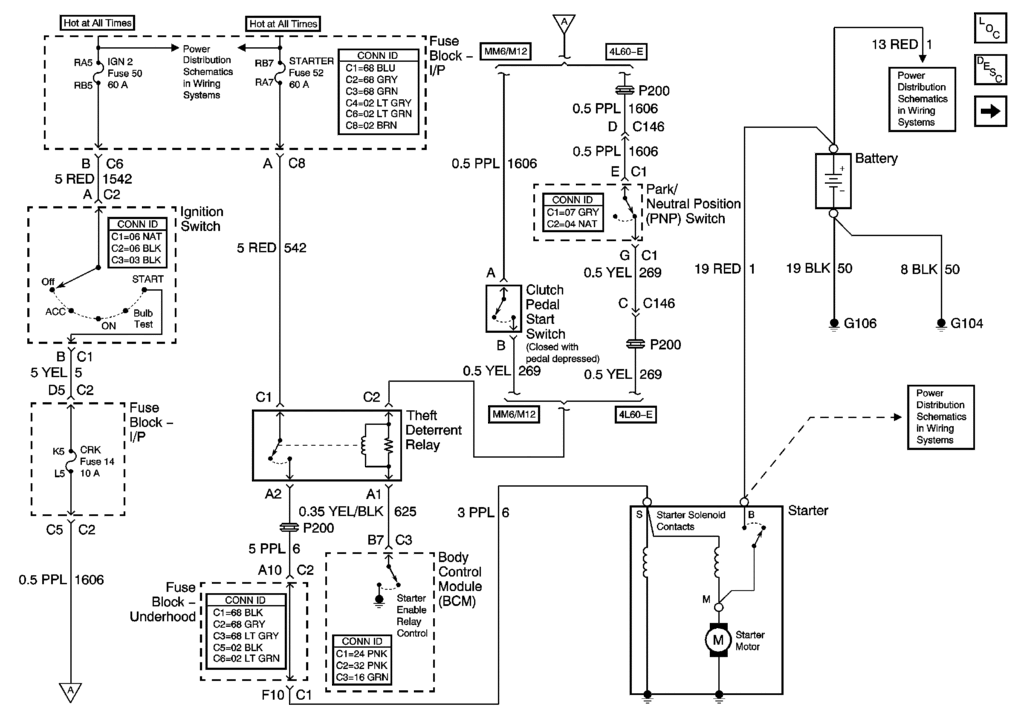
Make sure that you have the 12 VDC on the STARTER Fuse #52 & 12 VDC on the IGN2 Fuse # 50
Then check the red and purple wire on the relay. When you complete all the actions necessary to start the Eng the ignition key is in the CRANK/START position, you should have 12 VDC on the purple wire. That goes to the starter solenoid and allows the starter to start.
BC
Thread Starter
Tech Contributor
Joined: Dec 1999
Posts: 32,910
Likes: 2,402
From: Anthony TX
CI 6,7,8,9,11 Vet
St. Jude Donor '08
Excellent. Use the ignition switch thread and in it are the fuses that you need to test to see if there is the correct voltages coming out of the ignition switch. Test the fuse voltages using the small test points on the top of each fuse to ground.
BC
BC

Thread Starter
Tech Contributor
Joined: Dec 1999
Posts: 32,910
Likes: 2,402
From: Anthony TX
CI 6,7,8,9,11 Vet
St. Jude Donor '08
Directly above the BCM on the fire wall. the relay on the LEFT

Last edited by Bill Curlee; Nov 21, 2009 at 12:32 AM.

Safety Car


Joined: Jan 2004
Posts: 4,776
Likes: 142
From: North of Atlanta GA
St. Jude Donor '05
Thanks Bill, after reading your thread I informed the dealer that my problem may be ignition, that was the first thing they checked and sure enough it was! The contacts looked just like the ones in your pictures. Ignition was replaced and all is well again.


Melting Slicks

Joined: Sep 2006
Posts: 2,736
Likes: 7
From: Redding CA
Did anyone in this thread end up getting to the point where they had to drill out the actual ignition? I still cannot get my key to turn, I had a new key cut using the VIN number and not my old worn key. Now, I can get both keys into the ignition but one of the little "tumblers" or "pins" inside feels and looks like it's loose...
I have everything all pulled apart and my car is just sitting in my work parking lot so I just need to know if I should just drill this thing out tomorrow morning?
I already have the new lock cylinder, my sand paper/pencil ready, new cylinder has been cut w/ matching key.
I just need that thing to spin so I can release the shift lock cable and the lock cylinder itself.
Thank you for any advice,
Donnie
I have everything all pulled apart and my car is just sitting in my work parking lot so I just need to know if I should just drill this thing out tomorrow morning?
I already have the new lock cylinder, my sand paper/pencil ready, new cylinder has been cut w/ matching key.
I just need that thing to spin so I can release the shift lock cable and the lock cylinder itself.
Thank you for any advice,
Donnie