GM Tech 2 alternative

Race Director


Joined: Dec 2013
Posts: 12,505
Likes: 3,632

Let me break it down for you and what software you need, and for what.
On the c6, short of needing to download a firmware file to flash it into a new replacement module like a BCM that if vin dependent, all you need to troubleshoot and reset items on the car like a radio relearn is the Tech 2win program that is going to come on the disc. With this program and the GM nano, you don't need a subscription from GM.
Hence think of a TV, where it first need to be a operatiing system programming to be with (the firmware file), then once it flashed, all you need from that point is the remote control (tech2win in this case)
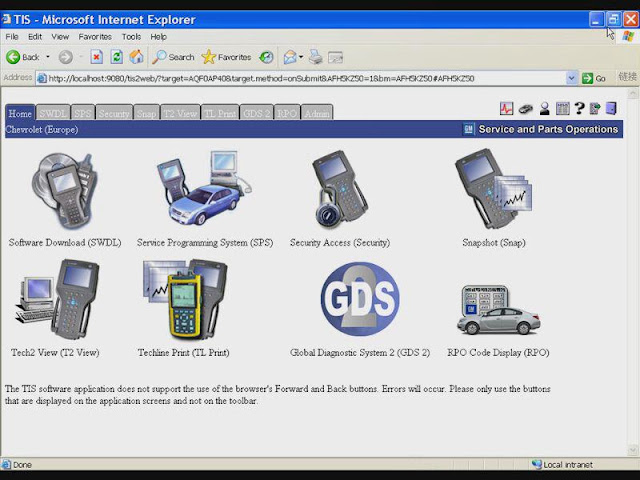
If you did need to replace one of the module like the BCM, ECM, Dash gauge cluster that requires a Vin specific firmware file, then the software you would need is TIS2000. Hence in Tis2000 program, is the Service Programming System program that would first require a subscription to GM to allow you to connect to GM servers to pull down the specific firmware file for your cars vin number, then flash it into the module for it initial set up.
Hence once you have the module replaced and it's needed firmware for the vin flash in to the module to begin with, then resetting the modules settings is done with the Tech2 win program instead.
Hence the only time you would need Tis2000, if if you are replacing a bad module on the car that requires firmware to be programmed into the module to begin with, and which that firmware file would come from GM for its initial flash.
TIS2000, And note that you will be using the stand alone Tech2 win with the nano, and not the tech2 veiw from TIS2000.

________________________________________ ________
Now lets go over the C7 and later model cars that do not use a Tech II, but use a MDI instead (the GM Nano is mdi clone).
So GDS2 works the pretty much the same at Tech2 win for the most part/what it will do, so again, short of needing to flash in firmware to a brand new replacement module, GDS2 covers most of the items on the car for trouble shooting and resetting as well.
Now if you do need to replace a module on the car needs to be initial firmware flashed to the vin to start with, here is where you would need the the Service Programming System program again.
Now with GDS2, it not Tis2000's programs SDS that you need, but GM GlobalTS program that will have the correct SDS for the newer cars that use GDS2 instead. Like the either of the SDS, to be able to connect to GM to get the needed firmware files from their servers, you would need to have a subscription to GM to run GM GM global software.
Now the part that blows on the C7, when you want to program in a Fob to the car using the tool, it not done with the GDS2 program. Hence in a c6, Tech2win allows you to program a fob into the car quickly since the needed menu in within the Tech2win program.
To program a fob into a C7 with the MDI, you have to use the GM global SDS program, since that is where the VTD relearn menu is located to program in fobs instead.
Now the glitch, do not think that anyone has cracked GM TS to have it run stand alone/ hence without needing a subscription to GM to run the program/without it needed to connect to GM, since it it a web base program.
GM TS, or more so, the web link since it a web base program,
On the c6, short of needing to download a firmware file to flash it into a new replacement module like a BCM that if vin dependent, all you need to troubleshoot and reset items on the car like a radio relearn is the Tech 2win program that is going to come on the disc. With this program and the GM nano, you don't need a subscription from GM.
Hence think of a TV, where it first need to be a operatiing system programming to be with (the firmware file), then once it flashed, all you need from that point is the remote control (tech2win in this case)
If you did need to replace one of the module like the BCM, ECM, Dash gauge cluster that requires a Vin specific firmware file, then the software you would need is TIS2000. Hence in Tis2000 program, is the Service Programming System program that would first require a subscription to GM to allow you to connect to GM servers to pull down the specific firmware file for your cars vin number, then flash it into the module for it initial set up.
Hence once you have the module replaced and it's needed firmware for the vin flash in to the module to begin with, then resetting the modules settings is done with the Tech2 win program instead.
Hence the only time you would need Tis2000, if if you are replacing a bad module on the car that requires firmware to be programmed into the module to begin with, and which that firmware file would come from GM for its initial flash.
TIS2000, And note that you will be using the stand alone Tech2 win with the nano, and not the tech2 veiw from TIS2000.
________________________________________ ________
Now lets go over the C7 and later model cars that do not use a Tech II, but use a MDI instead (the GM Nano is mdi clone).
So GDS2 works the pretty much the same at Tech2 win for the most part/what it will do, so again, short of needing to flash in firmware to a brand new replacement module, GDS2 covers most of the items on the car for trouble shooting and resetting as well.
Now if you do need to replace a module on the car needs to be initial firmware flashed to the vin to start with, here is where you would need the the Service Programming System program again.
Now with GDS2, it not Tis2000's programs SDS that you need, but GM GlobalTS program that will have the correct SDS for the newer cars that use GDS2 instead. Like the either of the SDS, to be able to connect to GM to get the needed firmware files from their servers, you would need to have a subscription to GM to run GM GM global software.
Now the part that blows on the C7, when you want to program in a Fob to the car using the tool, it not done with the GDS2 program. Hence in a c6, Tech2win allows you to program a fob into the car quickly since the needed menu in within the Tech2win program.
To program a fob into a C7 with the MDI, you have to use the GM global SDS program, since that is where the VTD relearn menu is located to program in fobs instead.
Now the glitch, do not think that anyone has cracked GM TS to have it run stand alone/ hence without needing a subscription to GM to run the program/without it needed to connect to GM, since it it a web base program.
GM TS, or more so, the web link since it a web base program,
Last edited by Dano523; Mar 3, 2018 at 05:51 AM.

Pro


Joined: Nov 2017
Posts: 583
Likes: 18
From: Whidbey Island, WA
I guess I'm puzzled as to how the car hides the body modules from an OBD2 device. OBD2 devices can be set to work with many different protocols, including the ISO 15765-4 CAN bus (11 bit, 500kbaud) used by the C6. Do the body modules use different pins on the OBD2? Or is it that the CAN message IDs for the body modules are unknown and therefore you cant set up a filter by transmitter module ID to sniff them?
I've been looking at the bus though an OBD2 using a simple Hayes AT terminal app to talk to the bus through the ELM327 in the OBD2 dongle; does anyone know how to use guides like this to see a historical code for something like the traction control or active handling?
I've been looking at the bus though an OBD2 using a simple Hayes AT terminal app to talk to the bus through the ELM327 in the OBD2 dongle; does anyone know how to use guides like this to see a historical code for something like the traction control or active handling?
Race Director
Joined: Dec 2013
Posts: 12,505
Likes: 3,632
Think this for a basic scanner tool like a Elm327 to read/clear basic trouble codes,

Pin 2 - J1850 Bus+
Pin 4 - Chassis Ground
Pin 5 - Signal Ground
Pin 6 - CAN High (J-2284)
Pin 7 - ISO 9141-2 K Line
Pin 10 - J1850 Bus
Pin 14 - CAN Low (J-2284)
Pin 15 - ISO 9141-2 L Line
Pin 16 - Battery Power
Now with a tech II, your working with the vendor option pins and needed vendor's protocols/proprietary software instead.
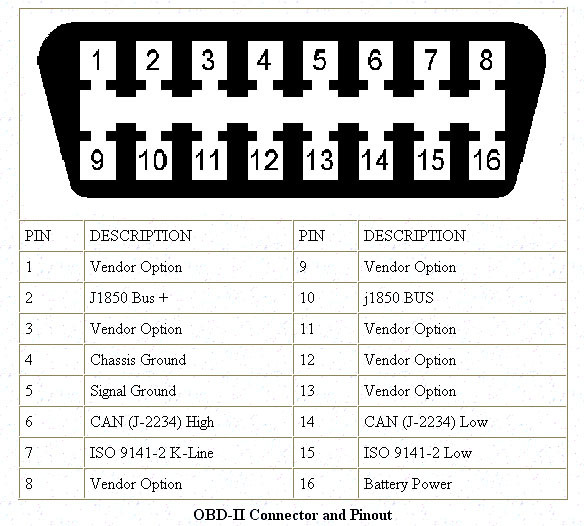
Hence for the BCM communication to the deeper body level that the basic elm 327 scanner does not do, it's done through pins 1 and 3 with tech II/GDS2 instead.
So if one was trying to skin the cat the less cheaper side, you could just reverse engineering using both Bosch GM MDI driver, and then GM MDI software and Tech2win eliminator. The glitch, the VX GM Nano already does the above for around $100 instead.
Pin 2 - J1850 Bus+
Pin 4 - Chassis Ground
Pin 5 - Signal Ground
Pin 6 - CAN High (J-2284)
Pin 7 - ISO 9141-2 K Line
Pin 10 - J1850 Bus
Pin 14 - CAN Low (J-2284)
Pin 15 - ISO 9141-2 L Line
Pin 16 - Battery Power
Now with a tech II, your working with the vendor option pins and needed vendor's protocols/proprietary software instead.
Hence for the BCM communication to the deeper body level that the basic elm 327 scanner does not do, it's done through pins 1 and 3 with tech II/GDS2 instead.
So if one was trying to skin the cat the less cheaper side, you could just reverse engineering using both Bosch GM MDI driver, and then GM MDI software and Tech2win eliminator. The glitch, the VX GM Nano already does the above for around $100 instead.
Last edited by Dano523; Mar 9, 2018 at 12:45 PM.
Pro
Joined: Nov 2017
Posts: 583
Likes: 18
From: Whidbey Island, WA
Thanks, that explains it. So if I wanted to know the exact code for something like a 'Service Active Handing' warning the most cost effective way would be a VX GM Nano? Will it pull such codes right out of the box, or do you need subscriptions or downloaded software, etc? If there is a youtube showing something similar that would be very helpful.
Race Director
Joined: Dec 2013
Posts: 12,505
Likes: 3,632
Thanks, that explains it. So if I wanted to know the exact code for something like a 'Service Active Handing' warning the most cost effective way would be a VX GM Nano? Will it pull such codes right out of the box, or do you need subscriptions or downloaded software, etc? If there is a youtube showing something similar that would be very helpful.
So with it, it will give you the DTC codes to begin with, and you can go into the code directed modules to check them to see what the problem is, what needs to be replaced or corrected.
So once you have GDS2 running and the Gm nano connected to the car and PC, step one is to go into to vehicle diagnostic, and use read veichal wide DCT and id information. This will list the Dtc to start with.
Now back out of that menu, and go into module diagnostic, and depending which module the DTC code pointed you at, go in that module to read it's data/trouble shoot the problems.
Again so long as you don't need a brand new module that will need to be initially firmware vin flashed to lock it to the car, or need to get into a security menu to say learn a fob into the car (both part of the SPS program, not the GDS2 program), you don't need a subscription to GM.
If you do need to use the SPS program for the above, then you can get at least a three day subscription to GM, and it will load the needed subscription locked programs to your computer as you use them (your VM GDS2 program will be locked away in it own little folder safe, independent of the programs that the subscription programs that will be downloaded to your machine, and will only work while you have an active subscription to GM).
Really, check around in your area to see Who has a Clone MDI with Vm GDS2 to give you a hand. This will not only give you chance to see how the device and GDS2 is used, but will make short work of figuring out the problem of the car. Trust me, once you see the what GDS2 can do with the car, you will want it for yourself as well.
On the C6's, by going through just the voltages of each module, I can tell where there is a electrical problem, before the problem causes a lose of comunication down the line instead.
Hence if the ECM has a voltage of 14.3 with the reast of the modules , yet the RCDLR has a voltage of say 13.4V, know that there is either a bad connection to the module, ground point problem, or that the board has a cold solder joint that needs to be re-soldered; before it starts to cause DTC problems isntead.
On the F55 module, again a snap to catch problems before they happen to start throwing DTC codes, since I can check ever sensor for it's voltage too. Hence say three of the level sensor are reading 2.1 volt, but one is reading 1.2 volts, you know it has a problem that needs to be resolved before it causes DTC codes next.
Last edited by Dano523; Mar 10, 2018 at 03:09 AM.

Heel & Toe

Joined: Oct 2013
Posts: 18
Likes: 3
I did some offline sps programming earlier relearning an junkyard passlock column for an 2007 trailblazer using my vcx nano but when i tried to program a friend's 08 avalanche window switch it wouldn't connect to the module. The only way it would connect to his truck was if i used my 07 Yukon Denali vin. It showed the new calibrations files and everything but i was afraid to try not knowing if the bcm is calibrated during this process or if it would write my vin to his bcm during the vin marrying of the window switch. Part numbers are the same for the window switch between the trucks since they both have folding power mirrors. I didn't want to render his truck in a none starting state.
Race Director
Joined: Dec 2013
Posts: 12,505
Likes: 3,632
I did some offline sps programming earlier relearning an junkyard passlock column for an 2007 trailblazer using my vcx nano but when i tried to program a friend's 08 avalanche window switch it wouldn't connect to the module. The only way it would connect to his truck was if i used my 07 Yukon Denali vin. It showed the new calibrations files and everything but i was afraid to try not knowing if the bcm is calibrated during this process or if it would write my vin to his bcm during the vin marrying of the window switch. Part numbers are the same for the window switch between the trucks since they both have folding power mirrors. I didn't want to render his truck in a none starting state.
Note, if you are using TDS sps, do not install the bosch MDI or Bosch Tech II driver. Your Nano manager installed the correct driver for the nano, and it should be the one your using.
Hence hit the skip screen every time you see this pop up when you start TDS SPS,
if did hit install them, go into unistall on your machine and uninstall the Bosch drivers.
Attachment 48333893
Since these are the only options you want to see in TDS SPS for device options.
Attachment 48333894
If TDS on line and using/only have and using the correct driver, but only have the one $40 subscription for your car, its the problem, and will need to buy another $40 subscription for his Vin# on your account, so you can pull up his Vin for firmware files as well.
If TIS2000 SPS with account so it connects to GM, then will have build the car in the pull down menu's since the Nano is using the generic driver you built for it to run in TIS2000, and often will not pull up the correct car on the initial vin search to begin with.
Note, you did remember to build the generic pass throu driver in TIS2000 after you installed the three Tis2000 discs for the nano device in XP?
So instead of using the vin number, build the car using the menu first, then hit next and let it bring up the correct vin number afterwards when it connects to the car to pull up the correct vin. Also in TIS2000, to get to the files you start with either reflash, or replace and reflash ECM to start with, this gets you to the module menu, and you can sell the module you want. So any module you are replacing, first select replace and flash ECM, and this will lead you down the correct path to get into the module menu on to replacement the module and flash it.


Last edited by Dano523; Aug 16, 2018 at 02:35 AM.
Heel & Toe
Joined: Oct 2013
Posts: 18
Likes: 3
Are you using TIS2000, or are you using TDS SPS online, and only have a singe subscription for your own car instead.
If TDS on line, and only have the one $40 subscription, its the problem, and will need to buy another $40 subscription for his Vin# on your account, so you can pull up his Vin for firmware files.
If TIS2000 SPS with account so it connects to GM, then will have build the car in the pull down menu's since the Nano is using the generic driver you built for it to run in TIS2000, and often will not pull up the correct car on the initial vin search to begin with. So instead of using the vin number, build the car using the menu first, then insert his correct vin number, and let it connect to GM to pull up the correct module and files. Also in TIS2000, to get to the files you start with either reflash, or replace and reflash ECM to start with, this gets you to the module menu, and you can sell the module you want. So any module you are replacing, first select replace and flash ECM, and this will lead you down the correct path to get into the module menu on to replacement the module and flash it.
If TDS on line, and only have the one $40 subscription, its the problem, and will need to buy another $40 subscription for his Vin# on your account, so you can pull up his Vin for firmware files.
If TIS2000 SPS with account so it connects to GM, then will have build the car in the pull down menu's since the Nano is using the generic driver you built for it to run in TIS2000, and often will not pull up the correct car on the initial vin search to begin with. So instead of using the vin number, build the car using the menu first, then insert his correct vin number, and let it connect to GM to pull up the correct module and files. Also in TIS2000, to get to the files you start with either reflash, or replace and reflash ECM to start with, this gets you to the module menu, and you can sell the module you want. So any module you are replacing, first select replace and flash ECM, and this will lead you down the correct path to get into the module menu on to replacement the module and flash it.
Corvette Stories
The Best of Corvette for Corvette Enthusiasts

Every 2027 Corvette Engine Explained
Joe Kucinski
Designer Imagines A Corvette That Looks More Like a Corvette Than the Corvette
Verdad Gallardo
10 Ugly Corvettes That We Still Kinda Love
Joe Kucinski
Top 10 Most Expensive Corvettes Ever Sold on Bring A Trailer
Brett Foote
10 Things Every Corvette Owner Needs (2026 Edition)
Michael S. Palmer
8 Most "Only Corvette Owners Understand" Quirks and Problems
Pouria Savadkouei
10 Reasons the C6 Z06 is Still A Performance Benchmark After 20 Years
Joe Kucinski
How Much Horsepower Every Corvette Engine "LOST" in 1972
Joe Kucinski
Top 10 DOs and DON'Ts for Protecting Your Convertible Top!
Michael S. Palmer
Race Director
Joined: Dec 2013
Posts: 12,505
Likes: 3,632
With the cracked version of TIS200, make sure you set up your VM shell with a full working version of XP to start with.
If you try to add TIS2000 to say the GDS2 XP shell, it will not work, since that XP shell for GDS2 is set up to not get out/Not use the internet to connector GM isntead.
If you try to add TIS2000 to say the GDS2 XP shell, it will not work, since that XP shell for GDS2 is set up to not get out/Not use the internet to connector GM isntead.
Last edited by Dano523; Aug 16, 2018 at 04:03 AM.
Heel & Toe
Joined: Oct 2013
Posts: 18
Likes: 3
Are you using TIS2000, or are you using TDS SPS online, and only have a singe subscription for your own car instead.
Note, if you are using TDS sps, do not install the bosch MDI or Bosch Tech II driver. Your Nano manager installed the correct driver for the nano, and it should be the one your using.
Hence hit the skip screen every time you see this pop up when you start TDS SPS,
if did hit install them, go into unistall on your machine and uninstall the Bosch drivers.

Since these are the only options you want to see in TDS SPS for device options.

If TDS on line and using/only have and using the correct driver, but only have the one $40 subscription for your car, its the problem, and will need to buy another $40 subscription for his Vin# on your account, so you can pull up his Vin for firmware files as well.
If TIS2000 SPS with account so it connects to GM, then will have build the car in the pull down menu's since the Nano is using the generic driver you built for it to run in TIS2000, and often will not pull up the correct car on the initial vin search to begin with.
Note, you did remember to build the generic pass throu driver in TIS2000 after you installed the three Tis2000 discs for the nano device in XP?
So instead of using the vin number, build the car using the menu first, then hit next and let it bring up the correct vin number afterwards when it connects to the car to pull up the correct vin. Also in TIS2000, to get to the files you start with either reflash, or replace and reflash ECM to start with, this gets you to the module menu, and you can sell the module you want. So any module you are replacing, first select replace and flash ECM, and this will lead you down the correct path to get into the module menu on to replacement the module and flash it.


Note, if you are using TDS sps, do not install the bosch MDI or Bosch Tech II driver. Your Nano manager installed the correct driver for the nano, and it should be the one your using.
Hence hit the skip screen every time you see this pop up when you start TDS SPS,
if did hit install them, go into unistall on your machine and uninstall the Bosch drivers.
Since these are the only options you want to see in TDS SPS for device options.
If TDS on line and using/only have and using the correct driver, but only have the one $40 subscription for your car, its the problem, and will need to buy another $40 subscription for his Vin# on your account, so you can pull up his Vin for firmware files as well.
If TIS2000 SPS with account so it connects to GM, then will have build the car in the pull down menu's since the Nano is using the generic driver you built for it to run in TIS2000, and often will not pull up the correct car on the initial vin search to begin with.
Note, you did remember to build the generic pass throu driver in TIS2000 after you installed the three Tis2000 discs for the nano device in XP?
So instead of using the vin number, build the car using the menu first, then hit next and let it bring up the correct vin number afterwards when it connects to the car to pull up the correct vin. Also in TIS2000, to get to the files you start with either reflash, or replace and reflash ECM to start with, this gets you to the module menu, and you can sell the module you want. So any module you are replacing, first select replace and flash ECM, and this will lead you down the correct path to get into the module menu on to replacement the module and flash it.
With the cracked version of TIS200, make sure you set up your VM shell with a full working version of XP to start with.
If you try to add TIS2000 to say the GDS2 XP shell, it will not work, since that XP shell for GDS2 is set up to not get out/Not use the internet to connector GM isntead.
If you try to add TIS2000 to say the GDS2 XP shell, it will not work, since that XP shell for GDS2 is set up to not get out/Not use the internet to connector GM isntead.
Race Director
Joined: Dec 2013
Posts: 12,505
Likes: 3,632
The VM GDS2 that comes on the white disc is dated. Its V15 that only goes to 2016, while the latest one is V17 that does all the cars up to 2018 isntead.
So here is the current one.
To download without out having to join anything, just install Chrome on your machine (delete it once you finish the download), and once you have the VM running, you may have to install the VX manager from the white disc in the VM GDS2 shell to install the needed Nano drivers.
Note, this XP VM shell will not connect out on the internet, so it not one that you want to use to install TIS2000 on. Hence will need to use a clean XP install disc to build a full working XP shell, then you can install TIS2000 on that shell.
http://blog.obdii365.com/2017/10/22/...obal-2017-7-1/
So here is the current one.
To download without out having to join anything, just install Chrome on your machine (delete it once you finish the download), and once you have the VM running, you may have to install the VX manager from the white disc in the VM GDS2 shell to install the needed Nano drivers.
Note, this XP VM shell will not connect out on the internet, so it not one that you want to use to install TIS2000 on. Hence will need to use a clean XP install disc to build a full working XP shell, then you can install TIS2000 on that shell.
http://blog.obdii365.com/2017/10/22/...obal-2017-7-1/
Last edited by Dano523; Aug 16, 2018 at 04:55 PM.
Heel & Toe
Joined: Oct 2013
Posts: 18
Likes: 3
The VM GDS2 that comes on the white disc is dated. Its V15 that only goes to 2016, while the latest one is V17 that does all the cars up to 2018 isntead.
So here is the current one.
To download without out having to join anything, just install Chrome on your machine (delete it once you finish the download), and once you have the VM running, you may have to install the VX manager from the white disc in the VM GDS2 shell to install the needed Nano drivers.
Note, this XP VM shell will not connect out on the internet, so it not one that you want to use to install TIS2000 on. Hence will need to use a clean XP install disc to build a full working XP shell, then you can install TIS2000 on that shell.
http://blog.obdii365.com/2017/10/22/...obal-2017-7-1/
So here is the current one.
To download without out having to join anything, just install Chrome on your machine (delete it once you finish the download), and once you have the VM running, you may have to install the VX manager from the white disc in the VM GDS2 shell to install the needed Nano drivers.
Note, this XP VM shell will not connect out on the internet, so it not one that you want to use to install TIS2000 on. Hence will need to use a clean XP install disc to build a full working XP shell, then you can install TIS2000 on that shell.
http://blog.obdii365.com/2017/10/22/...obal-2017-7-1/
Race Director
Joined: Dec 2013
Posts: 12,505
Likes: 3,632
Have full subscription for both TIS2000 and TDS SPS, both actual Tech II clone and Nano, so really depends on what tool I have in hand when firmware flashing isntead.
Hence I'm I'm doing a Fob relearn on an export car, the Tech II will drive me to use TIS200 by the end since such requires SPS as part of that step.
Hence tech2Win clone program does not work for this since it lacks the hand off over to TIS2000, so you just use TIS2000 from the start, with the Nano using the generic pass through driver to go into the security via just reprogramming mode.
If something else, then just use TDS sps with Nano (MDI clone) since the MDI will transfer data faster than a Tech II tool in pass through mode isntead.
Hence TIS200 only goes so far with cars years that use the Tech II, but TDS sps does all car years, and a lot easy to use as well. Hence in TIS2000, you have to get the "replace and program" or "reprogram" alone from the start correct to begin with, while with TDS SPS, that selection is a later step once you do have the module listed and what you want to do with it instead.
Hence I'm I'm doing a Fob relearn on an export car, the Tech II will drive me to use TIS200 by the end since such requires SPS as part of that step.
Hence tech2Win clone program does not work for this since it lacks the hand off over to TIS2000, so you just use TIS2000 from the start, with the Nano using the generic pass through driver to go into the security via just reprogramming mode.
If something else, then just use TDS sps with Nano (MDI clone) since the MDI will transfer data faster than a Tech II tool in pass through mode isntead.
Hence TIS200 only goes so far with cars years that use the Tech II, but TDS sps does all car years, and a lot easy to use as well. Hence in TIS2000, you have to get the "replace and program" or "reprogram" alone from the start correct to begin with, while with TDS SPS, that selection is a later step once you do have the module listed and what you want to do with it instead.
Last edited by Dano523; Aug 17, 2018 at 05:29 PM.
Heel & Toe
Joined: Oct 2013
Posts: 18
Likes: 3
Have full subscription for both TIS2000 and TDS SPS, both actual Tech II clone and Nano, so really depends on what tool I have in hand when firmware flashing isntead.
Hence I'm I'm doing a Fob relearn on an export car, the Tech II will drive me to use TIS200 by the end since such requires SPS as part of that step.
Hence tech2Win clone program does not work for this since it lacks the hand off over to TIS2000, so you just use TIS2000 from the start, with the Nano using the generic pass through driver to go into the security via just reprogramming mode.
If something else, then just use TDS sps with Nano (MDI clone) since the MDI will transfer data faster than a Tech II tool in pass through mode isntead.
Hence TIS200 only goes so far with cars years that use the Tech II, but TDS sps does all car years, and a lot easy to use as well. Hence in TIS2000, you have to get the "replace and program" or "reprogram" alone from the start correct to begin with, while with TDS SPS, that selection is a later step once you do have the module listed and what you want to do with it instead.
Hence I'm I'm doing a Fob relearn on an export car, the Tech II will drive me to use TIS200 by the end since such requires SPS as part of that step.
Hence tech2Win clone program does not work for this since it lacks the hand off over to TIS2000, so you just use TIS2000 from the start, with the Nano using the generic pass through driver to go into the security via just reprogramming mode.
If something else, then just use TDS sps with Nano (MDI clone) since the MDI will transfer data faster than a Tech II tool in pass through mode isntead.
Hence TIS200 only goes so far with cars years that use the Tech II, but TDS sps does all car years, and a lot easy to use as well. Hence in TIS2000, you have to get the "replace and program" or "reprogram" alone from the start correct to begin with, while with TDS SPS, that selection is a later step once you do have the module listed and what you want to do with it instead.


Race Director
Joined: Dec 2013
Posts: 12,505
Likes: 3,632
Do you have a link to tds sps? Can you also use it with the nano? I still can't get my friends 08 avalanche to connect to program his door switch. I don't know why it connects with my 07 vin. His truck was manufactured December 2007. Is this the limitation of the nano? Any help greatly appreciated.
I'm lost on this way since if you can read his car with a standard scanner through the ODBII port, but the Nano as MDI with generic pass through driver will not connect, then that is screaming that someone did an after market tune on the car, and lock the tune. Hence with locked tune, Tech II nor MDI will not be able to communicate with the car, since the GM security key has been changed to something else from the locked tune and why the standard GM key that Nano is trying to use is not working.
If standard scanner will not work to just pull codes, then need to clean the OBDII and BCM connectors with spray electrical cleaner to so you getting a good connection. Also, remember that the truck has to be in ACC or run mode to communicate with the car in TIS2000 using the nano/MDI clone.
List of cars/trucks of when they will need either tech II or GDS2, so his 08 avalanche uses a tech II and is listed in TIS2000.
http://sandyblogs.com/techlink/wp-co...d_Vehicles.pdf
As for TDS sps,
https://www.acdelcotds.com/acdelco/action/subscribehome
As for once you have paid for the subscription, and starting to download the needed files to run the it, Clip skip when it tries to load the Bosch drivers for the Bosch tech II and MDI devices. You don't want theses on your machine, and will use the VX driver device I listed above that will already be on your machine from when you loaded the XV Manager drivers before.
Last edited by Dano523; Aug 19, 2018 at 04:56 PM.
Heel & Toe
Joined: Oct 2013
Posts: 18
Likes: 3
Click my name on this post, and send me a PM with name and phone number to call you back.
I'm lost on this way since if you can read his car with a standard scanner through the ODBII port, but the Nano as MDI with generic pass through driver will not connect, then that is screaming that someone did an after market tune on the car, and lock the tune. Hence with locked tune, Tech II nor MDI will not be able to communicate with the car, since the GM security key has been changed to something else from the locked tune and why the standard GM key that Nano is trying to use is not working.
If standard scanner will not work to just pull codes, then need to clean the OBDII and BCM connectors with spray electrical cleaner to so you getting a good connection. Also, remember that the truck has to be in ACC or run mode to communicate with the car in TIS2000 using the nano/MDI clone.
List of cars/trucks of when they will need either tech II or GDS2, so his 08 avalanche uses a tech II and is listed in TIS2000.
http://sandyblogs.com/techlink/wp-co...d_Vehicles.pdf
As for TDS sps,
https://www.acdelcotds.com/acdelco/action/subscribehome
As for once you have paid for the subscription, and starting to download the needed files to run the it, Clip skip when it tries to load the Bosch drivers for the Bosch tech II and MDI devices. You don't want theses on your machine, and will use the VX driver device I listed above that will already be on your machine from when you loaded the XV Manager drivers before.
I'm lost on this way since if you can read his car with a standard scanner through the ODBII port, but the Nano as MDI with generic pass through driver will not connect, then that is screaming that someone did an after market tune on the car, and lock the tune. Hence with locked tune, Tech II nor MDI will not be able to communicate with the car, since the GM security key has been changed to something else from the locked tune and why the standard GM key that Nano is trying to use is not working.
If standard scanner will not work to just pull codes, then need to clean the OBDII and BCM connectors with spray electrical cleaner to so you getting a good connection. Also, remember that the truck has to be in ACC or run mode to communicate with the car in TIS2000 using the nano/MDI clone.
List of cars/trucks of when they will need either tech II or GDS2, so his 08 avalanche uses a tech II and is listed in TIS2000.
http://sandyblogs.com/techlink/wp-co...d_Vehicles.pdf
As for TDS sps,
https://www.acdelcotds.com/acdelco/action/subscribehome
As for once you have paid for the subscription, and starting to download the needed files to run the it, Clip skip when it tries to load the Bosch drivers for the Bosch tech II and MDI devices. You don't want theses on your machine, and will use the VX driver device I listed above that will already be on your machine from when you loaded the XV Manager drivers before.
Race Director
Joined: Dec 2013
Posts: 12,505
Likes: 3,632
The TDS sps is not going to solve the problem you are having with TIS2000, since its still using pretty much the same SPS programming.
Hence if you can't connect to the car with TIS2000 SPS, your going to have the same problem with TDS SPS as well.
Hence in TIS2000 once you build the car in the pull down menus (don't enter the vin number in that screen), then hit submit so you can connect to the car, it should be connecting and giving you back the Vin number in the next screen. Hence if the problem is here, then really need to check the OBD II pins on the car, and double check the car with a standard elm 327 candi scanner to make sure that it at least can read the car to begin with.
If the elm 327 candi scanner can read the car, but Tis2000 SPS or tech2win can not, then someone changed the GM security code in the car with a locked aftermarket tune isntead.
Hence if you can't connect to the car with TIS2000 SPS, your going to have the same problem with TDS SPS as well.
Hence in TIS2000 once you build the car in the pull down menus (don't enter the vin number in that screen), then hit submit so you can connect to the car, it should be connecting and giving you back the Vin number in the next screen. Hence if the problem is here, then really need to check the OBD II pins on the car, and double check the car with a standard elm 327 candi scanner to make sure that it at least can read the car to begin with.
If the elm 327 candi scanner can read the car, but Tis2000 SPS or tech2win can not, then someone changed the GM security code in the car with a locked aftermarket tune isntead.

Heel & Toe
Joined: Aug 2017
Posts: 19
Likes: 1
EDIT: .rar file is just a compressed file. Shows how much I know! I downloaded free 7zip to decompress it. Will probably not mess with it much more until tomorrow
Guys, I bought a computer to use with my VCX NANO, and finally got a day off.
My car is a 2008, A6. Need to look at some transmission problems. From what I remember I need TIS, not GDS2.
So I opened the disc that came with the nano.
It has GDS2 VM folder, Tech2Win.rar, and VMmare-player
I was able to install and play with GDS2 inside the VM, but it won’t connect to my car. I assume because it’s for the newer corvettes.
However, I cant for the life of me figure out how to do anything with the Tech2Win file, and have no clue what type of file .rar is. My computer doesn’t know what to do with it either.
Can someone explain to me in layman’s terms what I need to do to make this work on my 2008?
There is no readme file on the disc that came with my nano.
Guys, I bought a computer to use with my VCX NANO, and finally got a day off.
My car is a 2008, A6. Need to look at some transmission problems. From what I remember I need TIS, not GDS2.
So I opened the disc that came with the nano.
It has GDS2 VM folder, Tech2Win.rar, and VMmare-player
I was able to install and play with GDS2 inside the VM, but it won’t connect to my car. I assume because it’s for the newer corvettes.
However, I cant for the life of me figure out how to do anything with the Tech2Win file, and have no clue what type of file .rar is. My computer doesn’t know what to do with it either.
Can someone explain to me in layman’s terms what I need to do to make this work on my 2008?
There is no readme file on the disc that came with my nano.
Last edited by jonathans2k; Sep 8, 2018 at 09:54 PM.