




IMPORTANT ELECTRICAL INFORMATION (Long!)

Thread Starter
Tech Contributor


Joined: Dec 1999
Posts: 32,910
Likes: 2,402
From: Anthony TX
CI 6,7,8,9,11 Vet
St. Jude Donor '08

There really isn't a CHASSIS GROUND specifically for the HUD. Its connects to the IPC and that is grounded to G-201 (drivers door jam A pillar area)
BC
BC

3rd Gear

Joined: Jun 2011
Posts: 3
Likes: 0
Thanks for the ground info. I now have the HUD working but have lost speed. The analog gauge does a full sweep when first turning the key to the 'on' position but does not respond when the car is moving (stays at 0). The HUD speed also stays at 0. Going to the dealer on Tues.
Again, thanks for the gnd info.
Again, thanks for the gnd info.

1st Gear
Joined: Aug 2007
Posts: 1
Likes: 0
Joe monteith
My 99 is throwing of a service abs and service stability unit. I unplugged the battery for few minutes and hit reset. Within 100 miles i had to reset again. The warning lights are still on. Anyone have any thoughts?

Intermediate
Joined: Sep 2010
Posts: 42
Likes: 0
From: Grand Prairie Texas
Its a great post, but how do you actually pull the the connector apart? I actually don't see any clips that are holding it together. Is it possible that mine is so corroded that they wont pull apart?

Racer

Joined: Jul 2006
Posts: 410
Likes: 0
From: Eastampton New Jersey
Hey Bill, I got some major issues with fuel pressure. I checked all the fuses for the fuel pump, swapped out the relay on the fues box, cleaned the grounds near the headlights and the one under the battery box, took off the rear inner fenders and checked the 2 connectors and everything is clean and not corroded. The boost a pump fuse was blown and I swapped it out. Fuel pump was changed at the dealer about 18 months ago. I should be putting out 60 psi for the blower, but it'll maybe hit 45-50, start for a second then shut off. Then there won't be any fuel pressure.
Can ya help me and bail me out of this headache?
Can ya help me and bail me out of this headache?

Intermediate
Joined: Mar 2006
Posts: 32
Likes: 2
From: Farmingville NY
I searched this thread and I'm sorry in advance if I missed it, but I haven't found my problem on here.
Just recently all of my lights... dash lights, tail lights, DRL's all with the exception of the headlights will start flickering like crazy. I hear a fast "ticking" noise from the fuse box under the glovebox and felt which relay was ticking, but it tested just fine. When I turn the signal to turn right the lights seem to flicker simultaneously with the clicking of the turn signal, and the left turn signal works perfectly fine but the flickering is still going fast. At night when the headlights are on, the green lit arrow on the dash for the right signal stays on. When I signal right it flashes once then stops. It won't continue to flash like normal. Also when I lock the car with the FOB the panic horn goes off, so I have to lock it manually. The weird thing is, the problem doesn't happen all the time, but often enough that it's getting on my nerves. I was just wondering if anyone has been through this or knows how abouts I should proceed. Also if you might know what it could be and give me an estimate on how long it would take to fix the problem, I'd appreciate that as well. Thanks in advance for any help! It's greatly appreciated.
Just recently all of my lights... dash lights, tail lights, DRL's all with the exception of the headlights will start flickering like crazy. I hear a fast "ticking" noise from the fuse box under the glovebox and felt which relay was ticking, but it tested just fine. When I turn the signal to turn right the lights seem to flicker simultaneously with the clicking of the turn signal, and the left turn signal works perfectly fine but the flickering is still going fast. At night when the headlights are on, the green lit arrow on the dash for the right signal stays on. When I signal right it flashes once then stops. It won't continue to flash like normal. Also when I lock the car with the FOB the panic horn goes off, so I have to lock it manually. The weird thing is, the problem doesn't happen all the time, but often enough that it's getting on my nerves. I was just wondering if anyone has been through this or knows how abouts I should proceed. Also if you might know what it could be and give me an estimate on how long it would take to fix the problem, I'd appreciate that as well. Thanks in advance for any help! It's greatly appreciated.
Here's a list of the following things I did so far:
1) checked both connectors on each door. The ones that go through the accordion tubes. No wetness. No lose pins. Made all the female contacts tighter for the hell of it, cleaned and put dielectric grease on them.
2) checked BCM. Took it apart, checked PCB for wetness or build up. Cleaned all the connectors that plug into the BCM. Put dielectric grease on them.
3) checked battery terminals.
4) baked out the interior with the heat at max temp for over an hour with windows closed.
5) cleared all codes. took it for a ride. Only codes that return are B2578 and B2583 (front turn signal relays).
6) checked the individual relays. both work fine.
6a) If only #40 is unplugged (front left), the interior dash lights stop pulsing, and only one directional light lights (instead of both at once). If parking lights are on, only that directional light on the dash will be solidly lit.
6b) if only #38 is unplugged (front right), the interior dash pulse, both directionals on dash light up. Both front directionals turn on.If parking lights are on, both directional lights on the dash will be solidly lit.
Rear turning signals always work as they should.
Last edited by Lou99Vette; Jul 20, 2011 at 09:29 AM.
Corvette Stories
The Best of Corvette for Corvette Enthusiasts

Top 10 Most Expensive Corvettes Ever Sold on Bring A Trailer
Brett Foote
10 Things Every Corvette Owner Needs (2026 Edition)
Michael S. Palmer
8 Most "Only Corvette Owners Understand" Quirks and Problems
Pouria Savadkouei
10 Reasons the C6 Z06 is Still A Performance Benchmark After 20 Years
Joe Kucinski
How Much Horsepower Every Corvette Engine "LOST" in 1972
Joe Kucinski
Top 10 DOs and DON'Ts for Protecting Your Convertible Top!
Michael S. Palmer
Top 10 Most Explosive Corvettes Ever Made: Power-to-Weight Ratio Ranked!
Joe Kucinski
150 hp to 1,250 hp: Every Corvette Generation Compared by the Specs That Matter
Joe Kucinski
8 Coolest Corvette Pace Cars (and Replicas) of All Time
Verdad Gallardo
Intermediate
Joined: Mar 2006
Posts: 32
Likes: 2
From: Farmingville NY
I have this exact same problem. Does anyone have any ideas on what it could be? It happened the day after a lot of rain, so I suspect something is wet somewhere... but cant find it.
Here's a list of the following things I did so far:
1) checked both connectors on each door. The ones that go through the accordion tubes. No wetness. No lose pins. Made all the female contacts tighter for the hell of it, cleaned and put dielectric grease on them.
2) checked BCM. Took it apart, checked PCB for wetness or build up. Cleaned all the connectors that plug into the BCM. Put dielectric grease on them.
3) checked battery terminals.
4) baked out the interior with the heat at max temp for over an hour with windows closed.
5) cleared all codes. took it for a ride. Only codes that return are B2578 and B2583 (front turn signal relays).
6) checked the individual relays. both work fine.
6a) If only #40 is unplugged (front left), the interior dash lights stop pulsing, and only one directional light lights (instead of both at once). If parking lights are on, only that directional light on the dash will be solidly lit.
6b) if only #38 is unplugged (front right), the interior dash pulse, both directionals on dash light up. Both front directionals turn on.If parking lights are on, both directional lights on the dash will be solidly lit.
Rear turning signals always work as they should.
Here's a list of the following things I did so far:
1) checked both connectors on each door. The ones that go through the accordion tubes. No wetness. No lose pins. Made all the female contacts tighter for the hell of it, cleaned and put dielectric grease on them.
2) checked BCM. Took it apart, checked PCB for wetness or build up. Cleaned all the connectors that plug into the BCM. Put dielectric grease on them.
3) checked battery terminals.
4) baked out the interior with the heat at max temp for over an hour with windows closed.
5) cleared all codes. took it for a ride. Only codes that return are B2578 and B2583 (front turn signal relays).
6) checked the individual relays. both work fine.
6a) If only #40 is unplugged (front left), the interior dash lights stop pulsing, and only one directional light lights (instead of both at once). If parking lights are on, only that directional light on the dash will be solidly lit.
6b) if only #38 is unplugged (front right), the interior dash pulse, both directionals on dash light up. Both front directionals turn on.If parking lights are on, both directional lights on the dash will be solidly lit.
Rear turning signals always work as they should.
well I followed the service manual troubleshooting steps for the B2578 and B2583 codes, and everything checks out until I get to step 9 which wants you to check for "voltage shorts" at those relay connections. Not sure what if it means shorts to ground or to 12V, but I checked for ground shorts.
I get shorts to ground on CKT 1314 and 1315, which go to the front turning lamps.... but those circuits go to the bulbs, and then to ground.. I'm not sure what kind of resistance the bulbs should have.
I also get shorts to ground (continuity on my DVM) for CKT 14 & 15, which go to the turn signal switches, and the hazard switch. So the short could be in either. I believe the hazard also contains the flasher as well.. so that is a good chance where my problem might be.
when both relays #38 and #40 are taken out, everything works perfectly. No pulsing dash lights, no constant clicking relays, I can arm my alarm with the fob. So the problem has to be either of the above mentioned things, or from the BCM (since it appears to control the relays going on and off by switching ground to them).
Instructor
Joined: Jan 2009
Posts: 140
Likes: 1
From: Whitesboro Texas
I think I did a bad thing......
Well here goes. I was getting the a/c actuator codes (0441 0336) so I did all of the normal stuff. I bought a new drivers side actuator and replaced it, still go the codes so I removed it and tried the reindex and found it was a newer style actuator which only has one less gear. I indexed it to the full close position and the A/C worked great but I still couldn't clear the codes. A local body shop had an 02 coupe and he sold me the newer head unit for the A/C. I swapped it out and noticed the read out dim like it needed the chips soldered. I did this on my last head unit. The A/C still worked fine though. Still had the codes too. So this morning I go out and try to start the car and nothing. Completely dead. I pulled the new head unit and re-installed the original one. It looks dim also now. Charged the battery and it started. I shut the car down and reset the codes and everything immediately went dead. I pulled the battery and put a charge on it, reinstalled and when I went to start the car it went dead again. I immediately heard a buzzing sound coming from the passenger floor fuse panel. I go around and the fuse panel is buzzing. I touched relay 47 and it was vibrating like crazy so I pulled it. Still buzzing..It finally stopped buzzing after about 20 seconds. I put my meter on the battery and had 8 volts with the battery sitll connected. I removed the battery again and it has 11.8 volts out of the car. Had 12.5 after the charge.
I'm worried I may have fried the computer and I'm not sure what step to take next. I'm going to take the battery down and have it tested first. Any ideas after that would be appreciated.
Update: Battery..I had no idea a battery would cause that much chaos.. I had the battery tested and it was at 11.5v and was carrying 60 out of a possible 650 amps. Put the battery in and all is ok. Now back to clearing those stinkin A/C codes. (at least the A/C blows cold on both sided now)
I'm worried I may have fried the computer and I'm not sure what step to take next. I'm going to take the battery down and have it tested first. Any ideas after that would be appreciated.
Update: Battery..I had no idea a battery would cause that much chaos.. I had the battery tested and it was at 11.5v and was carrying 60 out of a possible 650 amps. Put the battery in and all is ok. Now back to clearing those stinkin A/C codes. (at least the A/C blows cold on both sided now)
Last edited by Rick Perkins; Jul 28, 2011 at 06:18 PM. Reason: Update

Cruising
Joined: Feb 2011
Posts: 12
Likes: 0
hi, I am getting codes for abs, active handling and so on, i will be cleaning the ground connections, my question, do i have to disconnect the battery before i do this, I have also found a wire disconnected to the drivers side sunvisor when i took it off because the mirror light did not work.
thanks, Rich
thanks, Rich
Thread Starter
Tech Contributor
Joined: Dec 1999
Posts: 32,910
Likes: 2,402
From: Anthony TX
CI 6,7,8,9,11 Vet
St. Jude Donor '08
Rich
Read and list the DTCs
MAKE SURE that you read the DTCs "BEFORE" you turn the key OFF!!!!!!!!!!!
READING YOUR Engine Diagnostic Trouble Codes (DTC)
This procedure should be carried out any time you experience a problem with your C5. Most inexpensive store bought aftermarket code readers will ONLY read power train DTC’s. Reading the DTC’s with the C5 built in code reader will allow you to read ALL the modules in the vehicle.
The Diagnostic Display Mode is entered with the following procedure:
1) Turn on the ignition but don't start the engine.
2) Press the RESET button to turn off any warning messages. (i.e. door open, trunk open ect)
3) Press and hold the OPTIONS button
4) While holding OPTIONS, press FUEL button four times within a 10 -second period.
Initially, the on-board diagnostics go into an Automatic Mode which will cycle through each module and shows diagnostic codes in a pre-set sequence: PCM - TCS - RTD - BCM - IPC - RADIO - HVAC - LDCM - RDCM - SCM - RFA. All codes will be displayed for each module. ( i.e. PCM = 4 codes) If none are present in a given module, you will see No More Codes on the display.
There are two types of diagnostic codes, Current and History designated with a letter suffix, “C” or “H”. A current code indicates a malfunction is present in the module displaying data. A history code indicates a problem existed sometime in the last 40 or 50 ignition cycles. When not accompanied by a current code of the same number, it's potential evidence of a previous problem, now resolved, that was not removed by clearing the codes. More likely it's an indication of an intermittent malfunction.
Intermittent codes are the most challenging of the diagnostics. An intermittent code may have happened once, may have happened more than once but is inconsistent or may be happening on a regular basis but not at the time the codes are displayed. History codes can also be caused by a current malfunction in a system that is not operating at the time codes are displayed. An example is the rear window defogger which doesn't operate until the Body Control Module detects engine rpm. For history codes set by a module that does not operate with the key on and engine off, a special diagnostic tool called a Scan Tester is necessary to properly diagnose the malfunction.
Once the system has displayed all modules, it goes into the manual mode which allows selection of each module using combinations of Driver Information Center buttons. Manual mode can also be entered during the automatic sequence by pressing any button except E/M. Once the display shows Manual Diagnostics, select a module by pressing the OPTIONS button to go forward or the TRIP button to go back. Once a module is selected, a code is displayed, and if more than one are present; press GAGES to go forward or FUEL to go back.
To exit the diagnostic mode at any time, press E/M. If you want to erase codes in a given module, press RESET To reset the codes once in manual mode, press and hold RESET until it displays NO CODES Press OPTIONS to go to the next module. Repeat the steps until you have reset the codes in all the computer modules.
NOTE!! Only reset the codes IF you want to - it is NOT necessary to do this. Clearing a code does not repair a problem. You are simply erasing the evidence of it in the module's memory. If you clear the code/s, and extinguish the Check Engine Light, your emissions status ready will NOT allow you to pass an emissions test until you have completed the required driving cycles. There are a few body module DTC’s that if set will prevent the module from operating properly. Once the DTC is cleared, the module will return to full function. This is not true for power train DTCs.
If you have never read and cleared your codes, there will probably be a lot of old history DTCs. It is recommended that you clear your codes and see if any come back during a driving cycle. Those are the ones that you need to concentrate on diagnosing.
Once you have the codes, the next question is: What to do with the information?
First, consult the factory service manual. Any serious C5 Do-It-Yourself owner should invest in the Corvette Service Manual of the appropriate model year. The Service Manual is really a requirement if you want to understand and work on your C5.
NOTE and a WARNING. You can read the DTCs while the engine is running. I pull mine up all the time while driving.
WARNING. Don’t become distracted while reading DTCs while your driving and cause an accident!!!!! Use common sense and drive safe.
These are some very good C5 Diagnostic Trouble Code (DTC) explanation web sites!!! They also explain how to read the DTCs
Here are some very good sites that explain what DTC mean:
http://www.gearchatter.com/viewtopic11755.php
http://www.obd-codes.com/trouble_cod...d-ii-codes.php
Make sure to include the H or C suffix when you post your DTCs!!
Read and list the DTCs
MAKE SURE that you read the DTCs "BEFORE" you turn the key OFF!!!!!!!!!!!
READING YOUR Engine Diagnostic Trouble Codes (DTC)
This procedure should be carried out any time you experience a problem with your C5. Most inexpensive store bought aftermarket code readers will ONLY read power train DTC’s. Reading the DTC’s with the C5 built in code reader will allow you to read ALL the modules in the vehicle.
The Diagnostic Display Mode is entered with the following procedure:
1) Turn on the ignition but don't start the engine.
2) Press the RESET button to turn off any warning messages. (i.e. door open, trunk open ect)
3) Press and hold the OPTIONS button
4) While holding OPTIONS, press FUEL button four times within a 10 -second period.
Initially, the on-board diagnostics go into an Automatic Mode which will cycle through each module and shows diagnostic codes in a pre-set sequence: PCM - TCS - RTD - BCM - IPC - RADIO - HVAC - LDCM - RDCM - SCM - RFA. All codes will be displayed for each module. ( i.e. PCM = 4 codes) If none are present in a given module, you will see No More Codes on the display.
There are two types of diagnostic codes, Current and History designated with a letter suffix, “C” or “H”. A current code indicates a malfunction is present in the module displaying data. A history code indicates a problem existed sometime in the last 40 or 50 ignition cycles. When not accompanied by a current code of the same number, it's potential evidence of a previous problem, now resolved, that was not removed by clearing the codes. More likely it's an indication of an intermittent malfunction.
Intermittent codes are the most challenging of the diagnostics. An intermittent code may have happened once, may have happened more than once but is inconsistent or may be happening on a regular basis but not at the time the codes are displayed. History codes can also be caused by a current malfunction in a system that is not operating at the time codes are displayed. An example is the rear window defogger which doesn't operate until the Body Control Module detects engine rpm. For history codes set by a module that does not operate with the key on and engine off, a special diagnostic tool called a Scan Tester is necessary to properly diagnose the malfunction.
Once the system has displayed all modules, it goes into the manual mode which allows selection of each module using combinations of Driver Information Center buttons. Manual mode can also be entered during the automatic sequence by pressing any button except E/M. Once the display shows Manual Diagnostics, select a module by pressing the OPTIONS button to go forward or the TRIP button to go back. Once a module is selected, a code is displayed, and if more than one are present; press GAGES to go forward or FUEL to go back.
To exit the diagnostic mode at any time, press E/M. If you want to erase codes in a given module, press RESET To reset the codes once in manual mode, press and hold RESET until it displays NO CODES Press OPTIONS to go to the next module. Repeat the steps until you have reset the codes in all the computer modules.
NOTE!! Only reset the codes IF you want to - it is NOT necessary to do this. Clearing a code does not repair a problem. You are simply erasing the evidence of it in the module's memory. If you clear the code/s, and extinguish the Check Engine Light, your emissions status ready will NOT allow you to pass an emissions test until you have completed the required driving cycles. There are a few body module DTC’s that if set will prevent the module from operating properly. Once the DTC is cleared, the module will return to full function. This is not true for power train DTCs.
If you have never read and cleared your codes, there will probably be a lot of old history DTCs. It is recommended that you clear your codes and see if any come back during a driving cycle. Those are the ones that you need to concentrate on diagnosing.
Once you have the codes, the next question is: What to do with the information?
First, consult the factory service manual. Any serious C5 Do-It-Yourself owner should invest in the Corvette Service Manual of the appropriate model year. The Service Manual is really a requirement if you want to understand and work on your C5.
NOTE and a WARNING. You can read the DTCs while the engine is running. I pull mine up all the time while driving.
WARNING. Don’t become distracted while reading DTCs while your driving and cause an accident!!!!! Use common sense and drive safe.
These are some very good C5 Diagnostic Trouble Code (DTC) explanation web sites!!! They also explain how to read the DTCs
Here are some very good sites that explain what DTC mean:
http://www.gearchatter.com/viewtopic11755.php
http://www.obd-codes.com/trouble_cod...d-ii-codes.php
Make sure to include the H or C suffix when you post your DTCs!!
Cruising
Joined: Feb 2011
Posts: 12
Likes: 0
Bill,
thanks for the info, i know somewhere on the thread is the answer about the battery but I have not located it. If i do not have to disconnect the battery to clean the ground connections or does it have to be disconnected? I purchased this car recently and I do not know if the radio has a security lock on it, from what I have read, if I disconnect the battery and do not know the security key for the radio, it will be nonfunctional when I reconnect the battery? I have gone through all the codes earlier and have since cleared all codes, the abs, service traction control and active handling are current codes and come intermittently, usually after driving the car then putting it in the garage, then restart later is when the codes come in. It is very humid here right now and I believe the combination of the hot engine and the humidity may be causing the problem if the ground connections are in question. this is an incredible forum with so much knowledge! I have saved literally hundreds of dollars already by following others advice. thank you very much Bill for sharing your knowledge.
Rich
thanks for the info, i know somewhere on the thread is the answer about the battery but I have not located it. If i do not have to disconnect the battery to clean the ground connections or does it have to be disconnected? I purchased this car recently and I do not know if the radio has a security lock on it, from what I have read, if I disconnect the battery and do not know the security key for the radio, it will be nonfunctional when I reconnect the battery? I have gone through all the codes earlier and have since cleared all codes, the abs, service traction control and active handling are current codes and come intermittently, usually after driving the car then putting it in the garage, then restart later is when the codes come in. It is very humid here right now and I believe the combination of the hot engine and the humidity may be causing the problem if the ground connections are in question. this is an incredible forum with so much knowledge! I have saved literally hundreds of dollars already by following others advice. thank you very much Bill for sharing your knowledge.
Rich
Thread Starter
Tech Contributor
Joined: Dec 1999
Posts: 32,910
Likes: 2,402
From: Anthony TX
CI 6,7,8,9,11 Vet
St. Jude Donor '08
Bill,
thanks for the info, i know somewhere on the thread is the answer about the battery but I have not located it. If i do not have to disconnect the battery to clean the ground connections or does it have to be disconnected? I purchased this car recently and I do not know if the radio has a security lock on it, from what I have read, if I disconnect the battery and do not know the security key for the radio, it will be nonfunctional when I reconnect the battery? I have gone through all the codes earlier and have since cleared all codes, the abs, service traction control and active handling are current codes and come intermittently, usually after driving the car then putting it in the garage, then restart later is when the codes come in. It is very humid here right now and I believe the combination of the hot engine and the humidity may be causing the problem if the ground connections are in question. this is an incredible forum with so much knowledge! I have saved literally hundreds of dollars already by following others advice. thank you very much Bill for sharing your knowledge.
Rich
thanks for the info, i know somewhere on the thread is the answer about the battery but I have not located it. If i do not have to disconnect the battery to clean the ground connections or does it have to be disconnected? I purchased this car recently and I do not know if the radio has a security lock on it, from what I have read, if I disconnect the battery and do not know the security key for the radio, it will be nonfunctional when I reconnect the battery? I have gone through all the codes earlier and have since cleared all codes, the abs, service traction control and active handling are current codes and come intermittently, usually after driving the car then putting it in the garage, then restart later is when the codes come in. It is very humid here right now and I believe the combination of the hot engine and the humidity may be causing the problem if the ground connections are in question. this is an incredible forum with so much knowledge! I have saved literally hundreds of dollars already by following others advice. thank you very much Bill for sharing your knowledge.
Rich
Information
The
following procedure will give you a new code that you can use instead of
your personal code. Using this new code, you can �unlock� your radio and
then �re-lock� it with a new code if you
wish.
Prerequisites:
The radio must be in LOC mode NOT in INOP
mode.
Let me explain. If you have activated the Theft-Deterrent
feature of your radio and loose power, the radio goes into LOC (theftlock)
mode. With the ignition on, you must use the MN and HR buttons to enter
you personal code in order to unlock it (The instructions are on page 3-27
in your Y2K Owner�s manual). If you fail to enter the correct code eight
(8) times, the radio goes into INOP mode. You have to wait an hour with
the ignition on before the radio returns to LOC mode (go for a long drive
somewhere).
Procedure:
01. Turn the ignition ON (The radio
displays LOC)
02. Hold down the Radio Presets 2 and 3 buttons for six
seconds
03. The radio display changes from LOC to a three-digit number.
Write this number down. Don�t take forever, fifteen seconds max before the
next step.
04. Press the AM/FM button
05. The radio display changes
to another three-digit number. Write this number to the right of the first
one.
06. You now have a six-digit number, the first three digits are
from STEP 03 and the last three digits are form STEP 05
07. Call 1 800
537 5140
08. Press 1 then # (pound). You�ll hear �Invalid Code, try
again�
09. Press 139010 then # (pound). You will be asked to enter your
four or six digit code followed by * (start)
10. Enter the number from
STEP 6 then * (star)
11. Listen to the four-digit number and write it
down. It will be repeated twice
12. Turn the ignition ON (The radio
displays LOC)
13. Use the MN and HR buttons to enter the code from STEP
11
14. Press the AM/FM button. The radio display changes to
SEC
Your radio is now �un-locked� and usable. The Theft-Deterrent
feature is STILL active! If you want to disable it, use the instruction on
page 3-27 in your Owners manual. Use the code from STEP 11 instead of your personal code.
Yes, you should disconnect the battery but,, if you dont the world will not come to and end.
BC

Race Director


Joined: Aug 1999
Posts: 15,299
Likes: 33
From: Houston Texas
The most prevalent cause of the U series DTCs are caused by a very brief loss of power.. One of the things that can cause this problem is a poor connection in one of the effected modules. First pull the accordion tubes and pull the door harnesses out of the door FRAME. Disconnect the power connector and look for bent female pins like this:
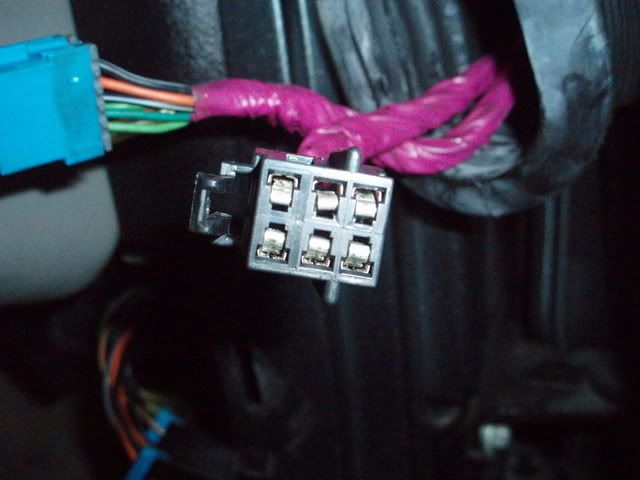
Bend the bent pin back in place with a metal pick.
Do the same for the seat connector.
Bill
Bend the bent pin back in place with a metal pick.
Do the same for the seat connector.
Bill
I'm getting the same code for a few modules: U1064. I get this code for the LDCM, RDCM, and SCM. I also get a 2262 for the LDCM.
Do these sound like issues with the modules themselves in the door?
Bill,
I was finally able to check my connectors in response to the issue above. However after comparing photos it looks like I may have checked the wrong connector or GM changed colors.
Here are the connectors I checked. I'm keeping in mind I may have checked the wrong ones, but do these look damaged? I am still getting the error codes so going to try again as I noticed there was another connector in the door assembly. Thanks.


Thread Starter
Tech Contributor
Joined: Dec 1999
Posts: 32,910
Likes: 2,402
From: Anthony TX
CI 6,7,8,9,11 Vet
St. Jude Donor '08
Bill,
I'm getting the same code for a few modules: U1064. I get this code for the LDCM, RDCM, and SCM. I also get a 2262 for the LDCM.
Do these sound like issues with the modules themselves in the door?
Bill,
I was finally able to check my connectors in response to the issue above. However after comparing photos it looks like I may have checked the wrong connector or GM changed colors.
Here are the connectors I checked. I'm keeping in mind I may have checked the wrong ones, but do these look damaged? I am still getting the error codes so going to try again as I noticed there was another connector in the door assembly. Thanks.


I'm getting the same code for a few modules: U1064. I get this code for the LDCM, RDCM, and SCM. I also get a 2262 for the LDCM.
Do these sound like issues with the modules themselves in the door?
Bill,
I was finally able to check my connectors in response to the issue above. However after comparing photos it looks like I may have checked the wrong connector or GM changed colors.
Here are the connectors I checked. I'm keeping in mind I may have checked the wrong ones, but do these look damaged? I am still getting the error codes so going to try again as I noticed there was another connector in the door assembly. Thanks.
Thats the communications connector. You need the POWER plug!!
BC

Team Owner

Joined: Jul 2006
Posts: 97,155
Likes: 1,471
From: Calgary, AB. There's a reason why white was the only color offered on every year Corvette. Proud Canadian German Jamaican!
St. Jude Donor '09, '12-'13-'14-'15-'16-'17
Telescopic steering wheel only moves in, motor works but only in one direction, any ideas as to what is wrong?

Pro


Joined: Mar 2002
Posts: 610
Likes: 1
From: Bluffton SC
Service active handling - B2606 and C1283
Wow lots of great info in this post. Plan to start cleaning the grounds/connectors this weekend.
99 Vert with 72k 2 owner miles. Car sits in the garage a lot these days but always hooked to Ctek charger. Battery is red top Optima that is appx 6 years old. Going to get the battery load tested this evening. Voltage shows as appropriate on the dic when starting/driving.
Have had absolutely no problems with codes in the past until yesterday morning driving to work. I got service active handling - service vehicle soon error message after driving for appx 10 minutes. Turned it off and checked the codes last night. Nothing but history codes with one current exception (forgot to bring my note with me this morning. I think it was B2606). I cleared all the codes so I could see what gets reset today. Drove the car to work today and after appx 1/4 mile I get act handling warming up and it set B2606 in A6 SCM. After about 10 minutes I got the service active handling - service vehicle soon again and it set C1283 in 28tcs. Will check for additional codes on my way home this evening but so far these are the only two.
Ideas/direction will be appreciated.
99 Vert with 72k 2 owner miles. Car sits in the garage a lot these days but always hooked to Ctek charger. Battery is red top Optima that is appx 6 years old. Going to get the battery load tested this evening. Voltage shows as appropriate on the dic when starting/driving.
Have had absolutely no problems with codes in the past until yesterday morning driving to work. I got service active handling - service vehicle soon error message after driving for appx 10 minutes. Turned it off and checked the codes last night. Nothing but history codes with one current exception (forgot to bring my note with me this morning. I think it was B2606). I cleared all the codes so I could see what gets reset today. Drove the car to work today and after appx 1/4 mile I get act handling warming up and it set B2606 in A6 SCM. After about 10 minutes I got the service active handling - service vehicle soon again and it set C1283 in 28tcs. Will check for additional codes on my way home this evening but so far these are the only two.
Ideas/direction will be appreciated.


Racer

Joined: Jun 2010
Posts: 415
Likes: 16
From: Toronto
I just want to add my 2 cents worth to this....
Today my right door lost communication....all dead, no lock or window.
DIC said NO COMM to the right door and my dashboard lit up with codes, etc!!
I re-did my grounds, but still had no power to the right door.
I pressed the lock button and wiggled the corrugated tube between the door and body and the lock worked sometimes, but still no window.
So I removed the rightside upper panel by the passenger right foot, the panel with the light on it, and it is made to swing around out of the way, just one xmas tree clip holding it up. I reached in and found another panel on the wall with the wires from the door going through it. I pulled it off and found two connectors behind it.
I simply wiggled them around and now my door works and the DIC communicates with it and says no codes!!
Hope this helps someone!!
Today my right door lost communication....all dead, no lock or window.
DIC said NO COMM to the right door and my dashboard lit up with codes, etc!!
I re-did my grounds, but still had no power to the right door.
I pressed the lock button and wiggled the corrugated tube between the door and body and the lock worked sometimes, but still no window.
So I removed the rightside upper panel by the passenger right foot, the panel with the light on it, and it is made to swing around out of the way, just one xmas tree clip holding it up. I reached in and found another panel on the wall with the wires from the door going through it. I pulled it off and found two connectors behind it.
I simply wiggled them around and now my door works and the DIC communicates with it and says no codes!!
Hope this helps someone!!