




2019 Navigation Update
Drifting


Joined: Dec 2015
Posts: 1,410
Likes: 414
From: Germantown Maryland

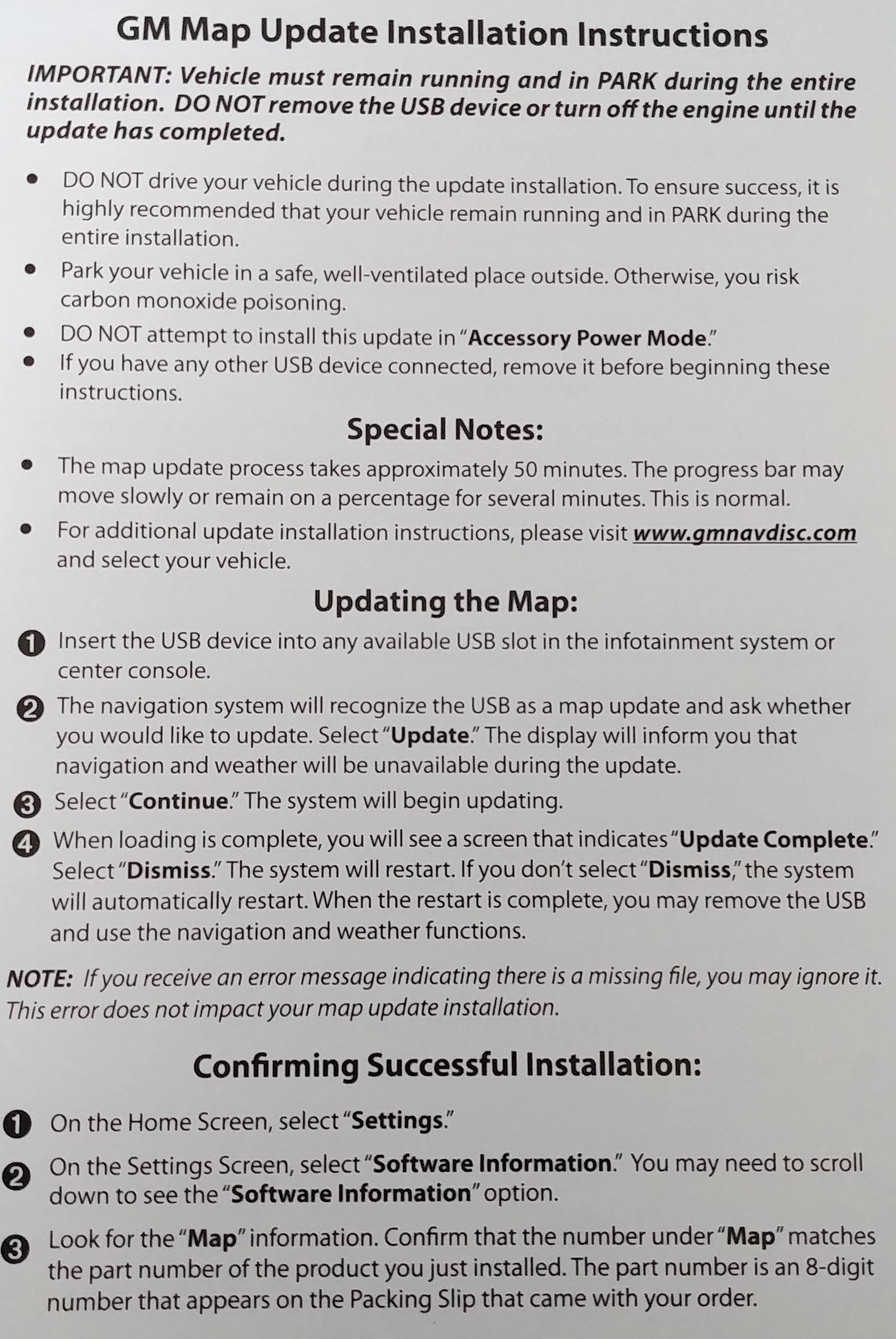
Strange... those directions for the confirmation steps are different from mine that came with the 2019 update I received for my 2016 vehicle. Mine says nothing about checking for version. Instead it says to enter the POI for a Detroit Shake Shack (must be a new location for 2019?) and confirm that it is in there. I am going to check to see if I have that POI before I start the update process.
Noticeable difference when I went from the original 2014 to V.2017 update. Who cares about that missing file error? It says right here on the instruction page to ignore it and that it does not impact the update installation. Regarding being able to confirm the update took place, there is a section specifically dedicated to that on the instructions page as well.
Last edited by raylo; Aug 15, 2018 at 05:05 PM.

Race Director


Joined: Jan 2014
Posts: 10,709
Likes: 7,101
From: Fulshear, TX
Strange... those directions for the confirmation steps are different from mine that came with the 2019 update I received for my 2016 vehicle. Mine says nothing about checking for version. Instead it says to enter the POI for a Detroit Shake Shack (must be a new location for 2019?) and confirm that it is in there. I am going to check to see if I have that POI before I start the update process.
Last edited by Kracka; Aug 15, 2018 at 05:07 PM.

Advanced

Joined: Apr 2014
Posts: 83
Likes: 3
Something new is happening too. Based on a series of patent filings from General Motors, the automaker is developing new active aerodynamic components for the Chevrolet Corvette, including a new rear wing, side skirts and unique ductwork in the front end and on the roof.
Reference: GM Patent Filing Reveals New Corvette Active Aero Bits
Reference: GM Patent Filing Reveals New Corvette Active Aero Bits
Race Director
Joined: Jan 2014
Posts: 10,709
Likes: 7,101
From: Fulshear, TX
Faster/smoother operation, better accuracy and response to my voice instructions, new neighborhoods, recent highway alignment changes, updated points of interest such as new gas stations, etc. I'll report back with any noticeable changes I see from this newest version now.
Last edited by Kracka; Aug 15, 2018 at 06:14 PM.
Team Owner


Joined: Sep 2000
Posts: 25,006
Likes: 2,706
From: Far NW 'burbs of Chicago
St. Jude Donor '13
Stupid recommendation. Put the USB stick in, start the update, and go for a 50 minute drive. There is no way I'd let the car sit there and idle for 50+ minutes to run the update.
As for how long it takes and why, I think my update flash drive had 12+ GB of data on it, that's a LOT of flash to erase and write when you consider it's a single-channel flash chip in that head unit that probably writes at 3-4 MB/sec. Do the math, 12,000 MB of data at 4 MB/second takes 3000 seconds, divided by 60 seconds. Wow. 50 minutes. There ya go.
As for how long it takes and why, I think my update flash drive had 12+ GB of data on it, that's a LOT of flash to erase and write when you consider it's a single-channel flash chip in that head unit that probably writes at 3-4 MB/sec. Do the math, 12,000 MB of data at 4 MB/second takes 3000 seconds, divided by 60 seconds. Wow. 50 minutes. There ya go.
Corvette Stories
The Best of Corvette for Corvette Enthusiasts

Top 10 Most Explosive Corvettes Ever Made: Power-to-Weight Ratio Ranked!
Joe Kucinski
150 hp to 1,250 hp: Every Corvette Generation Compared by the Specs That Matter
Joe Kucinski
8 Coolest Corvette Pace Cars (and Replicas) of All Time
Verdad Gallardo
Top 10 Corvette Engines RANKED by Peak Torque (70+ Years of Muscle!)
Joe Kucinski
Corvette ZR1X Will Be Pacing the Indy 500, And Could Probably Race, Too!
Verdad Gallardo
Top 10 Corvettes Coming to Mecum Indy 2026!
Brett Foote
Top 10 C9 Corvette MUST-HAVES to Fix These C8 Generation Flaws!
Michael S. Palmer
10 Revolutionary 'Corvette Firsts' Most People Don't Know
Joe Kucinski
5 Reasons to Upgrade to an LS6-Powered Corvette; 5 Reasons to Stay LT2
Michael S. Palmer
Team Owner


Joined: Aug 2004
Posts: 24,129
Likes: 1,038
From: The Beautiful Pacific Northwest
St. Jude Donor '05-'06-'07-'08-'09, '14-'15-'16-'17-'18
Faster/smoother operation, better accuracy and response to my voice instructions, new neighborhoods, recent highway alignment changes, updated points of interest such as new gas stations, etc. I'll report back with any noticeable changes I see from this newest version now.
Race Director
Joined: Jan 2014
Posts: 10,709
Likes: 7,101
From: Fulshear, TX
OK, drove the car to work this morning just to get a feel for the updates/enhancements! Huge improvements to the navigation screen. The startup sequence changed, faster to load up once the car was started, lots of new road alignment and new construction additions (including a road that's under construction but not even open yet), and new/updated/corrected points of interest. I'd say versions 2017 ---> 2019 was a bigger improvement for me than 2014 ---> 2017 was. Well worth the money spent; glad I upgraded [again]!

Burning Brakes


Joined: Jan 2017
Posts: 771
Likes: 220
From: Saint Clair Shores Michigan
^ Considering that I also own a 2017, this information is good to know. After checking the tracking number, mine is scheduled to arrive by the end of day tomorrow. I'll install it Saturday morning. If the instructions are asking to keep the vehicle running, yet idle, I can just clean the interior, trunk, and windows to buy time. No biggie.

Thread Starter
Moderator emeritus


Joined: Jun 2001
Posts: 18,599
Likes: 3,951
From: Jacksonville Florida BWO Dayton, Cincinnati, Bloomsbury NJ, Cincinnati
2015 C7 of the Year Finalist
Sounds good. My 2nd try with hopefully the correct part number is due to arrive by Saturday. The version I run now still shows me going cross-country and 4-wheeling on a lot of new roads.
Elmer
Elmer


Exception ID 10T

Joined: Oct 2017
Posts: 1,031
Likes: 509
From: NW of Jacksonville FL
Elmer, does your current version show 9B all the way to I-95? My updated version does.
Exception ID 10T
Joined: Oct 2017
Posts: 1,031
Likes: 509
From: NW of Jacksonville FL
The 2014-2015 update is a different part number than the 2016-2018 update, and the instructions for each are different, the difference being as you noted. The verification for the 2016-2018 part number does not say to check SETTINGS > SOFTWARE INFORMATION > MAP. In my case, with a 2017, the part number under MAP is still the original part number even though my install went in without a hitch and the Shake Shack check worked. I talked to GM Navdisc this morning and they said the new part number under MAP will not show for the 2016-2018 upgrade, they said that is only for the 2014-2015 upgrade. So, unless the dealer has a way to check with the MDI tool and GDS2 subscription, there really isn't any other way to know which part number is currently installed. Despite all that, I see new roads on mine that weren't on the old one.
Thread Starter
Moderator emeritus
Joined: Jun 2001
Posts: 18,599
Likes: 3,951
From: Jacksonville Florida BWO Dayton, Cincinnati, Bloomsbury NJ, Cincinnati
2015 C7 of the Year Finalist

Racer
Joined: Jan 2017
Posts: 367
Likes: 70
From: West Coast
Faster/smoother operation, better accuracy and response to my voice instructions, new neighborhoods, recent highway alignment changes, updated points of interest such as new gas stations, etc. I'll report back with any noticeable changes I see from this newest version now.
Race Director
Joined: Jan 2014
Posts: 10,709
Likes: 7,101
From: Fulshear, TX
I haven't been timing it before/after with a stopwatch, but it sure feels faster and more responsive with each update. When I first got the car back in 2014 one of the first things I noticed was how slow and laggy the infotainment system/touchscreen was to respond.

Race Director
Joined: Jan 2014
Posts: 10,709
Likes: 7,101
From: Fulshear, TX
These are the changes they've made in the past year:
http://gmnavdisc.navigation.com/cms/...en_US/GMNA/USD
http://gmnavdisc.navigation.com/cms/...en_US/GMNA/USD
Last edited by Kracka; Aug 16, 2018 at 02:03 PM.