





 Mar 25, 2015, 01:53 PM
Last edit by: IB Advertising
See related guides and technical advice from our community experts:
Browse all: Interior How-Tos
- C6 Corvette: How to Install an Android Tablet
Step by step instructions for do-it-yourselfers...
Browse all: Interior How-Tos

Android Head Unit & Backup Camera Installation

Heel & Toe

Joined: May 2013
Posts: 17
Likes: 0
From: Ormond Beach Florida

I purchased one of these units along with the PAC RP5-GM11 interface and am planning to install it on my 2010 C6. Perhaps you could confirm wiring to the PAC interface. I'm assuming all wiring is as per the PAC instructions except:
1. Red HU ACC wire spliced to red PAC ACC wire and PAC blue/white amplifier wire so that amplifier is enabled whenever power is on.
2. 12 terminal GM connector. Cut yellow and green/white wires. On connector end, yellow PAC wire to HU KEY1 and green/white PAC wire to HU GND wire. Other ends of the PAC wires going to the PAC module taped up and not used.
A few other questions:
1. Since the PAC SWC function is not used, does it matter what the PAC rotary switch is set to?
2. Did you require the chime module or do chime sounds function normally through the car speakers?
3. What steps did you have to go through to pair the OBDLink MX Bluetooth?
1. Red HU ACC wire spliced to red PAC ACC wire and PAC blue/white amplifier wire so that amplifier is enabled whenever power is on.
2. 12 terminal GM connector. Cut yellow and green/white wires. On connector end, yellow PAC wire to HU KEY1 and green/white PAC wire to HU GND wire. Other ends of the PAC wires going to the PAC module taped up and not used.
A few other questions:
1. Since the PAC SWC function is not used, does it matter what the PAC rotary switch is set to?
2. Did you require the chime module or do chime sounds function normally through the car speakers?
3. What steps did you have to go through to pair the OBDLink MX Bluetooth?
Thread Starter
Pro


Joined: May 2014
Posts: 578
Likes: 39
From: Mount Airy MD
Perhaps you could confirm wiring to the PAC interface. I'm assuming all wiring is as per the PAC instructions except:
1. Red HU ACC wire spliced to red PAC ACC wire and PAC blue/white amplifier wire so that amplifier is enabled whenever power is on.
2. 12 terminal GM connector. Cut yellow and green/white wires. On connector end, yellow PAC wire to HU KEY1 and green/white PAC wire to HU GND wire. Other ends of the PAC wires going to the PAC module taped up and not used.
1. Red HU ACC wire spliced to red PAC ACC wire and PAC blue/white amplifier wire so that amplifier is enabled whenever power is on.
2. 12 terminal GM connector. Cut yellow and green/white wires. On connector end, yellow PAC wire to HU KEY1 and green/white PAC wire to HU GND wire. Other ends of the PAC wires going to the PAC module taped up and not used.
2. Correct. The PAC harness brings its power in on the yellow wire and loops it back out on pin 6 to power the car SWC (purple wire on the car side of the connector). I believe yellow is constant power rather than switched, so I didn't care for that approach anyway (why energize the car SWC resistor tree when the ignition is off?). Cut that loop and connect the outbound yellow wire on pin 6 to the KEY1 wire. The SWC circuit becomes:
HU KEY1 <--> connector side PAC yellow pin 6 <--> car SWC purple pin 6 (+)
HU GND <--> connector side PAC green/white pin 7 <--> car SWC dark blue pin 7 (-)
A few other questions:
1. Since the PAC SWC function is not used, does it matter what the PAC rotary switch is set to?
2. Did you require the chime module or do chime sounds function normally through the car speakers?
3. What steps did you have to go through to pair the OBDLink MX Bluetooth?
1. Since the PAC SWC function is not used, does it matter what the PAC rotary switch is set to?
2. Did you require the chime module or do chime sounds function normally through the car speakers?
3. What steps did you have to go through to pair the OBDLink MX Bluetooth?

2. Yes, the chime sound is emitted by the RP5-GM11 module instead of through the speakers. The tone is pretty bad when at the default volume, so consider turning it down and mounting it in a location convenient for subsequent adjustment.
3. I merely pressed the button as per the OBDLink MX instructions. The Torque app worked immediately, the OBDLink app required a patch, and the DashCommand would benefit from a patch.
Have fun!
Thread Starter
Pro
Joined: May 2014
Posts: 578
Likes: 39
From: Mount Airy MD
$106 for the interface
$33 for the camera
$12 for the trim kit
That's $478, but I sold my stock head unit for $414, so my total was $64.
The OBDLink MX is a Bluetooth ELM327 device and does not interfere with phone call transfers.
Drifting


Joined: Jun 2011
Posts: 1,605
Likes: 35
From: Kalifornia

I am so doing this.

One thing is, I already have a DashTronix (radar HUD projector) and DashLogic on a 2-way OBD2 splitter. Now I'm going to have to order a 3-way ODM splitter for the OBDLink MX! Hope that works out.

Thread Starter
Pro
Joined: May 2014
Posts: 578
Likes: 39
From: Mount Airy MD
Have you tested simultaneous operation of DashLogic and OBDLink MX (Bluetooth connection to DashCommand) via a splitter cable like this or this?
Drifting
Joined: Jun 2011
Posts: 1,605
Likes: 35
From: Kalifornia

3rd Gear
Joined: Oct 2014
Posts: 3
Likes: 0
From: Texas
I'm very impressed with your install looks great!
My only question is there an android Unit you would rather have (or another brand / HU)?
I'm looking at replacing the unit in my C4 and going through the motions with Kenwood and Pioneer. To me both companies just seem like, they want their HU to be one of these systems that adapts and links to your phone. And most reviews say, it doesn't quite make it.
Where as w/ these Android stereos, I assume they would just link seamlessly with my Galaxy S5. Any cons to having this system?
Great post, it changed my mind for sure on the Kenwood DNX890HD I was about to order. Now I'm just looking for what's going to last a few years.
My only question is there an android Unit you would rather have (or another brand / HU)?
I'm looking at replacing the unit in my C4 and going through the motions with Kenwood and Pioneer. To me both companies just seem like, they want their HU to be one of these systems that adapts and links to your phone. And most reviews say, it doesn't quite make it.
Where as w/ these Android stereos, I assume they would just link seamlessly with my Galaxy S5. Any cons to having this system?
Great post, it changed my mind for sure on the Kenwood DNX890HD I was about to order. Now I'm just looking for what's going to last a few years.
Thread Starter
Pro
Joined: May 2014
Posts: 578
Likes: 39
From: Mount Airy MD
Thanks! A DNX was on my short list before I discovered pure Android alternatives. I am unencumbered by "brand loyalty" and am unwilling to pay a premium for names that offer less. I am super happy with this HU: reasonable price, fast shipping, high quality, outstanding capability / flexibility / upgradability, responsive support... what's not to like?
Corvette Stories
The Best of Corvette for Corvette Enthusiasts

Top 10 Most Expensive Corvettes Ever Sold on Bring A Trailer
Brett Foote
10 Things Every Corvette Owner Needs (2026 Edition)
Michael S. Palmer
8 Most "Only Corvette Owners Understand" Quirks and Problems
Pouria Savadkouei
10 Reasons the C6 Z06 is Still A Performance Benchmark After 20 Years
Joe Kucinski
How Much Horsepower Every Corvette Engine "LOST" in 1972
Joe Kucinski
Top 10 DOs and DON'Ts for Protecting Your Convertible Top!
Michael S. Palmer
Top 10 Most Explosive Corvettes Ever Made: Power-to-Weight Ratio Ranked!
Joe Kucinski
150 hp to 1,250 hp: Every Corvette Generation Compared by the Specs That Matter
Joe Kucinski
8 Coolest Corvette Pace Cars (and Replicas) of All Time
Verdad Gallardo
Thread Starter
Pro
Joined: May 2014
Posts: 578
Likes: 39
From: Mount Airy MD
nice job is there anything you don;t like about the unit now you've had it awhile? I'm ordering 1 for my 00 vert and i'm wondering about the gps functions are you happy with the program. Any info or shortcuts or mistakes you would change? Thanks
It acquires a GPS fix quickly and the iGo software works really well (hint: the voice prompt mixing volume is set under the device's Settings -> GPS section, not in the iGo app's settings). A more recent buyer reported that the wiring harness now includes an amp remote lead, which is merely teed off of the antenna remote lead but is less confusing than being conspicuously absent. I can't think of anything else about the installation that isn't already covered in this thread other than the need for a good matte screen protector since the angle of the dash is such that the display reflects light from the rear window, at least from my preferred seating position. Good luck!
Instructor

Joined: Nov 2003
Posts: 137
Likes: 5
From: Clifton NJ
Copy cat here
So I liked what you did, and looking to basically duplicate what you did on my '96. Since I have only a rudimental understanding of Android apps, and little experience with auto audio projects, I have a bunch of questions, but will only ask the most pressing:
1. After reading what passes as the installation / operation manual, it appears I will need to install the iGO application on the radio. If this is correct, how did you accomplish this? I'm thinking I will need to power it up on a bench top that has Wi-Fi. Does the radio have a on screen keyboard for entering info?
TIA for sharing..

ken
1. After reading what passes as the installation / operation manual, it appears I will need to install the iGO application on the radio. If this is correct, how did you accomplish this? I'm thinking I will need to power it up on a bench top that has Wi-Fi. Does the radio have a on screen keyboard for entering info?
TIA for sharing..
ken
Thread Starter
Pro
Joined: May 2014
Posts: 578
Likes: 39
From: Mount Airy MD
Thread Starter
Pro
Joined: May 2014
Posts: 578
Likes: 39
From: Mount Airy MD
Instructor
Joined: Nov 2003
Posts: 137
Likes: 5
From: Clifton NJ
This device comes with the iGo app already installed and a 4GB micro SD card in the Nav slot with worldwide (!) map data, so you need only touch the iGo icon on the screen or push the Navi hard button at top-right, which by default is mapped to the iGo app. This device also comes with a Google Play app already installed which makes it dead simple to download and install other apps when there is connectivity via WiFi or 3G (there are also ways to transfer app installers from your home computer via SD card). The on screen keyboard is responsive and easy to use, but even if you never use it to connect to the Internet and never install even a single additional app, it already does far more out of the box than a typical headunit, not to mention the stock system that came with these cars. Good luck!
One last, I hope, question: Is there any preferred spot to mount the GPS antenna? Can / should it be mounted on the inside of the windshield, or on the top on the dash?
Thread Starter
Pro
Joined: May 2014
Posts: 578
Likes: 39
From: Mount Airy MD
Instructor
Joined: Nov 2003
Posts: 137
Likes: 5
From: Clifton NJ
Since my '96 has no stock GPS antenna, I think I'll just go with centered on top of the dash as close to the windshield as I can get it.
Thanks so much for taking the time to post this thread, most educational and helpful!!
Thanks so much for taking the time to post this thread, most educational and helpful!!
Thread Starter
Pro
Joined: May 2014
Posts: 578
Likes: 39
From: Mount Airy MD
My GPS antenna. It's located under the defroster vent in the center of the dash. It fit's there very nicely under the slots, and has a straight shot up to space. And you can't see it!
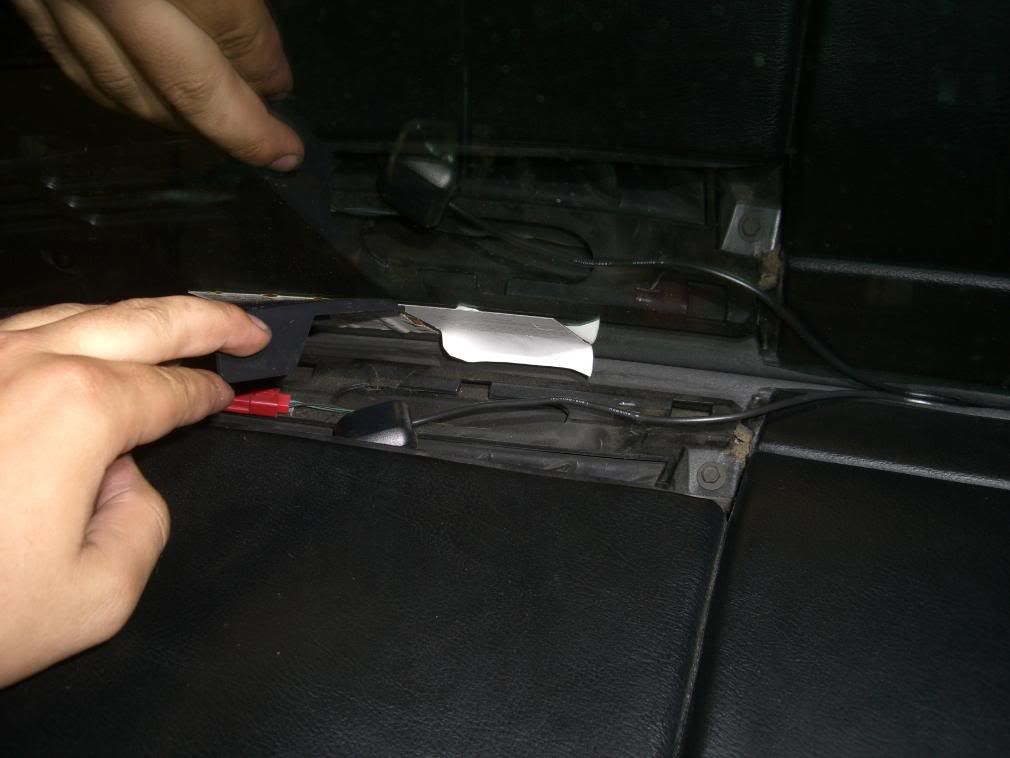
I routed the GPS antenna cable across the windshield under the rubber seal, then down and under the passenger carpet.
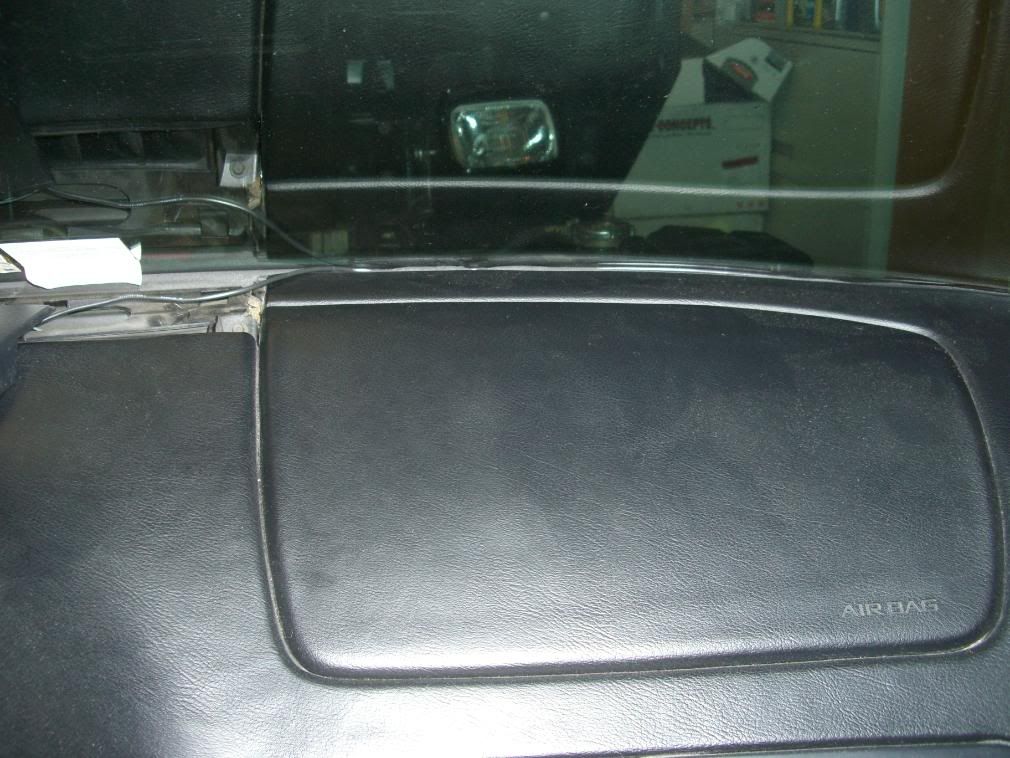
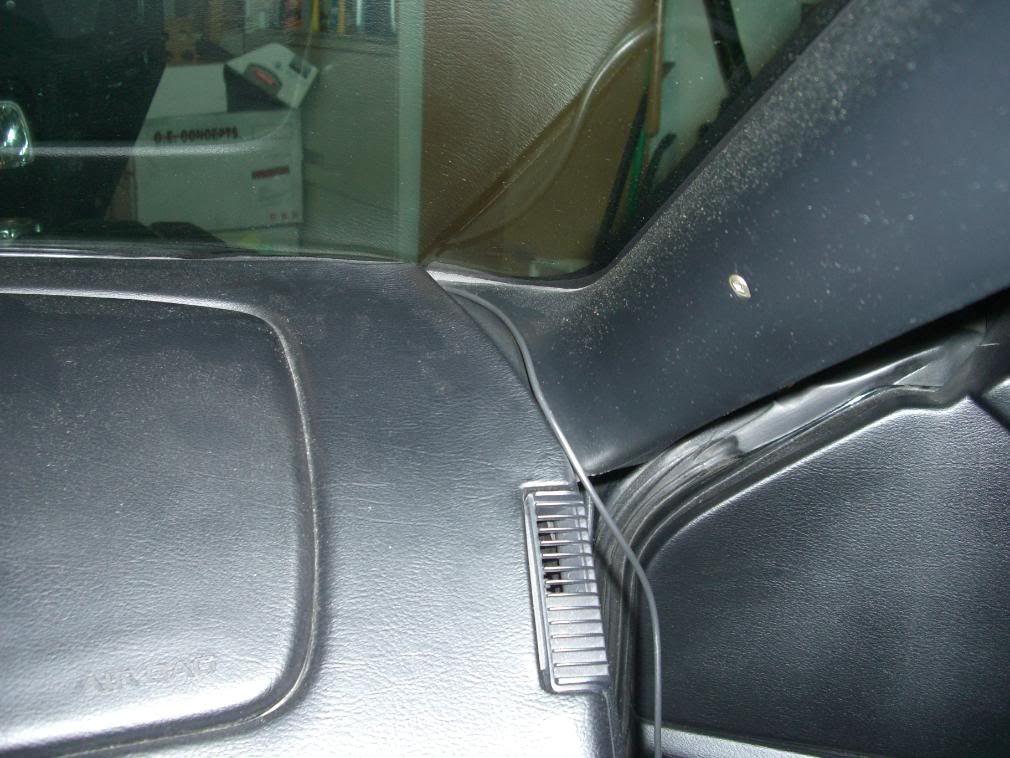
I routed the GPS antenna cable across the windshield under the rubber seal, then down and under the passenger carpet.


Race Director


Joined: Mar 1999
Posts: 12,597
Likes: 237
From: Bartlett Illinois
harder way, remove dash pad and place underneath
I have my GPS receiver for the App Radio buried.. but I had it on the vent at first:


Drifting
Joined: Jun 2010
Posts: 1,944
Likes: 48
From: CT
Im so doing this! Thanks for the writeup
How would I hook up an external GPS(10K) dongle for better track apps like racechrono? Is that a bluetooth thing? Sorry if thats a dumb question I can do a blower,heads,cam,etc but wiring a headunit......not so much
How would I hook up an external GPS(10K) dongle for better track apps like racechrono? Is that a bluetooth thing? Sorry if thats a dumb question I can do a blower,heads,cam,etc but wiring a headunit......not so much