




IMPORTANT ELECTRICAL INFORMATION (Long!)

Team Owner

Joined: Jun 1999
Posts: 30,492
Likes: 11
From: San Antonio Texas
Cruise-In IV Veteran
Cruise-In V Veteran

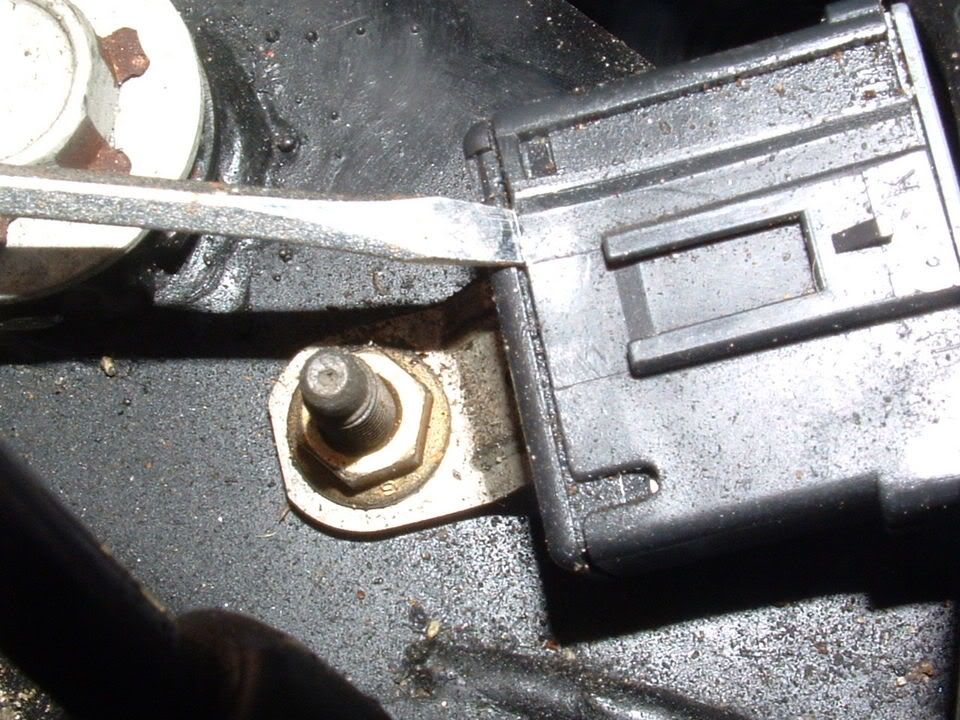
Your Ground connectors will come apart. If you have to find another person and have them grip the black plastic connector while you use a pair of vise grips to grip the metal grounding tang.
There are TWO small plastic retainers (one on each side) that need to be released using a small screw driver. While prying on the plastic loops to release clips,,,,pull and wiggle the ground lug.
If its that tight, its probably corroded in place. There designed to be tight but NOT so tight that they wont separate.
As for the door wiring harnesses, there should be ample harness to do all the cleaning you need to do. the extra wire and connectors will be tucked inside the door frame area. Pop both ends of the accordion tube loose and it will make life simple:
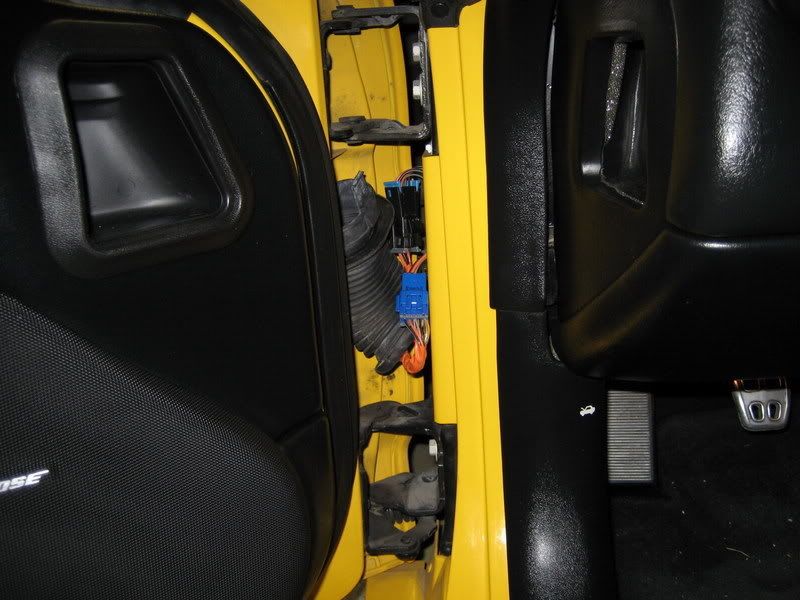
Once you get the connector in the open, separate it and look for corroded pins, loose connections or bare wires.
This is doable, you just need to give it a chance.
BC
BC
There are TWO small plastic retainers (one on each side) that need to be released using a small screw driver. While prying on the plastic loops to release clips,,,,pull and wiggle the ground lug.
If its that tight, its probably corroded in place. There designed to be tight but NOT so tight that they wont separate.
As for the door wiring harnesses, there should be ample harness to do all the cleaning you need to do. the extra wire and connectors will be tucked inside the door frame area. Pop both ends of the accordion tube loose and it will make life simple:
Once you get the connector in the open, separate it and look for corroded pins, loose connections or bare wires.
This is doable, you just need to give it a chance.
BC
BC
Thanks BC. I will give this another go this upcoming weekend. I did see the little retainers and that is what I was trying to press w/ the screwdriver to release, they were just quite stubborn. I'll put some more elbow grease to the problem this weekend. Just a bit timid of somehow trashing the connector and then leaving myself with a bigger problem. Of course I guess if that happened I could always do as the GM Engineer suggested and just bundle all the wires into a single eyelet style ground if worse came to worse.
I'll also give the door wiring harness another look. Knock on wood though the car hasn't given me a lick of problems since Friday.


Thread Starter
Tech Contributor


Joined: Dec 1999
Posts: 32,910
Likes: 2,402
From: Anthony TX
CI 6,7,8,9,11 Vet
St. Jude Donor '08
Theres your problem! Dont press DOWN on the retainer! Get two screw drivers and PRY UP. Use one on one side and the other screw driver on the other side. Once the small screwdrivers are inserted, the retainer clips wont be able to retain and you can wiggle the contact end out!
Team Owner
Joined: Jun 1999
Posts: 30,492
Likes: 11
From: San Antonio Texas
Cruise-In IV Veteran
Cruise-In V Veteran
Theres your problem! Dont press DOWN on the retainer! Get two screw drivers and PRY UP. Use one on one side and the other screw driver on the other side. Once the small screwdrivers are inserted, the retainer clips wont be able to retain and you can wiggle the contact end out!
Also, in the door I was looking in the actual door for the harness connectors and not the under the A-pillar.
Thanks for all the help BC!
Thread Starter
Tech Contributor
Joined: Dec 1999
Posts: 32,910
Likes: 2,402
From: Anthony TX
CI 6,7,8,9,11 Vet
St. Jude Donor '08
I think I'll try it like your picture, with the connector still bolted down to hold it steady for me. I was concerned if I pryed like that that I might break the clip.
Also, in the door I was looking in the actual door for the harness connectors and not the under the A-pillar.
Thanks for all the help BC!
Also, in the door I was looking in the actual door for the harness connectors and not the under the A-pillar.
Thanks for all the help BC!
BC

Advanced

Joined: Aug 2003
Posts: 66
Likes: 0
From: VA
you are my hero!
I have been throwing traction control codes, especially once the car is warmed up. The stealer has tried to toell me a bad tire pressure sensor was the reason I was throwing codes, what a dumb azz. I have also had my fuel gauge go to empty after the car is warmed up - I was oping it was a bad fuel guage but I suppose the sender could be the issue - first I will work on the grounds - thanks again!
I suck at doing FANCY web stuff! I may try to make this into a TECH TIP. I would have posted more pictures but the forum would not let me!  I have more info and pictures if anyone need them! Just e-mail me
bill327@msn.com
My 98 electrical issues are 98% solved!!! The only thing that is still kicking my A$% is a Fuel Level Sender problem. After I drive it for a while it goes to empty and I get DIC codes P0461 & P1431
I suspect it is a fuel level sender issue BUT is it the left or the right sensor?? The left one is $400. and the right one is $300.

 My luck it will be BOTH that are bad!!
To figure it out without using a TECH II, I have to remove both senders and do a resistance check on a full sweep of the float assembly!
Anybody else had this issue??
Bill
I have more info and pictures if anyone need them! Just e-mail mebill327@msn.com
My 98 electrical issues are 98% solved!!! The only thing that is still kicking my A$% is a Fuel Level Sender problem. After I drive it for a while it goes to empty and I get DIC codes P0461 & P1431
I suspect it is a fuel level sender issue BUT is it the left or the right sensor?? The left one is $400. and the right one is $300.
My luck it will be BOTH that are bad!!To figure it out without using a TECH II, I have to remove both senders and do a resistance check on a full sweep of the float assembly!
Anybody else had this issue??
Bill
Advanced
Joined: Aug 2003
Posts: 66
Likes: 0
From: VA
you are my hero!
I have been throwing traction control codes, especially once the car is warmed up. The stealer has tried to tell me a bad tire pressure sensor was the reason I was throwing codes, what a dumb azz. I have also had my fuel gauge go to empty after the car is warmed up - I was hoping it was a bad fuel guage but I suppose the sender could be the issue - first I will work on the grounds - thanks again!
I suck at doing FANCY web stuff! I may try to make this into a TECH TIP. I would have posted more pictures but the forum would not let me! I have more info and pictures if anyone need them! Just e-mail me
bill327@msn.com
My 98 electrical issues are 98% solved!!! The only thing that is still kicking my A$% is a Fuel Level Sender problem. After I drive it for a while it goes to empty and I get DIC codes P0461 & P1431
I suspect it is a fuel level sender issue BUT is it the left or the right sensor?? The left one is $400. and the right one is $300. My luck it will be BOTH that are bad!!
To figure it out without using a TECH II, I have to remove both senders and do a resistance check on a full sweep of the float assembly!
Anybody else had this issue??
Bill
I have more info and pictures if anyone need them! Just e-mail mebill327@msn.com
My 98 electrical issues are 98% solved!!! The only thing that is still kicking my A$% is a Fuel Level Sender problem. After I drive it for a while it goes to empty and I get DIC codes P0461 & P1431
I suspect it is a fuel level sender issue BUT is it the left or the right sensor?? The left one is $400. and the right one is $300.
My luck it will be BOTH that are bad!!To figure it out without using a TECH II, I have to remove both senders and do a resistance check on a full sweep of the float assembly!
Anybody else had this issue??
Bill
Team Owner
Joined: Jun 1999
Posts: 30,492
Likes: 11
From: San Antonio Texas
Cruise-In IV Veteran
Cruise-In V Veteran

Instructor

Joined: Feb 2002
Posts: 219
Likes: 0
From: Daphne AL
Hi Bill,
I have an '03 ZO6 and usually right I after I start driving in the mornings, the first or second time I push the brake (lite pressure, equal to resting your foot on the pedal) it feels like the front brakes grabs for about a 1/10 of a second and I get the Active Handling Active message. When this happens I am usually not going over 20 mph and the road is smooth and fairly straight. But rarely does it does it throw codes from this. Also this never happens if I turn off A/H & T/C before leaving the driveway.
Then after a mile or two of driving I get the Service A/H Service T/C warnings and the yellow TCS OFF light. This also happens if I turn A/H & T/C off before ever leaving the driveway, and will always throw error codes. This normally happens when on a semi-bumpy highway.
The codes are always TCS C1288 & C1287. There is a BCM code but I dont remember what it is. I checked the ground points on the frame rails in the engine bay. (They had very very lite corrosion but I cleaned them using a Dremmel with a steel strip brush and sprayed CRC's electrical grade silicon lubricant on them.)
What would cause this? Is this a ground issue or a bad sensor issue??
BTW, where can I get a manual like the one in those pictures? and are they model specific (ZO6 vs Coupe) or fairly generalized?
I have an '03 ZO6 and usually right I after I start driving in the mornings, the first or second time I push the brake (lite pressure, equal to resting your foot on the pedal) it feels like the front brakes grabs for about a 1/10 of a second and I get the Active Handling Active message. When this happens I am usually not going over 20 mph and the road is smooth and fairly straight. But rarely does it does it throw codes from this. Also this never happens if I turn off A/H & T/C before leaving the driveway.
Then after a mile or two of driving I get the Service A/H Service T/C warnings and the yellow TCS OFF light. This also happens if I turn A/H & T/C off before ever leaving the driveway, and will always throw error codes. This normally happens when on a semi-bumpy highway.
The codes are always TCS C1288 & C1287. There is a BCM code but I dont remember what it is. I checked the ground points on the frame rails in the engine bay. (They had very very lite corrosion but I cleaned them using a Dremmel with a steel strip brush and sprayed CRC's electrical grade silicon lubricant on them.)
What would cause this? Is this a ground issue or a bad sensor issue??
BTW, where can I get a manual like the one in those pictures? and are they model specific (ZO6 vs Coupe) or fairly generalized?
Corvette Stories
The Best of Corvette for Corvette Enthusiasts

Top 10 Most Expensive Corvettes Ever Sold on Bring A Trailer
Brett Foote
10 Things Every Corvette Owner Needs (2026 Edition)
Michael S. Palmer
8 Most "Only Corvette Owners Understand" Quirks and Problems
Pouria Savadkouei
10 Reasons the C6 Z06 is Still A Performance Benchmark After 20 Years
Joe Kucinski
How Much Horsepower Every Corvette Engine "LOST" in 1972
Joe Kucinski
Top 10 DOs and DON'Ts for Protecting Your Convertible Top!
Michael S. Palmer
Top 10 Most Explosive Corvettes Ever Made: Power-to-Weight Ratio Ranked!
Joe Kucinski
150 hp to 1,250 hp: Every Corvette Generation Compared by the Specs That Matter
Joe Kucinski
8 Coolest Corvette Pace Cars (and Replicas) of All Time
Verdad Gallardo

Team Owner
Joined: Jun 1999
Posts: 30,492
Likes: 11
From: San Antonio Texas
Cruise-In IV Veteran
Cruise-In V Veteran
Thanks BC. I will give this another go this upcoming weekend. I did see the little retainers and that is what I was trying to press w/ the screwdriver to release, they were just quite stubborn. I'll put some more elbow grease to the problem this weekend. Just a bit timid of somehow trashing the connector and then leaving myself with a bigger problem. Of course I guess if that happened I could always do as the GM Engineer suggested and just bundle all the wires into a single eyelet style ground if worse came to worse.
I'll also give the door wiring harness another look. Knock on wood though the car hasn't given me a lick of problems since Friday.
I'll also give the door wiring harness another look. Knock on wood though the car hasn't given me a lick of problems since Friday.
I did not dig in the door for the connectors to the RDCM, maybe another day, but for now it is working ok so I'll wait.
All in all, no further codes have been thrown, but only time will tell how long that lasts, hopefully a while.

Advanced
Joined: Dec 2007
Posts: 95
Likes: 0
From: Liberty NC
B2597
I have posted this elsewhere, before I found this thread. You folks are a godsend.
B2597 ??
We have had a good bit of rain here lately and i came threw a good size puddle. Since then my traction control has been cycling though On, Off and Competitive Mode kind of randomly. this has been going on for a couple of days. A few minutes ago, it tripped the "service traction control". I pulled the codes and got a C1293 and B2597. (I have a C1226 from previous issues i am arguing with the dealer on)
My button to turn the TC on and off does not seem to work.
Any ideas what "B2597 Traction Control System Switch Circuit" and "C1293 Master Cylinder Pressure Sensor Circuit" could mean? Did it just get wet and short something?
HELP!
I reset the codes and started the car in the garage a few times. It immediately goes to "TC off" then after 5 seconds goes to "comp. mode". It trips B2597 every time. I cannot find anything for help on that code. (I can find definitions, but no help)
I assume that I can still drive it like this, just no ABS in comp mode?
I see that some folks talk about EBCM and other EBTCM, are they the same thing?
I pulled the connector from the EBCM (by the ABS) and it looked clean, as did the grounds by the headlights (both sides).
HELP!
B2597 ??
We have had a good bit of rain here lately and i came threw a good size puddle. Since then my traction control has been cycling though On, Off and Competitive Mode kind of randomly. this has been going on for a couple of days. A few minutes ago, it tripped the "service traction control". I pulled the codes and got a C1293 and B2597. (I have a C1226 from previous issues i am arguing with the dealer on)
My button to turn the TC on and off does not seem to work.
Any ideas what "B2597 Traction Control System Switch Circuit" and "C1293 Master Cylinder Pressure Sensor Circuit" could mean? Did it just get wet and short something?
HELP!
I reset the codes and started the car in the garage a few times. It immediately goes to "TC off" then after 5 seconds goes to "comp. mode". It trips B2597 every time. I cannot find anything for help on that code. (I can find definitions, but no help)
I assume that I can still drive it like this, just no ABS in comp mode?
I see that some folks talk about EBCM and other EBTCM, are they the same thing?
I pulled the connector from the EBCM (by the ABS) and it looked clean, as did the grounds by the headlights (both sides).
HELP!
Advanced
Joined: Dec 2007
Posts: 95
Likes: 0
From: Liberty NC
B2597
Sorry, I thought that it was.
It is a 2002 coupe.
Thanks
(BTW, Bill, do you just live here? I am amazed at the response time!)
UPDATE: Unplugged the switch with no luck... ARGH (never the easy things)
It is a 2002 coupe.
Thanks
(BTW, Bill, do you just live here? I am amazed at the response time!)
UPDATE: Unplugged the switch with no luck... ARGH (never the easy things)
Last edited by TheeMike; Mar 11, 2008 at 08:17 AM. Reason: Update

Intermediate
Joined: Mar 2008
Posts: 38
Likes: 0
From: Lake City Florida
Hello everyone,
What a great place. I've been lurking since I bought my 98 on the 26th of Feb. My very first. I have followed this thread and another on the oil sending unit with undivided attention. With all that I have learned I have found the problem with the underhood lamp as well as fixing a few other minor problems (the oil sending unit is next). I have even cleaned my first ground connector. I certainly enjoy reading all of the successes here and I too would like to thank Mr Bill Curlee for his very valuable knowledge. I am restricted for now in what I can do (cervical fusion on March 7th, but I seem to be recovering so I will continue to work on my new "old" car. It is in great shape with just a couple of add ons (dual intake and Borla exhaust). After reading this thread, my found fix on the underhood lamp was the connector that the lamp assemble plugged into. it is bad/loose and needs to be replaced. Working, for now though. Blessings to all,
ms
What a great place. I've been lurking since I bought my 98 on the 26th of Feb. My very first. I have followed this thread and another on the oil sending unit with undivided attention. With all that I have learned I have found the problem with the underhood lamp as well as fixing a few other minor problems (the oil sending unit is next). I have even cleaned my first ground connector. I certainly enjoy reading all of the successes here and I too would like to thank Mr Bill Curlee for his very valuable knowledge. I am restricted for now in what I can do (cervical fusion on March 7th, but I seem to be recovering so I will continue to work on my new "old" car. It is in great shape with just a couple of add ons (dual intake and Borla exhaust). After reading this thread, my found fix on the underhood lamp was the connector that the lamp assemble plugged into. it is bad/loose and needs to be replaced. Working, for now though. Blessings to all,
ms
Safety Car


Joined: Feb 2001
Posts: 3,725
Likes: 53
From: Warrington Pa.
help
Well tonight my car went crazy, DIC displayed every message that it could. It ran fine and I got it home and ran the codes. I can't get the drivers door to lock or unlock and the window won't go up.
60-IPC 1225 H
99-HVAC U1160 H C
AO- LDCM No Communication
What should I look for ?? At this time I'm charging my battery to make sure it's fully charged.
** I will first check the door plugs if that doesn't work where to next???
Thanks Bill
EDIT..
Thanks Bill for your great sticky...Look what I found Everything works now!! Again thanks for all the hours you put in helping others. Bill

60-IPC 1225 H
99-HVAC U1160 H C
AO- LDCM No Communication
What should I look for ?? At this time I'm charging my battery to make sure it's fully charged.
** I will first check the door plugs if that doesn't work where to next???
Thanks Bill
EDIT..
Thanks Bill for your great sticky...Look what I found
Everything works now!! Again thanks for all the hours you put in helping others. Bill
Last edited by Bill Vett; Mar 14, 2008 at 01:04 PM.

Intermediate
Joined: Feb 2005
Posts: 39
Likes: 0
From: Midland Texas
I have a related problem with my 2004 ZO6, two days ago while driving the car the traction control and active handling lights came on along with the service engine soon. I have a friend with a Tech 2, we went to check the codes. When checking the tcm it indicates no communication has anyone else had this problem and if so how was it resolved. I have checked all the fuses and grounds all look good.

Race Director

Joined: Aug 2001
Posts: 11,028
Likes: 5
From: Chicago (Naperville) IL
Another "related" post. I noticed that my "Service Traction Sytem", "ABS inactive", etc pops up on occassion (less often, than often) right at the point where I put my foot on the brake in my A4 to shift out of park or when I put in park. Always happens when the brake pedal is pushed down.
Knock on wood, it does not come on during driving.
With this info, can I narrow down which grounds to inspect? Any actual pics (not service manual ones) of where they are by the wheel hubs and what they look like? How to clean and reconnect, etc.
...most pics I see are of ones in the engine bay and in the pass door.
Knock on wood, it does not come on during driving.
With this info, can I narrow down which grounds to inspect? Any actual pics (not service manual ones) of where they are by the wheel hubs and what they look like? How to clean and reconnect, etc.
...most pics I see are of ones in the engine bay and in the pass door.
Thread Starter
Tech Contributor
Joined: Dec 1999
Posts: 32,910
Likes: 2,402
From: Anthony TX
CI 6,7,8,9,11 Vet
St. Jude Donor '08
Another "related" post. I noticed that my "Service Traction Sytem", "ABS inactive", etc pops up on occassion (less often, than often) right at the point where I put my foot on the brake in my A4 to shift out of park or when I put in park. Always happens when the brake pedal is pushed down.
Knock on wood, it does not come on during driving.
With this info, can I narrow down which grounds to inspect? Any actual pics (not service manual ones) of where they are by the wheel hubs and what they look like? How to clean and reconnect, etc.
...most pics I see are of ones in the engine bay and in the pass door.
Knock on wood, it does not come on during driving.
With this info, can I narrow down which grounds to inspect? Any actual pics (not service manual ones) of where they are by the wheel hubs and what they look like? How to clean and reconnect, etc.
...most pics I see are of ones in the engine bay and in the pass door.
Read and post the DTCs
READING YOUR Engine Diagnostic Codes
The Diagnostic Display Mode is entered with the following procedure:
1) Turn on the ignition but don't start the engine.
2) Press the RESET button to turn off any warning messages. (i.e. door open, trunk open ect)
3) Press and hold OPTIONS
4) While holding OPTIONS, press FUEL four times within a 10-second period.
Initially, on-board diagnostics go into an Automatic Mode which shows diagnostic codes in a pre-set sequence: PCM - TCS - RTD - BCM - IPC - RADIO - HVAC - LDCM - RDCM - SCM - RFA. All codes will be displayed for each. ( i.e. PCM = 4 codes)
If none are present in a given module, you will see No More Codes on the display.
There are two kinds of diagnostic codes, Current and History designated with a letter suffix, C or ;H. A current code indicates a malfunction is present in the module displaying data. A history code indicates a problem existed sometime in the last 40 or 50 ignition cycles. When not accompanied by a current code of the same number, it's potential evidence of a previous problem, now resolved, that was not removed by clearing the codes.
More likely it's an indication of an intermittent malfunction.
Intermittent codes are the most challenging of the diagnostics. An intermittent code may have happened once, may have happened more than once but is inconsistent or may be happening on a regular basis but not at the time the codes are displayed. History codes can also be caused by a current malfunction in a system that is not operating at the time codes are displayed. An example is the rear window defogger which doesn't operate until the Body Control Module detects engine rpm. For history codes set by a module that does not operate with the key on and engine off, a special diagnostic tool called a Scan Tester is necessary to properly diagnose the malfunction.
Once the system has displayed all modules, it goes into the manual mode which allows selection of each module using combinations of Driver Information Center buttons. Manual mode can also be entered during the automatic sequence by pressing any button except E/M. Once the display shows Manual Diagnostics, select a module by pressing the OPTIONS button to go forward or the TRIP button to go back. Once a module is selected, a code is displayed, and if more than one are present;
press GAGES to go forward or FUEL to go back.
To exit the diagnostic mode at any time, press E/M. If you want to erase codes in a given module, press RESET
To reset the codes once in manual mode, press and hold RESET until it displays NO CODES Press OPTIONS to go to the next module. Repeat the steps until you have reset the codes in all the computer modules.
NOTE!! Only reset the codes IF you want to - it is NOT necessary to do this. Clearing a code does not repair a problem. You are simply erasing the evidence of it in the module's memory. If you clear the code/s, and extinguish the Check Engine Light, your emissions status ready will NOT allow you to pass an emissions test until you have completed the required driving cycles.
Once you have the codes, the next question is: What to do with the information?
First, consult the factory service manual. Any serious C5 Do-It-Yourself owner should invest in the Corvette Service Manual of the appropriate model year. The Service Manual is really a requirement if you want to understand and work on your C5.
These are the absolute best C5 Diagnostic Trouble Code (DTC) explanation web sites!!!
http://www.corvettedoctor.com/Code_Main.html
http://www.corvettedoctor.com/index.html
Go to “technical data base” and then to “Corvette ECM Computer Codes”. Then select your year car. Read the instructions and then scroll down to the "READ MORE" window to view the code definitions.\
Here is another very good site:
http://www.obd-codes.com/trouble_cod...d-ii-codes.php
Make sure to include the H or C suffix!!
Bill

Race Director
Joined: Aug 2001
Posts: 11,028
Likes: 5
From: Chicago (Naperville) IL
Another "related" post. I noticed that my "Service Traction Sytem", "ABS inactive", etc pops up on occassion (less often, than often) right at the point where I put my foot on the brake in my A4 to shift out of park or when I put in park. Always happens when the brake pedal is pushed down.
Knock on wood, it does not come on during driving.
With this info, can I narrow down which grounds to inspect? Any actual pics (not service manual ones) of where they are by the wheel hubs and what they look like? How to clean and reconnect, etc.
...most pics I see are of ones in the engine bay and in the pass door.
Knock on wood, it does not come on during driving.
With this info, can I narrow down which grounds to inspect? Any actual pics (not service manual ones) of where they are by the wheel hubs and what they look like? How to clean and reconnect, etc.
...most pics I see are of ones in the engine bay and in the pass door.
Here are the codes I wrote down early this week and then cleared them...
10-PCM
P1571H ASR Desired Torque
28-TCS
C1277H Requested Torque Signal CKT Malfunction
60-IPC
B0521H Tachometer Signal Circuit Malfunction
80-Radio
U1016H Loss of communication with PCM
LDCM
B2285H Battery #2 Fault
B2282H Battery #1 Fault
B2284H Battery #2 Fault
U1064H Loss of Communication with BCM
U1160H
---------
I was only getting "service traction system" (only - ABS was fine) before, when I pressed down on the brake to shift out of park or reverse. A few days ago, I was driving on a bumpy road and got service traction system and ABS inactive
, so the warnings came on for the first time while I was driving.Just checked the codes again and here are the ones that are there now...
10-PCM
P1571 H C ASR Desired Torque
28-TCS
C1277H Requested Torque Signal CKT Malfunction
C1225H RF Excessive Wheel Speed variation <----------NEW ONE
80 Radio
U1016H Loss of communication with PCM
So, based on reading this thread I should check the sensor that is on the RF wheel hub and make sure the connection is good - where on the inner hub is the wire with the connector? Top, bottom, towards the front of the Vette, etc? The pics show the hub removed from the Vette. I am not going to disconnect the battery, hopefully, that is OK. How about the other three codes, 2 noting torque - any ideas?
Also, I found this thread with a guy with a 97 A4 like me and is getting the same codes - I pm'd him too - hopefully he'll respond.
http://forums.corvetteforum.com/show...ighlight=P1571
What should I be looking for in regards to the PCM and BCM connections? These are under the battery right? I have an optima red top, so I don't think my battery is leaking.
Thanks
Last edited by Humy; Apr 9, 2008 at 12:34 PM.