





 typical......
IMPORTANT ELECTRICAL INFORMATION (Long!)

Le Mans Master


Joined: Oct 2010
Posts: 7,373
Likes: 1,128
From: cold & windy
Le Mans Master
Joined: Oct 2010
Posts: 7,373
Likes: 1,128
From: cold & windy

... still don't work
 i've still yet to open the door up yet - gotta find time to go & get a T30 bit at the store
  i reckon i should get on that.
Le Mans Master
Joined: Oct 2010
Posts: 7,373
Likes: 1,128
From: cold & windy
got it.
took the door apart today & found that some retard decided they didn't wanna make sure that everything was plugged in. 1 of the 3 plugs on the latch module was just tucked into the corner beside it. also, found out why that door's speaker wasn't working - unplugged, too.
the lock button still don't work, though. all the wiring & connections look good. i reckon i'll start looking inside the switch panel next.
any clue what the plug right between the door handle (the one you pull to unlatch it) & the speaker plug is for? i couldn't find anything it looked like it was supposed to plug into. it's got 4 male contacts in it - i can't remember for sure the colors of the associated wires, though. i think they were gray, gray/black, green, & something else.
took the door apart today & found that some retard decided they didn't wanna make sure that everything was plugged in. 1 of the 3 plugs on the latch module was just tucked into the corner beside it. also, found out why that door's speaker wasn't working - unplugged, too.
the lock button still don't work, though. all the wiring & connections look good. i reckon i'll start looking inside the switch panel next.
any clue what the plug right between the door handle (the one you pull to unlatch it) & the speaker plug is for? i couldn't find anything it looked like it was supposed to plug into. it's got 4 male contacts in it - i can't remember for sure the colors of the associated wires, though. i think they were gray, gray/black, green, & something else.

Advanced

Joined: Jan 2007
Posts: 56
Likes: 0
From: Dallas TX
My C5 Z06 has 2 electrical issues and I believe both are tied to the ignition so here goes: when I remove the key from the ignition the doors sometimes do not unlock automatically nor does the memory seat retract. Also, when I insert the key into the ignition the memory seat either moves into its proper position or only part way. Both issues are sporadic.

5th Gear
Joined: Dec 2007
Posts: 5
Likes: 0
Driver Information Center (DIC) buttons nonfunctional
Recently my DIC started to randomly display all the various pages (temps, tire pressures, etc) on its own. It periodically changes the display to a new one as if the buttons were being pressed. The buttons themselves are not functional so I have no control over the display. I have tried cleaning the general chassis ground connectors as described in the post and they were in good shape.
Is there any guidance on a more focused diagnostic of the DIC buttons and their associated connectors. Seems like a poor grounding or connector issue. How do you get to the harness, ground, etc of the DIC?
Is there any guidance on a more focused diagnostic of the DIC buttons and their associated connectors. Seems like a poor grounding or connector issue. How do you get to the harness, ground, etc of the DIC?

Thread Starter
Tech Contributor


Joined: Dec 1999
Posts: 32,910
Likes: 2,402
From: Anthony TX
CI 6,7,8,9,11 Vet
St. Jude Donor '08
Sounds like the IPC control buttons are defective. Pull the IPC and disconnect the buttons and see if it still cycles by its self

Cruising
Joined: Nov 2010
Posts: 10
Likes: 0
Electrical gremlins....
I just purchased a 2002 6 sp. 23k mi. Suddenly I lost my mileage/info area went blank. Blinkers stopped working just once so far but resumed, gas gauge won't register past 1/2 and my dash lights are very dim till I turn them all the way over.
Any thoughts???????
Thanks bob
Any thoughts???????
Thanks bob
Last edited by bvezina; Nov 3, 2010 at 05:33 PM. Reason: CAPS
Corvette Stories
The Best of Corvette for Corvette Enthusiasts

Top 10 Most Expensive Corvettes Ever Sold on Bring A Trailer
Brett Foote
10 Things Every Corvette Owner Needs (2026 Edition)
Michael S. Palmer
8 Most "Only Corvette Owners Understand" Quirks and Problems
Pouria Savadkouei
10 Reasons the C6 Z06 is Still A Performance Benchmark After 20 Years
Joe Kucinski
How Much Horsepower Every Corvette Engine "LOST" in 1972
Joe Kucinski
Top 10 DOs and DON'Ts for Protecting Your Convertible Top!
Michael S. Palmer
Top 10 Most Explosive Corvettes Ever Made: Power-to-Weight Ratio Ranked!
Joe Kucinski
150 hp to 1,250 hp: Every Corvette Generation Compared by the Specs That Matter
Joe Kucinski
8 Coolest Corvette Pace Cars (and Replicas) of All Time
Verdad Gallardo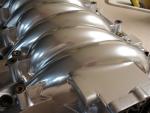
Melting Slicks


Joined: Apr 2002
Posts: 2,631
Likes: 2
From: Clever, MO aka SOMO
Bill Curlee or ............??
I'm about to clean the two underhood ground connectors and figure I'll probably break of 1 or 2 of those studs. So....what size self tapping screws do you guys use? I think someone said they drilled a hole for the screws.......what size drill bit is needed for that, and how deep did you drill the holes. I figure I'll just get all my supplies and tools ready, just in case! I've already got some dielectric grease on hand and some radio tuner cleaner in a spray can from RadioShack and a small brass wire brush.
This has been a helpful thread thru the years and I have read it all before, up to about 2 years ago. So far my '98 coupe has been flawless to 73k miles, but starting to get some "start up" dtc's. I can just hit the Reset button on the DIC, then go drive without any problems. Car still runs great, with great gas mileage. But, it's time to do some PM on it.
Thanks for your time.........and to all the Vets today.
I'm about to clean the two underhood ground connectors and figure I'll probably break of 1 or 2 of those studs. So....what size self tapping screws do you guys use? I think someone said they drilled a hole for the screws.......what size drill bit is needed for that, and how deep did you drill the holes. I figure I'll just get all my supplies and tools ready, just in case! I've already got some dielectric grease on hand and some radio tuner cleaner in a spray can from RadioShack and a small brass wire brush.
This has been a helpful thread thru the years and I have read it all before, up to about 2 years ago. So far my '98 coupe has been flawless to 73k miles, but starting to get some "start up" dtc's. I can just hit the Reset button on the DIC, then go drive without any problems. Car still runs great, with great gas mileage. But, it's time to do some PM on it.
Thanks for your time.........and to all the Vets today.

Melting Slicks
Joined: Apr 2002
Posts: 2,631
Likes: 2
From: Clever, MO aka SOMO
 It's located behind the composite intake manifold, near the drivers side head, screwed into the back of the engine block. It's acutally an easy fix, and there are numerous threads on the procedure if you just use the "Search this form" box at the top of one of the Technical forum pages. Basically, you remove the 10 bolts holding down the manifold then slide it forward carefully a few inches until you have access to use a large long socket to remove the sensor. Some guys remove all the stuff attached to the manifold first, but if you're crafty and careful you can do it without all that mess.
 Good luck.

Thread Starter
Tech Contributor
Joined: Dec 1999
Posts: 32,910
Likes: 2,402
From: Anthony TX
CI 6,7,8,9,11 Vet
St. Jude Donor '08
That one I can answer! It's located behind the composite intake manifold, near the drivers side head, screwed into the back of the engine block. It's acutally an easy fix, and there are numerous threads on the procedure if you just use the "Search this form" box at the top of one of the Technical forum pages. Basically, you remove the 10 bolts holding down the manifold then slide it forward carefully a few inches until you have access to use a large long socket to remove the sensor. Some guys remove all the stuff attached to the manifold first, but if you're crafty and careful you can do it without all that mess.
Good luck.
It's located behind the composite intake manifold, near the drivers side head, screwed into the back of the engine block. It's acutally an easy fix, and there are numerous threads on the procedure if you just use the "Search this form" box at the top of one of the Technical forum pages. Basically, you remove the 10 bolts holding down the manifold then slide it forward carefully a few inches until you have access to use a large long socket to remove the sensor. Some guys remove all the stuff attached to the manifold first, but if you're crafty and careful you can do it without all that mess. Good luck.
Strongly recommend not just sliding the intake manifold forward. Sand and dirt accumulates in pockets between the intake runners. That dirt will either fall into the intake runner or cause the intake manifold gasket to not seal properly.
Heres a picture of the dirt that I found under one manifold:

It's better to just pop out the injectors as a group, lift off the manifold, clean up the dirt/sand and you will have a much better success of sealing the manifold back to the heads and not getting the dirt into the intake runners..
BC
Melting Slicks
Joined: Apr 2002
Posts: 2,631
Likes: 2
From: Clever, MO aka SOMO
Bill........
Of course you're correct, I was being very general with my reply. I lift and move it like you describe too. Never know what may be lurking under there, so I try to vacuum around the manifold as much as I can before I even turn a wrench, then vacuum again like you suggest after I remove it. When I take it completly off the engine, I tape over the intake ports to be sure I don't accidently drop anything into the head while I'm working under the hood.
What size self tapping bolts did you use when cleaning the underhood grounds when you broke off one of the studs? I soaked mine with penetrating oil 2 days ago, but haven't had time yet to test them to see if the nuts will unscrew w/o snapping off.
Thanks,
Dennis
Of course you're correct, I was being very general with my reply. I lift and move it like you describe too. Never know what may be lurking under there, so I try to vacuum around the manifold as much as I can before I even turn a wrench, then vacuum again like you suggest after I remove it. When I take it completly off the engine, I tape over the intake ports to be sure I don't accidently drop anything into the head while I'm working under the hood.
What size self tapping bolts did you use when cleaning the underhood grounds when you broke off one of the studs? I soaked mine with penetrating oil 2 days ago, but haven't had time yet to test them to see if the nuts will unscrew w/o snapping off.
Thanks,
Dennis
FIXVET
Strongly recommend not just sliding the intake manifold forward. Sand and dirt accumulates in pockets between the intake runners. That dirt will either fall into the intake runner or cause the intake manifold gasket to not seal properly.
Heres a picture of the dirt that I found under one manifold:
It's better to just pop out the injectors as a group, lift off the manifold, clean up the dirt/sand and you will have a much better success of sealing the manifold back to the heads and not getting the dirt into the intake runners..
BC
Strongly recommend not just sliding the intake manifold forward. Sand and dirt accumulates in pockets between the intake runners. That dirt will either fall into the intake runner or cause the intake manifold gasket to not seal properly.
Heres a picture of the dirt that I found under one manifold:
It's better to just pop out the injectors as a group, lift off the manifold, clean up the dirt/sand and you will have a much better success of sealing the manifold back to the heads and not getting the dirt into the intake runners..
BC
Thread Starter
Tech Contributor
Joined: Dec 1999
Posts: 32,910
Likes: 2,402
From: Anthony TX
CI 6,7,8,9,11 Vet
St. Jude Donor '08
Take the broken stud to a Hardware Store or Home-Depot or Loewe's and in the screw section, find a "Self Tapping Screw" that has a similar size screw root as the broken stud that will fit into the ground terminal hole. The screw pack should have a recommended drill bit size for the hole that you will need to drill for the self tapping screw to take a bite and anchor. It will work as good or BETTER than that damn stud.
Find someone with a C6. Each of the ground locations has a SELF TAPPING screw in-place of the old studs.
Bill
Find someone with a C6. Each of the ground locations has a SELF TAPPING screw in-place of the old studs.
Bill

4th Gear
Joined: Nov 2010
Posts: 4
Likes: 0
From: Westminster CO
Electrical Issue
I am having an issue with all of the lights and accesories flashing on and off real quick while sitting idle. The engine doesn't die, but all the interior lights, the stereo, and even the headlights are flashing. The crazy part is, it seems to come and go.
Any suggestions to the cause?
Any suggestions to the cause?
Thread Starter
Tech Contributor
Joined: Dec 1999
Posts: 32,910
Likes: 2,402
From: Anthony TX
CI 6,7,8,9,11 Vet
St. Jude Donor '08
Terry
Use a DC Volt meter and read the DC Voltage directly at the battery terminals and then on the back of the alternator to ground and see what is there. See if the voltage readings are fluctuating at the battery.
Then switch it to Volts AC and see what you read on those same terminals. Report the results/ There should NOT be any AC Volts on a DC circuit.
Bill
Use a DC Volt meter and read the DC Voltage directly at the battery terminals and then on the back of the alternator to ground and see what is there. See if the voltage readings are fluctuating at the battery.
Then switch it to Volts AC and see what you read on those same terminals. Report the results/ There should NOT be any AC Volts on a DC circuit.
Bill
Last edited by Bill Curlee; Nov 20, 2010 at 12:49 PM.
Instructor
Joined: May 2007
Posts: 201
Likes: 0
From: Peoria Arizona
Hi Bill. I love this thread. I took me three days to get through it. I want your advice.
I have a 2002 Z06 I just bought.
Here is the problem: Everything works on the car except for two things.
1. The passenger window only goes halfway down and binds up. It sounds like the cable gets hung up. Then I can use the switch to move it back up. I have a replacement regulator and I'm going to install it.
2. The driver's door lock only works manually. When I push either door lock controller, the passenger side locks and unlocks but the driver's door does nothing. I have to lock it by hand when I get out or with the key. Same for when I push the key fob, only the passenger door locks. I can hear a clicking noise in the driver's door, but nothing moves.
Here's what I have done so far: I pulled the accordian tubes and examined the plugs on both sides. On both driver and passenger side, the serial bus wire (with the loose, clear inuslation) stops short of the BLUE plug. All the male and female pins looked OK but I need to clean them as there was some corrosion.
On the BLACK plug, there was also some corrosion. I saw the large orange wire had a female pin that was bent in and wouldn't make good contact. I removed the blue retaining clips in the black plug, but I can't get the female pin out and I didn't want to force it. It's the one on the top right in the first photo.


1. How do I replace or repair the female plug for the large orange wire?
2. What product do I use to clean the metal terminals?
3. What product do I use to protect them for future protection?
4. If I also use liquid electrical tape on the exposed serial bus wire and fix the orange female plug and the problem continues, what do I look at next?
I pulled codes and got only these codes. Everything else was clear:
A0 - LDCM
B2252 H Doorkey
B2282 H Battery #1
B2284 H Battery #2
U1064 H Loss Communication
A1 - RDCM
B2283 H Battery #1
B2285 H Battery #2
U1064 H Lost Communication
I have an Optima Red Top that came with the car. It shows 14+ volts while running. I have not checked the battery yet or cleaned or checked any body grounds yet. I have not checked the ignition switch yet.
Advice?
I have a 2002 Z06 I just bought.
Here is the problem: Everything works on the car except for two things.
1. The passenger window only goes halfway down and binds up. It sounds like the cable gets hung up. Then I can use the switch to move it back up. I have a replacement regulator and I'm going to install it.
2. The driver's door lock only works manually. When I push either door lock controller, the passenger side locks and unlocks but the driver's door does nothing. I have to lock it by hand when I get out or with the key. Same for when I push the key fob, only the passenger door locks. I can hear a clicking noise in the driver's door, but nothing moves.
Here's what I have done so far: I pulled the accordian tubes and examined the plugs on both sides. On both driver and passenger side, the serial bus wire (with the loose, clear inuslation) stops short of the BLUE plug. All the male and female pins looked OK but I need to clean them as there was some corrosion.
On the BLACK plug, there was also some corrosion. I saw the large orange wire had a female pin that was bent in and wouldn't make good contact. I removed the blue retaining clips in the black plug, but I can't get the female pin out and I didn't want to force it. It's the one on the top right in the first photo.
1. How do I replace or repair the female plug for the large orange wire?
2. What product do I use to clean the metal terminals?
3. What product do I use to protect them for future protection?
4. If I also use liquid electrical tape on the exposed serial bus wire and fix the orange female plug and the problem continues, what do I look at next?
I pulled codes and got only these codes. Everything else was clear:
A0 - LDCM
B2252 H Doorkey
B2282 H Battery #1
B2284 H Battery #2
U1064 H Loss Communication
A1 - RDCM
B2283 H Battery #1
B2285 H Battery #2
U1064 H Lost Communication
I have an Optima Red Top that came with the car. It shows 14+ volts while running. I have not checked the battery yet or cleaned or checked any body grounds yet. I have not checked the ignition switch yet.
Advice?
Thread Starter
Tech Contributor
Joined: Dec 1999
Posts: 32,910
Likes: 2,402
From: Anthony TX
CI 6,7,8,9,11 Vet
St. Jude Donor '08
Use a pick and pry up the little metal tong that makes contact. Looks like a couple of the others are a little bent down also. Adjust them. If you want to remove the female pin, you need to flatten a paper clip and slid it in from the front to release a metal tang on the terminal. Push it in at the bottom and pull out on the wire at the same time. Once you get under the metal tang, it will slide out.
Fix the power plug before you do any other electrical troubleshooting. Once you fix those pins, reset the DTCs and see if they clear.
Then go from there.
BC
Fix the power plug before you do any other electrical troubleshooting. Once you fix those pins, reset the DTCs and see if they clear.
Then go from there.
BC
Hi Bill. I love this thread. I took me three days to get through it. I want your advice.
I have a 2002 Z06 I just bought.
Here is the problem: Everything works on the car except for two things.
1. The passenger window only goes halfway down and binds up. It sounds like the cable gets hung up. Then I can use the switch to move it back up. I have a replacement regulator and I'm going to install it.
2. The driver's door lock only works manually. When I push either door lock controller, the passenger side locks and unlocks but the driver's door does nothing. I have to lock it by hand when I get out or with the key. Same for when I push the key fob, only the passenger door locks. I can hear a clicking noise in the driver's door, but nothing moves.
Here's what I have done so far: I pulled the accordian tubes and examined the plugs on both sides. On both driver and passenger side, the serial bus wire (with the loose, clear inuslation) stops short of the BLUE plug. All the male and female pins looked OK but I need to clean them as there was some corrosion.
On the BLACK plug, there was also some corrosion. I saw the large orange wire had a female pin that was bent in and wouldn't make good contact. I removed the blue retaining clips in the black plug, but I can't get the female pin out and I didn't want to force it. It's the one on the top right in the first photo.
1. How do I replace or repair the female plug for the large orange wire?
2. What product do I use to clean the metal terminals?
3. What product do I use to protect them for future protection?
4. If I also use liquid electrical tape on the exposed serial bus wire and fix the orange female plug and the problem continues, what do I look at next?
I pulled codes and got only these codes. Everything else was clear:
A0 - LDCM
B2252 H Doorkey
B2282 H Battery #1
B2284 H Battery #2
U1064 H Loss Communication
A1 - RDCM
B2283 H Battery #1
B2285 H Battery #2
U1064 H Lost Communication
I have an Optima Red Top that came with the car. It shows 14+ volts while running. I have not checked the battery yet or cleaned or checked any body grounds yet. I have not checked the ignition switch yet.
Advice?
I have a 2002 Z06 I just bought.
Here is the problem: Everything works on the car except for two things.
1. The passenger window only goes halfway down and binds up. It sounds like the cable gets hung up. Then I can use the switch to move it back up. I have a replacement regulator and I'm going to install it.
2. The driver's door lock only works manually. When I push either door lock controller, the passenger side locks and unlocks but the driver's door does nothing. I have to lock it by hand when I get out or with the key. Same for when I push the key fob, only the passenger door locks. I can hear a clicking noise in the driver's door, but nothing moves.
Here's what I have done so far: I pulled the accordian tubes and examined the plugs on both sides. On both driver and passenger side, the serial bus wire (with the loose, clear inuslation) stops short of the BLUE plug. All the male and female pins looked OK but I need to clean them as there was some corrosion.
On the BLACK plug, there was also some corrosion. I saw the large orange wire had a female pin that was bent in and wouldn't make good contact. I removed the blue retaining clips in the black plug, but I can't get the female pin out and I didn't want to force it. It's the one on the top right in the first photo.
1. How do I replace or repair the female plug for the large orange wire?
2. What product do I use to clean the metal terminals?
3. What product do I use to protect them for future protection?
4. If I also use liquid electrical tape on the exposed serial bus wire and fix the orange female plug and the problem continues, what do I look at next?
I pulled codes and got only these codes. Everything else was clear:
A0 - LDCM
B2252 H Doorkey
B2282 H Battery #1
B2284 H Battery #2
U1064 H Loss Communication
A1 - RDCM
B2283 H Battery #1
B2285 H Battery #2
U1064 H Lost Communication
I have an Optima Red Top that came with the car. It shows 14+ volts while running. I have not checked the battery yet or cleaned or checked any body grounds yet. I have not checked the ignition switch yet.
Advice?
4th Gear
Joined: Nov 2010
Posts: 4
Likes: 0
From: Westminster CO
Thanks for the advice. Since I just bought it from a dealer, I actually took it to them to try and cure it first. If they tell me today that they can't find it, I will get back to you and start on my own.
TK
TK
Instructor
Joined: May 2007
Posts: 201
Likes: 0
From: Peoria Arizona
Use a pick and pry up the little metal tong that makes contact. Looks like a couple of the others are a little bent down also. Adjust them. If you want to remove the female pin, you need to flatten a paper clip and slid it in from the front to release a metal tang on the terminal. Push it in at the bottom and pull out on the wire at the same time. Once you get under the metal tang, it will slide out.
Fix the power plug before you do any other electrical troubleshooting. Once you fix those pins, reset the DTCs and see if they clear.
Then go from there.
BC
Fix the power plug before you do any other electrical troubleshooting. Once you fix those pins, reset the DTCs and see if they clear.
Then go from there.
BC
When I put the door connections back together, they had a LOT more resistance so I believe there is good contact. I also checked my battery had a solid 12 volts while off.
I hook everything back up and cleared the codes. Still no drivers door lock. Just the same as before. I drove a couple places and no codes reappeared.
I can hear a click in the drivers door but only the passenger side works.
What next? Thanks